
For most homes, the TP-Link TL-PA9020P AV2000 kit is the best powerline adapter, a cheaper AV1000 kit such as the TL-PA7017P is enough for a single streaming box or console, and a model with built-in Wi-Fi such as the TL-WPA7617 suits people who need wireless coverage in a far room rather than just a wired port. Powerline works by sending data over your home’s electrical wiring, so results depend heavily on the wiring itself, and no kit is guaranteed to deliver its headline speed.
Our top picks


As an Amazon Associate we earn from qualifying purchases at no extra cost to you.
Best Powerline Adapters at a Glance
| Kit | Best for | Key stated specs | Limits |
|---|---|---|---|
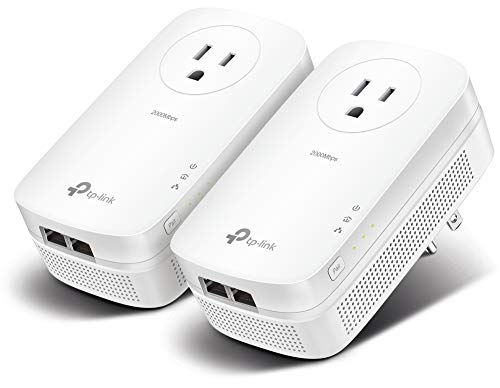
| TP-Link TL-PA9020P (AV2000) | Best overall, wired gaming and streaming | HomePlug AV2, 2×2 MIMO, two Gigabit Ethernet ports per adapter, pass-through outlet, 128-bit AES encryption | No Wi-Fi; real speeds far below 2,000 Mbps rating |
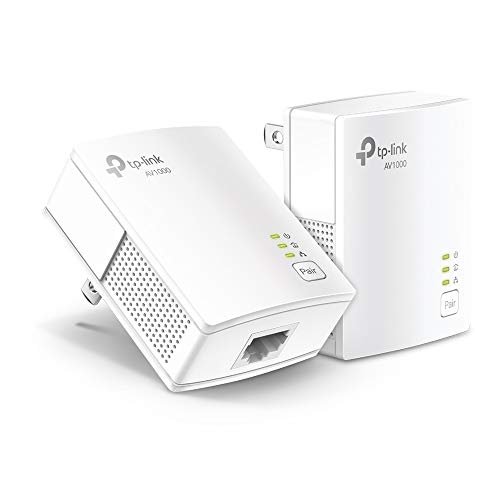
| TP-Link TL-PA7017P (AV1000) | Budget single-device connections | AV1000 class, Gigabit port, pass-through outlet | Slower ceiling, one wired port |
| Zyxel PLA6456 (AV2400 class) | Higher rated speed, flexible wiring | Rated around 2,400 Mbps by the maker | Larger, availability varies by region |
| TP-Link TL-WPA7617 / WPA7817 | Adding Wi-Fi to a far room | Powerline backhaul plus built-in Wi-Fi (AC1200 and Wi-Fi 6 AX1500 class) | Wi-Fi speed limited by the powerline link |
| NETGEAR PLP2000 | Alternative brand with Gigabit ports | AV2000 class | Check the model is still sold in your region |
Note that these are wired or wired-plus-Wi-Fi products. Roundups in 2026 do not describe a Wi-Fi 7 powerline kit, so treat any listing that claims one with caution.
How Powerline Adapters Work
A pair of adapters plugs into wall outlets. One connects by Ethernet cable to your router, the other connects to a device or a switch in another room. Data travels over the electrical wiring between them. Adapters that follow the HomePlug AV2 standard can pair with older AV1000, AV600, AV500 and AV200 adapters, which TP-Link lists for its own range, but the link then runs at the slower unit’s capability.
The rated number on the box, such as 2,000 or 2,400 Mbps, is a theoretical link rate that combines overheads and ideal conditions. Reviewers who measure throughput often report figures far lower. CableTV’s measurements of a TP-Link AV2000 kit, for example, landed in the range of roughly 150 to 200 Mbps across different rooms. That is still plenty for 4K streaming, video calls and most online games, and it can beat a weak Wi-Fi signal through several walls.
What Affects Real-World Performance
- Same electrical circuit: adapters work best on the same circuit or phase. Different breaker circuits can reduce speed, and in some homes the signal will not cross the panel at all.
- Wiring age and quality: older or damaged wiring and long runs lower throughput.
- Noisy devices: power strips with surge protection filters, phone chargers, LED drivers, hair dryers and some appliances can inject noise. Plug adapters directly into the wall, not into a surge strip or extension block.
- Distance: longer wire paths generally reduce speed.
- Pass-through outlets: the built-in outlet on adapters like the TL-PA9020P filters noise and keeps the socket usable for another device.
TP-Link TL-PA9020P: The Default Pick
PropelRC, HighSpeedInternet and others name this kit a top pick. The maker lists HomePlug AV2, 2×2 MIMO with beamforming, a pass-through outlet and 128-bit AES encryption. Each adapter has two Gigabit Ethernet ports, which lets you connect a TV and a console, or a small switch for more devices. The maker lists compatibility with other TP-Link powerline adapters from AV200 up to AV2000.
Criticisms from reviewers include a somewhat bulky body and awkwardly placed indicator lights. It has no Wi-Fi, so it is purely a wired solution. It sits in the mid-range to premium tier among powerline kits.
Budget Option: TL-PA7017P and Similar AV1000 Kits
If you only need one wired connection for a streaming player or console, an AV1000-class kit is usually enough, because real-world throughput on powerline rarely approaches even these ratings. These kits are cheaper, smaller and often have a single Gigabit port. They are the right pick when you want to avoid paying for performance the wiring cannot deliver. If you later want more ports, a small Ethernet switch can be added.
Kits With Wi-Fi: TL-WPA7617 and TL-WPA7817
These units combine powerline backhaul with a built-in access point. The TL-WPA7617 is an AC1200-class dual-band product and the TL-WPA7817 is a Wi-Fi 6 AX1500-class model, according to reviewer summaries. They suit garages, bedrooms and offices where Wi-Fi from the main router is weak but power outlets exist. Wireless speed is capped by the powerline link behind it, so treat them as a coverage tool, not a speed upgrade. Compare with a mesh system if your home already has Ethernet cable runs.
Speed-Focused Alternatives: Zyxel PLA6456
The Zyxel PLA6456 is rated around 2,400 Mbps by its maker and is mentioned in roundups as a speed-oriented alternative. The same caution applies: higher ratings do not guarantee a faster real connection, and availability differs by region.
Budget, Mid-Range and Premium Tiers
- Budget: AV600 or AV1000 kits for a single device, fine for streaming and basic gaming.
- Mid-range: AV2000 kits with Gigabit ports and a pass-through outlet, the sweet spot for most buyers.
- Premium: AV2400-class kits and models with built-in Wi-Fi 6, useful if the wiring is good and you need the extra features.
Pick X If… Decision Table
| Pick this | If you… |
|---|---|
| TL-PA9020P | Want the most commonly recommended all-round wired kit with two ports per adapter |
| TL-PA7017P or similar AV1000 | Need one wired connection for a streamer or console on a budget |
| TL-WPA7617 / WPA7817 | Need Wi-Fi in a room the router cannot reach |
| Zyxel PLA6456 | Want the highest rated speed class and can find it locally |
| Mesh Wi-Fi or MoCA instead | Have unreliable house wiring or coaxial cable already in the walls |
Setup and Safety Notes
- Plug adapters directly into a wall outlet. Avoid extension leads and surge strips unless the maker’s manual says otherwise.
- Pair the adapters using the sync button as described in the manual, and change the default encryption key if the maker advises it.
- Do not plug adapters into damaged outlets or ones that feel warm. If an outlet sparks, buzzes or is discolored, stop using it and ask a licensed electrician to inspect it.
- Use the adapter only within the voltage range stated on the label and in the regional version made for your country.
- Powerline adapters draw a small amount of standby power. Unplug them if you are away for long periods.
Alternatives to Powerline
- Mesh Wi-Fi: best when you want wireless coverage throughout the home and do not depend on wiring quality.
- MoCA adapters: use coaxial cable already in the walls and are described by reviewers as faster and more consistent where that cable exists.
- Running Ethernet cable: the most reliable option if you can route cable.
Troubleshooting a Slow Powerline Link
If speeds disappoint, work through the common causes. First, move the adapters to different outlets, ideally on the same circuit and away from other electronics. Second, remove surge strips and extension leads. Third, unplug nearby devices that might create electrical noise, such as chargers, aquarium pumps or dimmers, and see whether speeds improve. Fourth, update the adapter firmware if the maker provides a utility, and re-pair the adapters with the sync button.
Check the cabling too. Use a good Ethernet cable between router and adapter, and confirm the router port is Gigabit. If the adapters have lights showing link quality, a red or orange light usually means a weak connection, and the manual explains what each color means. If nothing helps, the wiring may simply not suit powerline, and a MoCA kit, a mesh system or a run of Ethernet cable is the better route.
Who Should Skip Powerline
Powerline is a poor fit for homes with very old wiring, several separate electrical panels, or heavy electrical noise. It is also unnecessary if you can run cable cheaply or if your main router already covers the room with a strong Wi-Fi 6 signal. For apartments with a shared electrical system, expect varied results, and remember that the adapters broadcast over wiring that neighbors may not share, so keep encryption turned on.
Frequently Asked Questions
Do powerline adapters work in every house?
No. Performance depends on the age, quality and layout of your electrical wiring and whether the outlets share a circuit. Some homes see good speeds, others see little improvement, so check the retailer’s return terms when you buy.
Are powerline adapters faster than Wi-Fi?
Sometimes. They can beat a weak Wi-Fi signal through several walls, but a strong nearby Wi-Fi 6 connection may be faster. Real powerline speeds are usually well under the rated number.
Can I plug a powerline adapter into a power strip?
Makers generally advise plugging directly into a wall outlet, because surge protectors and filters can block or reduce the signal. If you need the socket for another device, choose a model with a pass-through outlet.
Can I mix adapter brands?
Adapters following the same HomePlug AV standard can often communicate, but pairing different brands or generations may reduce speed or cause problems. Buying a matched kit is simpler.
Is powerline safe and secure?
Adapters use encryption, and TP-Link lists 128-bit AES on its AV2000 kit. Follow the maker’s instructions for pairing and keep the firmware current if updates are offered. Use them only in healthy outlets and consult an electrician about any wiring concerns.
Is there a Wi-Fi 7 powerline adapter?
Current 2026 roundups do not describe one. Wi-Fi 7 relates to the wireless router or access point, while powerline adds a wired link over mains wiring. If you need Wi-Fi 7 coverage, consider mesh Wi-Fi or a wired access point.
More from Amazon
Programs that pair well with the guide above. Offers and eligibility are set by Amazon and may change.
Free shipping on eligible items, Prime Video and more. Eligible new members can start with a free trial.
Start a Prime free trialAudiobooks and podcasts to listen to on the go. Eligible new members can start with a free trial.
Try Audible freeAd-free music streaming. Eligible new subscribers can start with a free trial.
Try Music Unlimited freeA free business account with business pricing and bulk-buying tools for work, shop or home office.
Create a business accountAs an Amazon Associate we earn from qualifying purchases.









