
The best headset stand with a USB hub depends on how much you need from it: the Razer Base Station V2 Chroma suits buyers who want USB 3.1 ports and a built-in audio feature set, the Cozoo-style stands suit buyers who want charging and extra outlets for a modest outlay, and the RGB stands from Tilted Nation, IFYOO, KAFRI and New Bee suit gamers who want lighting and a few extra ports on a crowded desk.
Our top picks


As an Amazon Associate we earn from qualifying purchases at no extra cost to you.
Headset Stands with USB Hubs at a Glance
| Model | Best for | Stated features (per makers and roundups) | Limits |
|---|---|---|---|
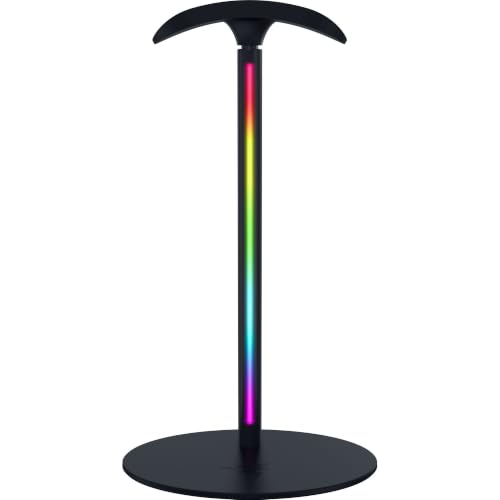
| Razer Base Station V2 Chroma | Premium desk centrepiece | Two USB-A ports, 3.5 mm jack, Chroma RGB synced through Razer software; roundups cite USB 3.1 ports and a built-in 7.1 DAC | Premium tier; Razer software needed for effects |
| Cozoo headphone stand with charger | Value and charging | USB ports and in some versions AC outlets, per roundups | Versions differ; check the exact listing |
| Tilted Nation gaming headset stand | Budget RGB | Two USB 2.0 ports, RGB lighting and a mouse bungee per a roundup | USB 2.0 speed only |
| IFYOO RGB gaming headset stand | Stable weighted base | Three RGB modes, two USB 2.0 ports, weighted metal base | USB 2.0 speed |
| KAFRI RGB stand | Many ports | Nine RGB modes, three USB ports (one USB-C and two USB-A) and two AC outlets per a roundup | Bulky for small desks |
| New Bee RGB aluminium stand | Budget pick | USB-C and USB pass-through, seven lighting modes | Basic hub performance |
Many sources that rank desk accessories use affiliate links, and details such as port speed and outlet count differ between versions of the same stand. Treat these figures as what makers and reviewers report and read the listing for the exact model.
What a Headset Stand Hub Actually Does
A headset stand with a USB hub is a stand that plugs into your computer by one USB cable and adds extra ports. This gives you easy access for a mouse receiver, flash drive, controller or phone charger without reaching behind the computer. Because the ports ride on that single upstream cable, they work only while the computer is on in most designs, and several devices share the bandwidth.
USB 2.0 versus USB 3.x
Most budget stands use USB 2.0. This is fine for a mouse dongle, keyboard receiver, headset charging cable or a controller, but slow for moving large files. Premium options such as the Razer Base Station V2 Chroma are reported to offer USB 3.1 speeds. If you plan to plug in storage, check the stated speed.
Charging power
USB 2.0 ports typically provide limited power, so charging a phone may be slow. If fast charging matters, plug the phone into a proper charger. Some stands with AC outlets or USB-C ports can offer more, but read the maker’s rating and do not exceed it.
AC outlets: a safety note
Some stands, such as certain Cozoo and KAFRI versions, include AC outlets. Treat them like a small power strip: follow the maker’s stated load rating, do not daisy-chain extension cords or strips, and do not plug in heating or high-draw devices. If you are unsure, ask a qualified electrician. Use the stand only with the supplied or specified cable and keep vents clear.
Fit and Compatibility
- Headset size: large over-ear headsets with thick headbands need a stand with a tall, wide hanger. Check the stated height and the maximum weight.
- Base stability: a weighted metal base, as on the IFYOO model, resists tipping with heavy headsets.
- Desk footprint: stands with several ports and outlets, such as the KAFRI, are bulkier. Measure available space.
- Cable reach: check the upstream cable length so it reaches your computer without strain.
- Operating system: basic hub functions are plug-and-play. Lighting control and audio features, such as the Razer’s, need its software, which suits Windows.
Audio Features: Do You Need Them?
The Razer Base Station V2 Chroma has a 3.5 mm jack and, according to reviewers, a built-in DAC that supports a surround-sound feature. This helps if your headset uses a 3.5 mm plug and your computer has a poor front panel connection. If your headset is wireless or connects via a USB dongle, you probably do not need those features and can save money.
Lighting
RGB lighting is mostly cosmetic. Some stands change colours with a button, while others sync with software. If you prefer a quiet desk, choose a stand with lighting that can be turned off, or choose a non-RGB model.
Budget Tiers
Budget
Stands such as the New Bee RGB aluminium model or the Tilted Nation provide a hanger, a few ports and lighting. Expect USB 2.0 and a simpler build.
Mid-range
Models such as the IFYOO, Cozoo and KAFRI add weighted bases, more ports or AC outlets. This tier fits most buyers.
Premium
The Razer Base Station V2 Chroma offers faster ports, audio features and software-linked lighting for buyers within that ecosystem.
Pick X If… Decision Table
| If you… | Pick | Reason |
|---|---|---|
| Want faster ports and a 3.5 mm audio feature | Razer Base Station V2 Chroma | USB 3.1 reported and built-in audio features |
| Want charging and power outlets for a low outlay | Cozoo-style stand | USB and in some versions AC outlets |
| Need extra ports for many devices | KAFRI | Three USB ports plus two AC outlets reported |
| Want a stable base for a heavy headset | IFYOO | Weighted metal base |
| Want a mouse bungee and RGB on a budget | Tilted Nation | Includes a bungee, two USB 2.0 ports |
| Want a simple USB-C pass-through | New Bee | USB-C and USB pass-through |
Alternatives
- A plain headset stand plus a separate USB hub: lets you choose each part, including a hub with faster ports. This takes more desk space.
- A monitor-mounted or under-desk headset hook: frees desk space if you do not need ports.
- A docking station: if you want video, Ethernet and charging for a laptop, a dock does that better than a stand.
Care and Safety
Unplug the stand before cleaning and wipe with a soft dry cloth. Avoid liquids near the ports. Do not overload the ports or outlets beyond the maker’s rating. If the stand becomes unusually warm, smells of burning or shows damage, stop using it. Place it on a flat, stable surface and keep headset cables from straining the ports.
Desk Layout and Cable Management
Think about where the stand sits before you buy. Most buyers place it beside the monitor on the side of their mouse hand’s opposite, so the headset can be lifted with the free hand. The upstream cable should run along the back of the desk to the computer, and the ports should face you so that plugging in a dongle or drive does not require leaning over. A stand that is too light may move when you pull a cable out, so weighted bases or non-slip feet are helpful. If your headset has a thick cable or detachable boom microphone, check that the hanger shape does not bend them. Keep wireless dongles on a short extension rather than directly in a side port if signal interference is a concern, and place any charging cable away from the headset’s headband to prevent strain. When you reorganise the desk, unplug the stand from the computer first, then move it, and reconnect only after everything is in place.
Frequently Asked Questions
Do the USB ports on a headset stand work when the computer is off?
In most designs, no. The ports are powered by the upstream USB cable, which depends on your computer’s power state. Some computers keep USB ports powered in sleep or off, depending on settings, so check your motherboard or laptop documentation.
Are headset stand USB ports fast enough for storage drives?
Budget stands use USB 2.0, which is slow for large transfers. Plugging a drive in works but takes time. For regular file transfers, use a computer port or a stand that states USB 3.x speeds.
Will the stand fit a large gaming headset?
Most stands handle typical over-ear headsets, but very wide or heavy headsets may need a tall hanger and a weighted base. Check the maker’s stated dimensions and weight limit.
Can I charge my phone from the stand?
You can usually plug in a cable, but USB 2.0 ports supply modest power, so charging can be slow. For fast charging, use a dedicated charger. Stands with USB-C or AC outlets may offer more but check the maker’s ratings.
Is it safe to use the AC outlets on a stand?
Use them only within the maker’s stated load, avoid daisy-chaining power strips and keep heat-producing devices off them. If you have doubts about your wiring or load, consult a qualified electrician.
Do I need software to use the hub?
Basic USB hub functions are plug-and-play. Software is typically only needed for lighting control or audio features, such as those on the Razer Base Station V2 Chroma.
More from Amazon
Programs that pair well with the guide above. Offers and eligibility are set by Amazon and may change.
Free shipping on eligible items, Prime Video and more. Eligible new members can start with a free trial.
Start a Prime free trialAudiobooks and podcasts to listen to on the go. Eligible new members can start with a free trial.
Try Audible freeAd-free music streaming. Eligible new subscribers can start with a free trial.
Try Music Unlimited freeA free business account with business pricing and bulk-buying tools for work, shop or home office.
Create a business accountAs an Amazon Associate we earn from qualifying purchases.









