
Key takeaways
- Find the best laptop cooling pads for gaming, work, and study. Compare five fan-powered pads by size, fan count, airflow controls, and comfort.
- Top Pick: Havit HV-F2056 Laptop Cooling Pad
- Runner-up: Klim Wind Laptop Cooling Pad
- Also consider: Cooler Master NotePal X3 Laptop Cooling Pad
A laptop that runs hot can slow down, grow loud, and feel uncomfortable on a desk or a lap. Its internal fan works harder, the keyboard area warms up, and long sessions become tiring. A cooling pad adds airflow beneath the machine and lifts it to a more comfortable angle.
The best laptop cooling pads match the size of the laptop, place fans near the vents, offer useful speed control, and stay stable while you type. This guide compares five fan-powered pads for different laptops, desks, and budgets.
As an Amazon Associate, we earn from qualifying purchases.
Quick Answer
For most people, the Havit HV-F2056 is the simplest all-round choice, with three fans, two height settings, and support for laptops up to 17 inches. Gamers with large machines should look at the Cooler Master NotePal X3, while lap users will prefer the soft neoprene Targus Chill Mat. Choose by laptop size first, then fan layout, noise, and desk space.
Havit HV-F2056 Laptop Cooling Pad

The Havit HV-F2056 is a slim, portable pad built around three fans and a metal mesh surface. It fits laptops from 15.6 to 17 inches, covering many everyday notebooks, work laptops, and mid-size gaming machines. Two height settings raise the back of the laptop for a more comfortable typing angle, and two USB ports let you pass the connection through to another device. At 1.54 pounds in published listings, it is light enough to move between a desk and a bag. The trade-off is control: no fan speed or noise figure is published, so buyers who want fine adjustment should look at the dial- and mode-controlled pads below.
Specs
| Feature | Details |
|---|---|
| Fans | 3 fans with blue LED lighting |
| Laptop size | 15.6 to 17 inches |
| Dimensions | 14.96 x 1.18 x 11.02 inches |
| Weight | 1.54 pounds |
| USB ports | 2 USB ports |
Klim Wind Laptop Cooling Pad

The Klim Wind is one of the longest-running names in laptop cooling. Four fans run at up to 1200 RPM, spreading airflow across the base of laptops from 11 to 17 inches. Two USB ports are built in, with one used to power the pad and the other left free for a mouse, keyboard, or drive. The pad has two back legs that raise the rear for a comfortable slope, plus front pegs that help hold the laptop in place. It weighs 1.61 pounds, so it sits firmly on a desk without feeling bulky. Klim also lists a five-year warranty, which is longer than the cover offered with many pads in this category. The Klim Wind suits buyers who want a proven, no-fuss pad with a wide fit and a long warranty.
Specs
| Feature | Details |
|---|---|
| Fans | 4 fans |
| Fan speed | Up to 1200 RPM |
| Laptop size | 11 to 17 inches |
| Dimensions | 15.79 x 10.71 x 1.22 inches |
| Weight | 1.61 pounds |
| USB ports | 2 USB ports |
Cooler Master NotePal X3 Laptop Cooling Pad

The Cooler Master NotePal X3 takes a different approach from the multi-fan pads above. Instead of several small fans, it uses one large 200mm fan with blue LED lighting. Fan speed is adjustable from 500 to 850 RPM using a built-in dial wheel, so you can turn the airflow down for quiet writing and up for demanding games or video work. A front vent directs a cool breeze toward your hands. The pad supports laptops up to 17 inches and weighs 0.9 kg, or 1.98 pounds, in manufacturer specifications. It suits gamers and desk-bound users who value quiet airflow and simple manual control, and it works best when the laptop vents sit near the centre of its base.
Specs
| Feature | Details |
|---|---|
| Fans | 1 fan, 200mm, with blue LED lighting |
| Fan speed | 500 to 850 RPM, adjustable by dial |
| Laptop size | Up to 17 inches |
| Dimensions | Not stated |
| Weight | 1.98 pounds |
| Front vent | Yes, for hand cooling |
Kootek Laptop Cooling Pad

The Kootek Laptop Cooling Pad, also sold as the Chill Mat 5, is built for buyers who want coverage across the whole underside of the laptop. It has five fans: one large central fan measuring 4.72 inches and four smaller fans measuring 2.76 inches each. The central fan runs at 1400 RPM and the smaller fans at 2400 RPM, pushing air across a wide area. Three working modes let you run the central fan alone, the four outer fans alone, or all five fans together. Six height settings give more tilt choices than most pads in this guide. Two USB ports are included, and the pad fits laptops from 12 to 17 inches. At 2.5 pounds, it is one of the heavier pads here, which adds desk stability but makes daily travel less appealing.
Specs
| Feature | Details |
|---|---|
| Fans | 5 fans, 1 large and 4 small |
| Fan speed | Central fan 1400 RPM, small fans 2400 RPM |
| Laptop size | 12 to 17 inches |
| Dimensions | 15.04 x 11.89 x 1.5 inches |
| Weight | 2.5 pounds |
| Height settings | 6 settings |
Targus Chill Mat Laptop Cooling Pad
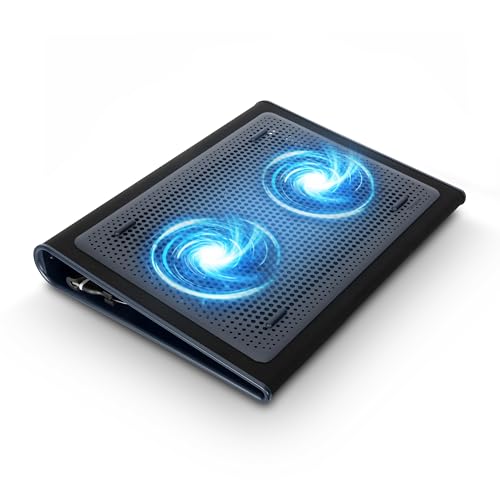
The Targus Chill Mat is the most lap-friendly pad in this guide. Its base is made from soft neoprene, which protects your legs from heat and gives the pad a comfortable feel when you work from a sofa, bed, or armchair. Two USB-powered fans disperse heat from beneath the laptop, and the pad fits most laptops up to 17 inches. It is lightweight, easy to carry from room to room, and simple to set up: plug it into a USB-A port and the fans start working. Its dual fans run at 1200 RPM in published comparisons. The trade-off is adjustability: it lacks the height settings of the Kootek and the dial control of the NotePal X3, and its soft base is less rigid than a metal mesh deck for heavy typing.
Specs
| Feature | Details |
|---|---|
| Fans | 2 fans |
| Fan speed | 1200 RPM |
| Laptop size | Up to 17 inches |
| Dimensions | Not stated |
| Weight | Not stated |
| Base material | Soft neoprene |
How to Choose
Start with laptop size, because a pad that is too small leaves part of the base unsupported and a pad that is too large wastes desk space. Measure the width of your laptop and compare it with the published dimensions of the pad, not just the screen size in the title. Next, look at where your laptop gets hot. If the vents sit near the centre, a large single fan such as the NotePal X3 can work well. If heat spreads across the whole base, a four- or five-fan pad such as the Klim Wind or the Kootek gives broader coverage. A dial or mode switch lets you balance airflow and noise, which matters in shared rooms and video calls. Height adjustment also affects comfort: raising the back of the laptop improves the typing angle and lifts the screen closer to eye level. Finally, check USB ports and power. Most pads draw power from a USB port, and many include a pass-through port so you do not lose a connection. If your laptop has few ports, a pad with two USB ports is more useful than one with a single cable.
Who Should Skip
You should skip a laptop cooling pad if your laptop already stays cool during normal use. Many modern ultrabooks and office laptops are designed to run quietly without extra airflow, and adding a pad may bring little benefit beyond a better typing angle. Skip a cooling pad if your laptop has blocked vents, a failing internal fan, or a battery that swells or overheats. A cooling pad cannot fix a hardware fault, and it should never be used to keep a damaged machine running. If the laptop shuts down or shows a swollen base, stop using it and seek repair instead. Large desktop-replacement laptops above 17 inches may also need a different solution, since most pads in this guide top out at 17 inches and a larger machine can overhang the edges. People who work in very quiet settings should also think carefully, because even quiet fans add some sound. If silence matters more than airflow, choose a pad with speed control and test it at its lowest setting first.
FAQ
Do laptop cooling pads really help?
A cooling pad can help by adding airflow beneath the laptop and lifting the base away from a desk or lap, which gives heat more room to escape. The benefit depends on vent position and workload. A pad is most useful for gaming, video editing, and other heavy tasks.
How many fans should a cooling pad have?
There is no single right number. One large fan can move a good volume of air quietly, while four or five smaller fans can cover a wider area. The best choice depends on where your laptop vents sit and how much noise you accept. Look at fan size and layout, not just the count, and favour adjustable speed.
Can I use a cooling pad on my lap?
Yes, but choose a pad made for lap use, such as the Targus Chill Mat with its soft neoprene base. Rigid mesh pads can feel uncomfortable on legs and may slide around. Keep the vents clear and avoid blocking the fans with fabric or bedding.
Will a cooling pad work with any laptop?
No, not every pad fits every laptop. Check the published laptop size range and the platform dimensions before buying, and make sure the pad supports your screen size and body width. Also check the power connection: most pads use USB-A, so a laptop with only USB-C ports may need an adapter.
Final Verdict
The best laptop cooling pad is the one that fits your laptop, matches its vent layout, and suits where you work. For most buyers, the Havit HV-F2056 offers the simplest route to cooler, more comfortable sessions, with three fans, a slim frame, and support for laptops up to 17 inches. If you want broader coverage and a long warranty, the Klim Wind is a strong mid-range alternative with four fans and a five-year warranty. Gamers who prefer quiet, wide airflow should consider the Cooler Master NotePal X3, with its large 200mm fan and speed dial. For full-base coverage, the Kootek five-fan pad is hard to beat on a desk, while the Targus Chill Mat stands apart for lap use. Measure your laptop first, check the fan layout against your vents, and favour speed control if you work in quiet rooms.
More from Amazon
Programs that pair well with the guide above. Offers and eligibility are set by Amazon and may change.
Free shipping on eligible items, Prime Video and more. Eligible new members can start with a free trial.
Start a Prime free trialAudiobooks and podcasts to listen to on the go. Eligible new members can start with a free trial.
Try Audible freeAd-free music streaming. Eligible new subscribers can start with a free trial.
Try Music Unlimited freeA free business account with business pricing and bulk-buying tools for work, shop or home office.
Create a business accountAs an Amazon Associate we earn from qualifying purchases.



