
Key takeaways
- Find the best NAS devices for home storage: five reliable picks for backups, photos, and media streaming, plus a guide to bays and networking.
- Top Pick: Synology DiskStation DS223j
- Runner-up: Synology DiskStation DS923+
- Also consider: QNAP TS-233
A home network attached storage device, usually called a NAS, puts your files on a box you own instead of on a subscription service. Photos, documents, music, and video sit on hard drives in your home, and every phone, laptop, and television on your network can reach them. When the internet goes down, your local files stay available, and when a laptop drive fails, a backup on the NAS can save the day.
Choosing the right NAS matters because the enclosure sets the limits for years. The number of drive bays decides how much storage you can add later, the processor decides how smoothly media apps run, and the network port decides how fast large files move. The five devices below cover a simple two-bay starter, a flexible four-bay family hub, a powerful premium enclosure, and two strong alternatives from other brands.
As an Amazon Associate, we earn from qualifying purchases.
Quick Answer
For most homes, a two-bay NAS with mirrored drives covers backups and photo storage, while a four-bay model suits growing media libraries and several users. Pick a diskless enclosure when you want to choose your own drives, check that the processor and memory match your media plans, and favour a 2.5 gigabit network port when you move large video files often.
Synology DiskStation DS223j
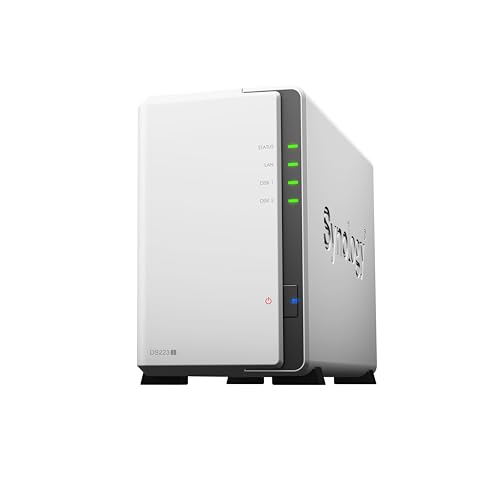
The Synology DiskStation DS223j is the simplest way into home network storage, and it is the pick for households that want reliable backups and shared files without a steep learning curve. It holds two drives, runs the Synology DiskStation Manager operating system, and covers the everyday jobs of a family NAS: central file storage, automatic computer backup, phone photo backup, and light media sharing.
This is a diskless enclosure, so drives are not included and must be bought separately. You can start with one drive and add a second later, or buy a matched pair and mirror them for protection against a single drive failure. The processor is modest, so this model suits file duties rather than heavy multitasking, and it is not the right box for several simultaneous high-resolution transcodes.
Specs
| Specification | Detail |
|---|---|
| Drive bays | 2 bays for 3.5 inch or 2.5 inch drives |
| Drives included | No, diskless enclosure |
| Processor | Realtek RTD1619B quad-core at 1.7 GHz |
| Memory | 1 GB DDR4, not upgradeable |
| Network | 1 gigabit Ethernet port |
| Operating system | Synology DiskStation Manager |
Synology DiskStation DS923+

The Synology DiskStation DS923+ is the premium pick in this roundup, and it is the enclosure to choose when a home NAS needs room to grow. Four drive bays give it far more capacity headroom than a two-bay model, and an expansion unit can raise the total to nine drives when a media library or a small business archive keeps growing.
A dual-core AMD Ryzen processor and 4 GB of memory that can expand to 32 GB give this model real multitasking ability. It copes with several users at once and handles media serving with greater confidence than the budget picks. Two M.2 slots accept NVMe solid state drives for caching or extra storage pools, and two gigabit network ports support link aggregation for a faster combined connection to a compatible switch.
Specs
| Specification | Detail |
|---|---|
| Drive bays | 4 bays for 3.5 inch or 2.5 inch drives |
| Drives included | No, diskless enclosure |
| Processor | AMD Ryzen R1600 dual-core |
| Memory | 4 GB DDR4, expandable to 32 GB |
| Network | 2 gigabit Ethernet ports |
| Expansion | Up to 9 drives with an expansion unit |
| Operating system | Synology DiskStation Manager |
QNAP TS-233

The QNAP TS-233 is the value alternative for buyers who want a straightforward two-bay NAS at a budget-friendly tier. It runs the QNAP QTS operating system, which covers file sharing, backup, photo management, and media streaming through a web interface and mobile apps. The hardware is deliberately simple: an ARM quad-core processor, 2 GB of memory, and a single gigabit network port.
Like the Synology two-bay model, this is a diskless enclosure, so you choose your own drives and decide whether to mirror them. Two bays keep the footprint small, and the QTS software includes snapshot protection for shared folders, which adds defence against accidental deletion, plus Time Machine support for Mac computers.
Specs
| Specification | Detail |
|---|---|
| Drive bays | 2 bays for 3.5 inch or 2.5 inch drives |
| Drives included | No, diskless enclosure |
| Processor | ARM Cortex-A55 quad-core at 2.0 GHz |
| Memory | 2 GB DDR4, not expandable |
| Network | 1 gigabit Ethernet port |
| Operating system | QNAP QTS |
Ugreen NASync DXP2800

The Ugreen NASync DXP2800 is the modern mid-range pick, and it stands out for faster networking and a newer processor at a mid-range tier. An Intel N100 quad-core processor and 8 GB of DDR5 memory give it more headroom than the budget ARM models, so it handles media apps, file sync, and several users with greater ease. A 2.5 gigabit Ethernet port moves large files noticeably faster than a standard gigabit connection.
This two-bay enclosure is diskless, so drives are bought separately, and two M.2 slots accept NVMe solid state drives for caching or additional storage. A 4K HDMI output lets the unit connect directly to a television or monitor. The Ugreen NAS operating system covers private cloud storage, automatic phone and computer backup, photo organisation, and media streaming, with mobile apps for remote access.
Specs
| Specification | Detail |
|---|---|
| Drive bays | 2 bays for 3.5 inch or 2.5 inch drives |
| Drives included | No, diskless enclosure |
| Processor | Intel N100 quad-core |
| Memory | 8 GB DDR5 |
| Network | 2.5 gigabit Ethernet port |
| Extra storage | 2 M.2 NVMe slots |
| Video output | 4K HDMI |
TerraMaster F4-424 Pro

The TerraMaster F4-424 Pro is the performance pick for homes that want four bays and serious processing power in one enclosure. An eight-core Intel Core i3 processor and 32 GB of DDR5 memory give it far more headroom than any other model in this roundup, so it copes with virtual machines, containers, media transcoding, and several demanding apps at once. Two 2.5 gigabit Ethernet ports provide fast file transfers.
Four drive bays accept large hard drives for a media library or a family archive, and two M.2 slots accept NVMe solid state drives for caching or extra storage pools. The TerraMaster operating system covers file sharing, backup, photo management, surveillance, and media streaming, and it supports common RAID modes for protecting data against a single drive failure. This is a diskless enclosure, so drives are bought separately.
Specs
| Specification | Detail |
|---|---|
| Drive bays | 4 bays for 3.5 inch or 2.5 inch drives |
| Drives included | No, diskless enclosure |
| Processor | Intel Core i3-N305 eight-core |
| Memory | 32 GB DDR5 |
| Network | 2 2.5 gigabit Ethernet ports |
| Extra storage | 2 M.2 NVMe slots |
| Operating system | TerraMaster TOS |
How to Choose
Start with the number of drive bays, because that decision is hard to change later. Two bays suit a first NAS and a mirrored pair of drives, which protects against one drive failing. Four bays suit a growing media library, because you can add drives later without replacing the enclosure. A mirrored setup halves usable capacity but keeps a copy of your data.
Next, match the processor and memory to your plans. File storage and backups run well on a modest ARM processor with 1 GB or 2 GB of memory. Media transcoding, photo indexing, and several apps at once need a stronger Intel or AMD processor and at least 4 GB of memory, with room to expand. A 2.5 gigabit port helps when you edit video directly from the NAS or back up large folders often, but your router and switch must support the faster speed for the benefit to appear.
Finally, budget for drives separately when the enclosure is diskless, because drives often cost as much as the enclosure itself. Choose drives rated for NAS use, confirm the operating system supports the backup tools you already use, and place the NAS somewhere with airflow, with a wired Ethernet connection to your router.
Who Should Skip
A NAS is not the right purchase for everyone. If you store very little and only need a backup for one laptop, a portable drive or a cloud backup plan is simpler and cheaper. If you have no wired network point near where the NAS would sit, the setup becomes awkward, because these devices work best on a wired Ethernet connection rather than Wi-Fi.
Skip a powerful four-bay model when your needs are plain file storage and photo backup, because the extra processor and memory will sit idle. Skip a budget two-bay model when you plan to transcode several high-resolution video streams at once, because the hardware will struggle. Also skip any NAS purchase until you have budgeted for drives and a backup plan for the NAS itself.
FAQ
Do NAS devices come with hard drives included?
Most enclosures in this roundup are sold diskless, which means drives are not included and must be bought separately. A few bundles pair an enclosure with drives, so check the listing carefully before ordering.
How many drive bays do I need for home storage?
Two bays suit most first-time buyers, because a mirrored pair protects against a single drive failure and covers backups and photos. Four bays suit a growing media library, because you can add drives later without replacing the enclosure.
Can a NAS replace cloud storage?
A NAS can replace cloud storage for local access, backups, and media streaming, and it keeps your files on hardware you own. It does not replace an off-site backup on its own, because fire, theft, or flood could still destroy the device. Keep a second copy of important files elsewhere.
Is a wired connection necessary for a NAS?
A wired Ethernet connection is strongly recommended, because it gives faster and more stable transfers than Wi-Fi. Most NAS devices have no Wi-Fi built in, so they must connect to a router or switch with a cable. Place the NAS near your router when possible.
Final Verdict
The best NAS device for home storage depends on how much you store and how hard the box needs to work. The Synology DiskStation DS223j is the best starting point for simple backups and family photos, while the QNAP TS-233 is the budget alternative. The Ugreen NASync DXP2800 adds modern speed for media-heavy homes, the Synology DiskStation DS923+ is the premium four-bay choice for growing libraries, and the TerraMaster F4-424 Pro is the performance pick for power users. Pick the bay count first, match the processor to your media plans, and budget for NAS-rated drives.
More from Amazon
Programs that pair well with the guide above. Offers and eligibility are set by Amazon and may change.
Free shipping on eligible items, Prime Video and more. Eligible new members can start with a free trial.
Start a Prime free trialAudiobooks and podcasts to listen to on the go. Eligible new members can start with a free trial.
Try Audible freeAd-free music streaming. Eligible new subscribers can start with a free trial.
Try Music Unlimited freeA free business account with business pricing and bulk-buying tools for work, shop or home office.
Create a business accountAs an Amazon Associate we earn from qualifying purchases.



