
Key takeaways
- How to choose a wireless mouse for your home office: size, shape, Bluetooth or dongle, DPI, battery life, quiet clicks, and five picks for every desk.
- Top Pick: Logitech MX Master 3S
- Runner-up: Logitech Lift Vertical Ergonomic Mouse
- Also consider: Logitech M720 Triathlon
A wireless mouse is one of the smallest items on a home office desk, yet it shapes how every working hour feels. The wrong shape can leave a wrist aching by mid-afternoon, and a dongle-only mouse can strand a laptop with no spare port. Choosing well starts with the desk, the hand, and the way the mouse will connect, not with a feature list.
The five mice below cover the main shapes and connection styles for home office work: a full-size premium mouse, a vertical ergonomic mouse, a multi-device mouse, a slim travel mouse, and a quiet budget mouse. Each is standalone, with no keyboard bundled in, described here only from its published specifications.
As an Amazon Associate, we earn from qualifying purchases.
Quick Answer
Start with fit and connection. Pick a full-size mouse for a fixed desk, a compact mouse for a laptop bag, and a vertical mouse if a flat shape causes wrist discomfort. Bluetooth suits modern laptops, a dongle suits desktops, and dual-mode mice cover both. For most office work, 1,000 to 4,000 DPI is enough, quiet clicks help in shared rooms, and long battery life means fewer interruptions.
1. Logitech MX Master 3S

The Logitech MX Master 3S is the premium pick for a fixed home office desk. It is a full-size, right-handed mouse with a sculpted thumb rest and a MagSpeed scroll wheel that switches between precise ratchet scrolling and fast free spinning, which suits long documents and spreadsheets. Its Darkfield sensor is rated at 8,000 DPI and tracks on glass.
The Standard Edition connects over Bluetooth or through the included Logi Bolt USB receiver, and it can stay paired with up to three devices. Quiet Clicks reduce click noise by 90 percent compared with the earlier MX Master 3, according to Logitech. The rechargeable battery charges over USB-C and lasts up to 70 days on a full charge, with a three-minute charge providing enough power for a full day of use.
Specs
| Specification | Details |
|---|---|
| Connectivity | Bluetooth and Logi Bolt USB receiver included |
| Sensor | 8,000 DPI Darkfield, tracks on glass |
| Scroll wheel | MagSpeed electromagnetic, ratchet and free-spin modes |
| Clicks | Quiet Clicks, 90 percent less click noise than MX Master 3 |
| Power | USB-C rechargeable, up to 70 days per charge |
| Multi-device | Up to 3 devices |
2. Logitech Lift Vertical Ergonomic Mouse

The Logitech Lift is the ergonomic pick for home workers whose wrist feels strained by a flat mouse. Its vertical shape holds the hand at a more upright angle, and it is sized for small to medium hands, so it suits many people who find larger vertical mice too bulky. The shape takes a short adjustment period, but for all-day use it changes the wrist angle rather than asking the hand to flatten onto the desk.
It connects over Bluetooth or through the included Logi Bolt USB receiver, and it can switch between devices. The sensor is rated at 4,000 DPI and is fully adjustable, which is ample for office work and high-resolution displays. Quiet clicks keep it discreet, and the four-button layout stays simple, with two thumb buttons that can be customized in Logitech software. It runs on a single AA battery, with a listed battery life of up to 24 months.
Specs
| Specification | Details |
|---|---|
| Connectivity | Bluetooth and Logi Bolt USB receiver included |
| Sensor | 4,000 DPI, fully adjustable |
| Shape | Vertical ergonomic, for small to medium hands |
| Buttons | 4, customizable |
| Clicks | Quiet clicks |
| Power | 1 AA battery, up to 24 months |
| Size | 108 by 70 by 71 mm |
| Weight | 125 g |
3. Logitech M720 Triathlon
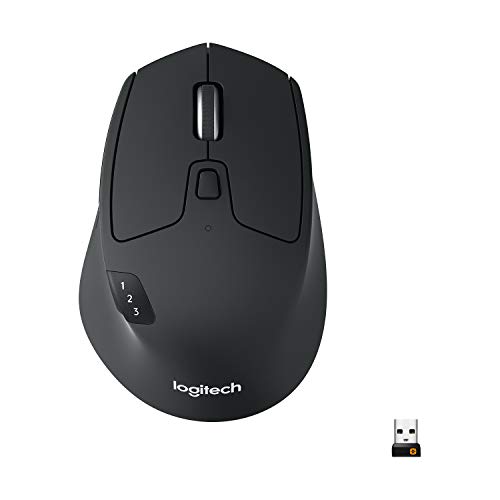
The Logitech M720 Triathlon is the multi-device pick for a home office that mixes a work laptop, a personal computer, and a tablet. It can stay paired with up to three devices and switch between them with a dedicated Easy-Switch button, connecting over Bluetooth or through the included Logitech Unifying receiver.
It is a full-size, right-handed mouse with a rubber-coated grip, six customizable buttons, and a hyper-fast scroll wheel that can spin freely through long pages or click step by step. The sensor is rated at 1,000 DPI, which is modest but steady for documents, email, and browser work. It runs on one AA battery, with a listed battery life of up to 24 months.
Specs
| Specification | Details |
|---|---|
| Connectivity | Bluetooth and Logitech Unifying receiver included |
| Multi-device | Up to 3 devices, Easy-Switch button |
| Sensor | 1,000 DPI |
| Buttons | 6, customizable |
| Scroll wheel | Hyper-fast |
| Power | 1 AA battery, up to 24 months |
| Size | 4.53 by 2.91 by 1.77 inches |
| Weight | 135 g with battery |
4. Logitech Pebble Mouse 2 M350s

The Logitech Pebble Mouse 2 M350s is the compact pick for a home office that moves around the house or travels with a laptop. Its slim, rounded pebble shape is only 1.05 inches thick, and at 76 g with its battery it adds almost nothing to a laptop bag. The flat profile is less supportive than a full-size mouse for eight hours at one desk, but for a secondary workspace, the trade is a fair one.
It connects over Bluetooth Low Energy and can switch between up to three devices with Easy-Switch. No USB receiver is included, although it works with a Logi Bolt receiver sold separately, so it suits laptops and tablets with reliable Bluetooth. The sensor adjusts from 400 to 4,000 DPI, the middle button can be customized in Logitech software, and the clicks use quiet Silent Touch technology. It runs on one AA battery, with a listed battery life of up to 24 months.
Specs
| Specification | Details |
|---|---|
| Connectivity | Bluetooth Low Energy, Logi Bolt compatible, receiver not included |
| Multi-device | Up to 3 devices, Easy-Switch |
| Sensor | 400 to 4,000 DPI |
| Clicks | Quiet Silent Touch clicks |
| Buttons | Customizable middle button |
| Power | 1 AA battery, up to 24 months |
| Size | 4.20 by 2.31 by 1.05 inches |
| Weight | 76 g with battery |
5. Logitech M330 Silent Plus

The Logitech M330 Silent Plus is the budget pick for a quiet home office. Its main strength is SilentTouch technology, which Logitech lists as reducing click noise by over 90 percent, so it suits shared rooms, late-night work, and video calls. It is a full-size, right-handed mouse with a contoured shape.
Connection is simple: a tiny 2.4 GHz USB nano receiver, with no Bluetooth at all. That makes it a good match for a desktop computer or a laptop with a spare USB-A port, and a poor match for a tablet or a laptop with only USB-C ports unless an adapter is already in use. The sensor is a fixed 1,000 DPI optical sensor, enough for everyday office work but with no adjustment for very wide displays. It runs on one AA battery, with a listed battery life of 18 to 24 months depending on the listing.
Specs
| Specification | Details |
|---|---|
| Connectivity | 2.4 GHz USB nano receiver only, no Bluetooth |
| Sensor | 1,000 DPI optical, fixed |
| Clicks | SilentTouch, over 90 percent less click noise |
| Buttons | 3, including middle click |
| Power | 1 AA battery, 18 to 24 months |
| Size | 105.4 by 67.9 by 38.4 mm |
| Weight | 91 g with battery |
How to Choose a Wireless Mouse
Start with shape and hand size. A full-size mouse supports the palm through a long workday, a compact mouse trades support for portability, and a vertical mouse changes the wrist angle for people who feel strain from a flat shape. A mouse that is too large forces the fingers to stretch, while one that is too small invites a cramped grip.
Next, match the connection to the computer. Bluetooth keeps ports free and suits laptops and tablets, a 2.4 GHz dongle suits desktops and computers where Bluetooth is disabled or unreliable, and a dual-mode mouse covers both. Multi-device switching is worth having when one desk serves a work laptop and a personal computer.
Then check the sensor and scroll wheel. For office work, 1,000 to 4,000 DPI covers documents, browsers, and spreadsheets, and higher DPI mainly helps on very large displays. A fast scroll wheel saves time in long documents, and quiet clicks are worth prioritizing in a shared home.
Who Should Skip a Wireless Mouse
A wireless mouse is not right for every desk. People at a single desktop with a wired keyboard may prefer a wired mouse, which never needs charging or a battery swap. Gamers who need very high polling rates should look at mice built for gaming rather than office models, which prioritize battery life and quiet clicks over speed.
A dongle-only mouse should be skipped by anyone whose laptop has only USB-C ports and no adapter, and a Bluetooth-only mouse should be skipped where Bluetooth is unreliable or disabled at work. Very small hands may find a full-size mouse uncomfortable, very large hands may find a slim travel mouse cramped, and most mice here are right-handed, so left-handed users should check handedness first.
FAQ
Should I choose Bluetooth or a 2.4 GHz dongle for a home office?
Choose Bluetooth when the computer has reliable Bluetooth and free ports matter, since it needs no receiver. Choose a 2.4 GHz dongle when Bluetooth is disabled, unreliable, or absent. A dual-mode mouse that offers both is the safest choice when the setup may change.
How much DPI do I need for office work?
Most home office work is comfortable between 1,000 and 4,000 DPI. A fixed 1,000 DPI sensor is enough for documents and email on a standard display, while an adjustable sensor up to 4,000 DPI or higher helps on wide or high-resolution monitors.
Are silent-click mice worth it for a home office?
Silent-click mice are worth it when the desk is shared with family, housemates, or a partner on calls, since quiet clicks reduce background noise. They change the sound of the click rather than the feel of the button, so they suit most office work.
How long should a wireless mouse battery last?
A rechargeable office mouse should last several weeks on a full charge, and the premium pick here is listed at up to 70 days. A mouse that runs on one AA battery should last many months, and the AA mice here are listed at up to 24 months. Battery life varies with use, so treat listed figures as planning guidance.
Final Verdict
The best wireless mouse for a home office fits the hand, matches the computer, and stays out of the way. For a fixed desk, the Logitech MX Master 3S offers the most comfort and control, while the Logitech Lift is better when wrist comfort comes first. The Logitech M720 Triathlon suits a desk shared by several devices, the Logitech Pebble Mouse 2 M350s suits a desk that moves, and the Logitech M330 Silent Plus suits a quiet room on a modest budget. Pick shape first, connection second, and extras last.
More from Amazon
Programs that pair well with the guide above. Offers and eligibility are set by Amazon and may change.
Free shipping on eligible items, Prime Video and more. Eligible new members can start with a free trial.
Start a Prime free trialAudiobooks and podcasts to listen to on the go. Eligible new members can start with a free trial.
Try Audible freeAd-free music streaming. Eligible new subscribers can start with a free trial.
Try Music Unlimited freeA free business account with business pricing and bulk-buying tools for work, shop or home office.
Create a business accountAs an Amazon Associate we earn from qualifying purchases.



