
Key takeaways
- Learn how to choose a network switch for your home, compare five gigabit Ethernet switches, and pick the right port count, speed, and management features.
- Top Pick: TP-Link TL-SG105 5-Port Gigabit Switch
- Runner-up: Netgear GS308 8-Port Gigabit Switch
- Also consider: TP-Link TL-SG108E 8-Port Easy Smart Managed Switch
A network switch gives a home network more wired connections without replacing the router. One Ethernet cable runs from the router to the switch, and the switch turns that single connection into five, eight, or sixteen wired ports for computers, game consoles, smart televisions, printers, and network storage.
Choosing the right switch is simpler than it first looks. Port count, port speed, managed or unmanaged operation, and physical size cover most home decisions. The five switches below are all gigabit Ethernet switches with RJ45 ports, covering compact desks, busy media setups, and larger homes.
As an Amazon Associate, we earn from qualifying purchases.
Quick Answer
For most homes, an eight-port unmanaged gigabit switch is the best starting point. It adds enough wired ports for a television, a console, a computer, and a printer, with nothing to configure. Choose five ports for a small desk, sixteen ports for a large household, and a managed switch only when separate network segments or traffic controls matter.
TP-Link TL-SG105 5-Port Gigabit Switch
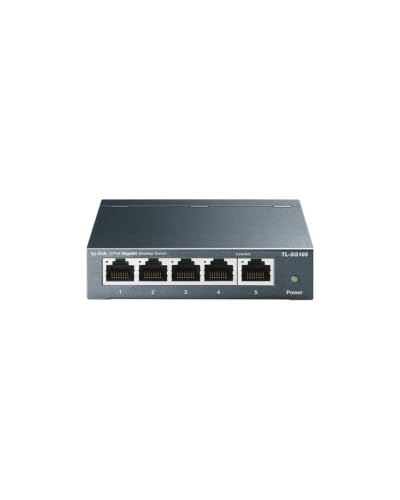
The TP-Link TL-SG105 is the compact pick in this guide. It has five gigabit RJ45 ports, so it suits a desk with a computer, a printer, and one or two other wired devices. When the router sits nearby and only a few extra ports are needed, a five-port switch keeps the setup small and uncluttered.
Setup is plug and play. Connect one port to the router, connect the other devices to the remaining ports, and the switch handles the rest. There is no software to install and no settings page to open. Auto-negotiation and Auto-MDI/MDIX support mean standard Ethernet cables work without crossover cables.
The metal housing and fanless design suit a quiet room. The listed switching capacity is 10 Gbps, matching five gigabit ports at full speed in both directions. This is a budget-group pick for buyers who value size, silence, and simplicity over port count.
Specs
| Spec | Detail |
|---|---|
| Ports | 5 RJ45 ports |
| Port speed | 10, 100, and 1000 Mbps |
| Switching capacity | 10 Gbps |
| Management | Unmanaged |
| Housing | Metal |
| Cooling | Fanless |
| Mounting | Desktop |
Netgear GS308 8-Port Gigabit Switch

The Netgear GS308 is the straightforward eight-port pick for a home network. Eight gigabit ports cover a living room or home office: a smart television, a game console, a streaming box, a computer, a printer, and a network drive, with ports to spare. It fits when five ports feel tight but sixteen would leave most of the switch empty.
Like other unmanaged switches, it needs no configuration. Plug the router into one port, plug devices into the rest, and the switch forwards traffic between them. The metal housing suits a shelf or a spot behind a television stand, and the fanless design keeps it silent.
The GS308 is unmanaged, so there are no settings for separate network segments, traffic priorities, or port monitoring. For most homes that is an advantage, because there is nothing to misconfigure. This is a budget-group pick for eight reliable wired ports and no extra work.
Specs
| Spec | Detail |
|---|---|
| Ports | 8 RJ45 ports |
| Port speed | 1 Gbps per port |
| Switching capacity | not stated |
| Management | Unmanaged |
| Housing | Metal |
| Cooling | Fanless |
| Mounting | Desktop or wall mount |
TP-Link TL-SG108E 8-Port Easy Smart Managed Switch
The TP-Link TL-SG108E is the managed pick in this guide, with the same eight-port gigabit layout as a basic eight-port switch. The difference is control. Its Easy Smart management adds VLANs, quality of service, IGMP snooping, and link aggregation, letting a home network separate traffic or give priority to certain kinds of data. That suits a home lab, a small office, or a household with network storage and several streaming devices.
Management runs through a web-based interface and a configuration utility. The switch still works as a plug-and-play device out of the box, so basic use needs no setup, and the extra features are there when needed.
It has eight shielded RJ45 ports, a metal housing, and desktop or wall mounting. Its listed switching capacity is 16 Gbps, matching eight gigabit ports in both directions. This is a mid-range pick for buyers who want traffic separation or prioritization, not just a plain wired connection.
Specs
| Spec | Detail |
|---|---|
| Ports | 8 RJ45 ports |
| Port speed | 10, 100, and 1000 Mbps |
| Switching capacity | 16 Gbps |
| Management | Easy Smart managed |
| Housing | Metal |
| Cooling | not stated |
| Mounting | Desktop or wall mount |
TP-Link TL-SG116 16-Port Gigabit Switch
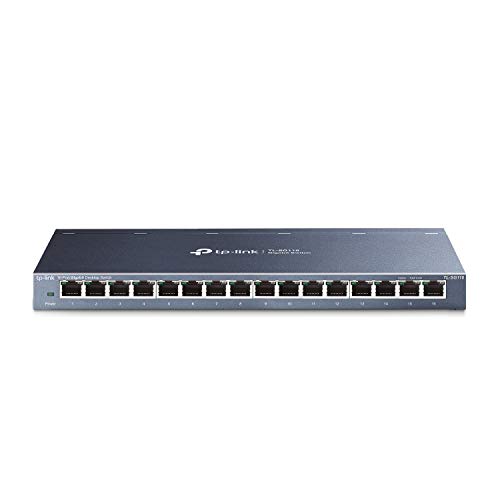
The TP-Link TL-SG116 is the sixteen-port pick for homes with many wired devices. Sixteen gigabit RJ45 ports can serve several rooms through wall jacks, home lab equipment, or a household where every television, console, computer, and camera recorder needs a wired link.
It is unmanaged, so setup stays simple despite the larger size. Connect the router to one port and connect devices to the rest. Listed traffic optimization features include port-based quality of service and IGMP snooping support, and the fanless metal design keeps noise down in a living room or bedroom.
Its listed switching capacity is 32 Gbps, matching sixteen gigabit ports in both directions. The case is larger than a five-port or eight-port model, so measure the shelf or desk before ordering. This is a mid-range pick when the device list is already long.
Specs
| Spec | Detail |
|---|---|
| Ports | 16 RJ45 ports |
| Port speed | 10, 100, and 1000 Mbps |
| Switching capacity | 32 Gbps |
| Management | Unmanaged |
| Housing | Metal |
| Cooling | Fanless |
| Mounting | Desktop or wall mount |
Netgear GS316 16-Port Gigabit Switch

The Netgear GS316 is the second sixteen-port pick in this guide, for buyers who prefer Netgear hardware or want a second brand option at this size. It has sixteen gigabit RJ45 ports for a large home network, a media room with many wired devices, or a small office.
Operation is unmanaged and plug and play. There is no software to install and no settings to change for basic use. That makes it easy to place near a router, a patch panel, or wall jacks and leave it running.
The listing does not state a switching capacity or housing material in the product information block checked for this guide, so those details are listed as not stated below. What is clear is the port count, the gigabit speed, the RJ45 interface, and the unmanaged design. This is a mid-range pick for a large wired setup where simplicity matters more than management features.
Specs
| Spec | Detail |
|---|---|
| Ports | 16 RJ45 ports |
| Port speed | 1 Gbps per port |
| Switching capacity | not stated |
| Management | Unmanaged |
| Housing | not stated |
| Cooling | not stated |
| Mounting | Desktop or wall mount |
How to Choose
Start by counting wired devices, then add two spare ports. A switch with no free ports forces another purchase as soon as a new television, console, or computer arrives. Five ports suit a single desk, eight suit a living room or home office, and sixteen suit a whole house, a home lab, or a small office.
Next, check port speed. Every switch in this guide has gigabit ports, which handle streaming, gaming, file transfers, and video calls without the limits of older hundred-megabit ports. Faster multi-gigabit ports only help when the router, cables, and connected devices also support the higher speed. For most homes, gigabit is the right baseline.
Then decide between unmanaged and managed. Unmanaged switches work out of the box with no settings, which is what most homes need. A managed or Easy Smart switch adds VLANs, traffic priorities, and monitoring, which help in a home lab or a household that wants to separate guest, work, and smart home traffic.
Finally, check the physical details. A fanless metal switch stays quiet in a living room, and desktop or wall mounting helps in a tight media cabinet. Measure the space and confirm that the Ethernet cables can reach the switch without stretching across a walkway.
Who Should Skip
Skip a network switch entirely when every device already connects reliably over wireless and no device needs a wired link. A switch adds ports, not wireless coverage, so it will not fix a weak wireless signal in a far room. A wireless access point or a mesh node is the better tool there.
Skip an unmanaged switch when the network needs separate segments for guests, work devices, or cameras. Unmanaged models cannot create those segments, so a managed switch is the better choice. Skip a five-port switch when the device list already fills it, since buying too small only delays the second purchase.
Also skip a sixteen-port switch for a single desk with two wired devices. A compact five-port or eight-port model will do the same job in less space. Match the switch to the device count, not to the largest model available.
FAQ
Do I need a managed switch for a home network?
Most homes do not. An unmanaged switch connects devices with no configuration, which covers streaming, gaming, work, and printing. A managed switch is worth considering for a home lab, separate network segments, or traffic controls, but it adds settings most households will never open.
How many ports should a home network switch have?
Count every wired device, then add two spare ports. Five ports suit a small desk, eight suit a living room or home office, and sixteen suit a large household or a home with wired wall jacks in several rooms.
Is a gigabit switch fast enough for streaming and gaming?
Yes, for most homes. A gigabit port carries far more data than a single video stream or game session needs, and a gigabit switch keeps wired traffic off the wireless network. Faster ports only help when the router, cables, and devices all support the higher speed.
Can I connect two switches together?
Yes. Connect a port on the first switch to a port on the second with an Ethernet cable, and devices on both switches can reach each other and the router. This works for adding ports in a second room, though one larger switch usually keeps cabling simpler.
Final Verdict
For most homes, the Netgear GS308 is the best starting point: eight gigabit ports, no configuration, and a quiet metal case. The TP-Link TL-SG105 suits a small desk, and the TP-Link TL-SG116 or Netgear GS316 suits a large household that needs sixteen ports. Buyers who want traffic controls should choose the TP-Link TL-SG108E, the only managed model here. Count the devices, add two spare ports, and pick the smallest switch that still leaves room to grow.
More from Amazon
Programs that pair well with the guide above. Offers and eligibility are set by Amazon and may change.
Free shipping on eligible items, Prime Video and more. Eligible new members can start with a free trial.
Start a Prime free trialAudiobooks and podcasts to listen to on the go. Eligible new members can start with a free trial.
Try Audible freeAd-free music streaming. Eligible new subscribers can start with a free trial.
Try Music Unlimited freeA free business account with business pricing and bulk-buying tools for work, shop or home office.
Create a business accountAs an Amazon Associate we earn from qualifying purchases.



