
Key takeaways
- Compare the best printers for home and office: budget inkjets, ink tank models, and fast mono and color laser all-in-ones, with specs to help you choose.
The best printer for most homes is the Epson EcoTank ET-2800, because its refillable ink tanks keep running costs low while still handling everyday documents, schoolwork, and the occasional photo. If your budget is tighter, the Canon PIXMA TR4720 covers print, copy, scan, and fax for less, and if you print mostly black-and-white documents, a mono laser such as the HP LaserJet M110w is faster and simpler to live with. For a busy small office, the HP Color LaserJet Pro MFP M283fdw adds fast color laser output and a 50-sheet feeder.
As an Amazon Associate, we earn from qualifying purchases.
Table of Contents
- How to Choose a Printer
- Epson EcoTank ET-2800 White
- Canon PIXMA TR4720
- Brother MFC-J4335DW
- HP LaserJet M110w
- HP Color LaserJet Pro MFP M283fdw
- Frequently Asked Questions
- Conclusion
- Product and ASIN Reference
How to Choose a Printer
Start with what you print. If most of your pages are black-and-white documents, a mono laser printer is the fastest and most fuss-free choice, and toner never dries out between uses. If you print color documents and photos, an inkjet makes more sense, and an ink tank model such as the EcoTank line is worth considering when you print often, because you refill bottles instead of replacing small cartridges.
Think about volume next. A printer with a 100-sheet tray is fine for a household that prints a few pages a week, but a home office that prints daily will appreciate a 150-sheet or 250-sheet tray and an automatic document feeder for multi-page scanning and copying. Automatic two-sided printing saves paper and time, and it is now common even on budget models.
Connectivity matters more than it used to. Wi-Fi printing from a phone or laptop is standard on the models below, and most also support mobile apps and voice assistants.
Finally, consider the running costs and the ink or toner system. Cartridge inkjets are cheap to buy but cost more per page. Ink tank printers cost more up front and far less per page over time. Laser printers use toner cartridges that last for many hundreds of pages and suit intermittent use, since toner does not dry out. Match the printer to your real workload rather than the fastest speed on the box, and the right choice becomes clear.
Epson EcoTank ET-2800 White

The Epson EcoTank ET-2800 is the best printer for most homes because it removes the most annoying part of owning an inkjet: constantly buying cartridges. Instead of small cartridges, it uses large refillable ink tanks that you top up from bottles, so a household that prints regularly spends far less on ink over the life of the printer. It prints, copies, and scans in color, connects over Wi-Fi, and handles everyday documents, school assignments, and family photos without fuss.
Print quality is strong for the class. Text comes out crisp and dark, color documents look clean, and photos printed on glossy paper hold up well for a home printer. The 100-sheet input tray is adequate for a household, and the flatbed scanner handles the occasional document or photo. Setup is straightforward through the Epson Smart Panel app, which walks you through filling the tanks and connecting to Wi-Fi.
The trade-off is speed. At 10 pages per minute in black and 5 in color, it is slower than the laser printers here, so it is not the pick for long documents against a deadline. It also lacks an automatic document feeder and a fax, which heavier home offices may miss. For everyone else, the low running cost and the sheer convenience of not thinking about cartridges make it the easiest printer to recommend.
Specs
- Type: Color inkjet all-in-one, print, copy, scan
- Ink system: Cartridge-free supertank with refillable ink bottles
- Print speed: Up to 10 ppm black, 5 ppm color
- Max print resolution: 5760 x 1440 dpi
- Paper capacity: 100-sheet input tray
- Connectivity: Wi-Fi, Wi-Fi Direct, USB
- Model: C11CJ66202
- Dimensions: 14.8 x 13.7 x 7.0 inches
Canon PIXMA TR4720

The Canon PIXMA TR4720 is the best budget printer in this roundup because it packs four functions into a compact, inexpensive machine: it prints, copies, scans, and faxes. For a household that needs a do-everything printer without spending much, it covers the basics well, and it includes features that usually appear on more expensive models, such as an automatic document feeder and automatic two-sided printing.
Print speeds are modest at 8.8 images per minute in black and 4.4 in color, which is fine for homework, forms, and the occasional report. The 100-sheet tray matches the Epson above, and the 20-sheet automatic document feeder makes multi-page copying and scanning far less tedious. It uses Canon PG-275 black and CL-276 tri-color cartridges, with high-yield XL versions available for heavier use, and it connects over Wi-Fi with support for mobile printing and voice assistants.
Photo printing is a pleasant surprise for a budget machine, with decent color on glossy paper. The main compromises are speed and the small color cartridge, so frequent color printing gets expensive relative to an ink tank model. If your printing is light and mostly black-and-white with the odd color page, the TR4720 is hard to beat for the money.
Specs
- Type: Color inkjet all-in-one, print, copy, scan, fax
- Print speed: Up to 8.8 ipm black, 4.4 ipm color
- Max print resolution: 4800 x 1200 dpi
- Paper capacity: 100-sheet input tray
- Automatic document feeder: Yes
- Duplex printing: Automatic
- Ink: Canon PG-275 black and CL-276 tri-color cartridges
- Connectivity: Wi-Fi, USB
- Model: 5074C002
- Dimensions: 17.2 x 13.0 x 7.5 inches
Brother MFC-J4335DW

The Brother MFC-J4335DW is the best mid-range inkjet all-in-one for a home office that prints and scans regularly. It is faster than the two budget inkjets above, with 20 pages per minute in black and 16 in color, and its INKvestment Tank cartridge system holds more ink than standard cartridges, so replacements come less often. It prints, copies, scans, and faxes, and it adds Ethernet alongside Wi-Fi and USB, which suits a printer shared across a small household network.
The 150-sheet paper tray holds more than the budget picks, and the 20-page automatic document feeder handles multi-page scanning and copying, including two-sided scans. Automatic duplex printing is built in, and the 1.8-inch color display makes it easy to copy or scan without opening a laptop. Print quality is solid across text and color documents, with sharp black text that suits reports and forms.
Compared with the Epson ET-2800, the Brother is faster and better equipped for scanning, but it still uses cartridges, so running costs are higher for heavy color printing. For a home office that wants a capable all-in-one without stepping up to a laser, it is the balanced choice.
Specs
- Type: Color inkjet all-in-one, print, copy, scan, fax
- Ink system: INKvestment Tank cartridges
- Print speed: Up to 20 ppm black, 16 ppm color
- Max print resolution: 1200 x 6000 dpi
- Paper capacity: 150-sheet input tray
- Automatic document feeder: 20-page
- Duplex printing: Automatic
- Connectivity: Wi-Fi, Ethernet, USB
- Model: MFCJ4335DW
- UPC: 012502662730
- Dimensions: 16.9 x 13.4 x 7.1 inches
HP LaserJet M110w
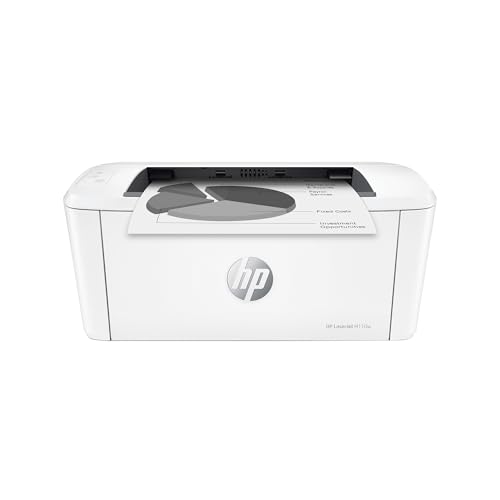
The HP LaserJet M110w is the best printer for anyone who mainly prints black-and-white documents and wants the fastest, simplest option. As a mono laser printer, it produces crisp text at 21 pages per minute, and because it uses toner instead of ink, it can sit unused for weeks and still print perfectly on the first page. There are no dried-out cartridges and no cleaning cycles to wait through.
It is also the smallest printer in this roundup, with a footprint that fits on a crowded desk or a shelf. The 150-sheet input tray is generous for its size, and it connects over Wi-Fi and USB with support for the HP Smart app and mobile printing. Setup is quick, and the preinstalled toner cartridge means it is ready to print out of the box.
The trade-offs are clear: it prints in black and white only, it does not scan or copy, and it has no automatic document feeder. If you need color or scanning, pair it with a phone scanning app or choose one of the all-in-ones above. For pure document printing, though, nothing else here is as fast or as low-maintenance.
Specs
- Type: Mono laser printer, print only
- Print speed: Up to 21 ppm black
- Max print resolution: 600 x 600 dpi
- Paper capacity: 150-sheet input tray
- Monthly duty cycle: Up to 8,000 pages
- Connectivity: Wi-Fi, Wi-Fi Direct, USB
- Model: LaserJet M110w
- UPC: 194850676994
- Dimensions: 13.6 x 7.5 x 6.3 inches
- Weight: 8.34 pounds
HP Color LaserJet Pro MFP M283fdw

The HP Color LaserJet Pro MFP M283fdw is the premium pick for a small office that needs fast color printing without inkjet running costs. It prints in black and color at 22 pages per minute, so long color documents finish quickly, and toner output stays sharp and smudge-resistant. It prints, copies, scans, and faxes, and its 250-sheet tray and 50-sheet automatic document feeder are sized for daily office use rather than occasional household printing.
The 2.7-inch color touchscreen makes walk-up copying and scanning easy. Connectivity covers Wi-Fi, Ethernet, and USB, with mobile printing through the HP Smart app. The large tray means fewer refills, and the feeder handles multi-page contracts without babysitting.
This is the biggest and heaviest printer in the roundup, so it needs a sturdy desk or a dedicated stand, and toner cartridges cost more per replacement than inkjet cartridges, even though they last longer. Availability can vary, so confirm stock before ordering. For a small office that prints every day and wants color laser speed and reliability, it is the most capable machine here.
Specs
- Type: Color laser all-in-one, print, copy, scan, fax
- Print speed: Up to 22 ppm black and color
- Max print resolution: 600 x 600 dpi
- Paper capacity: 250-sheet input tray
- Automatic document feeder: 50-sheet
- Duplex printing: Automatic
- Display: 2.7-inch color touchscreen
- Connectivity: Wi-Fi, Ethernet, USB
- Model: 7KW75A
- UPC: 193905486694
- Dimensions: 16.7 x 15.5 x 11.6 inches
Frequently Asked Questions
Should I buy an inkjet or a laser printer?
Choose a laser printer if you mostly print black-and-white documents and want fast, low-maintenance output, since toner never dries out. Choose an inkjet if you print color documents and photos, or if you need an affordable all-in-one. Ink tank inkjets suit frequent color printing, while cartridge inkjets suit light, occasional use.
What is the difference between an ink tank printer and a regular inkjet?
A regular inkjet uses small replaceable cartridges, while an ink tank printer such as the Epson EcoTank has large refillable tanks that you top up from bottles. Tank printers cost more up front but far less per page, so they pay off for households that print often.
Do I need an automatic document feeder?
An automatic document feeder matters if you scan or copy multi-page documents. It feeds pages one by one instead of making you lift the lid for each page. The Canon TR4720, Brother MFC-J4335DW, and HP M283fdw in this roundup all include one, while the Epson ET-2800 and HP M110w do not.
Can these printers print from a phone?
Yes. All five models support Wi-Fi printing from phones and tablets, and each works with its maker’s mobile app. The Epson, Canon, Brother, and HP models also support common mobile printing standards, so you can usually print without installing extra software.
Conclusion
The right printer depends on what you print and how often. The Epson EcoTank ET-2800 is the best all-round choice for a home that prints regularly, thanks to its refillable tanks and low running costs. The Canon PIXMA TR4720 is the best budget all-in-one, covering print, copy, scan, and fax for the least money. The Brother MFC-J4335DW is the strongest mid-range inkjet for a home office, with faster output, a bigger tray, and a 20-page feeder. The HP LaserJet M110w is the simplest and fastest option for black-and-white documents, and the HP Color LaserJet Pro MFP M283fdw is the premium pick for a small office that needs fast color laser printing every day. Pick the one that matches your workload and the space on your desk.
Product and ASIN Reference
| Printer | ASIN |
|---|---|
| Epson EcoTank ET-2800 White All-in-One Supertank Printer | B096N8CNBZ |
| Canon PIXMA TR4720 Wireless All-in-One Printer | B09CDXKNB9 |
| Brother MFC-J4335DW INKvestment Tank All-in-One Printer | B092YN1JK5 |
| HP LaserJet M110w Wireless Mono Laser Printer | B09J7946RJ |
| HP Color LaserJet Pro MFP M283fdw All-in-One Laser Printer | B083ZYLGGR |
More from Amazon
Programs that pair well with the guide above. Offers and eligibility are set by Amazon and may change.
Free shipping on eligible items, Prime Video and more. Eligible new members can start with a free trial.
Start a Prime free trialAudiobooks and podcasts to listen to on the go. Eligible new members can start with a free trial.
Try Audible freeAd-free music streaming. Eligible new subscribers can start with a free trial.
Try Music Unlimited freeA free business account with business pricing and bulk-buying tools for work, shop or home office.
Create a business accountAs an Amazon Associate we earn from qualifying purchases.









