
Key takeaways
- Choose the Cricut Maker 3 for a broad range of supported materials and a guided workflow; choose the Silhouette Cameo 5 for detailed custom layouts and design control; choose the Sizzix Big Shot for uncomplicated, repeatable die cuts without software. For business use, prioritize the…
Best Die Cutting Machines for Crafts and Small Businesses
The best die cutting machines for crafts and small businesses are the Cricut Maker 3 for broad material support, the Silhouette Cameo 5 for detailed work and adjustable cutting, and the Sizzix Big Shot for dependable, low-tech use with physical dies. The right choice depends less on a headline force rating than on what you cut, how large your designs are, and whether you prefer software-driven or manual operation.
Quick comparison
Specifications below describe commonly published machine dimensions and capabilities; bundles and regional versions can differ. Cutting-force figures are not directly comparable across brands because manufacturers measure and report them differently.
Our top picks


As an Amazon Associate we earn from qualifying purchases at no extra cost to you. Ratings are shown as listed on Amazon.
| Machine | Type and cutting width | Materials and tools | Best fit | Typical price range |
|---|---|---|---|---|
| Cricut Maker 3 | Digital; up to 12 in wide. With compatible Smart Materials, cuts up to 12 ft in one run. | Over 300 materials; blade, rotary blade, scoring, engraving and other tools, some sold separately. | Mixed-material projects and users who want guided software. | About $300–$450 |
| Silhouette Cameo 5 | Digital; 12 in cutting width, with mat-based projects up to 12 × 24 in. | Paper, vinyl, cardstock and other supported materials; tool and specialty-material compatibility varies. | Precise layouts, print-and-cut crafts and users who want more design control. | About $250–$400 |
| Sizzix Big Shot | Manual roller press; opening accommodates materials up to about 6 in wide. | Compatible thin dies and embossing folders; no digital file cutting. | Cardmaking, scrapbooking and occasional repeat shapes without software. | About $100–$180 |
Choose by workload, not by force rating
For varied materials and guided projects: Cricut Maker 3
The Maker 3 is the most versatile pick here if your projects move between paper, fabric, vinyl and other compatible materials. Its tool ecosystem supports operations beyond ordinary blade cutting, including scoring and engraving with the appropriate accessories. That breadth is useful for a small business making personalized products, but it increases the chance of buying tools you rarely use.
Cricut Design Space is designed around project setup and ready-made designs. It is approachable for beginners, though reliance on an online account and the platform’s design workflow may feel restrictive if you already work in professional vector software. Check whether your required functions and designs fit the current software plan before choosing.
For controlled layouts and detailed cutting: Silhouette Cameo 5
The Cameo 5 suits makers who want to arrange designs precisely on a page, work with print-and-cut projects, or make frequent custom layouts. Silhouette Studio offers substantial design control, but has a steeper learning curve than a simple project-first workflow; some advanced software features may require a paid edition. Confirm file-import and export needs before buying if you use design software already.
For shop work, precision depends on setup as much as the machine: use a clean, tacky mat, secure the material evenly, and run a small test cut when changing material or blade. A slightly misaligned print-and-cut job can waste a whole printed sheet, so calibration and adequate registration-mark margins matter.
For simple, repeatable shapes: Sizzix Big Shot
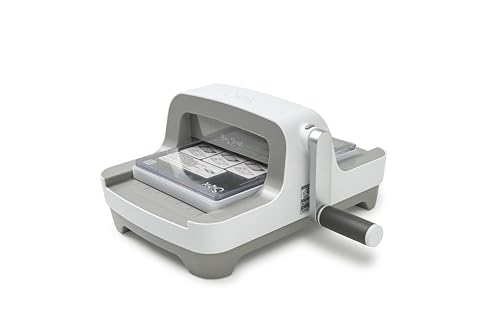
The Big Shot is a manual machine: place a compatible die and material between cutting plates, then feed the sandwich through the rollers. There is no software, file setup or electronic connection. This makes it practical for repeat shapes and embossing, especially when you value a direct physical workflow over design flexibility.
Its limitations are substantial for custom production. It cannot cut arbitrary digital artwork, and the usable width is constrained by the opening, die and plates. For a small business, it works best when a product line uses a manageable set of standard shapes rather than frequent one-off designs.
Match the machine to your situation
| Your situation | Best starting point | Why | Trade-off to accept |
|---|---|---|---|
| Beginner, occasional paper and vinyl crafts | Cricut Maker 3 | Guided project workflow and broad material options. | Software dependence and add-on tool costs. |
| Experienced designer making custom layouts | Silhouette Cameo 5 | Flexible on-screen arrangement and detailed project control. | Time spent learning software and calibrating jobs. |
| Small space, mostly cards and repeated shapes | Sizzix Big Shot | No computer setup; compact workflow for compatible dies. | Limited width and no custom digital cutting. |
| Frequent orders across varied materials | Cricut Maker 3 or Cameo 5 | Digital cutting is easier to adapt across designs and batches. | Budget for mats, blades, tools, test material and maintenance. |
What specifications don’t tell you
Cutting force is not a universal ranking. A higher published force does not guarantee a cleaner result on every material. Blade geometry, material support, number of passes, mat condition and the machine’s settings all affect the cut. For a material you plan to sell, verify compatibility in the manufacturer’s current guide and test it on scrap before promising production capacity.
Work area affects throughput. A 12-inch digital machine can handle wider craft layouts than a 6-inch manual press, but that does not mean every job can use the full width. Mat dimensions, material feed, design margins and the need to avoid seams all reduce practical usable area. Long-roll cutting can reduce repositioning, but it does not automatically improve small, intricate cuts.
Precision has a setup cost. Fine lettering and small corners are unforgiving of dull blades, lint on the mat or material shifting during cutting. For reliable batches, keep a test file with a small circle, fine text and a sharp corner. Run it when changing material lots, blade condition or settings, then adjust before cutting saleable stock.
Ownership costs and durability
Digital machines make custom designs possible, but their cost continues after purchase. Blades wear with use and abrasive materials; mats lose tack, collect fibers and eventually stop holding sheets flat. Specialty tools can add meaningfully to the initial price, so buy only those needed for confirmed projects. A manual machine has fewer electronic dependencies, but its plates can bow or develop marks and may need replacement to maintain even pressure.
A simple break-even check helps when deciding whether a digital machine is worthwhile. Suppose a machine and essential tools cost $350, and the machine saves $2 in outside cutting or labor per finished item. The purchase price alone breaks even after about 175 items ($350 ÷ $2). Add mats, blades, failed test cuts and your setup time to get a more realistic figure. If you make only a few items each month, outsourcing or a manual die-based workflow may cost less.
To extend life, remove scraps from mats promptly, store mats covered, and avoid forcing thick materials or incompatible tool-and-mat combinations. Feed material straight, keep the cutting area clear, and replace worn consumables when cuts become inconsistent rather than compensating with repeated heavy passes. Extra passes can damage both the material and the blade.
Bottom line
Choose the Cricut Maker 3 for a broad range of supported materials and a guided workflow; choose the Silhouette Cameo 5 for detailed custom layouts and design control; choose the Sizzix Big Shot for uncomplicated, repeatable die cuts without software. For business use, prioritize the machine that matches your actual product sizes and weekly workload, then budget for consumables and test material—not just the machine itself.
