
Key takeaways
- Number of bands: Four broad bands are enough for tone shaping; five to ten parametric bands cover most headphone and speaker corrections; 31 graphic bands are useful when fixed-frequency control is specifically required.
- Filter range: Look for coverage from about 20 Hz to 20 kHz. Subwoofer systems may benefit from filters below 30 Hz, while ultrasonic controls are rarely important for normal listening.
- Headroom: Boosting several bands can overload the signal before it reaches the amplifier. Apply a negative preamp or input trim equal to the largest combined boost, often 3–6 dB.
- Connectivity: USB is useful for computers; optical and coaxial inputs suit televisions and streamers; balanced TRS or XLR connections help in longer professional cable runs; RCA is adequate for short home-stereo connections.
- Noise performance: A good digital processor should not add audible hiss in a normal gain structure. Analog units depend more heavily on source level, cable length, grounding, and amplifier sensitivity.
- Preset storage: Multiple presets are valuable if you switch between headphones, speakers, late-night listening, and subwoofer settings.
The best equalizers depend on whether you need fast tone shaping, surgical correction, or automatic room compensation: choose a graphic EQ for simple hands-on adjustments, a parametric EQ for precision, and a DSP platform with measurement-based correction for speakers in a difficult room.
Our top picks


As an Amazon Associate we earn from qualifying purchases at no extra cost to you. Ratings are shown as listed on Amazon.
Best equalizers by listening situation
| Situation | Best fit | Why it makes sense | Typical market range |
|---|---|---|---|
| Low-cost computer EQ | Equalizer APO with a compatible interface | System-wide Windows filtering, flexible parametric bands, and no hardware box | Free software |
| Music production and mixing | FabFilter Pro-Q 3 | Precise parametric filters, spectrum display, dynamic EQ, and mid/side processing | About $150–$180 |
| Desktop DAC and headphone setup | RME ADI-2 DAC FS | High-quality conversion, headphone outputs, separate output controls, and built-in EQ | About $1,000–$1,300 |
| Simple analog stereo system | Schiit Loki Mini+ | Compact four-band analog tone control with immediate front-panel operation | About $150–$180 |
| Multiple sources and room correction | miniDSP Flex with optional Dirac Live version | Digital signal routing, configurable filters, and measurement-based correction | About $500–$1,000 depending on version |
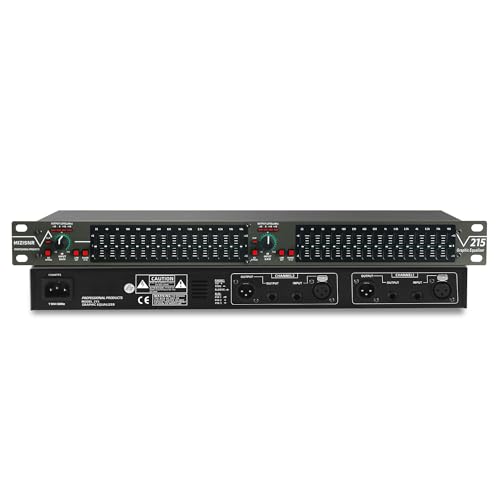
| Rack-mounted live or installed system | dbx 231s | Dual-channel 31-band graphic control in a standard 19-inch rack format | About $250–$350 |
Graphic versus parametric equalizers
A graphic equalizer gives each frequency band a fixed slider. A 10-band model may offer controls centered around 31 Hz, 62 Hz, 125 Hz, 250 Hz, 500 Hz, 1 kHz, 2 kHz, 4 kHz, 8 kHz, and 16 kHz. Moving several adjacent sliders creates a visible curve, so graphic EQs are quick to understand and useful for broad tonal changes.
The limitation is that the center frequencies and filter widths are predetermined. A room resonance at 47 Hz may sit between two sliders, forcing you to reduce more bass than necessary. Graphic EQs are also easy to over-adjust because a row of dramatic slider movements can produce phase shifts, reduced headroom, and an unnatural tonal balance.
A parametric equalizer lets you select the center frequency, gain, and Q value—or bandwidth—of each filter. For example, a 48 Hz resonance can be reduced by 4 dB with a Q of 6, leaving nearby bass mostly untouched. Parametric EQ is the better choice for correcting measured peaks, matching headphones, and creating repeatable presets.
For casual listening, fixed-band graphic controls are usually sufficient. For speakers in a room, studio work, or headphone correction, parametric control provides more useful precision.
Head-to-head: the main types of best equalizers
Software equalizers: maximum flexibility for the lowest cost
Equalizer APO is a practical Windows choice when the computer is the main audio source. It can apply system-wide filters and supports custom configurations, but setup is more technical than dragging sliders in a consumer music app. Compatibility can vary with exclusive-mode audio, games, conferencing software, and manufacturer control panels.
FabFilter Pro-Q 3 is aimed at production rather than simple playback. It provides adjustable filter slopes, dynamic EQ, spectrum analysis, mid/side processing, and extensive band control. Dynamic EQ is particularly useful when a frequency is problematic only at high volume: instead of cutting it permanently, the filter responds when that range becomes excessive.
Software EQ is the most economical option when you listen from one computer. It becomes less convenient when your sources include a television, turntable, streamer, and game console.
Analog hardware: immediate and easy to operate
The Schiit Loki Mini+ uses four broad analog tone bands rather than dozens of narrow correction filters. It is well suited to a conventional stereo chain where you want to add a little bass, reduce brightness, or compensate for different recordings. Its front panel is intuitive, but it cannot perform measurement-based room correction or store complex digital presets.
The dbx 231s offers two channels of 31-band graphic EQ in a rack-width chassis. It is more appropriate for live sound, installations, and systems where multiple people need to see and adjust the curve. Its fixed bands are useful for broad feedback management, although they are not a substitute for careful microphone placement, gain structure, or acoustic treatment.
Digital DSP: the strongest option for speakers and several sources
The miniDSP Flex is a flexible digital processor for stereo systems. Depending on the configuration, it can handle USB, digital, and analog connections while routing processed signals to power amplifiers, active speakers, or subwoofers. Models supplied with Dirac Live add measurement-based correction, which can address both frequency balance and some low-frequency room behavior.
DSP hardware generally offers the best combination of repeatable presets, crossover control, subwoofer integration, and room correction. The trade-off is setup complexity: you need a measurement microphone, a stable listening position, and the discipline to avoid correcting every small peak that is caused by a reflection rather than the speaker itself.
What specifications matter most?
- Number of bands: Four broad bands are enough for tone shaping; five to ten parametric bands cover most headphone and speaker corrections; 31 graphic bands are useful when fixed-frequency control is specifically required.
- Filter range: Look for coverage from about 20 Hz to 20 kHz. Subwoofer systems may benefit from filters below 30 Hz, while ultrasonic controls are rarely important for normal listening.
- Headroom: Boosting several bands can overload the signal before it reaches the amplifier. Apply a negative preamp or input trim equal to the largest combined boost, often 3–6 dB.
- Connectivity: USB is useful for computers; optical and coaxial inputs suit televisions and streamers; balanced TRS or XLR connections help in longer professional cable runs; RCA is adequate for short home-stereo connections.
- Noise performance: A good digital processor should not add audible hiss in a normal gain structure. Analog units depend more heavily on source level, cable length, grounding, and amplifier sensitivity.
- Preset storage: Multiple presets are valuable if you switch between headphones, speakers, late-night listening, and subwoofer settings.
Room correction: useful, but not automatic perfection
Room-correction systems such as Dirac Live use a measurement microphone to compare the sound at one or more positions with a target response. They can reduce broad bass peaks and improve the transition between a subwoofer and main speakers. They cannot remove a deep cancellation caused by speaker placement or make a reflective room acoustically dead.
Use correction after positioning the speakers, setting the subwoofer phase and crossover, and treating obvious reflections where practical. A sensible target curve is usually less aggressive than a perfectly flat line. Excessive treble correction can make the system sound unnatural away from the microphone position.
Room correction is less important for a single headphone listener in a quiet computer setup. It becomes much more valuable for stereo speakers, subwoofers, open-plan rooms, and systems used from more than one seat.
A practical setup method
- Set the EQ bypassed first. Match the source and amplifier levels so that an EQ change is not mistaken for an improvement simply because it is louder.
- Cut before boosting. A narrow cut at a measured resonance usually preserves more headroom than boosting every neighboring frequency.
- Use modest moves. Start with 2–3 dB changes. Large boosts may expose driver limits, increase distortion, or make the system fatiguing.
- Leave preamp headroom. If your largest boost is +5 dB, begin with approximately –5 dB of preamp gain and raise the amplifier only if needed.
- Compare at matched volume. Switch between bypass and processed modes at the same loudness, then listen to familiar speech, bass lines, and cymbals.
- Save a neutral preset. Keep one untouched reference and name other presets by use, such as “headphones,” “TV,” or “subwoofer.”
As a simple example, a preset with boosts of +3 dB at 60 Hz, +2 dB at 120 Hz, and +4 dB at 8 kHz should not automatically receive a –9 dB preamp adjustment: those bands do not all peak on the same musical signal at the same time. Starting with –4 dB to –6 dB is a practical safety margin, followed by level checks at the loudest material you play.
Ownership, maintenance, and common mistakes
Hardware equalizers have few consumables, but switches, potentiometers, and connectors are the parts most likely to wear. Dust can cause scratchy controls; use a soft brush and unplug the unit before cleaning. Avoid spraying cleaner directly into a control. Analog rack units also need adequate ventilation, especially when mounted above power amplifiers.
Software has different ownership issues. Presets can break after an operating-system, driver, or audio-routing change, so export configurations and keep a bypass version. Plugin licenses may also matter if a computer is replaced. DSP processors are more stable as dedicated appliances, but their microphones, USB cables, and measurement software become part of the setup.
The most common mistakes are boosting a frequency to compensate for poor speaker placement, correcting a room with one inaccurate microphone position, stacking several EQs unknowingly, and running out of digital headroom. Keep the signal path simple enough that you can identify which device is making each change.
Final buying recommendation
Choose a free or low-cost software equalizer if your listening is computer-based and you are comfortable with configuration. Choose a compact analog unit such as the Schiit Loki Mini+ for simple, tactile stereo tone control. Choose a high-quality DAC with built-in EQ such as the RME ADI-2 DAC FS for a premium desktop or headphone system. For speakers, subwoofers, and multiple sources, a miniDSP Flex with room-correction support is the most capable direction. A rack graphic equalizer such as the dbx 231s remains sensible when fixed bands, visible controls, and two-channel installation hardware matter more than automated correction.
