
Key takeaways
- Frequency range: Confirm that the receiver covers the band you want. Coverage alone does not guarantee good sensitivity across the entire span.
- Bandwidth: This determines how much spectrum you can inspect at once. More bandwidth can make searching easier, but it also uses more computer processing and storage.
- Sensitivity and dynamic range: Sensitivity affects weak-signal reception; dynamic range describes how well the receiver handles weak signals alongside strong ones. Manufacturers do not always publish directly comparable figures, so avoid ranking models by a single number.
- Software: Check compatibility with your operating system and preferred application. Common SDR programs include SDR#, SDR++, SDRangel, and SDRplay’s SDRuno; support varies by hardware and platform.
- Antenna connection: Small receivers often use SMA connectors, while other models may use different connector types. Budget for the correct adapter, and check whether the antenna expects 50-ohm coax.
Best SDR Receivers for Flexible Radio Monitoring
The best SDR receiver for most people is the Airspy R2 if you want a capable wideband receiver with strong dynamic range; choose an RTL-SDR Blog V4 for an inexpensive start, an Airspy HF+ Discovery for sensitive shortwave listening, or a HackRF One if transmitting and experimentation matter more than receive performance.
Software-defined radio (SDR) receivers turn radio signals into data that a computer or compatible device can process. The right choice depends less on the biggest advertised frequency range than on what you want to hear: crowded VHF and UHF bands, weak signals on shortwave, aircraft, satellites, or a broad span of spectrum at once.
Our top picks
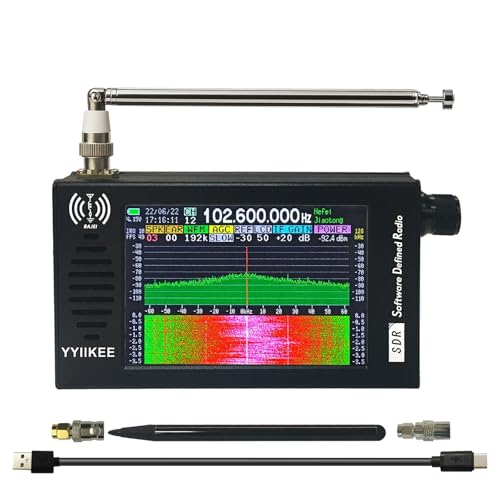
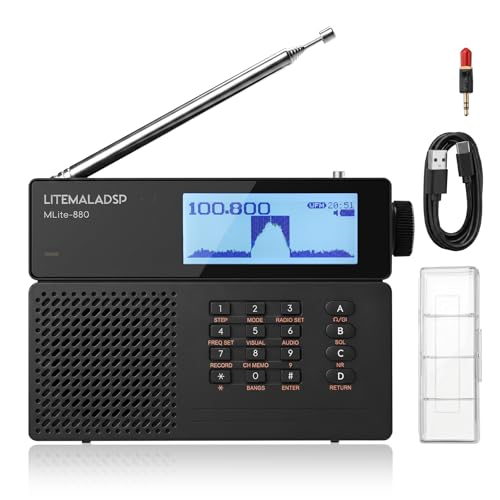


As an Amazon Associate we earn from qualifying purchases at no extra cost to you. Ratings are shown as listed on Amazon.
Quick comparison
| Receiver | Usable frequency range | Maximum sample bandwidth | Connection and power | Best suited to |
|---|---|---|---|---|
| RTL-SDR Blog V4 | About 500 kHz–1.766 GHz | Up to about 3.2 MHz | USB; powered by host | Low-cost receive-only learning and general monitoring |
| Airspy R2 | 24–1,800 MHz | Up to 10 MHz | USB; powered by host | VHF/UHF monitoring and wider local spectrum views |
| Airspy HF+ Discovery | About 0.5 kHz–31 MHz and 64–260 MHz | Up to 768 kHz | USB; powered by host | Shortwave and weak-signal listening |
| SDRplay RSP1A | 1 kHz–2 GHz | Up to 10 MHz | USB; powered by host | One receiver for a broad range of receive-only work |
| HackRF One | 1 MHz–6 GHz | Up to 20 MHz | USB; powered by host | Wideband experiments, including limited transmit work |
Specifications are manufacturer-stated headline figures; actual usable bandwidth, sensitivity, and performance depend on sample rate, software, computer, antenna, and signal conditions. The HackRF One is half-duplex: it cannot transmit and receive simultaneously. It is not a substitute for a dedicated high-performance receiver.
Choose by what you want to monitor
Best budget entry: RTL-SDR Blog V4
The V4 makes sense if you are learning SDR, tracking aircraft beacons, monitoring local VHF/UHF activity, or exploring broadcast and public signals where reception is lawful. Its low price leaves room in the budget for an antenna, adapters, and perhaps a filtered amplifier—often more useful than spending the whole budget on a more capable dongle.
Its modest bandwidth is the main constraint: a 3.2 MHz window cannot show as much spectrum at once as a 10 MHz receiver. The small aluminum enclosure also needs airflow during extended use. The included antenna, if bundled, is a starting point rather than a universal solution.
Best for VHF/UHF and a responsive spectrum view: Airspy R2
The R2’s 10 MHz maximum bandwidth gives you a broader real-time view than entry-level dongles, useful when searching a busy band or watching several nearby signals. Its frequency coverage fits many common VHF and UHF monitoring tasks, though it does not cover the HF shortwave bands.
Strong local transmitters can still overload any receiver. The R2’s better dynamic-range performance than basic dongles helps in difficult environments, but a band-pass filter or attenuator may be needed near broadcast towers. Pair it with an antenna designed for the band you care about rather than relying on one wideband antenna for everything.
Best for shortwave and weak HF signals: Airspy HF+ Discovery
If distant shortwave stations, amateur HF bands, or other signals below 30 MHz are your priority, the HF+ Discovery is the focused choice. Its filtering and strong handling of crowded bands help reduce the impact of powerful nearby signals. Its bandwidth is narrower than the R2 or HackRF One, but that is usually a sensible trade for HF listening rather than a drawback.
It also covers a separate VHF range, but not the full span from HF through UHF. Choose it for reception quality in its intended bands, not as an all-purpose scanner replacement.
Best broad receive-only coverage: SDRplay RSP1A
The RSP1A spans from longwave through much of the microwave range, with a 10 MHz maximum bandwidth. That broad coverage makes it attractive if your interests may shift between shortwave, broadcast, aviation, and other receive-only signals. Its headline frequency range does not mean one antenna will perform well across all of it: antennas, filters, and connector arrangements need to match the band.
SDRplay’s SDRuno is a dedicated option, and the receiver is also supported by other SDR software. Check current operating-system and application support before buying, especially if you plan to use a particular Linux setup or a portable device.
Best for wideband experimentation: HackRF One
HackRF One covers the broadest frequency range in this comparison and offers up to 20 MHz bandwidth. That makes it useful for experiments where seeing a large chunk of spectrum matters. Unlike the receive-only choices above, it can transmit as well as receive, but only one at a time, and its receive sensitivity and dynamic range are not its strongest selling points.
Transmit capability brings legal and practical responsibilities. Use only authorized frequencies, power levels, and equipment; a suitable load or antenna and careful setup are essential. For ordinary listening, the transmit function may add cost and complexity without improving reception.
Which one fits your situation?
| Your situation | Good starting choice | Why |
|---|---|---|
| New to SDR; limited budget; mostly local signals | RTL-SDR Blog V4 | Inexpensive, widely used, and capable enough to learn tuning, gain, and demodulation. |
| Regular VHF/UHF monitoring; want a wider spectrum view | Airspy R2 | Its 10 MHz bandwidth is useful for searching and monitoring busy bands. |
| Shortwave is the main interest; weak signals in crowded bands | Airspy HF+ Discovery | Purpose-built HF performance matters more here than maximum bandwidth. |
| Interests span many receive-only bands | SDRplay RSP1A | Broad coverage and substantial bandwidth provide flexibility, subject to antenna choices. |
| Want to experiment with transmitting as well as receiving | HackRF One | It supports both functions and a wide frequency range, with trade-offs in receive performance. |
What specs matter in practice?
- Frequency range: Confirm that the receiver covers the band you want. Coverage alone does not guarantee good sensitivity across the entire span.
- Bandwidth: This determines how much spectrum you can inspect at once. More bandwidth can make searching easier, but it also uses more computer processing and storage.
- Sensitivity and dynamic range: Sensitivity affects weak-signal reception; dynamic range describes how well the receiver handles weak signals alongside strong ones. Manufacturers do not always publish directly comparable figures, so avoid ranking models by a single number.
- Software: Check compatibility with your operating system and preferred application. Common SDR programs include SDR#, SDR++, SDRangel, and SDRplay’s SDRuno; support varies by hardware and platform.
- Antenna connection: Small receivers often use SMA connectors, while other models may use different connector types. Budget for the correct adapter, and check whether the antenna expects 50-ohm coax.
Plan for the antenna and setup, not just the receiver
For a first receive-only setup, connect the receiver directly to a suitable antenna, install compatible SDR software, and start with a moderate sample rate and gain. Tune a known local signal before troubleshooting distant stations. If the spectrum looks full of broad interference or strong signals overwhelm weaker ones, reduce gain first; adding an amplifier can make overload worse.
Antenna placement often matters more than a receiver upgrade. Put the antenna outdoors or near a clear window when practical, keep coax runs short, and use an antenna suited to the target band. For HF, a long wire or purpose-built HF antenna may be more effective than a compact VHF whip. For aircraft or local VHF/UHF monitoring, an appropriately tuned vertical antenna is often a better fit.
Ownership details that are easy to overlook
SDR receivers have few moving parts, but the first weak points are often the accessories: coax connectors loosen, inexpensive adapters add loss, and thin antenna leads can break at the plug. Avoid repeatedly twisting the cable while disconnecting it; hold the connector body, and use strain relief if the receiver hangs from a USB port. Keep the unit ventilated, particularly during long sessions, and protect it from moisture.
Before buying, include an antenna, coax, connector adapters, and any needed filters in your budget. A cheaper receiver with a well-matched antenna can outperform a more expensive receiver connected to a poor antenna or overloaded by nearby transmitters.
Bottom line
For a low-cost first step, choose the RTL-SDR Blog V4. For stronger general-purpose VHF/UHF monitoring, choose the Airspy R2; for shortwave and weak HF signals, choose the Airspy HF+ Discovery. The SDRplay RSP1A suits broad receive-only coverage, while HackRF One is the specialist pick when wideband experimentation and transmit capability are part of the plan. Match the receiver to your bands, then reserve money and time for the antenna and setup that make those signals usable.
