
Key takeaways
- Screen size and resolution: A 7-inch panel at 1024×600 is fine for timers and recipes at arm’s length, but text gets muddy across a room. 10-inch panels at 1280×800 are the threshold for comfortable video calls and photo display. Anything marketed above 10 inches should be 1080p or close to it.
- Assistant compatibility: Google Assistant displays surface YouTube, Google Photos, and Nest doorbells natively. Alexa displays pair best with Ring cameras, Fire TV, and Amazon’s drop-in calling. Neither platform is a wrong choice, but mixing ecosystems means losing features like camera feeds and photo frame mode.
- Camera privacy: Look for a physical shutter that slides over the lens, not just a software toggle. The best designs combine a shutter with a mic-off switch that cuts power to the array. This is non-negotiable for bedrooms.
- Audio quality: Most smart displays have modest speakers. If you plan to use it as a kitchen radio or bedroom speaker, check driver size and wattage — a 2-inch driver produces thin sound at volume.
The best smart displays in 2026 split cleanly by room: the Google Nest Hub (2nd gen) is still the default pick for kitchens and nightstands, the Amazon Echo Show 8 (3rd gen) wins for shared living spaces where video calls matter, and the Echo Show 5 suits tight budgets and small bedrooms. What actually separates them isn’t screen size alone — it’s display quality for glanceable info, which assistant your household already uses, and whether the camera can be physically shut off in a room where privacy matters.
Our top picks


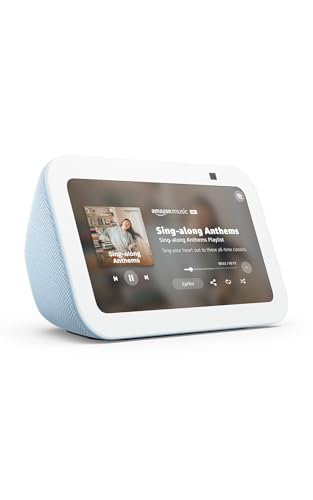

As an Amazon Associate we earn from qualifying purchases at no extra cost to you. Ratings are shown as listed on Amazon.
What to Compare Before You Buy
Smart display specs sheets bury the details that matter in daily use. Focus on these four criteria:
- Screen size and resolution: A 7-inch panel at 1024×600 is fine for timers and recipes at arm’s length, but text gets muddy across a room. 10-inch panels at 1280×800 are the threshold for comfortable video calls and photo display. Anything marketed above 10 inches should be 1080p or close to it.
- Assistant compatibility: Google Assistant displays surface YouTube, Google Photos, and Nest doorbells natively. Alexa displays pair best with Ring cameras, Fire TV, and Amazon’s drop-in calling. Neither platform is a wrong choice, but mixing ecosystems means losing features like camera feeds and photo frame mode.
- Camera privacy: Look for a physical shutter that slides over the lens, not just a software toggle. The best designs combine a shutter with a mic-off switch that cuts power to the array. This is non-negotiable for bedrooms.
- Audio quality: Most smart displays have modest speakers. If you plan to use it as a kitchen radio or bedroom speaker, check driver size and wattage — a 2-inch driver produces thin sound at volume.
Best Smart Displays Compared: 2026 Picks
Here’s how the leading options stack up on the specs that actually affect daily use:
| Model | Screen | Resolution | Camera | Assistant | Typical Price |
|---|---|---|---|---|---|
| Amazon Echo Show 5 (3rd gen) | 5.5″ | 960×480 | 2MP, physical shutter | Alexa | $40–90 |
| Google Nest Hub (2nd gen) | 7″ | 1024×600 | None (by design) | Google Assistant | $60–100 |
| Amazon Echo Show 8 (3rd gen) | 8″ | 1280×800 | 13MP, physical shutter | Alexa | $90–150 |
| Google Nest Hub Max | 10″ | 1280×800 | 6.5MP, hardware switch | Google Assistant | $180–230 |
| Amazon Echo Show 10 (3rd gen) | 10.1″ | 1280×800 | 13MP, physical shutter | Alexa | $200–250 |
Best for the Kitchen: Amazon Echo Show 8
The 8-inch, 1280×800 panel hits the sweet spot for a countertop — large enough to read a recipe from a meter away, small enough not to dominate the space. The 13MP camera with auto-framing keeps you centered during calls while cooking, and the physical shutter means you can disable it between uses. Alexa’s recipe and timer handling is the more mature of the two assistants for kitchen work; multiple named timers and unit conversions work reliably by voice.
The main caveat: the Echo Show 8 doesn’t have a built-in smart home hub radio in the standard model, so Zigbee device pairing may need a separate hub. If your kitchen display will also act as a smart home controller, check the hub-capable variant or a Zigbee-capable Echo.
Best for the Bedroom: Google Nest Hub (2nd gen)
The Nest Hub’s most important bedroom feature is what’s missing: no camera at all. There’s nothing to cover, no accidental video calls, no shutter to remember to slide. The 7-inch screen auto-dims well in dark rooms thanks to the ambient light sensor, so it won’t glow through the night like many cheaper panels.
The Sleep Sensing feature uses a radar sensor to track sleep duration and quality from the nightstand — no wearable required — though it tracks only the person closest to the device. It works best for solo sleepers or couples where one person’s data is enough.
Best for a Shared Living Space: Echo Show 10 or Nest Hub Max
Both 10-inch models earn their premium here. The Echo Show 10’s rotating base follows you during video calls, which sounds gimmicky but genuinely helps on a kitchen island or open-plan living room where people move around. The Nest Hub Max counters with Google’s face-match features: it recognizes who’s standing in front of it and surfaces that person’s calendar, reminders, and commute — useful when a household shares one screen.
Skip the Echo Show 10 if placement space is tight; the rotating base needs clearance to swivel and will hit walls or items behind it.
Best on a Tight Budget: Echo Show 5
At $40–90 depending on sales, the Show 5 is the cheapest way to get a camera-with-shutter display. The 5.5-inch screen is small — treat it as a bedside clock that does video calls and smart home control, not a photo frame. Resolution (960×480) is low enough that album art and small text look soft, but for alarms, weather, and Ring doorbell feeds it does the job.
Decision Matrix: Match Your Situation to a Pick
| Your situation | Pick | Why |
|---|---|---|
| Bedroom, privacy-sensitive | Nest Hub (2nd gen) | No camera, auto-dimming, sleep sensing |
| Kitchen, recipes + calls | Echo Show 8 | Readable recipe text, auto-framing camera |
| Living room, multiple users | Nest Hub Max | Face match personalizes content per user |
| Living room, frequent video calls | Echo Show 10 | Rotating base follows movement |
| Guest room or first smart display | Echo Show 5 | Lowest cost, physical shutter included |
| Deep in Google’s ecosystem (Photos, Nest) | Any Nest Hub | Native Google Photos frame mode, Nest cam feeds |
| Deep in Amazon’s ecosystem (Ring, Fire TV) | Any Echo Show | Ring doorbell auto-display, drop-in calling |
Ownership Realities Listings Don’t Mention
What wears first: The power cable and the screen coating. Smart displays run 24/7, so the DC cable gets bent at the same spot for years — route it with slack. The glossy panels on most models collect fingerprints and grease fast in kitchens; a microfiber cloth daily beats an occasional deep clean with sprayed cleaner, which can seep into speaker grilles.
Privacy habits that matter: Software mic-off is fine, but the physical shutter is what actually protects you — firmware bugs have existed. Make shutter-closing part of a routine. Also review the assistant’s voice history settings; both platforms let you auto-delete recordings after a set period.
The subscription trap: None of these devices requires a subscription for core features, but check before assuming — advanced smart home integrations, camera cloud storage (Ring Protect, Nest Aware), and some video calling features sit behind paid tiers. The hardware price is rarely the total cost of ownership.
Placement mistakes: Don’t put a smart display where direct sunlight hits the screen for hours — heat degrades the panel and fades photo display quality. Keep kitchen units at least a meter from the sink and stove splatter zone.
FAQ
Do I need a camera on a smart display?
Only if you’ll use it for video calls or as a security camera view. If not, a camera-free model like the Nest Hub removes the privacy question entirely and usually costs less.
Can a smart display replace a smart speaker?
Yes — every model above handles all the voice commands an equivalent speaker does, plus visual responses. Audio quality is comparable at each price tier.
Which assistant is better in 2026?
For most households the answer is whichever ecosystem you already own. Google’s displays handle general questions and YouTube better; Amazon’s integrate more smart home device brands and handle kitchen timers and shopping lists well.
