
Key takeaways
- Tactile low-profile switches: provide a bump during the press and are usually the safest choice for long-form typing.
- Linear low-profile switches: move smoothly from top to bottom and suit users who prefer an uninterrupted press.
- Short travel: reduces finger movement, but can make accidental presses more likely while you are adapting.
- Sound: low-profile does not mean silent. Desk resonance, keycap material, and typing force can matter as much as the switch.
The best Lofree keyboard for most buyers is the Flow Lite 84: it combines Lofree’s distinctive retro-modern styling with a compact layout, low-profile mechanical switches, multi-device wireless connectivity, and a lighter price than the premium Flow and Edge models.
Our top picks
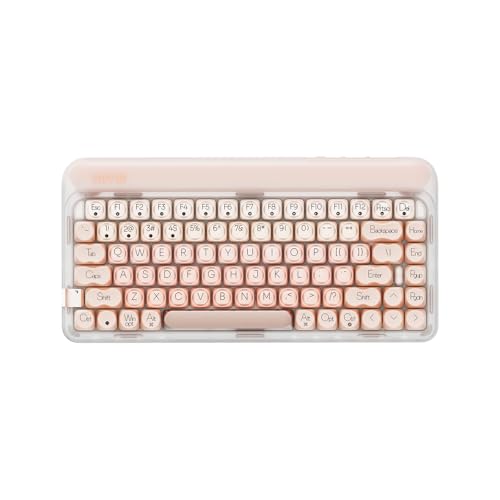


As an Amazon Associate we earn from qualifying purchases at no extra cost to you. Ratings are shown as listed on Amazon.
Best Lofree keyboards at a glance
| Keyboard | Best for | Layout | Connection | Approx. battery | Approx. weight | Typical market range |
|---|---|---|---|---|---|---|
| Lofree Flow Lite 84 | Most people, office and home use | 84-key / 75% | Bluetooth, 2.4GHz, USB-C | About 2,000mAh | About 560g | $100–$140 |
| Lofree Flow 84 | Premium low-profile typing | 84-key / 75% | Bluetooth, 2.4GHz, USB-C | About 2,000mAh | About 650g | $140–$180 |
| Lofree Flow 100 | Number-pad users | 100-key | Bluetooth, 2.4GHz, USB-C | About 2,000mAh | About 900g | $150–$190 |
| Lofree Edge 84 | Premium build and portability | 84-key / 75% | Bluetooth, 2.4GHz, USB-C | About 2,000mAh | About 615g | $160–$220 |
| Lofree Block 98 | Retro styling with a full productivity layout | 98-key | Bluetooth, 2.4GHz, USB-C | About 2,000mAh | About 1kg | $130–$180 |
Weights, battery capacity, included keycaps, and wireless support can vary by regional bundle or revision, so check the exact configuration before ordering. The table is intended for choosing between product families rather than replacing the model’s specification sheet.
1. Lofree Flow Lite 84: the best overall choice
The Flow Lite 84 is the easiest Lofree to recommend when you want a smaller desk footprint without giving up the arrow cluster, function row, or dedicated navigation keys. Its 75% layout removes the number pad but preserves the keys most people use every day.
Its low-profile tactile switches have a shorter travel than conventional mechanical switches. That makes the keyboard feel quicker and less tall than a standard board, while still offering a noticeable bump for touch typists. The sound is usually more controlled than a large, high-profile mechanical keyboard, although it is not silent.
The Lite version is also the sensible value pick. It generally uses more plastic and a simpler construction than the regular Flow, but that keeps the weight and price down. Choose it for a work laptop, shared desk, or frequent room-to-room use.
2. Lofree Flow 84: the better typing upgrade
The Flow 84 is aimed at buyers who care more about key feel and construction than minimum weight. Its gasket-style mounting and denser construction give keystrokes a softer, more refined bottom-out than the Lite. The result is still unmistakably low-profile, but it feels less like a thin travel keyboard.
Switch choice matters here. Lofree’s tactile option suits writers who want feedback at the actuation point; a linear option is preferable for smooth gaming inputs or users who dislike a bump. Neither is universally better. A tactile switch can reduce accidental presses for some typists, while a linear switch tends to feel faster and more uniform.
Buy the Flow 84 if the keyboard will be used for several hours most days and you are prepared to pay for a more substantial typing platform. The extra cost is harder to justify for occasional email or tablet use.
3. Lofree Flow 100: best for spreadsheets and number entry
The Flow 100 keeps the low-profile switch system but adds a dedicated number pad. It is the better choice for finance, inventory, accounting, and data-entry work, where repeatedly reaching for a number row is slower than using a separate keypad.
The trade-off is desk width. A 100-key keyboard commonly occupies roughly 36 to 39cm of horizontal space, compared with about 32cm for an 84-key model. That extra width can push the mouse farther away and create an awkward shoulder angle on a narrow desk.
Choose the Flow 100 when the number pad is used at least several times a week. If it is needed only occasionally, an 84-key keyboard plus a separate keypad is more flexible.
4. Lofree Edge 84: best premium compact design
The Edge 84 is the enthusiast-oriented compact option. It focuses on a slimmer, more sculpted case and a premium retro-futurist appearance while retaining the practical 75% arrangement. Its appeal is not simply decoration: the compact footprint leaves more room for a mouse, notebook, or drawing tablet.
Compared with the Flow Lite, the Edge is the more deliberate purchase. You are paying for materials, finish, and a more distinctive design rather than a dramatic change in the basic wireless feature set. It makes sense for a primary desk keyboard where appearance and typing feel matter every day.
Check the keycap profile before buying. Low-profile keycaps can feel immediately familiar to laptop users, but users coming from tall sculpted keycaps may need several days to adjust to the shallower front-to-back shape.
5. Lofree Block 98: the retro full-function option
The Block 98 is for buyers who want a bold retro look and nearly all the functionality of a full-size keyboard. Its 98-key arrangement keeps the number pad while compressing the navigation area, making it narrower than a traditional full-size board.
This layout is a compromise rather than a direct replacement for either an 84-key or 104-key keyboard. It saves space beside the number pad, but the tighter navigation cluster may require an adjustment period. It is a good fit for office productivity when a number pad is essential and visual character matters more than the smallest possible footprint.
Switch feel: what changes between the choices?
- Tactile low-profile switches: provide a bump during the press and are usually the safest choice for long-form typing.
- Linear low-profile switches: move smoothly from top to bottom and suit users who prefer an uninterrupted press.
- Short travel: reduces finger movement, but can make accidental presses more likely while you are adapting.
- Sound: low-profile does not mean silent. Desk resonance, keycap material, and typing force can matter as much as the switch.
Do not choose by switch color alone. Confirm whether the exact bundle includes tactile or linear switches, and look for replacement-switch compatibility if long-term customization matters.
Wireless connectivity and daily ownership
The newer Flow, Edge, and Block families commonly offer Bluetooth, a 2.4GHz wireless receiver, and wired USB-C. Bluetooth is convenient for laptops, tablets, and phones; 2.4GHz is generally the better choice for a fixed desktop because it avoids pairing menus and typically provides a more direct connection. USB-C is useful when the battery is empty or when wireless interference is a concern.
A 2,000mAh battery sounds substantial, but runtime depends on backlighting, brightness, connection mode, and sleep settings. A useful planning estimate is:
2,000mAh ÷ 80mA average draw = approximately 25 hours of active use.
That calculation is not a guaranteed runtime figure; a keyboard drawing 20mA may last much longer, while bright lighting can reduce it substantially. For a backlight-free office setup, charging once every few weeks may be realistic. With lighting enabled for a full workday, expect to charge more often.
Decision matrix: which Lofree should you buy?
| Your situation | Best choice | Why |
|---|---|---|
| First mechanical keyboard or limited budget | Flow Lite 84 | Practical size, broad connectivity, and the lowest entry cost among the main premium models |
| Several hours of typing every day | Flow 84 | More substantial construction and a softer, more premium typing experience |
| Frequent spreadsheet or numeric work | Flow 100 | Dedicated number pad without the full width of a conventional full-size board |
| Small desk or mouse-heavy setup | Edge 84 | Compact 75% footprint with premium styling |
| Retro appearance plus a number pad | Block 98 | Nearly full-size functionality in a compressed, statement-making design |
Durability, cleaning, and common mistakes
The parts most likely to show wear first are keycap legends, stabilizers on the space bar and shift keys, and the battery after repeated charge cycles. Keep food and liquid away from the board, and use a soft brush or compressed air held at a safe distance rather than forcing debris deeper under the switches.
- Do not pull keycaps at an angle; use a keycap puller and lift vertically.
- Do not spray cleaner directly onto the keyboard.
- Store the wireless receiver in its intended compartment when transporting the board.
- Turn off lighting when battery life is more important than appearance.
- Confirm the operating-system layout before remapping unfamiliar compact-keyboard shortcuts.
For most buyers, the Flow Lite 84 delivers the strongest balance of price, size, and function. Spend more on the Flow 84 or Edge 84 when typing feel and materials are central to the purchase, choose the Flow 100 for regular number entry, and select the Block 98 when retro character and a number pad belong on the same desk.
