Key takeaways
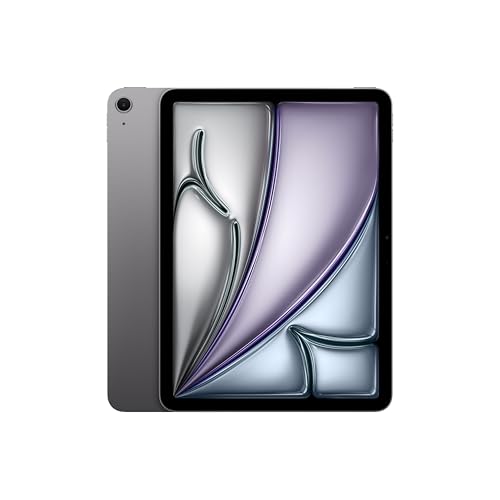
- Best Overall: iPad 11-inch (A16), for speed, app quality and support longevity.
- Best Value: Alexa Tablet 11, for a 2.5K 90Hz screen and 8GB of RAM at a lower price tier.
- Best for Smart Home Use: Alexa Tablet 11, because Alexa+ is built in and it is designed to double as a countertop display.
- Best for Students and Creatives: iPad 11-inch (A16), thanks to Apple Pencil support and a deep catalogue of drawing and note apps.
- Best Android Alternative at a Similar Size: Lenovo Idea Tab 11, a 2.5K 90Hz Android tablet in the same bracket.
- Best Step Up: iPad Pro 11-inch (M5), for buyers who outgrow either of the two main contenders.
The iPad 11-inch (A16) is the better tablet for most buyers who want apps, speed and years of software support, while the Alexa Tablet 11 is the better pick for anyone who wants a sharper, smoother screen and a lower entry price and who lives in the Alexa and Google Play world. The iPad wins on raw performance and long-term polish; the Alexa Tablet 11 wins on screen refresh rate, RAM and value. If you are weighing the two because both are sold as “11-inch” tablets, the rest of this guide breaks down where they differ in ways a spec sticker does not show.
Both tablets are mainstream, mid-priced slates aimed at streaming, reading, browsing, video calls and light schoolwork. They are not workstations. That shared target is exactly why the choice is interesting: the Alexa Tablet 11 undercuts the iPad on price tier while offering a higher-resolution, 90Hz panel and more memory on paper, and the iPad answers with a much faster chip, a mature tablet app ecosystem and the longest update track record in the category.
Our top picks


As an Amazon Associate we earn from qualifying purchases at no extra cost to you.
Top Picks at a Glance
- Best Overall: iPad 11-inch (A16), for speed, app quality and support longevity.
- Best Value: Alexa Tablet 11, for a 2.5K 90Hz screen and 8GB of RAM at a lower price tier.
- Best for Smart Home Use: Alexa Tablet 11, because Alexa+ is built in and it is designed to double as a countertop display.
- Best for Students and Creatives: iPad 11-inch (A16), thanks to Apple Pencil support and a deep catalogue of drawing and note apps.
- Best Android Alternative at a Similar Size: Lenovo Idea Tab 11, a 2.5K 90Hz Android tablet in the same bracket.
- Best Step Up: iPad Pro 11-inch (M5), for buyers who outgrow either of the two main contenders.
Head-to-Head Spec Table
| Spec | Alexa Tablet 11 | iPad 11-inch (A16) |
|---|---|---|
| Screen size and type | 11-inch LCD, 2560 x 1600 (16:10) | 10.9-inch Liquid Retina LCD, 2360 x 1640 |
| Pixel density | About 276 ppi | About 264 ppi |
| Refresh rate | 90Hz | 60Hz |
| Peak brightness (rated) | 500 nits | 500 nits |
| Processor | MediaTek MT8189 (2 x Cortex-A78, 6 x Cortex-A55) | Apple A16 |
| RAM | 8GB | 6GB |
| Storage options | 64GB or 128GB | 128GB, 256GB or 512GB |
| Software | Android 16 with Google Play and Alexa+ | iPadOS |
| Rated battery | 6,500mAh; up to 15 hours video, 27W charging | About 10 hours of web or video (Apple rating) |
| Cameras | 8MP front and rear | 12MP front (landscape) and 12MP rear |
| Wireless | Wi-Fi 6 | Wi-Fi 6, optional 5G model |
| Stylus | USI-standard styluses | Apple Pencil (USB-C) |
| Build | Aluminum unibody, IP52 rated | Aluminum body, no water or dust rating |
| Price tier | Budget to Mid-range | Mid-range |
Specs here come from the manufacturers’ listings and from launch coverage by outlets such as Notebookcheck and Tom’s Guide. A few items, such as the Alexa Tablet 11’s exact weight, were not listed in the sources we checked, so we left them out rather than guess.
1. iPad 11-inch (A16): Best for Speed, Apps and Longevity
- 10.9-inch Liquid Retina display, 2360 x 1640, rated 500 nits
- Apple A16 chip with 6GB of RAM
- 128GB base storage, with 256GB and 512GB options; Wi-Fi and Wi-Fi plus 5G versions
- 12MP rear camera and a 12MP front camera positioned on the long edge for video calls
- USB-C, Touch ID in the top button, Wi-Fi 6
Best for: anyone who wants the smoothest, most predictable tablet experience and plans to keep the device for four or five years. Skip if: you want a high-refresh display, you are fully invested in Android and Google services, or you want the lowest possible entry cost.
The A16 is the same family of chip that powered flagship phones, and Tom’s Guide describes it as strong but not top-tier for the most demanding apps and games. In everyday terms, that means multitasking between a browser, a video call and a notes app feels quick, large photo edits do not stall, and games from the App Store run well at default settings. The 6GB of RAM is less than the Alexa Tablet 11’s 8GB on paper, but iPadOS is tuned tightly to its hardware, so the gap rarely shows in daily use.
The bigger story is software. iPad apps are designed for the larger canvas rather than stretched from a phone, which matters for drawing, note-taking, video editing, music apps and school software. Apple also has the longest record of delivering major OS updates to older models, so an iPad bought today is far more likely to still be current at the end of its life than most Android tablets in the same bracket. Resale value follows the same pattern: used iPads hold their worth better than most competing slates.
The weak points are well known. The display is a 60Hz panel, so scrolling and pen strokes look a little less fluid than on a 90Hz screen. Base storage of 128GB is reasonable, but there is no microSD slot and storage upgrades are costly in the higher tiers. Accessories add up quickly too: the Apple Pencil and a keyboard folio each cost real money on top of the tablet.
Pros:
- Fast chip with room to grow as apps get heavier
- Best-in-class tablet app catalogue and long update support
- Sensible front camera placement for video calls in landscape
- Strong resale value
Cons:
- 60Hz screen feels less smooth than 90Hz rivals
- No expandable storage; upgrades cost more
- No water or dust resistance rating
2. Alexa Tablet 11: Best for Value and Smart Home Households
- 11-inch 2.5K display (2560 x 1600), 90Hz, rated 500 nits, roughly 276 ppi
- MediaTek MT8189 chip, 8GB RAM
- 64GB or 128GB of UFS 3.1 storage; no microSD slot reported
- 6,500mAh battery, up to 15 hours of video per the maker, 27W charging
- Android 16 with Google Play, Alexa+ built in, Wi-Fi 6, 8MP cameras, IP52 rating, USI stylus support
Best for: households that already use Alexa, families who want a tablet that can also act as a kitchen or living-room display, and shoppers who care more about screen quality and price than about peak performance. Skip if: you play demanding games, rely on iPad-only apps, or want guaranteed multi-year update promises.
On paper, the display is the standout. A 2560 x 1600 panel at 90Hz is a step above what you normally find at this price tier, and the resolution is higher than the iPad’s. Text looks crisp, scrolling looks smooth, and the 16:10 shape is a natural fit for widescreen video, with fewer black bars than the iPad’s squarer proportions. Both screens are rated to the same 500 nits, so do not expect either to be a bright-sunlight champion.
The MediaTek MT8189 is a budget-to-midrange chip with two performance cores and six efficiency cores. That is plenty for streaming, reading, browsing, social apps and video calls, but it is not in the same league as the A16 for heavy lifting. Expect longer load times in big games and occasional slowdowns when many apps are open. The 8GB of RAM helps with keeping apps resident in memory, which is a genuine advantage for casual multitasking.
The Alexa+ integration is what separates this tablet from a generic Android slate. Hands-free voice control, smart home dashboards and a display mode that turns the tablet into a hub are built in, alongside full Google Play access so mainstream apps are available. The IP52 rating, meaning protection against dust and light drips, is a quiet bonus for a device that may live on a kitchen counter, and the aluminum unibody gives it a more premium feel than the price tier suggests.
Pros:
- Higher-resolution 90Hz display than the iPad
- 8GB of RAM and fast UFS 3.1 storage
- Alexa+ built in plus Google Play
- Lower entry price and an IP52 rating
Cons:
- Slower chip, weaker for games and heavy apps
- Update track record is far shorter than Apple’s
- Android tablet app layouts are less polished than iPad apps
Round by Round: Where Each Tablet Wins
Display
The Alexa Tablet 11 takes this round on paper, with a 90Hz refresh rate and roughly 276 pixels per inch against the iPad’s 60Hz and about 264. The difference in sharpness is small at normal viewing distance; the refresh rate is the part most people notice. There is one number that surprises shoppers: despite its “11-inch” label, the Alexa Tablet 11’s 16:10 shape gives it about 54 square inches of screen, while the iPad’s squarer 10.9-inch panel works out to about 56 square inches. The iPad actually shows slightly more usable area, which helps for documents, split-screen apps and reading in portrait.
Performance
The iPad wins clearly. The A16 is in a different tier from a MediaTek MT8189, and it shows in app launch times, export speeds and sustained gaming. If your usage is strictly video, reading and browsing, the gap shrinks to the point of being invisible. If you edit photos or video, sketch in layered apps or play 3D games, the iPad’s headroom is worth paying for.
Software and Support
The iPad wins on app quality and on the confidence of long-term updates. The Alexa Tablet 11 wins on Alexa+ integration, Google services and flexibility: Android lets you sideload, customize the home screen and use Google apps without friction. Check the manufacturer’s current update commitment before buying either tablet, because the length of the support window affects how many years the device stays safe to use.
Battery and Charging
The Alexa Tablet 11 carries a 6,500mAh cell rated for up to 15 hours of video and charges at up to 27W. Apple rates the iPad at around 10 hours of web browsing or video, and Tom’s Guide’s own timing of the iPad came in at about 11 hours 25 minutes. Because the figures use different methods, treat them as roughly comparable: both should last a full day of normal use, and the Alexa Tablet has the edge on charging speed.
Stylus, Keyboard and Accessories
The iPad supports the Apple Pencil (USB-C) and a wide range of keyboard folios, from Apple’s own to dozens of third-party options. The Alexa Tablet 11 supports USI styluses, which are inexpensive and available from several brands, though the writing experience and app support vary. For serious drawing or handwriting, the iPad ecosystem is deeper.
Durability
Both use aluminum bodies. The Alexa Tablet 11’s IP52 rating gives it a small margin against dust and splashes; the iPad has no official rating. Neither is a rugged tablet, so a case is sensible for either.
Worked Example: Which Costs Less to Own?
Price tiers matter less than cost per year of useful life. Suppose a household keeps the iPad for five years and the Alexa Tablet 11 for three, which is a cautious assumption given the difference in update history. Even if the iPad costs more up front, spreading it over five years can match or beat the cheaper tablet replaced after three, especially once you factor in resale value. On the other hand, if you tend to replace tablets every two or three years regardless, or the tablet will mostly be a shared kitchen display, the Alexa Tablet 11’s lower entry cost is the smarter spend. Do the same arithmetic with the current store prices before you buy, because prices move with promotions.
Decision Matrix: Match Your Situation to a Tablet
| Your situation | Better fit | Why |
|---|---|---|
| Streams video and reads in bed | Alexa Tablet 11 | Wider 16:10 shape, sharper panel, lower price tier |
| Keeps a tablet for 5 years or more | iPad 11-inch (A16) | Longer update history and stronger resale value |
| Wants a kitchen or hallway smart display | Alexa Tablet 11 | Alexa+ built in and an IP52 rating |
| Draws or takes handwritten notes daily | iPad 11-inch (A16) | Apple Pencil and a deeper pool of drawing and note apps |
| Plays demanding 3D games | iPad 11-inch (A16) | A16 has far more headroom than the MediaTek chip |
| Lives in Google services and Android apps | Alexa Tablet 11 | Native Google Play and Android customisation |
| Shares one tablet between several children | Alexa Tablet 11 | Lower replacement cost if it is dropped or damaged |
| Attends video meetings in landscape | iPad 11-inch (A16) | 12MP front camera mounted on the long edge |
Ownership Realities: What Wears First
Tablets rarely fail in the display or the processor. They age at the battery, the charging port and the software. After two or three years of daily charging, any lithium battery holds noticeably less, which is why a larger cell and quick charging, as on the Alexa Tablet 11, are practical advantages rather than just numbers. The USB-C port is the next common failure point: use a quality cable, avoid leaving the tablet plugged in at an angle on a kitchen counter, and do not yank the cable out sideways. Software is the quiet killer. When updates stop, apps eventually drop support for the old operating system, and a perfectly working tablet becomes awkward to use. Choosing the model with the stronger update record, usually the iPad, protects you against that outcome, while a lower-cost tablet is easier to justify if you plan to replace it on a shorter cycle.
Screen protection is worth a small investment on either tablet. A tempered-glass protector and a case with a raised lip cost little and prevent the most common cause of early replacement, a cracked corner from a short fall. If you plan to use a stylus, pick a matte protector carefully, because some textured films wear down pen tips faster and change how writing feels. Keep the tablet out of hot cars, since heat accelerates battery ageing, and avoid charging overnight on a pillow or blanket where airflow is blocked.
Also Consider
Lenovo Idea Tab 11
An 11-inch Android tablet with a 2.5K IPS touchscreen, a 90Hz refresh rate, a MediaTek Dimensity 6300 chip and 8GB of memory in the listed configuration. A good fit if you want Android without Alexa-focused software. Price tier: Budget.
Samsung Galaxy Tab S10 Lite
A 10.9-inch LCD tablet with S Pen support and microSD expansion listed, plus Samsung’s desktop mode and software extras. Better for note-taking than the Alexa Tablet 11, though the price tier is higher. Price tier: Mid-range.
Alexa Tablet 12 Pro
The larger sibling, with a 12-inch 2.8K display and configurations up to 16GB of RAM, plus a bundle with a pen and keyboard. A better productivity pick than the 11, and a clear step up in price. Price tier: Premium.
iPad Pro 11-inch (M5)
The high-end option, with a Ultra Retina XDR display and an M-series chip. Buy it only if you need pro-level performance. Price tier: Premium.
How We Chose
This comparison is based on research, not bench work. We compared manufacturer spec sheets and store listings for each tablet, cross-checked launch coverage from Notebookcheck and Pocket-lint, and used Tom’s Guide’s timing of the iPad for battery context. We did not physically use or benchmark either tablet, and we have not repeated any maker’s performance claims as fact. Where a spec was missing or disputed, we said so. Our weighting favoured screen quality, performance for everyday tasks, software support, accessory ecosystem and ownership cost, in that order of impact for typical buyers. Alternatives were included only if they sit in the same size and price neighbourhood.
Buying Guide
Match the chip to your heaviest task
List the most demanding thing you will do weekly. If it is streaming, reading or video calls, any chip in this comparison is enough and you should spend your money on the screen and battery instead. If it is 3D gaming, layered drawing or 4K editing, choose the A16 or better. Paying for processing power you will not use is the most common tablet mistake.
Check storage honestly
64GB sounds fine until offline downloads, games and photos arrive. As a rule of thumb, allow 20GB for the system, 5 to 10GB for each large game and roughly 1GB per hour of downloaded HD video. A user who downloads three movies and two games already passes 40GB. The iPad starts at 128GB; with the Alexa Tablet 11, the 128GB version is the safer buy, and without a microSD slot you cannot add space later.
Weigh refresh rate against fit and finish
A 90Hz panel makes scrolling and handwriting feel smoother, but it is a comfort feature, not a necessity. Many buyers stop noticing the difference after a day. Fit and finish, app quality and support length matter more over several years.
Count the accessory bill
A tablet that needs a stylus, keyboard and case is really a two- or three-part purchase. Price the full setup. The Apple Pencil and a decent keyboard folio can approach the cost of a second budget tablet, while USI styluses and third-party Android keyboards are cheaper but less polished.
Check the update promise
Look for the number of years of OS and security updates the maker commits to. Past about three years, a tablet without updates becomes a security risk for banking and email apps. Apple’s record is the benchmark here; for the Alexa Tablet 11, read the current official commitment before you buy.
Common Mistakes to Avoid
- Choosing by screen size label alone. Aspect ratio changes usable area, as the 54 versus 56 square inch comparison shows.
- Buying the lowest storage tier on a device with no card slot.
- Ignoring the front camera position if you take many video calls; the iPad’s landscape camera is a real advantage.
- Assuming an Android tablet will have the same tablet-optimised apps as an iPad.
- Buying an older clearance unit without checking whether it still receives updates.
Frequently Asked Questions
Is the Alexa Tablet 11 better than the iPad 11-inch?
It is better in some areas and worse in others. The Alexa Tablet 11 has a higher-resolution 90Hz screen, more RAM and a lower price tier, while the iPad has a much faster chip, better tablet apps and longer update support. For most buyers who want one tablet to last years, the iPad is the safer choice.
Is the iPad 11th generation worth it over cheaper Android tablets?
Yes, if you value speed, app quality and resale value. If you mostly watch video and browse, a cheaper Android tablet such as the Alexa Tablet 11 or Lenovo Idea Tab 11 gives you most of the experience for less.
Does the Alexa Tablet 11 run Google Play apps?
Yes. It runs Android with Google Play, so mainstream apps such as streaming services, Chrome and Google Docs are available alongside Alexa+ features.
Which tablet has better battery life?
Both should last a full day of normal use. The Alexa Tablet 11 is rated for up to 15 hours of video, and Apple rates the iPad at about 10 hours, but the two figures use different methods, so real-world differences are smaller than the numbers suggest.
Can I use a stylus with both?
Yes. The iPad works with the Apple Pencil (USB-C), and the Alexa Tablet 11 supports USI styluses. Apple’s ecosystem has deeper drawing and note-taking app support.
Which is better for kids?
The Alexa Tablet 11 is easier on a family budget and its IP52 rating helps against spills, but a sturdy case is still essential on either tablet. The iPad has strong parental controls and a large catalogue of educational apps.
Should I wait for a newer model?
If you need a tablet now, buy now. Both models are current, and waiting only makes sense if you specifically want a feature neither offers, such as an OLED display, in which case look at the premium tier.
Which One Should You Buy?
Pick the iPad 11-inch (A16) if you want the fastest everyday tablet, the best app selection, Apple Pencil support and the longest likely lifespan. Pick the Alexa Tablet 11 if you want a sharper, smoother screen, 8GB of RAM and Alexa+ for less money, and your usage is mainly streaming, reading, browsing and smart home control. If neither fits, the Lenovo Idea Tab 11 covers the budget Android slot and the Galaxy Tab S10 Lite suits note-takers who prefer Android. In short: choose the iPad for longevity and performance, the Alexa Tablet for value and smart home convenience.
Sources
- Manufacturer product pages and store listings for the Alexa Tablet 11 and iPad (A16)
- Notebookcheck launch coverage of the Alexa Tablet 11
- Pocket-lint coverage of the Alexa tablet lineup
- Tom’s Guide iPad (A16) and best cheap tablets coverage
- PhoneArena specification comparison for the iPad 11th generation
Last updated: October 2026