
For most people with a laptop and a phone, a 100W GaN wall charger with two or more USB-C ports, such as the Anker Prime 100W or the Ugreen Nexode 100W, is the one-charger answer; a compact 65W model suits phone-and-tablet households and travelers who want the smallest option; and a 160W to 200W multi-port unit suits desks with several devices. The best GaN charger depends on the total power you need and how many ports you will use at once. This guide explains how to choose and compares the models reviewers cite.
Our top picks
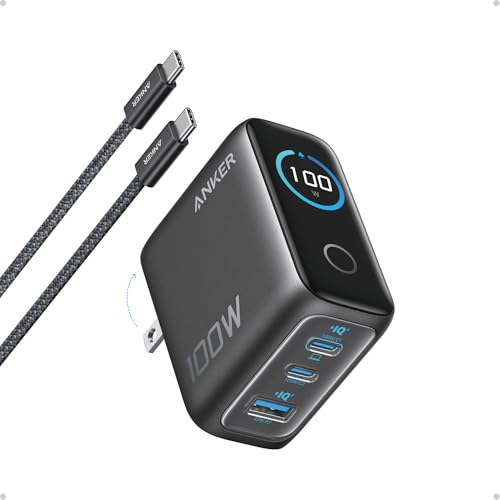 Anker 100W Max USB C Charger
- Full-Speed 100W Max Power: Advanced GaN technology delivers…
- See Charging in Motion: The high-definition smart display…
- Travel-Sized for Daily Carry: With a foldable plug…
 Anker 140W Max 4-Port GaN Charging Blocks
- Fast Charging for Four Devices: Enjoy the convenience…
- Dual High-Speed USB-C Ports: Rapidly charge your 15-inch…
- Superior Safety: The advanced Activeshield 4.0 system monitors…
| Product | Key specs | |
|---|---|---|
 Anker USB Charger Block | Check price | |
| Anker 100W Max USB C Charger | Full-Speed 100W Max Power: Advanced GaN technology delivers… See Charging in Motion: The high-definition smart display… Travel-Sized for Daily Carry: With a foldable plug… | Check price |
| Anker 140W Max 4-Port GaN Charging Blocks | Fast Charging for Four Devices: Enjoy the convenience… Dual High-Speed USB-C Ports: Rapidly charge your 15-inch… Superior Safety: The advanced Activeshield 4.0 system monitors… | Check price |
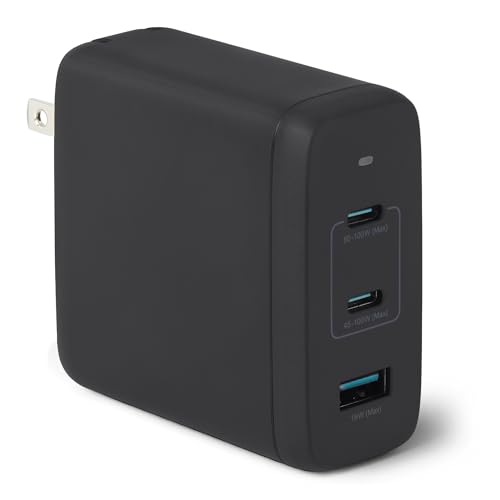 Amazon Basics 120W Fast Charging USB-C Nano | Check price |
As an Amazon Associate we earn from qualifying purchases at no extra cost to you.
GaN Chargers at a Glance
| Charger | Best for | Key reported specs | Limits |
|---|---|---|---|
| Anker Prime 100W | Laptop-first all-rounder | Three ports; reviewers report 100W from a single port and a 65W/35W split across two; output reported at about 89W with all three ports in use | Mid-range tier; fewer ports than some rivals |
| Ugreen Nexode 100W | Value and port count | Four ports, two of which reach 100W per reviewers; reported to keep 65W for a laptop when a phone joins | Larger body than the Anker, per one comparison |
| Baseus PicoGo Pro 100W | Travel with a display | Three USB-C ports and a display for power and temperature, as reported by Technobezz | Display adds size |
| Baseus Enerfill 100W | Adaptive power sharing | Foldable plug, listed safety certifications per Gagadget | Larger than the Anker Prime |
| Baseus 65W GaN Mini | Budget travel charger | Single-purpose compact unit | Fewer ports, less power |
| Anker Prime 160W / Ugreen Nexode 200W | Desk power hub | High total output across several ports | Heavy, less portable |
What GaN Actually Means
GaN stands for gallium nitride, a semiconductor that wastes less energy as heat than traditional silicon, according to charger makers. That allows a given power rating to fit into a smaller case. It does not change the charging standard your device uses; speed still depends on the charger, the cable and the device all supporting the same protocol, usually USB Power Delivery.
Reviewer Notes
Anker Prime 100W
Multiple roundups, including Gadgetping and others, treat the Anker Prime 100W as the model most reviewers land on. It is compact for its power, with one reviewer claiming a body around 45 percent smaller by volume than the Ugreen. The power split matters: with two devices you get 65W plus 35W, enough for a laptop and a phone. With all three ports used, total output drops to around 89W.
Ugreen Nexode 100W
Talk of the House calls it best value, and SmartGearOutlet praises performance and heat management. Four ports let you power more devices, and reviewers note that it holds 65W for a laptop when a phone is added. It is physically bigger than the Anker, which matters in a travel bag.
Baseus options
Baseus covers several niches. The PicoGo Pro includes a display of power and temperature, which Technobezz rates for travel. Gagadget’s choice, the Enerfill, is praised for adaptive power sharing and certifications but is larger. The 65W Mini is described as delivering most of the performance of larger units at a much lower tier.
High-wattage desk hubs
The Anker Prime 160W and Ugreen Nexode 200W are for people charging a laptop, tablet, phone and accessories simultaneously. They are heavier and better left on a desk.
How Much Power Do You Need?
- 20 to 30W: Enough for most phones. Tablets charge slowly.
- 45 to 65W: Suits many ultrabooks, tablets and phones. A 65W charger is the most common travel size.
- 100W: Needed for larger laptops that the maker rates at 100W. Check the laptop’s power adapter label.
- 140W and above: Needed for some performance laptops using extended-power USB-C. Match the maker’s rating.
If a charger is rated for less than your laptop’s adapter, the laptop may charge slowly or only while idle.
Compatibility and Safety Notes
- Use the right cable. Cables rated for 100W (and 240W for the highest) are needed for full power. A cable meant only for data or low power can limit charging.
- Look for safety certifications. Reputable makers list certifications, such as UL or CE marks. Avoid unbranded chargers with no listed safety testing.
- Follow regional plug requirements. International travelers need plug adapters, and chargers rated for the local voltage range.
- Do not cover a charger. Warm is normal, but keep it ventilated and off beds and couches while charging.
- Stop using damaged chargers. Replace chargers with cracked cases, bent prongs or overheating. If a device or charger becomes very hot, unplug it.
- Power splits. Multi-port chargers share power. Read the maker’s output table to see what each port delivers when several are in use.
- Wall plug fit. Large chargers can block adjacent outlets on a power strip; folding prongs help in bags.
Budget Tiers
Budget tier: Compact 20 to 65W single or dual-port chargers, such as the Baseus Mini, cover phones and light laptops.
Mid-range tier: The Anker Prime 100W, Ugreen Nexode 100W and Baseus 100W models sit here, covering most laptops and phones.
Premium tier: 160W to 200W desk hubs and chargers with displays or advanced power management.
Pick X If… Decision Table
| Pick this | If you want |
|---|---|
| Anker Prime 100W | The most compact 100W unit that most reviewers favor |
| Ugreen Nexode 100W | More ports and strong value, accepting a larger body |
| Baseus PicoGo Pro | A power and temperature display for travel |
| Baseus 65W Mini | A low-cost charger for a phone and a light laptop |
| Anker Prime 160W or Ugreen 200W | A desk hub for many devices at once |
Alternatives
- Your device’s own adapter: The safest match for a specific laptop, though not always compact.
- Power bank with USB-C PD: Useful on the move; not a wall replacement.
- Desktop charging stations: Plug-in strips with USB-C ports for a home office.
- Wireless charging pads: Convenient for phones but slower and less efficient than wired.
Reading a Charger’s Spec Label
The label on a charger lists output combinations such as 5V, 9V, 15V and 20V at specific currents. The highest combination, for example 20V at 5A, equals 100W. Not every port supports every voltage, and when several ports are active the output is often reduced. Makers publish tables showing the split, and reading it before you buy prevents surprises when you connect a laptop and a phone together.
Look also for mentions of PPS, a Power Delivery extension used by some phones for finer voltage control, and for protocol support such as Quick Charge or proprietary phone charging modes. A phone that supports a proprietary fast-charging standard may charge faster with its own brand of charger than with a generic one.
Size, plug design and travel
Compact chargers with folding prongs are easier to pack and less likely to scratch other items. For international trips, choose a charger whose input range covers the local voltage, which is normally printed on the label, and add a plug adapter for the country. Do not use a simple adapter with appliances not rated for the local voltage.
Cable pairing
Even the best charger depends on the cable. A short, quality cable reduces voltage drop, and an e-marked cable is needed for currents above 3A. If your laptop charges slowly, a cable is as likely a culprit as the charger.
When to replace
Chargers do not last forever. Replace one that buzzes loudly, smells burnt, has loose prongs or has been dropped hard. Consumer safety agencies advise against using chargers that have visible damage.
Single-port versus multi-port
If you only ever charge one device, a single-port charger is smaller and avoids power-sharing questions. If you charge a laptop, phone and earbuds together, a multi-port model saves outlets and bag space. Count the devices you actually plug in on a typical day and add one spare port for guests or future gear.
Outlet position
Wide chargers can cover neighboring sockets on a wall plate or strip. Compact bodies, side-facing designs and extension cords with spaced outlets all solve this.
Frequently Asked Questions
Is GaN safer or faster than regular chargers?
GaN chargers run cooler for their power and fit in smaller cases, but speed depends on the charging standard your device supports. Safety depends on certified design, not just the material.
Will a 100W charger harm my phone?
No. USB Power Delivery negotiates with the device, which draws only what it can accept. A phone will take its own maximum.
Can one charger power a laptop and phone at once?
Yes with a multi-port charger, but power is shared. The Anker Prime 100W, for example, is reported to split 65W and 35W across two ports.
Do I need a special cable?
For 65W and above, use a cable rated for that power. Cheap cables limited to lower wattage can slow charging.
Why does my charger feel warm?
Some warmth is normal, especially under load. If it becomes uncomfortable to touch, unplug it and follow the maker’s guidance.
Are cheap unbranded GaN chargers worth it?
It is risky. Look for makers who list safety certifications and warranty terms, since a poorly built charger can damage devices or create a hazard.
More from Amazon
Programs that pair well with the guide above. Offers and eligibility are set by Amazon and may change.
Free shipping on eligible items, Prime Video and more. Eligible new members can start with a free trial.
Start a Prime free trialAudiobooks and podcasts to listen to on the go. Eligible new members can start with a free trial.
Try Audible freeAd-free music streaming. Eligible new subscribers can start with a free trial.
Try Music Unlimited freeA free business account with business pricing and bulk-buying tools for work, shop or home office.
Create a business accountAs an Amazon Associate we earn from qualifying purchases.









