Key takeaways
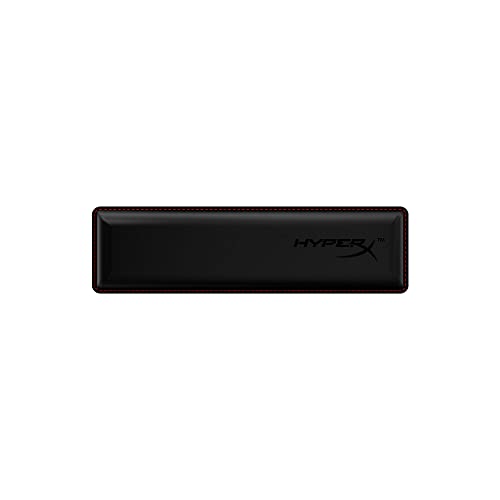
- Best Overall: HyperX Wrist Rest, Full Size – cooling gel memory foam, 457 mm long, anti-slip rubber base.
- Best Set: Gorilla Grip Memory Foam Wrist Rest (2-piece) – keyboard and mouse rests together.
- Best Value: TECKNET Wrist Rest for Computer Keyboard – thick memory foam at a very low tier.
- Best for Cooler Surfaces: Yolanda Keyboard Wrist Rest with Cooling Gel – stitched edges and a gel layer.
- Best Soft Fabric Set: Gimars Gel Memory Foam Keyboard Wrist Rest Set – silky superfine fabric cover.
- Best for Firm Support: Vaydeer Wrist Rest for Keyboard and Mouse – memory foam arm cushion with a non-slip base.
The best keyboard wrist pad for most desks is the HyperX Wrist Rest in the full-size version, a 457 mm cooling-gel memory-foam rest with an anti-slip base and a documented, standard height. The runner-up is the Gorilla Grip Memory Foam Wrist Rest set, which adds a matching mouse pad rest for people who want both hands supported at one low price tier. If you are looking for the best keyboard pad for wrist comfort, this guide compares six options by length, height, filling, and surface, and explains how to match a pad to your keyboard so it actually helps instead of just sitting there.
A wrist rest is a small accessory with an outsized effect on how a desk feels. The right pad is the correct length for your keyboard, close to the height of the keys, and covered in a material you do not mind touching for hours. The wrong one is too tall, too soft, or too short, and ends up pushing your wrists into an awkward angle. This guide is research-based: we compared manufacturer specs, listing details, and ergonomic guidance, and we did not personally use these products. A wrist rest is a comfort accessory, not medical equipment; if you have ongoing wrist pain, numbness, or tingling, check with a doctor or physical therapist.
Our top picks



As an Amazon Associate we earn from qualifying purchases at no extra cost to you.
Top Picks at a Glance
- Best Overall: HyperX Wrist Rest, Full Size – cooling gel memory foam, 457 mm long, anti-slip rubber base.
- Best Set: Gorilla Grip Memory Foam Wrist Rest (2-piece) – keyboard and mouse rests together.
- Best Value: TECKNET Wrist Rest for Computer Keyboard – thick memory foam at a very low tier.
- Best for Cooler Surfaces: Yolanda Keyboard Wrist Rest with Cooling Gel – stitched edges and a gel layer.
- Best Soft Fabric Set: Gimars Gel Memory Foam Keyboard Wrist Rest Set – silky superfine fabric cover.
- Best for Firm Support: Vaydeer Wrist Rest for Keyboard and Mouse – memory foam arm cushion with a non-slip base.
Comparison Table
| Product | Best for | Key specs | Watch for | Price tier |
|---|---|---|---|---|
| HyperX Wrist Rest, Full Size | Full-size keyboards, gaming desks | 457 x 88 x 22 mm; cooling gel and memory foam; about 311 g | Too long for compact keyboards (sizes also in TKL and compact) | Mid-range |
| Gorilla Grip 2-Piece Set | Keyboard and mouse together | Memory foam; silky mousepad rest; ergonomic design | Dimensions: check the listing | Budget |
| TECKNET Wrist Rest | Tight budgets | Thickened memory foam support pad | Dimensions and cover material: check the listing | Budget |
| Yolanda Cooling Gel Wrist Rest | Warm rooms and long sessions | Cooling gel; stitched edges; black finish | Dimensions not listed in the title | Budget |
| Gimars Gel Memory Foam Set | Soft fabric feel | Gel and memory foam; superfine fabric; keyboard and mouse set | Fabric may show wear sooner than synthetic leather | Budget |
| Vaydeer Wrist Rest | Firm cushion and non-slip base | Soft memory foam arm cushion for desk; non-slip base | Dimensions: check the listing | Budget |
1. HyperX Wrist Rest, Full Size: Best Overall
- Full-size model measures 457 mm long by 88 mm wide and 22 mm thick, per the maker.
- Cooling gel infused memory foam with a cloth cover and anti-fray stitching.
- Textured, non-slip rubber base.
- Weight about 311 grams on the HP listing and 318 grams on a retailer page.
- Also sold in TKL (362 mm), compact (318 mm), and mouse (228 mm) versions with the same width and thickness.
Best for: people with a full-size keyboard who want one dependable pad with published measurements. Skip if: you use a keyboard with a very low profile, where 22 mm may be too tall.
The HyperX rest is a rare example of a wrist rest with a spec sheet you can plan around. The 457 mm length matches a typical full-size keyboard with a number pad, so the pad runs the full width of the keyboard rather than leaving gaps. The 88 mm depth gives enough surface for the heel of your palm without pushing the keyboard too far from the front of the desk.
The 22 mm thickness is the figure to compare with your keyboard. A rest should be about the same height as the front edge of your keys, or slightly below. A standard full-size mechanical keyboard with a typical keycap profile sits at roughly 30 to 40 mm at the front, depending on the case and any feet, so a 22 mm pad is somewhat lower than the keys. That is generally the safe side: it supports the heel of the hand during pauses without lifting the wrist above the keys.
Foam fillings compress with use, and cooling gel surfaces mostly feel cool at first contact rather than all day. Think of the gel as a comfort detail, not an air conditioner. A wipe-clean cloth cover is easy to maintain, though lint and dust can collect over time.
Pros: published dimensions; multiple lengths; anti-slip base; sturdy stitching. Cons: price tier above generic pads; cloth cover can collect dust; 22 mm may be tall for low-profile boards.
2. Gorilla Grip Memory Foam Wrist Rest Set: Best Set
- Two-piece set: a keyboard rest and a mouse rest.
- Memory foam filling with a silky cover described as suited to a mouse.
- Ergonomic design per the listing.
- Dimensions and height: not listed in the title; check the product page before ordering.
Best for: someone who wants matching wrist support for both keyboard and mouse. Skip if: you use a TKL or compact keyboard, because the keyboard rest may be too long.
Sets are popular because wrist comfort is not only about typing. Many desk workers spend more time on the mouse than on the keyboard, and a small mouse rest reduces the need to hold the wrist off the desk. The silky cover on the mouse piece is meant to let your hand move without friction.
Because many foam rests run about 1 inch thick, it matters to check that the keyboard piece matches your keys. If your keyboard has a low profile, a thinner pad is better. If it is a tall mechanical board, a thicker pad will keep your wrists neutral. Measure the front height of your keyboard before choosing.
Pros: keyboard and mouse pieces; memory foam; low entry cost. Cons: specs not listed in the title; fabric may attract dust; mouse rest needs a stable mouse surface.
3. TECKNET Wrist Rest for Computer Keyboard: Best Value
- Thickened memory foam wrist support pad per the listing.
- Described as an ergonomic palm rest for the keyboard.
- Dimensions, cover material, and base grip: not listed in the title.
Best for: first-time wrist rest buyers who want to try one without spending much. Skip if: you need a published length that matches your keyboard exactly.
A budget pad is a sensible experiment. Many people find they either love a wrist rest immediately or never use it. Starting with a low-cost pad makes it easy to find out. The product page does not publish dimensions in the title, so measure your keyboard width, compare with the listed pad length, and look at customer photos to confirm the match.
One tip for budget pads: check the base. A good non-slip base is more important than extra cushioning. If the pad slides forward when you type, it will annoy you within a day. Slightly textured rubber or silicone is better than a smooth plastic base.
Pros: very low cost; thick foam; simple design. Cons: limited published specs; cover material not listed; quality may vary across batches.
4. Yolanda Keyboard Wrist Rest with Cooling Gel: Best for Cooler Surfaces
- Cooling gel surface with stitched edges per the listing.
- Black color; sold as a keyboard wrist rest or pad.
- Dimensions and height: not listed in the title.
Best for: people in warm rooms who dislike sweaty wrists during long sessions. Skip if: you prefer a plush, soft feel over a firmer gel surface.
Gel-top pads feel cooler to the touch and are less prone to show sweat marks. Stitched edges are worth noticing because the edges are the first thing to fray on cheap foam pads. Stitching helps keep the cover and filling together during daily use.
Gel wrist rests tend to feel firmer than pure memory foam. That firm support is good for people who rest their wrists lightly rather than sink into the pad. If you plan to lean heavily on the pad, check the filling details on the product page.
Pros: cooler surface; stitched edges; simple design. Cons: specs not in the title; firmer feel; gel surface can pick up fingerprints.
5. Gimars Gel Memory Foam Keyboard Wrist Rest Set: Best Soft Fabric Set
- Gel memory foam filling with a silky superfine fabric cover per the listing.
- Sold as a keyboard and mouse wrist rest set.
- Marketed as enlarged compared with the prior version.
- Exact dimensions: not listed in the title.
Best for: people who like a soft fabric feel on both keyboard and mouse. Skip if: you prefer a wipe-clean synthetic cover.
Fabric covers feel pleasant on bare skin but they behave differently from leather-like covers. They breathe better and do not feel sticky, but they can pick up lint, crumbs, and oils over time. If you eat at your desk, a fabric cover needs more attention. Vacuum or brush it periodically, and spot clean according to the manufacturer’s directions.
This set also includes a mouse piece, so it is another option for people who want the full-desk approach. Because it is described as enlarged, it may suit users with larger hands, but confirm the size so the keyboard piece does not overhang your keyboard.
Pros: soft fabric; keyboard and mouse pieces; gel foam filling. Cons: fabric can show wear; dimensions not listed in the title; may be bulkier than slim pads.
6. Vaydeer Wrist Rest for Keyboard and Mouse: Best for Firm Support
- Soft memory foam arm cushion for desk use per the listing.
- Non-slip base described for keyboard and mouse use.
- A separate Vaydeer model combines a wrist rest with a keyboard stand and riser; that is a different product.
- Dimensions: not listed in the title.
Best for: desk workers who want a reliable non-slip base and simple support. Skip if: you need a published thickness or length.
Vaydeer has a reputation among desk accessory shoppers for simple, practical designs. This version is a straightforward memory foam pad with a stable base. The non-slip underside matters on glossy desks, where a pad can walk forward as you type.
If you want an integrated approach, Vaydeer also offers a rest combined with a keyboard riser. That is helpful if you want to raise the keyboard and support the wrists at once, but it changes your typing angle, so consider whether you want that change.
Pros: simple; non-slip base; mouse and keyboard focus. Cons: specs not in the title; less cooling than gel; basic look.
Also Consider
- HyperX Wrist Rest, Tenkeyless: the 362 mm version of the HyperX pad for TKL keyboards, with the same gel and memory foam construction.
- MEKASS Ergonomic Wrist Rest for Keyboard and Mouse: a memory foam set with a non-slip silicone base.
- KUOSGM Ergonomic Wave Wrist Rest with Keyboard Stand: a wave-shaped rest with an integrated stand, suited to people who want to tilt the keyboard.
- Sushret Cloud Wrist Rest Set: a cloud-shaped cushioned set with a PU leather cover for shoppers who want a decorative desk accessory.
How We Chose
We started with the most common wrist-rest formats: full-size keyboard pads, tenkeyless pads, and keyboard-and-mouse sets. We read manufacturer pages and retailer listings, compared material descriptions, and reviewed general ergonomic guidance about wrist position while typing. We did not personally use these products, and this guide makes no claims about measured comfort or medical outcomes.
We gave extra weight to products with clear dimensions, a non-slip base, and a cover material that is easy to keep clean. Where a listing did not provide a dimension, we wrote “not listed” so you know to confirm the size before you buy. We also made sure the lineup includes different feels (gel, fabric, firm foam) because comfort preferences differ.
Buying Guide
Match the pad length to your keyboard
A full-size keyboard is typically about 17 to 18 inches wide, so a pad of about 18 inches (457 mm) covers it. A tenkeyless keyboard is shorter, about 14 inches, which matches a 362 mm (14.25 inch) pad. A compact 60 or 65 percent board is smaller still. Measure your keyboard’s width with a ruler and choose a pad that is the same length or slightly shorter. A pad that is too long sticks out on the sides and gets in the way of the mouse.
Check the height against your keys
For the pad to be useful, its top surface should be level with or slightly below the front edge of your keys. Measure from the desk to the front of the space bar. If your keyboard is about 20 mm tall at the front, a 22 mm pad will be slightly higher, which might feel awkward. If the keyboard is 35 mm tall, a 22 mm pad is comfortably below it. Thin pads suit low-profile keyboards, while thick pads suit tall mechanical keyboards.
Choose a filling that matches how you rest
Memory foam molds to the heel of your hand and is soft. Gel-infused foam adds a cooler surface and a slightly firmer feel. A pure gel pad is firmer and can feel cold at first. If you want to rest lightly during pauses, a firmer pad is fine. If you lean on the pad while typing, choose a softer one.
Look at the cover and the base
Fabric covers feel soft but collect lint. Synthetic leather wipes clean but can feel warm. Silicone-like covers are durable but can feel sticky. On the underside, a rubber or silicone base grips the desk, while a smooth plastic base can slide. The base matters more than the cover for daily use.
Remember how to use it
A wrist rest is meant for resting during pauses, not for anchoring your wrists while you type. Keep your hands floating while you type and use the rest when you stop. Take breaks, adjust your chair and keyboard height, and keep your wrists in a neutral position. If you feel pain, numbness, or tingling, talk to a medical professional.
Common Mistakes
- Buying a pad too tall for a low-profile keyboard, which angles the wrists upward.
- Choosing a full-length pad for a compact keyboard.
- Pressing the heel of the hand into the pad while typing instead of letting hands float.
- Ignoring the base grip, then fighting a sliding pad on a glossy desk.
- Expecting a cushion to fix a desk that is too high or a chair that is too low.
Which Pad for Which Keyboard? A Decision Matrix
| Keyboard type | Typical width | Pad length to look for | Pad thickness to look for |
|---|---|---|---|
| Full-size with number pad | About 17-18 in (430-457 mm) | About 18 in (457 mm) | 20-25 mm for standard boards |
| Tenkeyless (TKL) | About 14 in (355 mm) | About 14 in (362 mm) | 20-25 mm for standard boards |
| Compact 60-65 percent | About 11-12 in | About 12.5 in (318 mm) | 20-25 mm |
| Low-profile or laptop-style keyboard | Varies | Match the keyboard width | 10-15 mm |
These ranges are general guides; always confirm against your own keyboard, because widths vary by brand.
A Worked Sizing Example
Imagine a full-size keyboard that measures 17.5 inches wide and 1.4 inches tall at the front edge. A pad that is 18 inches long is slightly longer than the keyboard, so measure the desk space you have left on each side. If the pad overhangs by 0.25 inch on each side, that is fine. A 22 mm pad is about 0.87 inch, which is lower than the 1.4 inch front edge by roughly half an inch. That is a comfortable difference for resting your palm during pauses without lifting your wrist.
Now imagine a low-profile board that measures 0.8 inch tall at the front. The same 22 mm pad at 0.87 inch would be slightly higher than the keys, which can tilt your wrists upward. In that case, a thinner pad or a smaller keyboard rest is a better choice. This calculation takes only a minute and prevents the most common reason people stop using a wrist rest.
Setting Up Your Desk Around the Pad
A wrist pad works best as part of a desk setup rather than a patch for a poor one. Start with the chair: your elbows should sit at roughly a right angle, with your forearms parallel to the floor or sloping very slightly down toward the keyboard. If the desk is too high, raise the chair and use a footrest rather than adding a thicker pad. Next, place the keyboard so that your upper arms hang relaxed at your sides, not reaching forward. Then slide the pad into place directly in front of the keyboard so that your palms touch it lightly when you pause.
Finally, build a habit. Rest the heel of your hand on the pad while reading or thinking, lift slightly while typing, and stand up or stretch every half hour or so. A pad can make that routine more comfortable, but the routine is what keeps your desk time sustainable. If a pad ever feels like it forces your wrists into a bend, move it, swap it for a thinner one, or remove it.
Frequently Asked Questions
What is the best keyboard wrist pad?
For most desks it is the HyperX Wrist Rest in the length that matches your keyboard. It has published dimensions, a non-slip base, and a cooling gel memory foam build.
Are wrist rests good for typing?
They can make pauses more comfortable by supporting the heel of the hand. They are not meant to anchor your wrists while you type. Keep your hands floating during typing and rest between bursts.
Is memory foam or gel better?
Memory foam is softer and conforms to your hand. Gel-infused foam feels cooler and a bit firmer. Choose based on whether you prefer a plush or supportive feel.
How thick should a wrist rest be?
About the same height as the front edge of your keys, or slightly lower. Many full-size rests are around 20 to 25 mm, and low-profile boards need thinner ones.
Can a wrist rest help with wrist pain?
A rest is a comfort accessory and we cannot say it prevents or treats any condition. If you have persistent pain, numbness, or tingling, see a doctor or physical therapist, and also review your desk and chair setup.
Should I buy a set with a mouse rest?
If you spend a lot of time on the mouse, yes. A set like the Gorilla Grip or Gimars covers both hands. If you mostly type, a single keyboard pad is enough.
How do I clean a wrist rest?
Wipe synthetic and gel covers with a damp cloth. For fabric covers, brush or vacuum lint and spot clean as directed. Do not soak foam unless the manufacturer says it is safe.
Which One Should You Buy?
Pick the HyperX Wrist Rest if you want a pad with published dimensions and a strong base for a full-size or TKL keyboard. Choose the Gorilla Grip or Gimars set if you want keyboard and mouse support together, and the TECKNET pad if you want to try a rest without spending much. Go with the Yolanda for a cooler gel surface and the Vaydeer if a firm, non-slip pad appeals. Measure your keyboard width and front height first, confirm the pad dimensions, and use the rest during pauses.
Sources
- HyperX product pages for the Wrist Rest range
- HP product details for the HyperX Wrist Rest, Full Size
- Manufacturer and retailer listing details for Gorilla Grip, TECKNET, Yolanda, Gimars, and Vaydeer wrist rests
- OSHA computer workstation ergonomics guidance
- Mayo Clinic and CDC general guidance on workstation posture
Last updated: October 2026