
Key takeaways
- Find the best mini PCs for home office work, from quiet budget boxes to powerful multitaskers, with specs, ports, and clear buying guidance.
- Top Pick: Beelink SER5 Max
- Runner-up: GMKtec NucBox K6
- Also consider: Geekom Mini IT13
A mini PC can turn a small desk into a full workstation without the bulk of a tower. These compact desktops tuck behind a monitor or sit quietly beside a keyboard, yet many of them carry the same processors and memory found in much larger machines. For a home office, that combination of small footprint and serious capability is hard to beat.
The trick is matching the machine to the work. A writer who lives in documents and video calls needs something very different from a designer juggling large files or a data worker running several apps at once. The five mini PCs below cover that range, from a low-power budget box to a high-performance multitasker, all with room for two or three displays.
As an Amazon Associate, we earn from qualifying purchases.
Quick Answer
For most home offices, the Beelink SER5 Max is the sweet spot, pairing a strong Ryzen processor with generous memory. Budget buyers should look at the Beelink Mini S13 Pro, while heavy multitaskers will get more headroom from the GMKtec NucBox K6 or the Geekom Mini IT13.
Beelink SER5 Max

The Beelink SER5 Max is the most balanced pick in this roundup. Its AMD Ryzen 7 7735U processor has eight cores and sixteen threads, so it handles video calls, spreadsheets, browser tabs, and background apps without feeling strained. The 24 GB of LPDDR5 memory is generous for office work and leaves room for heavier days, while the 500 GB SSD keeps boot times and file access quick.
Connectivity is a strong point. The SER5 Max supports triple 4K displays through HDMI, DisplayPort, and Type-C, which suits a dual-monitor desk with a third screen for reference material. Wi-Fi 6 and Bluetooth 5.4 cover wireless networking and peripherals, and USB 3.2 ports handle external drives and accessories. It is a mid-range choice that fits comfortably in most home offices.
Specs
| Feature | Detail |
|---|---|
| Processor | AMD Ryzen 7 7735U, up to 4.75 GHz |
| Memory | 24 GB LPDDR5 |
| Storage | 500 GB SSD |
| Displays | Triple 4K via HDMI, DisplayPort, and Type-C |
| Wireless | Wi-Fi 6 and Bluetooth 5.4 |
| Operating system | not stated |
GMKtec NucBox K6

The GMKtec NucBox K6 is the performance pick for home offices where the workload goes beyond documents and email. Its AMD Ryzen 7 7840HS processor runs up to 5.1 GHz, and the 32 GB of DDR5 memory running at 5600 MHz gives demanding multitasking plenty of room. The 1 TB PCIe 4.0 SSD offers fast storage with space for large project folders.
Dual 2.5 gigabit LAN ports make this a good fit for a wired home office, and USB4 adds a fast connection for docks and high-speed drives. HDMI and DisplayPort outputs support multi-monitor setups, while Wi-Fi 6E and Bluetooth 5.2 handle wireless needs. Storage can expand through a second SSD slot, so the machine can grow with the workload. This is a premium option for people who want headroom.
Specs
| Feature | Detail |
|---|---|
| Processor | AMD Ryzen 7 7840HS, up to 5.1 GHz |
| Memory | 32 GB DDR5, 5600 MHz |
| Storage | 1 TB PCIe 4.0 SSD |
| Displays | HDMI and DisplayPort |
| Wired networking | Dual 2.5 gigabit LAN |
| Wireless | Wi-Fi 6E and Bluetooth 5.2 |
| Expansion | Second SSD slot, memory expandable to 64 GB |
Geekom Mini IT13

The Geekom Mini IT13 brings Intel power to a compact home office. Its 13th generation Intel Core i9-13900HK processor reaches up to 5.4 GHz, which keeps heavy multitasking, large spreadsheets, and creative apps responsive. The 16 GB of DDR4 memory is upgradeable, and the 1 TB NVMe SSD provides fast storage for files and applications.
Display support is generous, with 8K output capability and quad-display support through HDMI and USB4 ports. Two USB4 ports running at 40 gigabits per second make it easy to connect a fast dock or external drive. Wi-Fi 6E and Bluetooth 5.2 round out the wireless side, and Windows 11 Pro comes pre-installed. This is a premium pick for professionals who want Intel performance in a small case.
Specs
| Feature | Detail |
|---|---|
| Processor | Intel Core i9-13900HK, up to 5.4 GHz |
| Memory | 16 GB DDR4, upgradeable |
| Storage | 1 TB NVMe SSD |
| Displays | Quad display, 8K capable, HDMI and USB4 |
| Wireless | Wi-Fi 6E and Bluetooth 5.2 |
| Operating system | Windows 11 Pro |
Acemagic K1
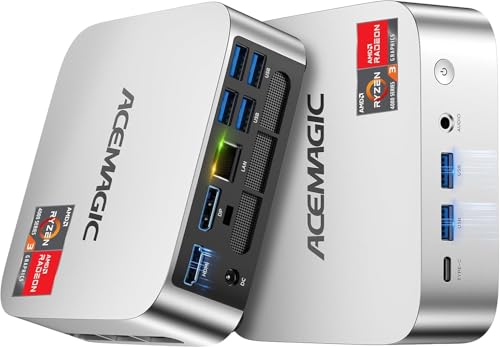
The Acemagic K1 is a sensible mid-range choice for everyday office work. Its AMD Ryzen 4300U processor runs up to 3.7 GHz and is rated at 28 watts maximum, so it stays cool and quiet during long workdays. The 16 GB of DDR4 memory and 512 GB SSD cover documents, email, browsing, and video calls with room to spare.
Triple 4K display support through HDMI means a two- or three-monitor desk is easy to set up. Wi-Fi and Bluetooth keep wireless accessories connected, and a wired LAN port is there for a stable connection. Windows 11 Pro is pre-installed, so the machine is ready for office software straight out of the box. It is a good fit for a tidy desk where silence matters.
Specs
| Feature | Detail |
|---|---|
| Processor | AMD Ryzen 4300U, up to 3.7 GHz |
| Memory | 16 GB DDR4 |
| Storage | 512 GB SSD |
| Displays | Triple 4K via HDMI |
| Power | 28 watts maximum |
| Operating system | Windows 11 Pro |
Beelink Mini S13 Pro
The Beelink Mini S13 Pro is the budget pick, and it proves that a home office does not need a large machine or a large outlay. Its Intel N150 processor runs up to 3.6 GHz across four cores, which is enough for writing, spreadsheets, browsing, and video meetings. The 12 GB of LPDDR5 memory and 500 GB SSD keep everyday tasks moving smoothly.
Dual HDMI outputs support two 4K displays, which covers the most common home office layout. Wi-Fi 6 and Bluetooth 5.2 handle wireless connections, and a 2.5 gigabit LAN port offers a fast wired option. The compact case fits almost anywhere, including behind a monitor on a VESA mount. For light to moderate office work, this little machine is all many people need.
Specs
| Feature | Detail |
|---|---|
| Processor | Intel N150, up to 3.6 GHz |
| Memory | 12 GB LPDDR5 |
| Storage | 500 GB SSD |
| Displays | Dual 4K via HDMI |
| Wired networking | 2.5 gigabit LAN |
| Wireless | Wi-Fi 6 and Bluetooth 5.2 |
| Operating system | Windows 11 Home |
How to Choose
Start with the processor and memory, because those decide how the machine feels day to day. Four cores and 12 GB of memory are enough for documents, email, and video calls. Eight cores and 24 GB or more suit heavier multitasking, large files, and creative apps. Storage matters too: 500 GB is fine for cloud-based work, while 1 TB is better for local files and large projects.
Next, count the displays. Most home offices use two monitors, so dual HDMI or a mix of HDMI and DisplayPort is the minimum to look for. Triple-display support is worth having if a third screen for reference material appeals to you. Check the ports as well: USB4 and fast LAN are useful for docks and wired networks, while Wi-Fi 6 or newer keeps wireless connections reliable.
Finally, think about noise and placement. Low-power chips run cooler and quieter, which matters in a small room. A VESA mount lets the PC hide behind a monitor, while a small case on the desk keeps ports within easy reach. Choose the machine that fits the work first, then the desk.
Who Should Skip
Mini PCs are not for everyone. People who need a dedicated graphics card for heavy video editing, 3D rendering, or demanding games should look at a full desktop tower instead, since these compact machines rely on integrated graphics. The same applies to anyone who plans frequent hardware upgrades beyond memory and storage, as the small cases leave little room for expansion.
A mini PC may also be the wrong call for a shared family computer that sits in a living room and serves many purposes at once. In that case, a larger machine with more ports and upgrade room could be a better fit. And if the work involves only a browser and cloud apps, a Chromebook or a tablet with a keyboard might be simpler and cheaper.
FAQ
Can a mini PC replace a desktop tower for home office work?
Yes, for most office work a mini PC can fully replace a tower. Modern processors and fast SSDs handle documents, spreadsheets, video calls, and browser multitasking with ease. A tower only pulls ahead for heavy graphics work, large-scale upgrades, or tasks that need a dedicated graphics card.
How much memory does a home office mini PC need?
For everyday office work, 12 GB to 16 GB of memory is enough. People who keep many apps and browser tabs open, work with large files, or run virtual machines should aim for 24 GB or 32 GB. More memory keeps the system responsive when the workload grows.
Do mini PCs support two monitors?
Most modern mini PCs support two or more monitors. The models in this roundup all offer at least dual-display output through HDMI, DisplayPort, or USB-C. Check the display outputs in the spec table before buying to confirm the setup matches the monitors on the desk.
Are mini PCs noisy?
Most mini PCs are quiet during office work, and low-power models are often near silent. Higher-performance models use a fan that may become audible under heavy load, but during documents, email, and video calls they usually stay quiet. Placement behind a monitor or under a desk reduces any fan noise further.
Final Verdict
The best mini PC for a home office depends on the workload, but the Beelink SER5 Max is the pick that suits the most people, balancing a strong processor, generous memory, and triple-display support. The GMKtec NucBox K6 and Geekom Mini IT13 offer more performance for heavier days, the Acemagic K1 covers everyday work quietly, and the Beelink Mini S13 Pro proves a budget box can handle a full workday. Pick the machine that matches the work, and the small case will take care of the desk.
More from Amazon
Programs that pair well with the guide above. Offers and eligibility are set by Amazon and may change.
Free shipping on eligible items, Prime Video and more. Eligible new members can start with a free trial.
Start a Prime free trialAudiobooks and podcasts to listen to on the go. Eligible new members can start with a free trial.
Try Audible freeAd-free music streaming. Eligible new subscribers can start with a free trial.
Try Music Unlimited freeA free business account with business pricing and bulk-buying tools for work, shop or home office.
Create a business accountAs an Amazon Associate we earn from qualifying purchases.



