
Key takeaways
- Compare five single-drive SSD enclosures for M.2 NVMe and SATA drives, from 10Gbps budget picks to a 40Gbps USB4 model, and match one to your drive.
For most buyers, the SABRENT EC-SNVE is the strongest all-round pick because it accepts both NVMe and SATA M.2 drives and installs without tools. Budget buyers with a known NVMe drive should look at the UGREEN 10Gbps enclosure, while anyone with a USB4 or Thunderbolt port should look at the UGREEN 40Gbps fin-cooled model. Every enclosure below holds one drive only. These are portable single-drive cases, not multi-bay RAID enclosures or docking stations, so they suit one drive at a time and need no external power.
Table of Contents
- How to Choose an SSD Enclosure
- At a Glance
- SABRENT EC-SNVE
- UGREEN M.2 NVMe Enclosure 10Gbps
- SABRENT EC-PNVO
- ASUS ROG Strix Arion White
- UGREEN 40Gbps M.2 NVMe Enclosure
- Frequently Asked Questions
- Conclusion
- Product and ASIN Reference
How to Choose an SSD Enclosure
Start with the drive, not the enclosure. M.2 is a form factor, not a protocol: NVMe drives use the PCIe interface, while M.2 SATA drives use the SATA interface. An NVMe-only enclosure cannot see a SATA drive at all, so buyers who are unsure which protocol their drive uses should pick a dual-protocol enclosure such as the SABRENT EC-SNVE. The protocol is printed on the drive label or in the drive data sheet.
Next, check the drive length. Common M.2 lengths are 2230, 2242, 2260, and 2280, where the number is the length in millimetres. Most enclosures in this roundup accept all four lengths, but the SABRENT EC-SNVE is listed for 2242, 2260, and 2280 only, so a short 2230 drive from a handheld console or compact laptop needs a different case. Also check the key type: M-key and B+M-key drives are the usual fit, while B-key-only drives and M.2 PCIe AHCI drives are excluded by every enclosure here.
Interface speed is the third decision. A 10Gbps USB 3.2 Gen 2 link caps real-world transfers at roughly 1,000 MB/s, which is plenty for backups and everyday file moves. A 20Gbps or 40Gbps enclosure only pays off on a matching USB4 or Thunderbolt port, and even then the drive itself and the cable must support the full rate.
Cooling matters during long transfers. A bare NVMe drive under sustained writes gets hot, and a hot drive slows down. Aluminium bodies, thermal pads, and finned shells all help move heat away from the drive. Fanless designs are silent and have no moving parts to fail. Tool-free installation is worth having when drives are swapped often, since it removes the risk of losing a tiny M.2 screw. Finally, confirm the box contents: some enclosures ship with both cable types, while others ship with one cable only.
At a Glance
| Enclosure | Interface | Drive protocols | M.2 lengths | Install |
|---|---|---|---|---|
| SABRENT EC-SNVE | USB 3.2 Gen 2, 10Gbps | NVMe and SATA | 2242, 2260, 2280 | Tool-free |
| UGREEN M.2 NVMe 10Gbps | USB 3.2 Gen 2, 10Gbps | NVMe only | 2230, 2242, 2260, 2280 | Screw-closed shell |
| SABRENT EC-PNVO | USB 3.2 Gen 2, 10Gbps | NVMe only | 2230, 2242, 2260, 2280 | Tool-free flip-open |
| ASUS ROG Strix Arion White | USB 3.2 Gen 2×1, 10Gbps | NVMe only | 2230, 2242, 2260, 2280 | Screwdriver-free |
| UGREEN 40Gbps Fin-Cooled | USB4, 40Gbps | NVMe only | 2230, 2242, 2260, 2280 | Screw-closed shell |
SABRENT EC-SNVE
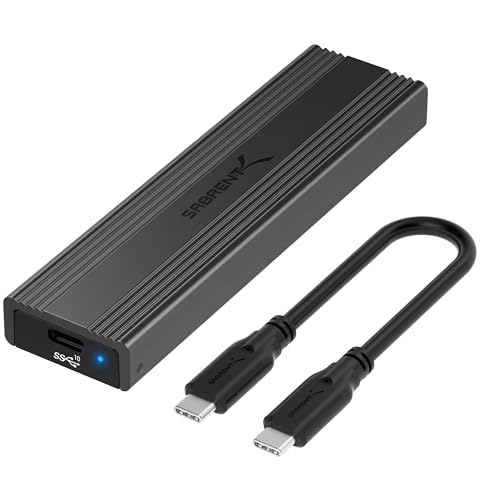
The SABRENT EC-SNVE is the most flexible enclosure in this roundup. It accepts both M.2 PCIe NVMe and M.2 SATA drives, so it rescues older SATA sticks that NVMe-only enclosures cannot see. Installation is fully tool-free: a button releases an inside latch, the case slides open, the drive drops in, and a plastic clip holds it in place.
A Realtek RTL9210B bridge runs the USB 3.2 Gen 2 link at 10Gbps, with listed real-world transfers up to 1,000 MB/s. The slim aluminium case with an ABS frame measures 117 by 32 by 13 mm and weighs 63 grams, so it slips into a laptop sleeve without notice. A thermal pad is included, and the box also contains an 8-inch USB-C to USB-C cable and a printed manual. Note that the box does not include a USB-C to USB-A cable, so buyers with only USB-A ports need their own cable or an adapter.
Two cautions belong here. First, the supported lengths are listed as 2242, 2260, and 2280, so the short 2230 size is not covered even though some roundups list it. Second, at least one product description for this model states that it does not support SATA M.2 drives, which conflicts with the main listing and with Sabrent’s own manual. Buyers planning to reuse a SATA drive should confirm SATA support on the current listing before ordering.
Specs:
- Interface: USB 3.2 Gen 2 Type-C, up to 10Gbps
- Listed transfer rate: up to 1,000 MB/s
- Drive support: M.2 PCIe NVMe and M.2 SATA, 2242, 2260, and 2280
- Bridge controller: Realtek RTL9210B
- Installation: tool-free, slide-open with button latch
- Body: aluminium case with ABS frame, 117 x 32 x 13 mm, 63 g
- In the box: enclosure, 8-inch USB-C to USB-C cable, thermal pad, manual
- Warranty: 2 years
- ASIN: B08RVC6F9Y
- Tier: budget
UGREEN M.2 NVMe Enclosure 10Gbps
The UGREEN 10Gbps enclosure, model 35267, is the straightforward budget pick for buyers who already know their drive is NVMe. It does one job with no extras: a USB 3.2 Gen 2 link at 10Gbps, UASP and TRIM support, and room for M-key and B+M-key NVMe drives in all four common lengths from 2230 to 2280, with capacities up to 8TB. The aluminium shell and a silicone thermal pad handle heat, and the box includes both a USB-C to USB-C cable and a USB-C to USB-A cable, which covers older laptops as well as current ones.
The limits are clearly stated on the listing, and they matter. This enclosure does not support M.2 SATA NGFF SSDs or SSDs with a pre-installed heatsink, and it only accepts NVMe drives thinner than 3.5 mm. A SATA drive, a drive with a thick heatsink, or a MacBook original SSD will not work here. One buyer note on a regional listing also questioned the tool-free claim, reporting a visible screw in the housing. A crawl of the listing also showed no featured offers available at the time of checking, so confirm availability on the product page before ordering.
Specs:
- Interface: USB 3.2 Gen 2, up to 10Gbps
- Drive support: M.2 NVMe only, M key and B+M key, 2230, 2242, 2260, and 2280, up to 8TB
- Protocols: UASP and TRIM
- Body: aluminium, 4.72 x 1.5 x 0.51 inches, 93 g
- In the box: enclosure, USB-C to USB-C cable, USB-C to USB-A cable
- Date first available: May 24, 2024
- Limits: no M.2 SATA support, no drives with heatsinks, drive thickness under 3.5 mm
- ASIN: B0D53K7HK9
- Tier: budget
SABRENT EC-PNVO
The SABRENT EC-PNVO is the newer of the two SABRENT enclosures here, first listed in May 2025, and it trades the EC-SNVE’s dual-protocol support for a simpler flip-open design aimed squarely at NVMe drives. Opening the lid, inserting the drive, locking it in place, and closing the lid needs no screws or tools. It accepts M.2 NVMe drives in 2230, 2242, 2260, and 2280 sizes, including the short 2230 size the EC-SNVE does not cover, with capacities up to at least 8TB.
The USB 3.2 Gen 2 link runs at up to 10Gbps, and the listing states a 1,250 MB/s data transfer rate. That figure sits above the practical ceiling of a 10Gbps link, so treat it as a listing claim rather than a measured result; real-world transfers on a 10Gbps port land near 1,000 MB/s. The aluminium body with cooling measures 11.66 by 3.15 by 1.52 cm and weighs 74.28 grams. The box includes a USB-C to USB-C cable, a USB-C to USB-A adapter, and a user manual. This is an NVMe-only enclosure, so SATA M.2 drives are not compatible.
Specs:
- Interface: USB 3.2 Gen 2, up to 10Gbps
- Listed transfer rate: 1,250 MB/s on the listing
- Drive support: M.2 NVMe only, 2230, 2242, 2260, and 2280, up to 8TB
- Installation: tool-free flip-open lid
- Body: aluminium with cooling, 11.66 x 3.15 x 1.52 cm, 74.28 g
- In the box: enclosure, USB-C to USB-C cable, USB-C to USB-A adapter, manual
- UPC: 840025274563
- Date first available: May 18, 2025
- ASIN: B0F933F1G8
- Tier: mid-range
ASUS ROG Strix Arion White
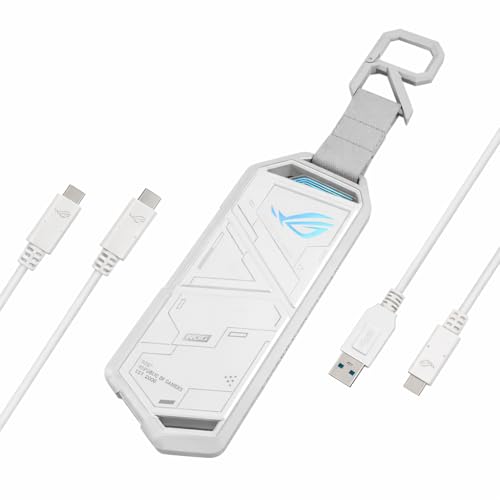
The ASUS ROG Strix Arion White is the premium-feeling 10Gbps enclosure in this roundup. The aluminium alloy body, pin-ejector tray, and screwdriver-free design give it a more finished feel than the budget cases, and the Aura Sync RGB lighting along the sides suits a gaming setup. Thermal pads are included to pull heat away from the drive during extended use, and the box contains both a USB-C to USB-C cable and a USB-C to USB-A cable.
The Arion White fits M-key and B+M-key NVMe drives in 2230, 2242, 2260, and 2280 sizes over a USB 3.2 Gen 2×1 Type-C link at up to 10Gbps. The bridge chip is the ASMedia ASM2362. The listing states support for drives up to 2TB, while some coverage states up to 4TB; this article follows the listing figure. SATA M.2 drives are not supported. The black Arion is a separate listing, so buyers who want the white finish should use only the white model listed here.
Specs:
- Interface: USB 3.2 Gen 2×1 Type-C, up to 10Gbps
- Drive support: M.2 PCIe NVMe only, 2230, 2242, 2260, and 2280, up to 2TB per the listing
- Bridge controller: ASMedia ASM2362
- Installation: screwdriver-free with pin ejector
- Body: aluminium alloy, 4.9 x 1.9 x 0.4 inches, thermal pads included
- Lighting: Aura Sync RGB
- In the box: enclosure, USB-C to USB-C cable, USB-C to USB-A cable, pin ejector, quick installation guide
- Model: ESD-S1C/WHT/G/AS//
- UPC: 197105563339
- Date first available: September 26, 2024
- Warranty: 1 year
- ASIN: B0DGSS3248
- Tier: premium
UGREEN 40Gbps M.2 NVMe Enclosure
The UGREEN 40Gbps fin-cooled enclosure is the speed pick in this roundup, and it only makes sense for buyers whose computer actually has a USB4 or Thunderbolt 3 or 4 port. Its ASMedia ASM2464PD bridge runs a USB4 link at up to 40Gbps, with a listed maximum speed of 3,600 MB/s. Reaching that figure needs a Thunderbolt 4 cable and a Thunderbolt 4 device; on a 10Gbps port the enclosure falls back to 10Gbps rates.
Cooling is fully passive. A double-sided fin design multiplies the heat dissipation surface across the aluminium body, so there is no fan noise and no moving part to fail. The enclosure accepts NVMe drives in 2230, 2242, 2260, and 2280 sizes with capacities up to 8TB, and it works across Windows, macOS, Linux, and Android hosts. It does not support SATA NGFF drives or mSATA drives. Two details need flagging. First, the model number is listed as 55316 on the price-history record, while some coverage of the 40Gbps UGREEN line cites 15976, so confirm the model on the listing before ordering. Second, a crawl of the listing showed no featured offers available at the time of checking, so confirm availability on the product page before ordering.
Specs:
- Interface: USB4, up to 40Gbps; Thunderbolt 3 and 4 compatible
- Listed transfer rate: up to 3,600 MB/s
- Bridge controller: ASMedia ASM2464PD
- Drive support: M.2 NVMe only, 2230, 2242, 2260, and 2280, up to 8TB
- Cooling: double-sided aluminium fin design, fanless
- Limits: no SATA NGFF or mSATA support; full speed needs a Thunderbolt 4 cable and device
- Model: 55316 per the price-history record
- ASIN: B0F62NG7K3
- Tier: premium
Frequently Asked Questions
Will an SSD enclosure work with any M.2 SSD?
No. The enclosure must match the drive protocol, length, and key type. NVMe-only enclosures cannot see SATA drives, and dual-protocol enclosures such as the SABRENT EC-SNVE accept both. Check the drive label or data sheet for the protocol, then match the length (2230, 2242, 2260, or 2280) and the M-key or B+M-key connector before ordering.
Do I need a 40Gbps enclosure?
Only when the host computer has a USB4 or Thunderbolt 3 or 4 port and the workload moves large files often, such as video editing or full-drive backups. On a 10Gbps port, a 40Gbps enclosure runs at 10Gbps speeds, so a 10Gbps model delivers the same real-world result for less.
Should I pick an NVMe or a SATA enclosure?
Pick based on the drive, not on preference. NVMe drives are faster and need an NVMe-capable enclosure, while older M.2 SATA drives need a dual-protocol enclosure such as the SABRENT EC-SNVE. When the drive type is unknown, a dual-protocol enclosure is the safe choice because it accepts either kind.
Does an SSD enclosure include the SSD?
No. Every enclosure in this roundup is sold diskless, so the buyer supplies the drive. A new drive may need partitioning and formatting before use, and the enclosure does not add storage by itself. Check the box contents on the listing, since cables and thermal pads vary between models.
Conclusion
The right SSD enclosure follows the drive. The SABRENT EC-SNVE is the best all-round pick because it accepts both NVMe and SATA drives and installs without tools. The UGREEN 10Gbps enclosure is the budget pick for a known NVMe drive, and the SABRENT EC-PNVO is the easiest option for frequent drive swaps. The ASUS ROG Strix Arion White adds a premium build and RGB lighting at 10Gbps, while the UGREEN 40Gbps fin-cooled model is the pick for USB4 and Thunderbolt hosts that can use its full speed. Confirm the drive protocol, length, and the host port before ordering, and check availability on the product page.
As an Amazon Associate, we earn from qualifying purchases.
More from Amazon
Programs that pair well with the guide above. Offers and eligibility are set by Amazon and may change.
Free shipping on eligible items, Prime Video and more. Eligible new members can start with a free trial.
Start a Prime free trialAudiobooks and podcasts to listen to on the go. Eligible new members can start with a free trial.
Try Audible freeAd-free music streaming. Eligible new subscribers can start with a free trial.
Try Music Unlimited freeA free business account with business pricing and bulk-buying tools for work, shop or home office.
Create a business accountAs an Amazon Associate we earn from qualifying purchases.



