
Key takeaways
- Compare the best webcams for streaming, from budget 1080p picks to 4K and AI-tracking models. Find the right camera for Twitch, YouTube, and calls.
- Top Pick: Logitech C920s Pro HD Webcam
- Runner-up: Elgato Facecam
- Also consider: Razer Kiyo Pro
A good webcam is the fastest way to make a stream look professional. Viewers forgive a plain background, but a soft, noisy, or lagging camera feed is the first thing a new visitor notices.
The five cameras below are all standalone USB webcams built for streaming, recording, and video calls. They range from a budget 1080p workhorse to a 4K camera with AI tracking, and each one is judged on published specifications: resolution and frame rate, field of view, focus, microphones, connection, and mounting.
As an Amazon Associate, we earn from qualifying purchases.
Quick Answer
For most streamers, the Elgato Facecam is the sweet spot, with clean uncompressed 1080p video at 60 frames per second and a sensor tuned for indoor light. The Logitech C920s is the best budget pick, while the Logitech Brio 4K suits creators who want 4K detail and flexible framing.
Best Budget Webcam for Streaming
Logitech C920s Pro HD Webcam

The Logitech C920s Pro HD Webcam has been a default recommendation for years. It captures Full HD video at 1080p and 30 frames per second, with a five-element glass lens, autofocus, and a fixed 78-degree diagonal field of view that frames one or two people comfortably. Logitech RightLight 2 adjusts the image automatically when room lighting changes.
Setup is simple: the camera connects over USB-A with an attached five-foot cable, clips onto a monitor, and also fits a standard tripod thread. Two built-in stereo microphones flank the lens, so a new streamer can start without a separate microphone. The 30 frames per second ceiling is the main trade-off, but for talking-head streams and video calls, the C920s delivers a clean, reliable picture at a budget-friendly position in the lineup.
Specs
| Spec | Detail |
|---|---|
| Max resolution | 1080p at 30 frames per second |
| Field of view | 78 degrees diagonal, fixed |
| Focus | Autofocus |
| Microphone | Dual built-in stereo microphones |
| Connection | USB-A, attached 5-foot cable |
| Privacy shutter | Yes, flip-down cover |
| ASIN | B07K986YLL |
Best 1080p Webcam for Streaming
Elgato Facecam

The Elgato Facecam is built around one idea: send the cleanest possible 1080p signal to streaming software. It outputs uncompressed 1080p video at 60 frames per second over USB 3.0, which keeps fast movement smooth and avoids the compression artifacts that can appear when a camera squeezes video down before it reaches the computer. A Sony Starvis CMOS sensor and an all-glass prime lens with an f/2.4 aperture are tuned for indoor lighting, so the image stays detailed without a full lighting rig.
Focus is fixed, with a sharp range of 30 to 120 centimeters, which suits a streamer sitting at a desk at a consistent distance. The 82-degree diagonal field of view frames a head-and-shoulders shot without pulling in too much of the room. There is no built-in microphone, so this camera assumes a separate microphone is already part of the setup, which is normal for a dedicated streaming desk.
Specs
| Spec | Detail |
|---|---|
| Max resolution | 1080p at 60 frames per second, uncompressed |
| Field of view | 82 degrees diagonal |
| Focus | Fixed focus, 30 to 120 cm range |
| Microphone | None |
| Connection | USB-C, USB 3.0 |
| Privacy shutter | Not stated |
| ASIN | B0973DV11T |
Best Webcam for Low Light Streaming
Razer Kiyo Pro
The Razer Kiyo Pro is the pick for streamers whose rooms are dim, unevenly lit, or lit mainly by a monitor. Its Type 1/2.8 Sony Starvis CMOS sensor uses back-illuminated pixel technology to gather more light than a typical webcam sensor, and an adaptive light sensor adjusts exposure as conditions change. It records uncompressed 1080p video at 60 frames per second, with an HDR mode at 30 frames per second for high-contrast scenes.
Framing is flexible: the wide-angle lens offers three field-of-view presets of 80, 90, and 103 degrees, switched through Razer Synapse software, so the same camera can frame a tight solo shot or a wider view with a second person. Focus is automatic with a manual override, and the lens is protected by Corning Gorilla Glass 3. A built-in stereo microphone array captures 16-bit audio at 48 kHz for casual streams.
Specs
| Spec | Detail |
|---|---|
| Max resolution | 1080p at 60 frames per second, uncompressed |
| Field of view | Adjustable 80, 90, or 103 degrees |
| Focus | Autofocus with manual override |
| Microphone | Built-in stereo microphone array |
| Connection | USB 3.0 |
| Privacy shutter | Not stated |
| ASIN | B08T1MWX6J |
Best 4K Webcam for Streaming
Logitech Brio 4K Webcam

The Logitech Brio 4K Webcam is the resolution leader in this roundup, capturing Ultra HD video at 4K and 30 frames per second, 1080p at up to 60 frames per second, and 720p at up to 90 frames per second. A 13-megapixel sensor and 5x digital zoom let a streamer crop into a tighter frame without a soft image, useful for hiding a cluttered background. RightLight 3 with HDR adjusts automatically for low light, backlighting, and high-contrast scenes.
Three diagonal field-of-view presets frame the shot: 65 degrees for head-and-shoulders, 78 degrees for a wider desk view, and 90 degrees for more of the room. Dual omnidirectional microphones with noise cancellation handle voice pickup for calls and casual streams. An infrared sensor supports Windows Hello sign-in on compatible computers. It connects with a USB-A to USB-C cable and mounts on a monitor or tripod.
Specs
| Spec | Detail |
|---|---|
| Max resolution | 4K at 30 frames per second |
| Field of view | Adjustable 65, 78, or 90 degrees |
| Focus | Autofocus |
| Microphone | Dual noise-cancelling microphones |
| Connection | USB-A to USB-C cable |
| Privacy shutter | Yes, attachable cover |
| ASIN | B09NBWWP79 |
Best AI Tracking Webcam for Streaming
OBSBOT Tiny 2 Webcam
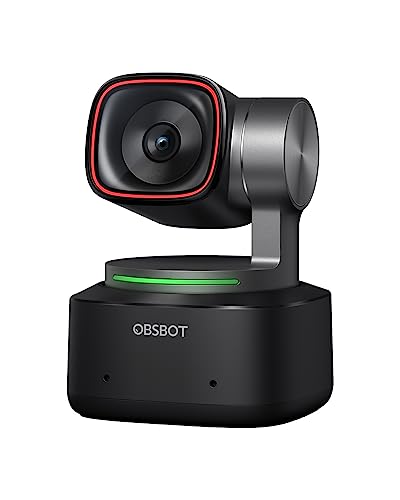
The OBSBOT Tiny 2 Webcam is the only camera in this roundup that moves on its own. It is a pan-tilt-zoom webcam with AI tracking modes that follow the streamer around the frame, which suits presenters who stand, pace, or demonstrate products away from the desk. A 1/1.5-inch CMOS sensor records 4K video at 30 frames per second, with 60 frames per second at lower resolutions, and PixGain HDR handles mixed lighting.
Control goes beyond the usual software sliders: the Tiny 2 supports voice commands and gesture control, so a streamer can start or stop tracking, or zoom in, without touching the computer. Two built-in microphones with noise cancellation cover voice pickup for calls and casual streams. A privacy mode turns the lens away when the camera is not in use. The motorized base adds setup that a fixed webcam avoids, and it needs a stable surface for the pan and tilt motors.
Specs
| Spec | Detail |
|---|---|
| Max resolution | 4K at 30 frames per second |
| Field of view | Not stated |
| Focus | Autofocus with AI tracking |
| Microphone | Dual built-in microphones |
| Connection | USB-C |
| Privacy shutter | Privacy mode turns lens away |
| ASIN | B0C3B6ZR1V |
How to Choose a Webcam for Streaming
Start with resolution and frame rate. A 1080p camera at 60 frames per second is the standard for live platforms, and 60 frames per second keeps hand movements and reactions smooth. A 4K camera is worth it mainly for recording and cropping, since live output is usually downscaled anyway.
Next, think about light. A larger sensor and a low-light mode matter more than raw resolution in a dim room. Field of view decides how much of the room appears behind you: a narrow angle keeps the focus on your face, while a wide angle fits a second person. Autofocus suits streamers who lean in and out, while fixed focus is fine at a steady distance.
Audio deserves a quick check too: a camera without a microphone needs a separate one. Finally, match the connection to the computer: 4K and uncompressed 1080p at 60 frames per second need a USB 3.0 port, while USB 2.0 limits the camera to lower resolutions or compressed video.
Who Should Skip These Webcams
A dedicated webcam is not the right tool for every creator. Anyone who already owns a mirrorless or DSLR camera and a capture card will get better image quality, and these webcams will feel like a step down. Streamers who record outdoors or in large spaces should look at action cameras or camcorders instead, since a desk webcam is designed for a short, fixed distance in a room.
Budget matters as well. If streaming is an occasional hobby and the built-in laptop camera only serves weekly calls, a new webcam may not change much; lighting or a microphone often improve a stream more than a camera upgrade. The AI tracking camera is a poor fit for a streamer who never leaves their chair, since its moving base adds cost for a feature that would sit unused. Anyone on an older computer should check system requirements first, since 4K and uncompressed video need a modern processor and a USB 3.0 port.
Frequently Asked Questions
Do I need a 4K webcam for streaming?
No, not for most live streams. Live platforms commonly broadcast at 1080p, so a good 1080p camera at 60 frames per second is enough for a clean live picture. A 4K webcam is worth it for recording, cropping in editing, or uploading the stream later as a video.
Is 60 frames per second important for a streaming webcam?
Yes, it helps when there is movement on screen. At 60 frames per second, hand gestures, head turns, and reactions look smoother than at 30 frames per second. For a mostly still talking-head stream, 30 frames per second is acceptable, but 60 is safer for gaming and energetic shows.
Does a webcam microphone sound good enough for streaming?
A built-in webcam microphone works for casual streams and video calls, but a dedicated USB microphone sounds clearer and picks up less room noise. The Elgato Facecam has no microphone at all, so it needs a separate one. Treat a webcam microphone as a starter option, not a long-term audio setup.
Can I use a streaming webcam for video calls and recording?
Yes. All five cameras here work as standard USB video devices, so they appear in Zoom, Teams, Google Meet, OBS Studio, and recording software without special drivers in most cases. The same camera can serve a live stream in the evening and a work call the next morning.
Final Verdict
The Elgato Facecam is the best all-round pick for a dedicated streaming desk, with uncompressed 1080p video at 60 frames per second and a sensor built for indoor light. The Logitech C920s is the sensible budget choice for anyone starting out, and the Razer Kiyo Pro is the answer for dim rooms. Creators who record in 4K or crop their footage should choose the Logitech Brio 4K, while presenters who move around during a broadcast will get the most from the OBSBOT Tiny 2 and its AI tracking.
More from Amazon
Programs that pair well with the guide above. Offers and eligibility are set by Amazon and may change.
Free shipping on eligible items, Prime Video and more. Eligible new members can start with a free trial.
Start a Prime free trialAudiobooks and podcasts to listen to on the go. Eligible new members can start with a free trial.
Try Audible freeAd-free music streaming. Eligible new subscribers can start with a free trial.
Try Music Unlimited freeA free business account with business pricing and bulk-buying tools for work, shop or home office.
Create a business accountAs an Amazon Associate we earn from qualifying purchases.



