
Key takeaways
- Learn how to choose a capture card for console and camera streaming. Compare five proven USB and PCIe picks, from 1080p60 to 4K144, and find your fit.
- Top Pick: Elgato HD60 X
- Runner-up: Elgato 4K X
- Also consider: AVerMedia Live Gamer Ultra 2.1
A capture card is the bridge between your console or camera and your streaming computer. It takes an HDMI signal, turns it into a video feed your software can use, and sends a clean copy onward to your display so you can keep playing while the audience watches. Without one, a console or a mirrorless camera has no way to feed video into streaming software.
The right card depends on what you play, what you record, and what computer you own. A 1080p60 USB card is enough for most streams, while a 4K144 HDMI 2.1 card suits creators who record high-resolution footage for later editing. This guide explains the specs that matter and compares five proven capture cards, from a compact camera adapter to an internal PCIe card for dual-PC setups.
As an Amazon Associate, we earn from qualifying purchases.
Quick Answer
For most console streamers, the Elgato HD60 X is the safest starting point, with 1080p60 HDR10 capture and smooth 4K60 passthrough. If you want to record in 4K, step up to the Elgato 4K X or the AVerMedia Live Gamer Ultra 2.1. Dual-PC streamers should consider the internal Elgato 4K60 Pro MK.2, and camera users should look at the Elgato Cam Link 4K.
1. Elgato HD60 X
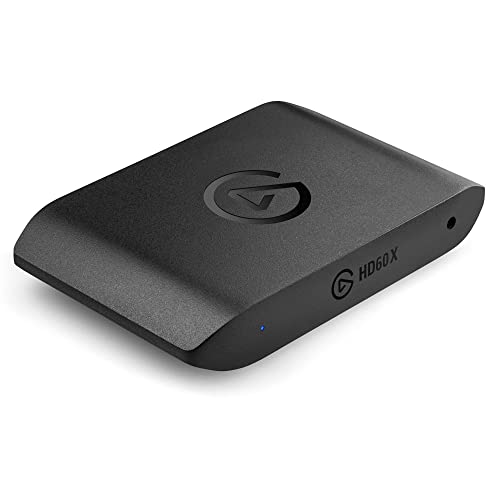
The Elgato HD60 X is the most versatile entry point in this guide. It captures up to 1080p60 with HDR10, or 4K30, while passing a 4K60 HDR10 signal through to your display with variable refresh rate support. That combination means your console output stays smooth on screen while the recording feed stays clean. It connects over USB 3.0 and works with PC and Mac.
Setup is straightforward: the card is driverless on supported systems, appears as a video source in OBS and similar software, and needs no external power supply. Its 1080p240 and 1440p120 passthrough modes also suit high-refresh-rate monitors, since you can play at a higher refresh rate than you record.
Specs
| Specification | Details |
|---|---|
| Brand | Elgato |
| Form factor | External USB |
| Interface | USB 3.0 |
| Max capture resolution | 1080p60 HDR10 or 4K30 |
| Max passthrough | 4K60 HDR10, 1440p120, 1080p240 |
| HDR support | HDR10 |
| Variable refresh rate | Yes |
| Compatibility | PC, Mac |
| In the box | HD60 X, USB-C cable, HDMI cable |
2. Elgato 4K X

The Elgato 4K X is the flagship USB card in this lineup, built around HDMI 2.1. It captures up to 4K144 with HDR10, or 1080p240, which makes it the strongest choice for creators who record high-frame-rate 4K gameplay for edited videos. Passthrough matches the capture ceiling at 4K144, and variable refresh rate and HDR10 are supported on both paths.
It connects over USB 3.2 Gen 2, which provides the bandwidth needed for 4K144 capture, and it works with PC, Mac, and iPad. It ships with an 8K-rated HDMI cable and a USB-C cable. Its main trade-off is that it demands a capable computer and a fast USB port to reach its top capture modes.
Specs
| Specification | Details |
|---|---|
| Brand | Elgato |
| Form factor | External USB |
| Interface | USB 3.2 Gen 2 |
| Max capture resolution | 4K144 HDR10 or 1080p240 |
| Max passthrough | 4K144 HDR10 |
| HDR support | HDR10 |
| Variable refresh rate | Yes |
| Compatibility | PC, Mac, iPad |
| In the box | 4K X, USB-C cable, 8K HDMI cable |
3. AVerMedia Live Gamer Ultra 2.1

The AVerMedia Live Gamer Ultra 2.1 is the main HDMI 2.1 rival to the Elgato 4K X, and it stands out for its ultrawide support and its customizable RGB light bar. It captures up to 4K144 on Windows, or 4K60 on macOS, and passes through up to 4K144 with HDR and variable refresh rate. Ultrawide resolutions such as 3440 by 1440 are supported, and it also supports VRR recording at selected resolutions through AVerMedia Streaming Center.
The card uses USB 3.2 Gen 2 over a Type-C connection and includes an HDMI 2.1 cable in the box. AVerMedia supplies its own software for firmware updates and capture, while the card also works as a standard video source in OBS. For high-resolution capture with ultrawide support, this is a strong premium alternative to the 4K X.
Specs
| Specification | Details |
|---|---|
| Brand | AVerMedia |
| Form factor | External USB |
| Interface | USB 3.2 Gen 2 Type-C |
| Max capture resolution | 4K144 on Windows, 4K60 on macOS |
| Max passthrough | 4K144 HDR, 1440p240 HDR, 1080p360 HDR |
| HDR support | Yes |
| Variable refresh rate | Yes |
| Compatibility | PC, Mac |
| In the box | Live Gamer Ultra 2.1, HDMI 2.1 cable, USB-C cable, audio cable, quick start guide |
4. Elgato 4K60 Pro MK.2
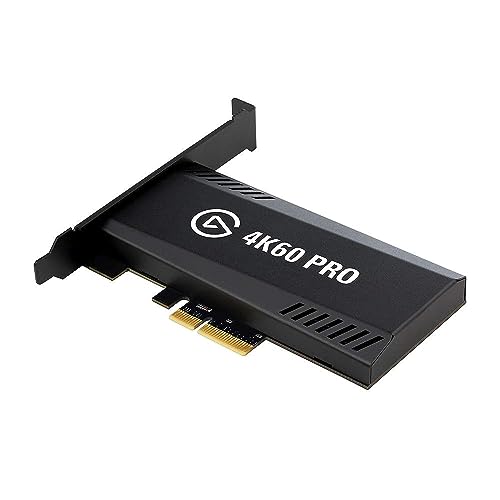
The Elgato 4K60 Pro MK.2 is the only internal card in this guide, built for dual-PC streaming rigs. It installs into a PCIe x4 slot, captures up to 4K60 with HDR10, and passes the signal through to a display at 4K60 HDR10 with variable refresh rate. Because it uses the PCIe bus rather than USB, it delivers ultra-low latency through Elgato Instant Gameview technology.
Internal installation is both its strength and its limitation. It needs a desktop PC with a free PCIe slot and a compatible CPU and graphics card, and it runs on Windows only, so laptop owners and Mac users should look elsewhere. It supports passthrough up to 240 Hz at lower resolutions, which suits high-refresh-rate gaming monitors.
Specs
| Specification | Details |
|---|---|
| Brand | Elgato |
| Form factor | Internal PCIe |
| Interface | PCIe x4 |
| Max capture resolution | 4K60 HDR10 |
| Max passthrough | 4K60 HDR10 with VRR, up to 240 Hz |
| HDR support | HDR10 |
| Variable refresh rate | Yes |
| Compatibility | Windows PC |
| In the box | 4K60 Pro MK.2, high and low profile brackets, HDMI cable |
5. Elgato Cam Link 4K

The Elgato Cam Link 4K is the most compact card here, and it serves a different purpose from the other four. Instead of capturing a console, it turns a DSLR, camcorder, or action camera into a webcam. It plugs into a USB 3.0 port, accepts an HDMI signal from the camera, and presents it as a standard video source in OBS, Zoom, Discord, and similar software. Capture reaches 1080p60 or 4K30, and the latest model supports 4K60 with MJPEG compression.
Its small size makes it easy to carry, and it needs no separate power supply. The trade-off is that it has no HDMI output, so there is no passthrough for a monitor; it is purely a capture device. It works with PC, Mac, and iPad, and it is the budget-friendly pick for creators who already own a camera with a clean HDMI output.
Specs
| Specification | Details |
|---|---|
| Brand | Elgato |
| Form factor | External USB dongle |
| Interface | USB 3.0 |
| Max capture resolution | 1080p60 or 4K30, 4K60 with MJPEG on latest model |
| Max passthrough | None, no HDMI output |
| HDR support | Not stated |
| Variable refresh rate | Not stated |
| Compatibility | PC, Mac, iPad |
| In the box | Cam Link 4K |
How to Choose Capture Cards
Start with the resolution you actually record at. If you stream at 1080p, a 1080p60 capture card is enough, and paying for 4K144 capture adds nothing your audience will see. If you record footage for edited videos, higher capture resolutions and frame rates matter more.
Next, check passthrough, the signal your card sends to your display. A card with 4K60 HDR passthrough lets you play in 4K while recording at a lower resolution. High-refresh-rate players should confirm the card supports their monitor refresh rate, and console players should look for variable refresh rate support.
Form factor comes third. External USB cards work with laptops and desktops and move easily between machines, while internal PCIe cards suit dedicated streaming PCs and offer the lowest latency. Camera users need a card that accepts a clean HDMI feed and presents it as a webcam source, which only some cards do.
Finally, confirm compatibility before buying. Check that the card supports your operating system, that your computer has a fast enough USB port or a free PCIe slot, and that it works with the software you use. A card that only supports Windows will not help a Mac-only setup.
Who Should Skip
A capture card is not for everyone. If you only stream PC games from the same computer you play on, you do not need one, since streaming software can capture the game directly. A card only earns its place when the video comes from a separate source, such as a console, a second PC, or a camera.
Laptop owners should skip internal PCIe cards entirely, since there is no slot to install one in, and Mac users should check operating system support carefully, because some internal cards are Windows only. If your display or console is limited to 1080p, a premium 4K144 card will not improve anything; a 1080p60 card will do the same job.
FAQ
Do I need a capture card to stream console games?
Yes, if you want to stream from a console through a computer. A console cannot send video directly to streaming software, so a capture card takes the console HDMI output and turns it into a video source your computer can use.
What is the difference between capture resolution and passthrough?
Capture resolution is the quality of the video feed sent to your computer for recording or streaming. Passthrough is the signal the card sends onward to your display, and it can be higher than the capture resolution. A card might pass 4K60 to your TV while only recording at 1080p60.
Can a capture card record a camera for video calls?
Yes. Cards such as the Cam Link 4K accept an HDMI feed from a camera and present it as a webcam source, so video call and streaming software treat the camera like any other webcam. The camera needs a clean HDMI output without menus or overlays on screen.
Does a capture card affect gaming performance?
An external USB card has little effect on the gaming device, since the card handles the video signal and your computer does the encoding. The main performance factor is the encoding workload on the streaming computer, so a capable CPU or graphics card matters more than the capture card itself.
Final Verdict
Most buyers should start with the Elgato HD60 X. It covers 1080p60 HDR10 capture, smooth 4K60 passthrough, and broad compatibility at a sensible mid-range position, and it suits the way most people stream today. Creators who record in 4K should step up to the Elgato 4K X or the AVerMedia Live Gamer Ultra 2.1, which both offer HDMI 2.1 capture up to 4K144. Dual-PC streamers with a desktop rig should consider the internal Elgato 4K60 Pro MK.2 for its low latency, while camera users will get the most from the compact Elgato Cam Link 4K.
More from Amazon
Programs that pair well with the guide above. Offers and eligibility are set by Amazon and may change.
Free shipping on eligible items, Prime Video and more. Eligible new members can start with a free trial.
Start a Prime free trialAudiobooks and podcasts to listen to on the go. Eligible new members can start with a free trial.
Try Audible freeAd-free music streaming. Eligible new subscribers can start with a free trial.
Try Music Unlimited freeA free business account with business pricing and bulk-buying tools for work, shop or home office.
Create a business accountAs an Amazon Associate we earn from qualifying purchases.



