Key takeaways
- "Top rated" is a label every television seems to wear, which makes it a poor shortcut for a living room decision.
“Top rated” is a label every television seems to wear, which makes it a poor shortcut for a living room decision. A smart TV is really three purchases in one: a panel, a streaming platform, and a size that suits your wall and your seat. This guide sorts five popular smart sets by those three questions, using only what the listed specs state, so you can see where a budget 1080p screen is plenty and where a 4K QLED or Mini LED panel earns its higher cost.
It is written for shoppers who want a television that works the moment it is plugged in: voice remote, built-in apps, Wi-Fi, no separate streaming box. Whether you are outfitting a bedroom, a first apartment, or a main family room in 2026, the lineup below spans a 40-inch Full HD set up to a 65-inch Mini LED model, with two different smart platforms to compare.
Quick Picks
Our top picks


 INSIGNIA 75" Class F50 Series LED 4K
- 4K Ultra HD (2160p resolution): Enjoy breathtaking HDR10…
- High Dynamic Range: Provides a wide range of…
- Alexa voice control: The Alexa Voice Remote lets…


As an Amazon Associate we earn from qualifying purchases at no extra cost to you.
| Product | Best for | Key spec from the title |
|---|---|---|
| Roku Select 40-Inch | Bedrooms, dorms, kitchens | 1080p Full HD LED, Wi-Fi, Bluetooth headphone mode |
| Insignia F50 55-Inch | Everyday living room on a budget | 4K UHD LED, Fire TV, Alexa voice remote |
| Roku Select 55-Inch QLED | Brighter, more colorful 4K picture | 4K (2160p) QLED, voice remote, Bluetooth headphone mode |
| Insignia F40 40-Inch | Small rooms that need live TV apps | 1080P Full HD Direct LED, Fire TV, Alexa voice remote |
| Samsung M70H 65-Inch | Big-screen movie nights | Mini LED, 4K, Mini LED Processor, Vision AI Companion |
How to Choose
Match screen size to seating distance
A practical rule is to multiply the screen diagonal by roughly 1.2 to 1.6 to get a comfortable viewing distance in inches. A 40-inch set suits a seat about 4 to 5 feet away, such as a bed or desk. A 55-inch set works from about 6 to 7 feet, and a 65-inch model from about 7 to 9 feet. Buying one size larger than feels necessary is common advice, but only if the room can hold it without craning your neck. Measure the wall, the stand depth, and the distance from the couch before you commit, because a screen that overwhelms a small room is as frustrating as one that looks lost in a big one.
Decide whether 4K matters at your size
On a 32-inch to 40-inch screen viewed from across a bedroom, the jump from 1080p to 4K is hard to spot, and plenty of streaming content still looks fine at Full HD. At 50 inches and above, 4K resolution starts to show finer detail, and almost all new premium sets use it. If the listing says 2160p or 4K UHD, you have the pixel count; panel type (LED, QLED, Mini LED) then determines brightness and contrast. Also remember that a 4K screen only shows its advantage when the content is 4K, so check that the streaming plans or discs you actually use deliver it.
Know what the panel names mean
Standard LED sets use a backlight behind an LCD layer, and “Direct LED” means the lights sit directly behind the screen. QLED adds a quantum dot layer aimed at richer color. Mini LED uses far smaller backlight elements so the set can dim and brighten more zones, which generally helps contrast in dark scenes. None of these names guarantee a number, so look for peak brightness, local dimming zones, and HDR format support on the full spec sheet; the titles here do not state them. Treat any single marketing term as a starting point for questions rather than an answer.
Pick the smart platform you will live with
Roku sets pair a streaming interface with a voice remote, while the Insignia models run Fire TV with an Alexa voice remote, which suits households already using Alexa devices. Samsung uses its own smart system with a Vision AI Companion. Ignore marketing about app counts, since every major streaming service is available on all of them. Instead, check the number of HDMI ports, whether one supports eARC for a soundbar, and, for gamers, whether 120 Hz refresh and variable refresh rate are listed. Budget models usually trim port counts, speaker quality, and peak brightness first, so a lower cost tier is a fair trade only when you do not need those extras.
The 5 Best Options
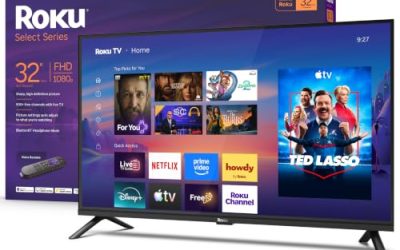
Roku Select 40-Inch
This is the simplest set in the group: a 40-inch Full HD (1080p) LED television with a voice remote, Wi-Fi, and a Bluetooth headphone mode. It targets spare rooms, kitchens, dorms, and anyone who wants a second screen without paying for resolution they cannot see at that size.
- Strength: Bluetooth headphone mode lets you listen privately, handy in shared spaces or late at night.
- Strength: Full HD at 40 inches is a sensible match for a bedroom viewing distance.
- Trade-off: it is 1080p, so it will not display native 4K detail, and a larger room will expose that quickly.
Skip it if the television will be your main living room screen, a gaming display, or if you sit more than about six feet back, where a larger 4K set makes more sense.
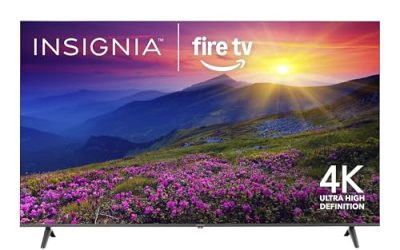
Insignia F50 55-Inch
The Class F50 Series pairs a 55-inch LED 4K UHD panel with Fire TV and an Alexa voice remote, and the title notes you can stream live TV without cable. It is the straightforward family-room pick for people who want 4K resolution and voice control at a modest tier.
- Strength: 4K UHD resolution at a size that fits most living rooms.
- Strength: Alexa voice remote fits easily into a home that already uses Alexa for lights or timers.
- Trade-off: the listing names a standard LED panel, so expect less punch than QLED or Mini LED designs.
Skip it if you want the most vivid color or plan to watch mostly in a bright room where panel brightness matters a great deal. Shoppers who care about a richer picture should look one step up the lineup.
Roku Select 55-Inch QLED
This 55-inch model steps up to a 4K (2160p) QLED panel while keeping Roku’s voice remote, Wi-Fi, and Bluetooth headphone mode. QLED suggests a color-focused upgrade over plain LED at the same screen size, making it appealing to shoppers who stream a lot of movies and sports.
- Strength: QLED labeling points to a more colorful image than an ordinary LED panel.
- Strength: Bluetooth headphone mode plus voice remote keeps daily use simple.
- Trade-off: it is still a mid-range feature set, and the title does not mention local dimming, HDR formats, or a high refresh rate, so confirm those on the spec sheet.
Skip it if you want a darker-room contrast showpiece or a gaming-focused screen with advertised 120 Hz support.
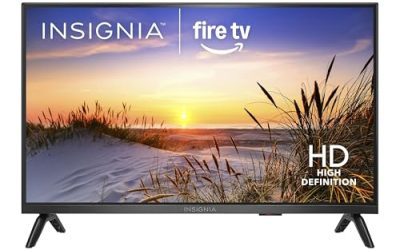
Insignia F40 40-Inch
The Class F40 Series is a 40-inch 1080P Full HD Direct LED set running Fire TV, with an Alexa voice remote and the title’s promise of free and live TV options. It suits small rooms, kitchens, and RV or cabin setups where a compact screen is the point.
- Strength: Direct LED backlighting is named in the title, a design that places lights behind the panel.
- Strength: Alexa voice remote and live TV access make it easy for less technical family members.
- Trade-off: Full HD resolution only, so it is not future-proof for 4K sources.
Skip it if you already prefer the Roku interface, want a bigger-room television with 4K resolution, or expect to connect a modern console and need advanced gaming features.
Samsung M70H 65-Inch
This is the premium step in the lineup: a 65-inch Class M70H Series with Mini LED, 4K resolution, a Mini LED Processor 4K, Pure Spectrum Color, and a Vision AI Companion. It is built for shoppers who care about contrast and want a large picture for movies, sports, and shared viewing.
- Strength: Mini LED backlighting is aimed at sharper contrast than conventional LED designs.
- Strength: a 65-inch screen gives a theater-like presence in a living room with room to spare.
- Trade-off: it carries the highest cost tier here and needs a large wall or stand with enough width and weight capacity.
Skip it if your room is small, your seat is only a few feet away, or you simply want a secondary television.
Which One Fits Your Situation
You are furnishing a guest bedroom
The Roku Select 40-Inch is the logical choice. Full HD looks sharp at that size, and Bluetooth headphone mode keeps late-night viewing quiet for a sleeping partner. Its size also leaves room on a dresser or wall bracket.
You want one affordable 4K screen for the family room
The Insignia F50 55-Inch delivers 4K UHD and an Alexa voice remote without stretching to premium cost. It is the easiest pick for a household that mostly streams shows and local channels and wants voice search through Alexa.
You care about color more than the lowest cost
The Roku Select 55-Inch QLED adds quantum dot color labeling at the same screen size as the Insignia, which is the cleaner upgrade path for movie and sports viewers. Choose it when the extra color matters more than saving a tier, and when the room gets mixed daytime and evening light.
You are planning a home theater night every weekend
The Samsung M70H 65-Inch with Mini LED is the one that fits a dedicated big-screen setup, especially in a dimmer room, where Mini LED contrast is easiest to notice. If a small spare room still needs a screen, pair this purchase with the Insignia F40 40-Inch for the bedroom instead.
Common Mistakes
- Choosing by a “top rated” label instead of confirming the panel type, size, and ports against the full spec sheet.
- Buying 4K for a small bedroom screen while skipping the larger size that would actually improve the experience.
- Ignoring HDMI port count and eARC support, then running out of inputs when a soundbar and console arrive.
- Assuming QLED and Mini LED mean the same thing; they describe different technologies.
- Forgetting wall-mount spacing and stand width, which often decide whether a 65-inch set fits at all.
Smart TV Privacy and Setup Tips
- Use a wired connection if you can. A short Ethernet run avoids dropouts, but only if the model has a LAN port. Otherwise place the router within sight of the screen.
- Check the viewing-data settings. Smart sets commonly offer an option for content recognition, which logs what appears on screen. Turn it off during setup if you prefer not to share it.
- Skip the demo store mode. Pick “home” mode when prompted, since the store preset runs the backlight at maximum.
- Update early. Install firmware as soon as the TV connects; platform updates often add apps and fix input problems.
- Limit pre-installed apps. Remove or hide those you will never open so the home screen stays quick to navigate.
Which One Should You Buy?
| If you… | Choose… |
|---|---|
| Need a small screen for a bedroom or guest room | Roku Select 40-Inch or Insignia F40 40-Inch |
| Want a 4K screen for a family room without a big jump in cost | Insignia F50 55-Inch |
| Care about color and plan to sit back from a larger screen | Roku Select 55-Inch QLED |
| Want the largest screen in the group for movie nights | Samsung M70H 65-Inch |
Who Should Skip These
A buyer who wants the deepest blacks for dark-room movies will be limited by the LED and QLED sets here; an OLED model is the usual step up, though outside this list. A serious console gamer who needs 120Hz should read the spec sheet for refresh rate rather than assume the sets here deliver it. And if privacy is a high concern, a basic display paired with a separate streaming device you control may be a better route than a built-in smart platform. Finally, anyone buying a 65-inch screen for a small apartment should remember that the viewing distance, not the spec list, decides how good it looks.
Specs and Terms Explained
QLED vs. Standard LED
Both use an LED backlight. A QLED set adds a quantum-dot layer that widens the range of colors the screen can show. It improves color, not contrast, so a dim room still exposes the limits of an LED panel.
Streaming Platform
A platform is the menu system that runs the apps. A simple one loads quickly and is easy for guests, while a more complex one may offer deeper settings. Choose based on who will hold the remote.
Why Resolution Alone Is Not the Whole Story
A 4K label tells you the pixel count, not how well the set handles motion, glare, or off-angle viewing. On a 40-inch screen viewed from a normal seat, the difference between 1080p and 4K is small, so spend extra on 4K only when the screen is large or you sit fairly close.
Related guides
- Sony Wh-1000Xm5 Vs Bose Quietcomfort Ultra Headphones
- Carbon Fiber Folding Electric Wheelchairs
- Bose Quietcomfort Ultra Vs Bose 700 Headphones
Frequently Asked Questions
Is a 1080p smart TV still worth buying?
Yes, for screens around 32 to 40 inches in bedrooms or kitchens. At those sizes and distances, extra resolution is hard to notice, and the saved budget can go toward a larger living room set.
What is the difference between QLED and Mini LED?
QLED adds a quantum dot layer to improve color. Mini LED shrinks the backlight elements so the television can control brightness across more zones. They can be combined, so read the full specs.
Do I need a soundbar with these televisions?
Thin panels leave little room for large speakers, so many buyers add a soundbar. Look for an eARC-capable HDMI port to connect one with the fewest cables.
Which smart platform is easier to use?
Both are built around a simple home screen and voice remote. If you use Alexa devices, Fire TV fits naturally; if you prefer a neutral streaming-first layout, Roku is the common choice.
More from Amazon
Programs that pair well with the guide above. Offers and eligibility are set by Amazon and may change.
Free shipping on eligible items, Prime Video and more. Eligible new members can start with a free trial.
Start a Prime free trialAudiobooks and podcasts to listen to on the go. Eligible new members can start with a free trial.
Try Audible freeAd-free music streaming. Eligible new subscribers can start with a free trial.
Try Music Unlimited freeA free business account with business pricing and bulk-buying tools for work, shop or home office.
Create a business accountAs an Amazon Associate we earn from qualifying purchases.