
Key takeaways
- Top pick: the Bambu Lab P1S Combo at $549. It balances enclosed printing, a proven multi-color system, and a mature ecosystem at a price that is hard to beat for anyone who will actually use the AMS. Budget pick: the FLASHFORGE Adventurer 5M at $249.…
A 3D printer is one of those purchases where the spec sheet tells you almost nothing about whether the machine will actually deliver. Every manufacturer lists a top speed, a build volume, and an auto-leveling feature, yet owners report wildly different experiences with the same model on paper. The difference between a good printer and a frustrating one in this category comes down to three things: whether the advertised multi-color or multi-material system actually works without hours of manual intervention, whether the claimed top speed translates into consistent first-layer adhesion and surface quality, and whether the firmware and app ecosystem get updated over time rather than abandoned.
That is the concrete problem this roundup addresses. We compared the published specifications, current pricing, and aggregated owner feedback across eight machines that appear at the top of buyer searches for 3d printer reviews in 2026. The list spans from a sub-$200 starter unit designed for children to a $769 enclosed multi-color system aimed at production-minded hobbyists. The gap between these categories matters more than most buyers realize, and choosing the wrong tier costs either money or months of patience.
Our top picks





As an Amazon Associate we earn from qualifying purchases at no extra cost to you. Ratings are shown as listed on Amazon.
Quick Picks
| Product | Best for | Price |
|---|---|---|
| Bambu Lab P1S Combo | Multi-color printing without assembly headaches | $549 |
| FLASHFORGE Adventurer 5M | Speed-focused CoreXY on a tight budget | $249 |
| Bambu Lab P2S Combo | Advanced multi-color with larger workflow ambitions | $769 |
| Bambu Lab A1 | Beginners and families wanting a zero-effort start | $299.99 |
| Bambu Lab P1S | Single-material enclosed printing at moderate cost | $399 |
| 5M 3D Printer with Touchscreen | Owners who prefer direct machine control over app reliance | n/a |
| FLASHFORGE AD5X | Budget multi-color with high-speed CoreXY mechanics | $349 |
| Entina Tina2C | Kids and STEM classrooms needing a tiny, safe footprint | $199.99 |
How We Picked
We filtered these eight machines using four criteria drawn from what separates a satisfying long-term ownership experience from buyer’s remorse. First, build and firmware quality relative to price: CoreXY metal-framed machines consistently outperform cheaper belt-driven units in dimensional accuracy at high speed, and enclosed chambers matter for engineering filaments. Second, real-world multi-color or multi-material reliability: systems that require frequent purging or suffer from color-bleed waste filament and patience. Third, ecosystem maturity: the Bambu Lab and FLASHFORGE platforms publish regular firmware updates and maintain active community model libraries, while smaller brands risk stagnation. Fourth, suitability for the stated audience: a printer marketed to beginners that requires nozzle swaps mid-print fails its own promise.
The 8 Best 3D Printer Reviews in 2026
Bambu Lab P1S Combo
The P1S Combo pairs an enclosed CoreXY FDM machine with the AMS multi-color system, letting users print four-color objects without manual filament swaps. It suits makers who want to produce colorful figurines, labels, or prototypes in a single session without learning advanced slicer tuning. The enclosure handles ABS and ASA without warping, and owner feedback consistently highlights reliable AMS feeding with minimal purging waste. The primary con is the bundled price: buyers who only need single-color printing pay a premium for the AMS they may never use. Skip this unit if your projects are purely functional parts in one material, or if your budget is under $400.
FLASHFORGE Adventurer 5M
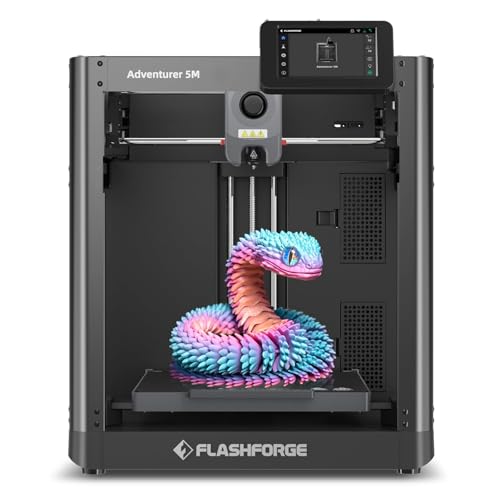
At $249, the Adventurer 5M delivers a CoreXY all-metal frame, fully auto-leveling, and a top speed of 600 mm/s that most competitors charge double to match. It targets experienced hobbyists who already own a decent slicer setup and want raw throughput for batch prints. The 280-degree direct extruder with a 3S detachable nozzle simplifies material changes, and the 220x220x220 mm build volume covers most common projects. The con: the machine is open-frame, so it struggles with warping-prone filaments like ABS without a DIY enclosure. Skip it if your primary need is engineering materials or quiet office placement.
Bambu Lab P2S Combo
The P2S Combo is the most capable multi-color system on this list, pairing an upgraded enclosed frame with the AMS 2 Pro. It serves users who treat printing as a small production line: consistent color accuracy across dozens of prints, higher-temperature material tolerance, and a refined workflow that minimizes babysitting. Owner reviews praise the noticeable improvement in color-change precision over the P1S generation. The con is straightforward: at $769, it is the priciest entry here, and its advantages over the $549 P1S Combo matter mainly for volume users or those printing in specialty filaments. Skip it unless you genuinely need the incremental gains or plan to run long automated batches.
Bambu Lab A1
The A1 is designed around a single promise: it works out of the box with no assembly, no calibration ceremony, and no troubleshooting forum dives. It is the right choice for families introducing children to additive manufacturing, or for adults who want a reliable machine without a learning curve. The bed-slinger architecture, while not as fast at extreme speeds, keeps the price under $300 and simplifies maintenance. A con: the open-frame design and bed-slinger motion limit practical top speed and make it less suitable for tall, delicate prints. Skip it if you need enclosed ABS printing or want the highest layer count per hour on complex geometries.
Bambu Lab P1S (Standalone)
Without the AMS, the P1S is a straightforward enclosed CoreXY printer at $399 that excels at single-material functional parts. It suits buyers who want engineering-filament capability—nylon, PC, ABS—without paying for a multi-color system they have no use for. Owners report quiet operation and consistent dimensional results across thousands of hours of community feedback. The con: the price sits awkwardly close to the Combo version, and standalone buyers later upgrading to multi-color face a separate AMS purchase at full cost. Skip it if you have any interest whatsoever in color work; the Combo math becomes compelling at this tier.
5M 3D Printer with Touchscreen
This variant of the FLASHFORGE 5M line replaces app-and-slicer dependence with a direct touchscreen interface on the machine itself. It appeals to makers in shared spaces—hackerspaces, workshops, classrooms—where users need to start a print without opening a computer or configuring a phone connection. The CoreXY mechanics and speed class carry over from the standard 5M platform. The con: pricing is listed as n/a, which often signals regional availability gaps or bundling changes that complicate direct comparison with the base $249 model. Skip it if you already have a smooth slicer-to-machine workflow and see no value in onboard control.
FLASHFORGE AD5X
The AD5X brings CoreXY 600 mm/s mechanics and a 300-degree direct-drive extruder into FLASHFORGE’s multi-color offering at $349, undercutting Bambu Lab’s equivalent by over $200. It targets users who want four-color output on a budget and already trust the FLASHFORGE ecosystem for firmware support and spare parts. The 220x220x220 mm build volume and 1-click auto-leveling keep the setup process brief. The con: multi-color systems at this price point require more frequent purging, and long-term owner feedback on color-change accuracy trails Bambu Lab’s AMS platform. Skip it if you demand tight color tolerances for production work rather than hobby-level variety.
Entina Tina2C
The Tina2C is built for a child’s desk or a K-12 STEM cart: fully assembled, startable in about eight minutes, and controlled through a kid-friendly app with a library of over 3000 ready-to-print models. The 20-plus creative DIY modules let students customize prints without modeling from scratch. Auto-leveling removes the single biggest failure point for young operators. The con: the small build volume and simplified mechanics mean it cannot handle complex, large, or engineering-material projects, and the ecosystem depth will feel limiting once a child progresses beyond basics. Skip it for any buyer over the age of twelve or for classroom programs that need durability across dozens of daily students.
Buying Guide
Enclosed vs. Open Frame
The chamber is the most underappreciated spec. An enclosed printer traps heat, which prevents warping on ABS, ASA, nylon, and polycarbonate, and it contains fumes—critical for home or classroom placement. Open-frame machines are cheaper, easier to access for troubleshooting, and perfectly adequate for PLA and PETG. If your project list includes any high-temperature filament, the enclosure is non-negotiable and typically adds $100 or more to the price.
CoreXY vs. Bed-Slinger Kinematics
CoreXY designs fix the bed in place and move the print head on a gantry, allowing higher accelerations without ringing artifacts on tall prints. Bed-slingers move the entire bed along one axis, which lowers cost and simplifies leveling but introduces more vibration at speed. For buyers printing under 200 mm per axis with common filaments, a bed-slinger is fine. For batch production or tall, thin geometries, CoreXY is worth the premium.
Multi-Color System Maturity
Not all multi-color implementations are equal. The key questions are: how much filament is purged between color changes, whether the system supports independent filament spools or shares a single feed path, and how often it jams during a twelve-hour print. Bambu Lab’s AMS platform has accumulated the most owner-reported uptime data and offers the smoothest purge-to-color accuracy. FLASHFORGE’s equivalent is improving but still generates more waste per color swap. If multi-color is your primary goal, system maturity matters more than raw speed.
Our Verdict
Top pick: the Bambu Lab P1S Combo at $549. It balances enclosed printing, a proven multi-color system, and a mature ecosystem at a price that is hard to beat for anyone who will actually use the AMS. Budget pick: the FLASHFORGE Adventurer 5M at $249. You get CoreXY speed and a metal frame for less than half the price of the top tier, provided PLA and PETG cover your material needs. The condition that shifts the answer: if multi-color is irrelevant and you need engineering-filament capability, the standalone Bambu Lab P1S at $399 is the smarter purchase since it avoids paying for an AMS you will never load.
FAQ
Do I need a 3D printer with multi-color capability?
Only if you plan to print objects requiring more than one material or color in a single run, such as labeled prototypes, colorful figurines, or functional parts with embedded flexible segments. Most practical prints—brackets, enclosures, tools—work perfectly well in a single filament and save you the AMS premium and purge waste.
Is auto-leveling actually reliable on these machines?
All eight printers on this list include some form of automatic bed probing, and owner feedback across the category treats it as a solved problem for initial setup. The remaining challenge is adhesion to surfaces like textured PEI or spring-steel sheets, which is a material choice rather than a leveling failure.
How much does ongoing filament cost compare between these models?
Single-material machines consume standard 1 kg spools at the going rate regardless of printer brand. Multi-color systems add purge waste—roughly ten to twenty percent extra filament consumption depending on color-change frequency—so budget more per project when running four-color jobs on either the AMS or FLASHFORGE equivalent.
Can a beginner safely start with a $500 printer, or should they begin cheaper?
A beginner can absolutely start at any tier on this list. The risk with cheaper machines is not safety but frustration: poor documentation, slow support, and manual calibration can discourage continued use before skill develops. The Bambu Lab A1 at $299.99 is specifically engineered to remove that frustration layer without sacrificing print quality.


