The Lorex 4K Spotlight Indoor/Outdoor Wi-Fi security camera is the best Lorex pick for most homes, because it combines an 8 MP sensor, a 140 degree view, color night vision and person, vehicle, animal and package detection in one unit. If you want round-the-clock recording across several cameras, a wired Lorex system with a recorder is the more reliable route. The right choice depends mostly on how many cameras you need and whether you can run cable.
Our top picks


As an Amazon Associate we earn from qualifying purchases at no extra cost to you.
Quick comparison of Lorex camera types
| Pick | Best for | Key specs | Price range |
|---|---|---|---|
| 4K Spotlight Indoor/Outdoor Wi-Fi (W881AAD) | Single camera, easy setup | 8 MP, 140 degree view, IP65, 32 GB microSD included, 2.4/5 GHz Wi-Fi | Mid |
| 4K Dual-Lens Outdoor | Wide yard coverage | Two lenses, IP67 outdoor rating per Security.org | Upper-mid |
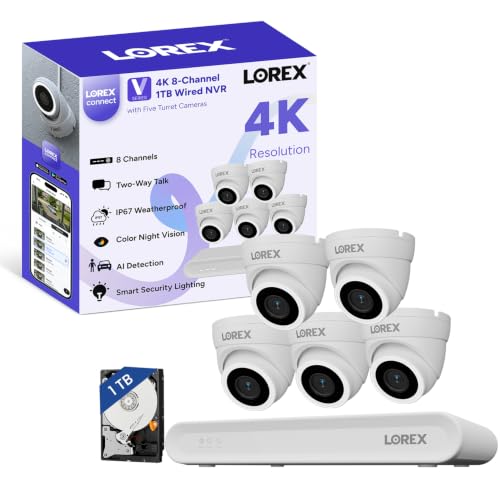
| Wired 4K system with recorder (NVR/DVR) | Whole-property coverage | Continuous recording to a local hard drive, PoE or coax options | Mid to premium |
| Wi-Fi add-on camera for a Lorex Fusion system | Extending an existing system | Connects wirelessly to a compatible Fusion recorder | Mid |
Best overall: Lorex 4K Spotlight Indoor/Outdoor Wi-Fi Camera
Per Lorex’s spec page, the W881AAD uses an 8 MP sensor and a 140 degree field of view, with Smart Security Lighting that can show color and adjustable light colors. Smart Motion Detection Plus recognizes people, vehicles, animals and packages, and the camera adds two-way talk and a siren. It carries an IP65 rating and an operating range of about minus 20 to 55 degrees Celsius, so it handles cold winters and hot porches.
It works with Alexa and Google Assistant according to Lorex, though Consumer Reports notes it does not work with Apple Home. The trade-offs: although it is called wireless, it is not battery-powered. It needs an AC outlet or an optional solar panel, and cloud storage beyond the included microSD card is a paid plan.
Best for wide coverage: Lorex 4K Dual-Lens Outdoor Camera
Two lenses in a single housing cover a driveway and a front walkway without needing two mounting points. Security.org highlighted its video quality and an outdoor rating that covers harsh temperatures. The trade-off is cost and bulk, and you still depend on a strong Wi-Fi signal where the camera mounts, so measure signal strength with a phone before drilling.
Best for reliability: a wired Lorex system with a recorder
Wired kits record continuously to a local drive and keep working when the internet drops. They suit anyone covering a large property or small business, and the cameras can draw power over one cable if you choose a PoE setup. The trade-offs are installation effort (running cable through walls or conduit) and the need to size the hard drive. As a worked example, if each camera records at about 4 Mbps, one camera writes roughly 43 GB per day, so 8 cameras need around 340 GB per day and a 4 TB drive holds about 12 days. Use the recorder’s own calculator and choose the retention you want.
Best for expanding a system: Wi-Fi camera on Lorex Fusion
Lorex Fusion lets a compatible Wi-Fi camera connect wirelessly to a Fusion recorder so you can cover a detached garage or shed where cable is impractical. The trade-off is that range and compatibility vary by recorder model, so confirm the exact recorder and camera pairing on Lorex’s compatibility page.
How to choose: a simple decision guide
| If you have | Choose |
|---|---|
| One or two entrances, renting or no cable access | Wi-Fi Spotlight camera |
| Large yard or several outbuildings | Wired system plus a few Fusion Wi-Fi cameras |
| Poor internet upload speed | Wired system with local recording |
| Strong smart-home integration needs | Check Alexa/Google support for the exact model first |
Resolution matters less than placement. Mount cameras 8 to 10 feet high, angled slightly down, and avoid pointing at a bright sky or reflective glass.
Ownership realities
- Subscriptions: Lorex offers cloud plans for clip history, but local microSD or recorder storage means a camera still works without one.
- Privacy: Consumer Reports noted two-factor authentication is not offered on the Spotlight camera’s app. Use a unique password and keep firmware updated.
- Weatherproofing: IP65 handles rain and water jets; keep cables and connectors out of standing water.
- Night lighting: Built-in spotlights can bother neighbors, so set activity zones and schedules.
Setup steps that prevent most problems
- Test the signal first. Stand where the camera will mount and check that your phone gets a solid Wi-Fi connection on the same band. A weak signal causes dropped clips and slow alerts, and no camera setting fixes that. If the signal is poor, add a mesh node or choose a wired camera.
- Plan the power path. The Spotlight model needs an outlet or the optional solar panel. Run a weatherproof extension only if the connector is protected from rain, because exposed plugs are a common failure point.
- Mount at the right height and angle. Eight to 10 feet puts faces in frame while keeping the camera out of easy reach. Angle it slightly down so the field of view includes the ground near the door.
- Set activity zones. Mask the street, a neighbor’s window and swaying trees so motion alerts are meaningful. Fewer false alerts mean you actually read the real ones.
- Choose notification types. Person and package alerts are usually enough. Turning on every vehicle and animal alert in a busy area quickly becomes noise.
- Format and check the microSD card. Confirm the camera is recording events, then review one clip to confirm it captured the full approach and not just the end of it.
Wi-Fi camera versus wired system: ownership comparison
| Factor | Wi-Fi Spotlight camera | Wired system with recorder |
|---|---|---|
| Install time per camera | About 15 to 30 minutes | 1 to 3 hours with cable runs |
| Works during internet outage | Records to microSD only | Yes, to local drive |
| Storage limit | microSD up to 256 GB | Hard drive, often multiple TB |
| Best number of cameras | 1 to 4 | 4 to 16 |
| Main weakness | Wi-Fi dependence | Cabling effort |
Common mistakes to avoid
- Aiming the camera through a window, where glare and IR reflection ruin night footage.
- Mounting directly over a bright porch light, which causes washed-out images.
- Skipping firmware updates, which often include security fixes.
- Assuming a wireless camera needs no power cable.
- Buying more resolution than your storage can hold, since 4K clips fill cards quickly.
Frequently Asked Questions
Are Lorex cameras good for home security?
Lorex is an established brand with both Wi-Fi and wired lines, and Consumer Reports lists its 4K Spotlight camera among its best outdoor cameras of 2026. Reliability depends on Wi-Fi strength and correct placement.
Do Lorex cameras need a monthly fee?
No fee is required for basic operation, since many models record to microSD or a local recorder. Cloud storage and some extended features are optional paid plans.
Are Lorex cameras battery-powered?
The Wi-Fi Spotlight model plugs into AC power or an optional solar panel. If you need true battery operation, check the specific model’s power listing before buying.
Can I use a Lorex camera without Wi-Fi?
Wired Lorex systems record to a local recorder without internet. A Wi-Fi camera needs a network connection for setup and remote viewing, though microSD recording can continue during short outages.
How long does a Lorex camera last?
Well-installed outdoor cameras commonly last several years, but lifespan depends on weather exposure, power quality and firmware support. Check the warranty period for the exact model.
More from Amazon
Programs that pair well with the guide above. Offers and eligibility are set by Amazon and may change.
Free shipping on eligible items, Prime Video and more. Eligible new members can start with a free trial.
Start a Prime free trialAudiobooks and podcasts to listen to on the go. Eligible new members can start with a free trial.
Try Audible freeAd-free music streaming. Eligible new subscribers can start with a free trial.
Try Music Unlimited freeA free business account with business pricing and bulk-buying tools for work, shop or home office.
Create a business accountAs an Amazon Associate we earn from qualifying purchases.