
Key takeaways
- Compare the best streaming sticks by published specs: 4K HDR, Dolby Vision, Wi-Fi 6E, voice remotes and storage, with a pick for every TV and setup.
The fastest way to make an older television feel new again is to plug a streaming stick into a spare HDMI port. The five sticks below cover every major platform — Fire TV, Roku, Google TV and Android TV — and all of them hide behind the TV, run from a compact voice remote and stream in HD or 4K HDR. The right pick depends on three things: the resolution your TV supports, the Wi-Fi standard your router broadcasts, and which voice assistant and app store your household already uses. This guide compares the current models on published specifications only, so you can match a stick to your screen and network without guessing.
As an Amazon Associate, we earn from qualifying purchases.
Quick Answer
For most people, the Amazon Fire TV Stick 4K Max (2nd Gen) is the strongest all-round streaming stick, with a 2.0 GHz quad-core processor, 16GB of storage and Wi-Fi 6E support. Roku fans should pick the Roku Streaming Stick 4K for its simple interface and long-range Wi-Fi receiver, while the Chromecast with Google TV (HD) suits 1080p televisions.
How to Choose
Match the stick to your TV’s resolution. A 4K stick only delivers 4K when the television behind it has a 4K panel, so owners of 1080p sets lose nothing by choosing an HD model such as the Chromecast with Google TV (HD). If you plan to keep the TV for years, a 4K stick is the safer long-term buy because it can downscale cleanly to HD today and unlock full resolution after a TV upgrade.
Check the HDR formats, not just the resolution. Dolby Vision is the premium HDR format used by much of the Netflix and Disney Plus catalogue, and every 4K stick in this guide supports it alongside HDR10 and HDR10 Plus. HD models top out at HDR10 and HDR10 Plus, which still improves contrast on compatible televisions.
Wi-Fi generation matters in busy homes. Wi-Fi 6E adds the 6 GHz band, which stays uncongested in apartment buildings, while Wi-Fi 6 improves efficiency on crowded 5 GHz networks. Older Wi-Fi 5 sticks still stream 4K reliably when the router is in the same room, but a long-range receiver or a newer radio helps when the TV sits far from the router.
Pick a platform you will enjoy using. Fire TV leans into Alexa and Amazon services, Roku offers the most neutral app-first home screen, and Google TV builds recommendations around your Google account with Chromecast casting built in. The TiVo Stream 4K takes a different route, merging streaming apps and live TV into one unified guide.
Storage fills up faster than expected. Streaming apps, channel data and cached artwork grow over time. A stick with 16GB of storage needs far less housekeeping than an 8GB model, and expandable storage over USB is a useful escape hatch for households that install many apps.
The 5 Best Streaming Sticks
1. Amazon Fire TV Stick 4K Max (2nd Gen) — Best Overall

The Fire TV Stick 4K Max is Amazon’s flagship stick and the most powerful model in this roundup. Its 2.0 GHz quad-core processor is the fastest chip fitted to any of these five devices, and the 16GB of storage doubles what the standard Fire TV Stick 4K offers. Wi-Fi 6E tri-band support keeps streams stable on modern routers, and the Fire TV Ambient Experience turns an idle television into a display for artwork and widgets. The included Alexa Voice Remote Enhanced adds backlit buttons and a channel guide button.
Specs:
- Resolution: up to 4K at 60 fps
- HDR: Dolby Vision, HDR10, HDR10 Plus, HLG
- Processor: quad-core 2.0 GHz
- Storage: 16GB
- Wi-Fi: Wi-Fi 6E tri-band (2.4 GHz, 5 GHz, 6 GHz)
- Audio: Dolby Atmos support
- Remote: Alexa Voice Remote Enhanced
- Extras: Fire TV Ambient Experience, Bluetooth 5.2
2. Roku Streaming Stick 4K — Best for Simple, Neutral Menus
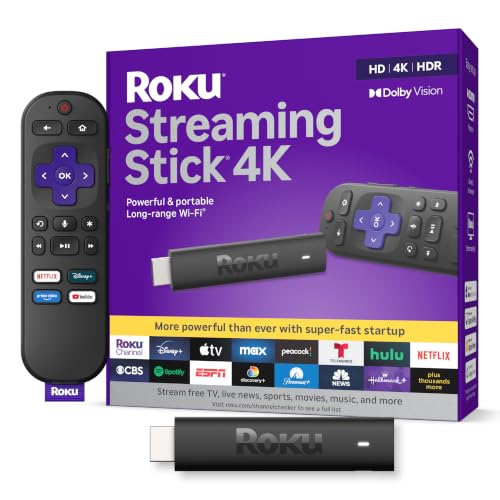
The Roku Streaming Stick 4K keeps the platform’s famously plain home screen: a grid of apps with no heavy recommendation layer. Its long-range Wi-Fi receiver is the standout hardware feature, using a receiver built into the power cable to hold a steadier connection at distance than a standard stick radio. Dolby Vision and HDR10 Plus support match the Fire TV Max on picture formats, and the voice remote controls TV power and volume so most viewers can put the original remote away. AirPlay support makes it the easiest stick here for iPhone households.
Specs:
- Resolution: up to 4K at 60 fps
- HDR: Dolby Vision, HDR10, HDR10 Plus, HLG
- Storage: channel and app storage managed by Roku OS
- Wi-Fi: dual-band with long-range receiver
- Audio: DTS Digital Surround and Dolby Atmos passthrough
- Remote: Roku Voice Remote with TV controls
- Extras: Apple AirPlay, works with Alexa, Google Assistant and HomeKit
3. Amazon Fire TV Stick 4K (2nd Gen) — Best Mid-Range Fire TV
Sold today under the Fire TV Stick 4K Plus name, this is the same second-generation Fire TV Stick 4K hardware: a 1.7 GHz quad-core processor, 8GB of storage and Wi-Fi 6. It streams in 4K with Dolby Vision and Dolby Atmos, and it supports cloud gaming through the Xbox app and Amazon Luna, which the Max also offers. For televisions in bedrooms and second rooms, it delivers nearly the same viewing experience as the Max; the trade-offs are slower app launches, half the storage and no Wi-Fi 6E band.
Specs:
- Resolution: up to 4K at 60 fps
- HDR: Dolby Vision, HDR10, HDR10 Plus, HLG
- Processor: quad-core 1.7 GHz
- Storage: 8GB
- Wi-Fi: Wi-Fi 6 dual-band (2.4 GHz and 5 GHz)
- Audio: Dolby Atmos support
- Remote: Alexa Voice Remote
- Extras: Xbox cloud gaming and Amazon Luna support
4. TiVo Stream 4K — Best for Merging Apps and Live TV
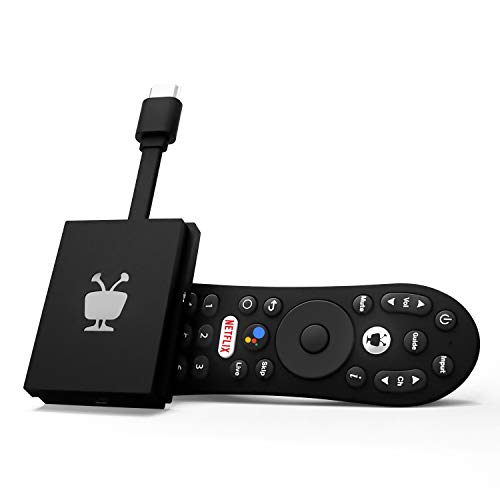
The TiVo Stream 4K runs Android TV but replaces the standard home screen with TiVo’s own guide, which pulls streaming apps and live TV into a single searchable interface with one watchlist across services. Hardware is older than the Fire TV models — an Amlogic S905Y2 chip with 2GB of RAM — yet it still outputs 4K with Dolby Vision, and its USB-C port allows storage expansion that the other sticks here lack. Chromecast is built in, and the voice remote uses Google Assistant.
Specs:
- Resolution: up to 4K at 60 fps
- HDR: Dolby Vision, HDR10, HDR10 Plus
- Processor: Amlogic S905Y2
- Memory and storage: 2GB RAM, 8GB storage
- Wi-Fi: 802.11ac dual-band MIMO
- Audio: Dolby Atmos and DTS support
- Remote: TiVo voice remote with Google Assistant
- Extras: USB-C port for storage expansion, Chromecast built-in
5. Chromecast with Google TV (HD) — Best for 1080p Televisions

Google’s HD stick is the honest budget pick for the millions of 1080p televisions still in daily use. It runs the full Google TV interface with personalised recommendations, supports HDR10 and HDR10 Plus at 1080p, and includes a voice remote with Google Assistant — features the original cast-only Chromecast never had. Google has retired the 4K version of this dongle in favour of a larger set-top Streamer, so HD is the remaining stick-format Chromecast; on a 1080p panel it gives up nothing in picture quality.
Specs:
- Resolution: up to 1080p HDR at 60 fps
- HDR: HDR10, HDR10 Plus, HLG
- Storage: 8GB
- Wi-Fi: 802.11ac dual-band (2.4 GHz and 5 GHz)
- Audio: Dolby Digital, Dolby Digital Plus, Dolby Atmos passthrough
- Remote: Chromecast Voice Remote with Google Assistant
- Extras: Chromecast built-in, Google TV interface
Who Should Skip a Streaming Stick
Skip the stick format entirely if your television sits in a cabinet with poor Wi-Fi reception and you need a wired Ethernet connection; a set-top box with a network port will serve you better. Gamers who want local game installs, and households that rely on niche apps outside the major stores, should also look at full streaming boxes instead. Finally, if your smart TV is recent and its built-in apps still receive updates, a stick adds a second remote without adding much capability — wait until the built-in platform loses support.
Frequently Asked Questions
Will a 4K streaming stick work on a 1080p TV?
Yes. Every 4K stick in this guide detects the television’s resolution over HDMI and outputs 1080p on an HD set, then switches to 4K automatically if you later connect it to a 4K television. Menus and apps behave exactly the same; only the output resolution changes.
Do streaming sticks need a subscription?
No subscription is required to use the device itself. Free services and ad-supported live channels are included on every platform here, while paid services such as Netflix, Disney Plus and Prime Video need their own subscriptions, exactly as they do on a smart TV.
Can a streaming stick replace a cable box?
For most households, yes, provided your channels are available through streaming apps or a live TV streaming service. The TiVo Stream 4K is built specifically around merging live TV and apps into one guide, while Fire TV and Roku both surface live channels on their home screens.
How long do streaming sticks stay useful?
A stick typically remains useful for four to six years, until app updates outgrow its processor or storage. Choosing a faster chip and more storage — the combination the Fire TV Stick 4K Max offers — is the simplest way to stretch that lifespan, and keeping a few gigabytes free helps any model stay responsive.
Final Verdict
Buy the Fire TV Stick 4K Max (2nd Gen) if you want the fastest stick with the longest useful life, or the Roku Streaming Stick 4K if you prefer a neutral interface and stronger reception at range. The Fire TV Stick 4K covers second rooms well, the TiVo Stream 4K suits viewers who still watch live TV, and the Chromecast with Google TV (HD) remains the sensible finishing touch for a 1080p set.
More from Amazon
Programs that pair well with the guide above. Offers and eligibility are set by Amazon and may change.
Free shipping on eligible items, Prime Video and more. Eligible new members can start with a free trial.
Start a Prime free trialAudiobooks and podcasts to listen to on the go. Eligible new members can start with a free trial.
Try Audible freeAd-free music streaming. Eligible new subscribers can start with a free trial.
Try Music Unlimited freeA free business account with business pricing and bulk-buying tools for work, shop or home office.
Create a business accountAs an Amazon Associate we earn from qualifying purchases.



