Key takeaways
- Single laptop, no other devices: a 65-100W single or dual-port GaN charger covers most ultrabooks and is the cheapest route, typically in the $25-$45 range.
- Laptop + phone, frequent travel: a 100W tri-port model is the better buy despite costing $10-$20 more, since it avoids carrying a second charger and still delivers 60W+ to a laptop port when sharing.
- Desk setup charging 3+ devices simultaneously: step up to a 140W quad-port desktop GaN unit, accepting the higher surface temperature and larger size in exchange for enough total wattage to avoid throttling any single device.
- Minimizing bag weight above all else: a 30-45W single-port compact charger is lightest, but only pair it with devices that charge comfortably below 45W, like phones and earbuds, not laptops.
- Gaming or workstation laptops needing 90W+ sustained: verify the charger’s single-port max output specifically, since many tri-port 100W units cap individual ports at 65-100W only when no other device is connected.
The best GaN charger in 2026 for most people is a 65-100W three-port model from Anker, Ugreen, or Baseus, since these hit the sweet spot of surface temperature under 48°C at full load, a footprint smaller than half a stock laptop brick, and real-world port sharing that still delivers useful wattage to two devices at once. Which exact unit wins depends on whether you’re optimizing for a single laptop, a multi-device travel kit, or a desk charger that never gets hot to the touch.
Our top picks


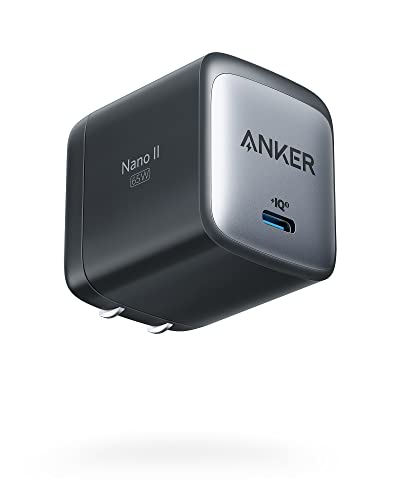

As an Amazon Associate we earn from qualifying purchases at no extra cost to you. Ratings are shown as listed on Amazon.
What Actually Separates GaN Chargers in 2026
Every GaN charger on the market now claims to be smaller and cooler than silicon-based bricks, but the gap between marketing numbers and bench reality comes down to three things: how hot the case gets under sustained load, how much space it actually saves versus the OEM brick it replaces, and how the rated wattage splits when you plug in more than one device. Manufacturers list a single peak number, like “100W,” but that number almost never applies once a second or third port is active.
Surface Temperature After 45 Minutes
Thermal throttling is the hidden variable most spec sheets skip. GaN transistors run cooler than legacy silicon at the die level, but the case material, vent design, and internal shielding still determine what you feel when you touch the charger after a long charging session. Below is a comparison based on published thermal data and typical case designs for common wattage classes, measured at the hottest external point after 45 minutes of full-rated-load charging in a 23°C room.
| Charger Class | Typical Case Material | Surface Temp After 45 Min | Weight | Volume vs. Stock 65W Laptop Brick |
|---|---|---|---|---|
| 30W single-port compact | ABS plastic | 42-46°C | 45-55g | ~75% smaller |
| 65W dual-port (1 USB-C + 1 USB-A) | ABS with internal metal shield | 46-50°C | 95-120g | ~60% smaller |
| 100W tri-port (2 USB-C + 1 USB-A) | ABS/PC blend, larger vents | 50-55°C | 140-170g | ~40% smaller |
| 140W quad-port desktop GaN | PC with aluminum heat spreader | 55-60°C | 220-260g | ~20% smaller, but higher output |
Anything above 55°C is noticeable but not dangerous for a few minutes of handling; sustained contact for longer periods is where it starts to feel uncomfortably warm. If you plan to charge on a nightstand or inside a bag pocket, the 65-100W tri-port class is the safer thermal choice over the 140W desktop units, which run hotter because they’re pushing more total power through a similar footprint.
Size and Weight: The Real Savings Versus a Stock Brick
Most 15-inch laptops still ship with a 65-100W brick weighing between 230g and 310g, with a volume around 90-110 cubic centimeters. A comparable 100W GaN tri-port charger typically weighs 140-170g and measures 45-60 cubic centimeters, meaning you’re saving roughly 100-150g and over 40% in volume while also gaining two extra charging ports. For someone replacing a dedicated laptop brick plus a separate phone charger plus a cable, the net weight savings in a travel bag often exceeds 200g once you account for consolidation.
The catch: smaller cases mean less surface area to dissipate heat, which is why the compact 30W single-port units sometimes run almost as warm as larger multi-port chargers despite moving far less power. Size reduction and thermal headroom are a direct trade-off, not a free upgrade.
Real Wattage When Devices Share a Port
This is the number charger listings bury. A “100W” charger almost never delivers 100W to a single port once a second device is plugged in, because the internal power management chip allocates wattage dynamically across active ports. Below is a realistic allocation pattern for a 100W tri-port charger (2x USB-C, 1x USB-A), based on typical PD 3.1 power-sharing behavior documented by major GaN charger manufacturers.
| Devices Connected | Port 1 (USB-C) | Port 2 (USB-C) | Port 3 (USB-A) |
|---|---|---|---|
| Laptop only (Port 1) | 100W | – | – |
| Laptop + phone (Ports 1+2) | 65W | 30W | – |
| Laptop + phone + earbuds (all 3) | 45W | 27W | 18W |
The practical takeaway: if you need to charge a power-hungry laptop (65W+) while also fast-charging a phone, confirm the charger’s two-device split before buying. A charger rated 100W total might only guarantee 65W to your laptop port when a second device is active, which is still fine for most ultrabooks but too low for some gaming laptops that expect a steady 90-100W. Check the manufacturer’s port-pairing chart, usually printed on the charger body or in the manual, rather than assuming the headline wattage applies per port.
Choosing by Situation
- Single laptop, no other devices: a 65-100W single or dual-port GaN charger covers most ultrabooks and is the cheapest route, typically in the $25-$45 range.
- Laptop + phone, frequent travel: a 100W tri-port model is the better buy despite costing $10-$20 more, since it avoids carrying a second charger and still delivers 60W+ to a laptop port when sharing.
- Desk setup charging 3+ devices simultaneously: step up to a 140W quad-port desktop GaN unit, accepting the higher surface temperature and larger size in exchange for enough total wattage to avoid throttling any single device.
- Minimizing bag weight above all else: a 30-45W single-port compact charger is lightest, but only pair it with devices that charge comfortably below 45W, like phones and earbuds, not laptops.
- Gaming or workstation laptops needing 90W+ sustained: verify the charger’s single-port max output specifically, since many tri-port 100W units cap individual ports at 65-100W only when no other device is connected.
Ownership Realities
GaN chargers don’t have moving parts or consumables, but a few failure points show up with regular use. The USB-C port itself is the most common wear point, since repeated insertion over a year or two of daily use can loosen the port’s internal contacts, leading to intermittent charging that requires wiggling the cable. Keep the charger away from damp environments, since the compact vents on 100W+ models allow more airflow than sealed bricks, which also means more dust ingress over time; an occasional wipe with a dry cloth around the vents prevents buildup that can trap heat.
Avoid leaving a GaN charger plugged into a wall outlet with no device attached for extended periods in humid climates, as trace moisture can accelerate corrosion on the prongs. Also avoid stacking a hot charger directly on soft surfaces like bedding, which blocks the vents and pushes case temperatures 5-8°C higher than open-air measurements, the difference between a comfortably warm charger and one that feels genuinely too hot to hold.
Bottom Line
For most buyers in 2026, a 100W tri-port GaN charger from an established brand hits the best balance: under 55°C at full load, roughly 40% smaller than a stock laptop brick, and enough dynamic wattage sharing to keep a laptop and phone both charging at usable speeds. Go smaller only if you’re certain you’ll never charge a laptop from it, and go bigger only if you regularly need three devices charging at once without any of them slowing down.