
Key takeaways
- Write small letters quickly to reveal lag and wobble.
- Draw diagonal lines and slow circles to expose calibration errors.
- Write near the screen edges to check palm rejection and edge accuracy.
The best E Ink tablet for most readers is the Kindle Scribe (2024), while the reMarkable Paper Pro is the better choice for a premium writing experience, the BOOX Note Air4 C for flexible apps and color, and the Kobo Elipsa 2E for library-friendly reading and annotation.
These tablets are not interchangeable. The right choice depends on whether you primarily read purchased books, mark up PDFs, write long notes, use Android apps, or want a distraction-free digital notebook. The comparison below focuses on the details that product listings often understate: writing latency, surface feel, stylus precision, front-light behavior, file handling, battery expectations, and software friction.
Our top picks


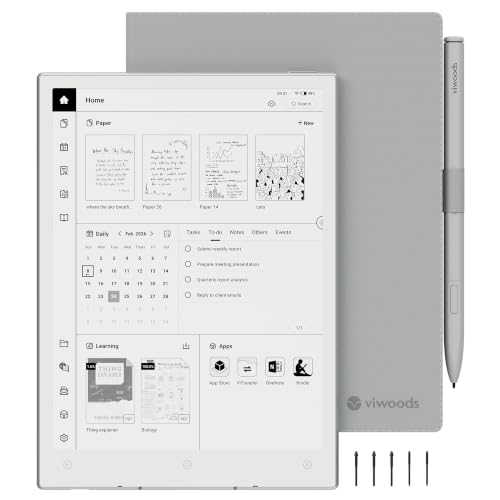

As an Amazon Associate we earn from qualifying purchases at no extra cost to you. Ratings are shown as listed on Amazon.
Best E Ink tablets at a glance
| Tablet | Screen and weight | Storage | Writing hardware | Best for |
|---|---|---|---|---|
| Kindle Scribe (2024) | 10.2-inch, 300 ppi, about 433 g | 16 GB, 32 GB, or 64 GB | Basic or Premium Pen; no charging | Kindle reading plus occasional notes |
| reMarkable Paper Pro | 11.8-inch color, 229 ppi, about 525 g | 64 GB | Marker or Marker Plus; pressure-sensitive | Focused handwriting and large PDFs |
| BOOX Note Air4 C | 10.3-inch color, 300 ppi monochrome, about 495 g | 64 GB | Wacom EMR-compatible stylus | Android apps, research, and mixed documents |
| Kobo Elipsa 2E | 10.3-inch, 227 ppi, about 390 g | 32 GB | Kobo Stylus 2; battery-powered | Ebooks, library borrowing, and annotations |
| Supernote Manta | 10.7-inch, 300 ppi, about 375 g | Removable microSD support | Replaceable ceramic nib; pressure-sensitive | Long-term handwritten notebooks |
Weight figures can vary slightly by region and configuration. Covers, pens, and screen protectors add noticeable bulk, particularly to the reMarkable Paper Pro and BOOX models.
Our top picks by situation
Best overall for reading and writing: Kindle Scribe
The Kindle Scribe is the simplest recommendation for someone who wants a large reading screen, excellent text sharpness, and a pen that is always ready. Its 300 ppi monochrome display makes novels and ordinary PDFs crisp, and the warm front light is useful at night. Battery life is typically measured in weeks rather than days, depending on reading, front-light brightness, and note-taking.
Writing latency is low enough for normal handwriting, though the experience feels more like a smooth glass tablet than a deeply textured paper notebook. The Premium Pen’s shortcut and eraser are convenient, and the pen does not need charging. The limitations are equally important: Kindle’s notebook tools are less flexible than dedicated handwriting systems, and PDF export, notebook conversion, and document transfer can require more steps than experienced note-takers expect.
Choose it when reading Kindle books is central. Do not choose it primarily for sophisticated linked notebooks, extensive cloud workflows, or color documents.
Best for a distraction-free notebook: reMarkable Paper Pro
The reMarkable Paper Pro is the most notebook-like option here. Its textured surface gives the stylus more resistance than the Kindle Scribe, which improves control for slow handwriting, diagrams, and sketching. Pen latency is low, and the pen tracks accurately across the large display without needing Bluetooth pairing.
Its color display and adjustable front light make highlighted PDFs and diagrams more useful than on a monochrome device. Color E Ink is less vivid and less responsive than an LCD, however, and color refresh can look grainier or slower than black-and-white text. The device is also relatively heavy once the keyboard or folio is added.
The software is intentionally limited. That is an advantage for people who want fewer notifications and fewer app decisions, but a disadvantage if you expect web browsing, Kindle applications, cloud storage services, or a full office suite. Some advanced features and cloud conveniences may depend on a Connect subscription, so include that recurring cost in your ownership calculation.
Best for apps and research: BOOX Note Air4 C
The BOOX Note Air4 C is the most capable general-purpose E Ink tablet in this group because it runs Android and supports a broad selection of reading, storage, and productivity applications. It is a strong fit for researchers who move between PDFs, web articles, note apps, and cloud drives.
Its front light, color layer, split-screen tools, and broad file compatibility are practical advantages. You can open common PDF, EPUB, DOCX, TXT, CBZ, and image files, although the result depends on the application used. Reflowable ebooks may display differently from app to app, and DRM-protected books can be more complicated than ordinary files.
The trade-off is a less focused interface. Notifications, app settings, synchronization choices, and occasional refresh artifacts all require management. Pen response is quick in the native note application, but a third-party Android app may feel slower or less consistent. Buy it for flexibility, not for the purest paper simulation.
Best for library reading: Kobo Elipsa 2E
The Kobo Elipsa 2E combines a large monochrome screen with Kobo’s reading ecosystem and OverDrive library integration in supported markets. Its warm front light is comfortable for evening reading, and the 10.3-inch panel gives PDFs more room than a conventional ebook reader.
Handwriting is adequate for annotations and basic notebooks, with good palm rejection when the software recognizes the intended writing mode. It is not as notebook-focused as the reMarkable or Supernote, and the 227 ppi display is less sharp than the Kindle Scribe’s 300 ppi panel. Kobo’s support for common ebook formats is helpful, but PDF layout remains dependent on the document itself.
Best for serious handwritten archives: Supernote Manta
The Supernote Manta is aimed at people who treat handwriting as a long-term information system. Its ceramic-nib pen is designed to reduce routine nib replacement, and the software emphasizes headings, keywords, links, and organization across notebooks. The removable storage is also useful for owners who want more control over their files.
The unusual ceramic nib should not be pressed aggressively against abrasive third-party screen films. The tablet’s minimal front-light approach may also matter: if you regularly write in dark rooms, a device with a built-in front light is more convenient. Supernote is strongest for structured notes, meeting records, and daily journaling rather than multimedia reading.
Writing latency, texture, and accuracy: what matters in practice
Writing latency is the delay between pen movement and the ink appearing. On current E Ink tablets, native note apps generally provide the best response. A low-latency pen can still feel slow if the device is rendering a complex PDF, using a third-party app, or refreshing a color layer. When comparing models, test three tasks rather than drawing a single line:
- Write small letters quickly to reveal lag and wobble.
- Draw diagonal lines and slow circles to expose calibration errors.
- Write near the screen edges to check palm rejection and edge accuracy.
Surface texture affects control more than headline latency. A rougher surface provides resistance and hides small hand movements, but may produce more nib wear. A smoother surface is quieter and easier to clean, but can feel slippery during fast writing. Pressure sensitivity is valuable for drawing and line variation; it is less important for ordinary meeting notes.
File compatibility and front-light differences
For ordinary ebooks, EPUB support matters more than the number of supported formats. For work documents, PDF handling is the real dividing line. Look for cropping, margin controls, handwriting layers, search, page thumbnails, and reliable export. A tablet that opens a PDF but cannot navigate or annotate it efficiently is not a good document tool.
Front lights also differ. Warm and cool LEDs can be blended for comfortable evening reading, but front-light uniformity matters more than maximum brightness. A good light should avoid bright bands, dark corners, and visible color shifts. The reMarkable Paper Pro and BOOX Note Air4 C are especially attractive for users who read color-coded documents; the Kindle Scribe and Supernote are better suited to crisp monochrome text and handwriting.
Decision matrix
| Your situation | Best choice | Why | Main compromise |
|---|---|---|---|
| First large E Ink tablet, mostly books | Kindle Scribe | Sharp display, long battery life, simple pen | Less powerful notebook organization |
| Daily handwritten notes, few distractions | reMarkable Paper Pro | Excellent texture and focused software | Higher cost and limited apps |
| Research across apps and cloud services | BOOX Note Air4 C | Android flexibility and color documents | More setup and software maintenance |
| Library ebooks and occasional annotations | Kobo Elipsa 2E | Strong reading workflow and library support | Lower screen resolution and simpler notes |
| Long-lived, highly organized notebooks | Supernote Manta | Links, keywords, replaceable-style ceramic nib | Less suitable for dark-room reading |
Battery life and ownership costs
Manufacturers’ battery claims are difficult to compare because usage assumptions differ. A practical expectation is several weeks for mostly reading, roughly one to three weeks for frequent handwriting, and several days to around two weeks for heavy Android use with front-light brightness and wireless services enabled. Color refresh, Bluetooth, Wi-Fi, and third-party apps can reduce runtime substantially.
Consider a simple cost-per-use calculation. If a tablet and pen cost $400 and you use them for four years on 250 days per year, the hardware cost is about $0.40 per use: $400 divided by 1,000 uses. Add a folio, replacement nibs, and any subscription before comparing prices. This is not a promise of lifespan; it is a way to compare a device used daily with one bought mainly for occasional travel.
Protect the display from pressure inside a bag, keep grit away from the writing surface, and clean it with a soft, dry microfiber cloth. Avoid household glass cleaner and spraying liquid directly onto the device. The parts most likely to wear first are folio corners, pen tips, charging ports, and surface films. Do not leave an E Ink tablet in a hot car, and back up important notebooks in both the manufacturer’s cloud system and an independent local format.
Which one should you buy?
Buy the Kindle Scribe if your priority is reading with useful handwriting on the side. Buy the reMarkable Paper Pro if writing feel and concentration matter more than apps. Choose the BOOX Note Air4 C when file types, Android applications, and color annotations justify extra complexity. Choose the Kobo Elipsa 2E for a library-centered reading workflow, or the Supernote Manta for a durable, organized handwritten archive.
The best E Ink tablets are defined less by the largest screen or longest claimed battery life than by how little friction they add to your actual routine. Match the software ecosystem first, then compare writing texture, front-light quality, and document handling within that shortlist.
