Key takeaways
- Sixteen inches is the size where a laptop stops being a compromise screen and starts replacing a small monitor.
Sixteen inches is the size where a laptop stops being a compromise screen and starts replacing a small monitor. It gives you room for two windows side by side, a spreadsheet with a readable column count, or a timeline in a video editor, while still fitting in a backpack. The catch is that the 16 inch class contains very different machines: business notebooks with anti-glare panels, premium ultraportables with huge battery claims, and entry-level models whose main selling point is the large display. Picking the best 16 inch laptop therefore starts with deciding what you are paying the extra screen area for.
This guide suits students who want one machine for lectures and streaming, remote workers who live in documents and video calls, and anyone upgrading from a 13 or 14 inch model who is tired of scrolling. It compares six 16 inch laptops using only the facts printed in each listing title: processor family, memory, storage, display type and the extras the seller chose to highlight. Models with a 15.6 inch screen were left out because they belong to a different class, even when the listing tries to suggest otherwise. Use the picks as a shortlist, then confirm the exact configuration on the product page before you buy in 2026.
Quick Picks
Our top picks


As an Amazon Associate we earn from qualifying purchases at no extra cost to you.
| Product | Best for | Key spec from the title |
|---|---|---|
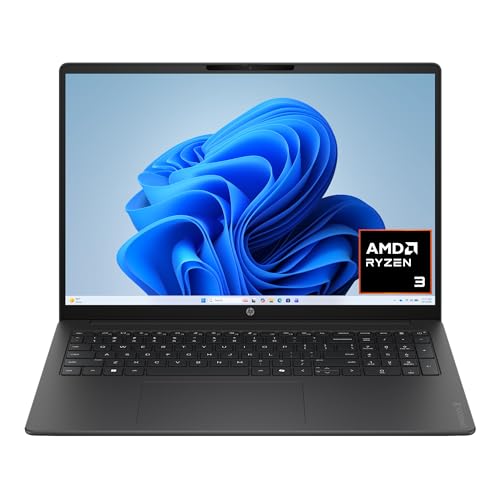
| HP OmniBook 3 16 | Light everyday use with a sharp screen | 2K touchscreen, Ryzen 3, 8 GB RAM, 512 GB SSD |
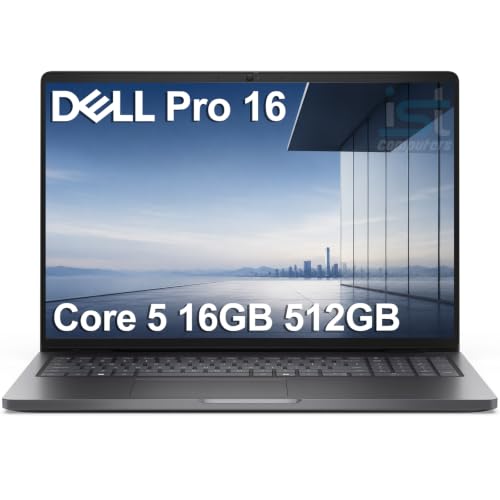
| Dell Pro 16 PC16250 | Business and office workloads | Core 5 120U, 16 GB DDR5, 512 GB SSD, FHD+ anti-glare |
| Dell 16 DC16251 | Large local storage and a 16:10 display | Core 7 150U, 16 GB DDR5, 1 TB SSD, 2K touchscreen |
| Generic 16 inch AMD A9 Laptop | Very basic use on a tight budget | AMD A9-9400, 8 GB RAM, 256 GB SSD, 9000 mAh battery |
| HP 16 inch OmniBook | Balanced home and study machine | Ryzen 5, 16 GB DDR5, 512 GB SSD, Wi-Fi 6 |
| LG Gram Pro 16 | Heavy multitasking and long days away from an outlet | Core Ultra 7 355, 32 GB RAM, 1 TB SSD, 28.5H battery |
How to Choose
Display: resolution, aspect ratio and finish
A 16 inch panel at 1920 by 1080 spreads the same pixels over a larger area, so text looks softer than on a 14 inch screen. Look for a 16:10 or 2K class panel (2560 by 1600 or similar) if you read long documents; the extra height makes a noticeable difference. Anti-glare coatings help in bright offices, while glossy touchscreens look richer but reflect lamps and windows. Brightness is stated in nits on some listings, and 300 nits is a reasonable floor for indoor use. Ignore marketing terms like “eye care” unless a measurable spec backs them.
Memory and storage floors
Plan on 16 GB of RAM if you keep many browser tabs, video calls and office files open at once. An 8 GB configuration works for light study, but it leaves little headroom as software grows, and some budget models cannot be upgraded. For storage, 512 GB is a comfortable starting point, while 256 GB fills up quickly with a few large projects. Favor an SSD over eMMC or hard drives, and note when a listing says expandable, since that often means a free slot that you must fill yourself.
Processor class and battery claims
Current Intel Core Ultra and AMD Ryzen 5 or 7 processors handle office work, light photo editing and video playback without strain. Older entry chips such as AMD A-series parts are fine for email and web pages but struggle once you add video calls and many tabs. Battery claims in a title are best treated as best-case numbers; capacity in milliamp hours means little without voltage or watt-hour figures. A large 16 inch screen draws a lot of power, so look for an efficient chip and a screen that is not unnecessarily bright for your room.
Ports, size and where budget models cut corners
A 16 inch laptop is wider than most bags expect, so check that your backpack sleeve can take it. Look for at least one USB-C port that supports charging or video output, plus HDMI and a headphone jack. Budget models usually save money on keyboard backlighting, webcam quality, build rigidity and speaker volume. Numeric keypads come standard on many 16 inch designs and are a genuine benefit for accounting or data entry, so do not dismiss them as filler.
The 6 Best Options
HP OmniBook 3 16
The title describes a 16 inch laptop with a 2K touchscreen, an AMD Ryzen 3 processor, 8 GB of RAM, a 512 GB SSD and AMD Radeon 610M graphics, running Windows 11 Home. It targets everyday use where screen sharpness matters more than raw speed, which suits a student reading articles, writing essays and streaming lectures rather than running demanding software.
- Strength: a 2K touchscreen is a clear step up from the 1080p panels common at this size.
- Strength: the 512 GB SSD gives space for documents, photos and a handful of applications.
- Trade-off: 8 GB of RAM limits multitasking and leaves little room for long-term software growth.
Skip it if you plan to run many programs at once, edit video or keep this laptop for several years of heavier use. Buyers who open many tabs with a video call running will feel the memory ceiling first.
Dell Pro 16 PC16250
This is a business-oriented machine with an Intel Core 5 120U processor, 16 GB of DDR5 memory, a 512 GB SSD and a 16 inch FHD+ anti-glare display. The title also references the Latitude 5550 name and an Ultra 5 125U chip, so it is worth confirming which exact configuration ships. The business-AI-PC wording points at managed office fleets and small companies rather than home entertainment.
- Strength: 16 GB of DDR5 memory is a healthy baseline for office work and many browser tabs.
- Strength: the anti-glare FHD+ screen suits bright offices and long document sessions.
- Trade-off: the mixed model naming in the title makes it harder to know exactly what you are getting.
Skip it if you want a touchscreen or a vivid, glossy display for media. The listing does not mention a 2K panel, so text sharpness will be closer to standard full HD stretched across a large screen.
Dell 16 DC16251
The listing highlights a 16:10 2K touchscreen, an Intel Core 7 150U processor, 16 GB of DDR5 RAM and a 1 TB SSD, with Intel integrated graphics and Windows 11 Home. It combines the strongest storage and memory pairing in the mid-range of this list, making it a sensible desk-replacement choice for someone who keeps large photo folders, course files and a long list of installed programs.
- Strength: the 1 TB SSD removes storage worries for large photo libraries and project files.
- Strength: the 16:10 2K panel offers extra vertical space for documents and spreadsheets.
- Trade-off: integrated graphics are enough for everyday work but not for demanding games or 3D tools.
Skip it if you need a dedicated graphics card or prefer a matte, anti-glare screen. Touch panels reflect overhead lights, so a bright office may call for the matte option in the Dell Pro instead.
Generic 16 inch AMD A9 Laptop
This brandless model lists 8 GB of DDR memory, a 256 GB SSD that can be expanded to 1 TB, an AMD A9-9400 processor with Radeon R5 graphics up to 3.2 GHz, a 9000 mAh battery and a numeric keypad. It is the entry point for owners who want a big screen at the lowest tier, and the numeric keypad plus upgrade path make it a practical home-office or family computer for simple tasks.
- Strength: expandable storage lets you grow the drive later.
- Strength: the numeric keypad helps with spreadsheets and data entry.
- Trade-off: the A9-9400 is an older entry-level chip and will feel slow with modern multitasking.
Skip it if you need video calls, many tabs or software that demands modern processing power, or if brand support matters to you. An unnamed seller listing also makes warranty and software support harder to judge than a major manufacturer would.
HP 16 inch OmniBook
The listing describes a 2K IPS touchscreen, a Ryzen 5 processor, 16 GB of DDR5 RAM, a 512 GB SSD, Wi-Fi 6 and a long-battery-life claim, with Windows 11. It reads as a balanced, general-purpose configuration, the kind a family or a college student can share for homework, streaming and light creative projects without paying for features that sit idle.
- Strength: 16 GB of DDR5 memory pairs well with the Ryzen 5 for everyday multitasking.
- Strength: an IPS touchscreen at 2K resolution gives good viewing angles and sharp text.
- Trade-off: the battery description is a general claim without hours, so real endurance is unclear.
Skip it if you want a dedicated graphics card or a confirmed battery runtime figure. Buyers who rely on unplugged work should compare it with the LG Gram listing, which states hours.
LG Gram Pro 16
The most capable listing here pairs an Intel Core Ultra 7 355 processor with 32 GB of LPDDR5X memory at 7500 MHz and a 1 TB SSD, behind a 16 inch 2K IPS touchscreen listed at 350 nits. The title advertises 28.5 hours of battery life.
- Strength: 32 GB of RAM leaves ample room for heavy multitasking and large files.
- Strength: the 350 nit IPS panel is bright enough for well-lit rooms and the stated battery figure is the longest in this group.
- Trade-off: this is the premium tier, so the extra capability costs more than most buyers need.
Skip it if your work is simple browsing and documents, because a mid-range model will cover that with less spending. Anyone who prefers a matte screen should also note that this one is a touchscreen.
Which One Fits Your Situation
You split the day between lectures and streaming
The HP 16 inch OmniBook with its Ryzen 5, 16 GB of RAM and 2K IPS touchscreen is the balanced choice. The HP OmniBook 3 16 is a lighter-spec alternative if budget matters most.
You work in documents and meetings all day
The Dell Pro 16 PC16250 suits office routines with its anti-glare FHD+ display and 16 GB of DDR5, although the Dell 16 DC16251 offers more storage and a sharper panel.
You carry the laptop everywhere
The LG Gram Pro 16 stands apart because of its listed 28.5 hours of battery life and 32 GB of memory, which covers long travel days away from a charger.
You only need a large screen for basic tasks
The generic AMD A9 model is the lowest-cost route to a 16 inch display, provided you accept slower performance and limited support.
Common Mistakes
- Counting a 15.6 inch laptop as a 16 inch model because the titles sound similar.
- Choosing 8 GB of RAM for a laptop you plan to keep for several years.
- Assuming a bigger screen automatically means better resolution, when many 16 inch panels are only 1080p.
- Trusting a battery headline without checking the actual watt-hour capacity or processor efficiency.
- Forgetting that a 16 inch chassis may not fit a standard backpack sleeve or sit comfortably on a small desk.
Specs and Terms Explained
16:10 versus 16:9
The ratio describes screen shape. A 16:10 panel is a little taller, so you see more rows of a document or spreadsheet without scrolling. A 16:9 panel is wider and shorter and suits video. For work, taller is generally the better choice.
sRGB coverage
This figure tells you how much of the standard web color range a screen can display. Basic office panels often fall well short of full coverage, which is fine for documents and a problem for photo editing. If color matters, look for a high percentage stated plainly.
Nits
Brightness is rated in nits. Around 300 is a workable minimum for bright rooms. Lower values leave the screen hard to read near windows.
Weight and watt-hours
A 16-inch body can range from very light to a full desktop replacement. Compare listed weight and battery capacity, because the largest batteries add real weight.
Webcam and microphones
Meetings are a big part of life on a work laptop. A 1080p camera is clearer than a 720p one, and a physical privacy shutter is handy. Budget models often skimp here, so read the camera line in the listing.
Cooling and fan noise
Larger bodies give cooling more room, so many 16-inch laptops stay quieter under load than small ones, though budget models may use thin fans that spin up even during office work.
Sizing and Compatibility Checklist
- Confirm your bag’s sleeve is rated for 16 inches; a 15.6-inch sleeve may not close.
- Check the charger type. USB-C lets one adapter serve a phone as well, while a barrel plug means carrying a dedicated brick.
- Count ports against your gear: a monitor cable, a flash drive and a mouse receiver can use all of a thin laptop’s connections.
- Look for a numeric keypad if you work with figures, and note that it can shift the main keys off-center.
- Think about desk space. A 16-inch laptop needs more depth than a 14-inch one, especially with a monitor riser.
- Read the memory and storage lines carefully; budget listings sometimes leave out the storage type.
Which One Should You Buy?
| If you… | Choose… |
|---|---|
| Want a mainstream 16-inch for school and streaming | HP OmniBook 3 16 |
| Need a business-oriented notebook for documents and meetings | Dell Pro 16 PC16250 |
| Want a Dell 16-inch with a more general focus | Dell 16 DC16251 |
| Only need a large screen for basic tasks | Generic 16 inch AMD A9 Laptop |
| Prefer another HP take on the same size | HP 16 inch OmniBook |
| Carry it everywhere and want a light 16-inch | LG Gram Pro 16 |
Related guides
- Sony Wh-1000Xm5 Vs Bose Quietcomfort Ultra Headphones
- Bose Quietcomfort Ultra Vs Bose 700 Headphones
- Carbon Fiber Folding Electric Wheelchairs
Frequently Asked Questions
Is 16 inches too big for travel?
It is larger than a 14 inch model, but many 16 inch laptops fit standard bags that take 15.6 inch devices. Check the actual dimensions and the backpack sleeve size before committing.
Does a buyer need a touchscreen on a 16 inch laptop?
Not for typing and office work. Touchscreens help with annotation and tablet-style use, but they are glossy and reflect more light, so anti-glare office panels can be easier on the eyes.
Is 16 GB of RAM necessary?
For light use 8 GB can work, yet 16 GB gives comfortable headroom for browsers, video calls and office tools together. If the RAM cannot be upgraded later, buying more at the start is safer.
Does a bigger battery capacity guarantee longer runtime?
No. Runtime depends on the processor, screen brightness and workload as much as the battery size. Treat title claims as best-case figures rather than guarantees.
More from Amazon
Programs that pair well with the guide above. Offers and eligibility are set by Amazon and may change.
Free shipping on eligible items, Prime Video and more. Eligible new members can start with a free trial.
Start a Prime free trialAudiobooks and podcasts to listen to on the go. Eligible new members can start with a free trial.
Try Audible freeAd-free music streaming. Eligible new subscribers can start with a free trial.
Try Music Unlimited freeA free business account with business pricing and bulk-buying tools for work, shop or home office.
Create a business accountAs an Amazon Associate we earn from qualifying purchases.