Key takeaways
- An information technology student does not use a laptop like a literature student does. Somewhere in the first year you will be asked to run a.
An information technology student does not use a laptop like a literature student does. Somewhere in the first year you will be asked to run a virtual machine, install a Linux distribution next to Windows, configure a small network in a simulator, and keep a code editor, a browser full of documentation and a terminal open at the same time. That workload punishes the specifications that student laptop listings love to hide: memory, storage and the processor class. The central question for this guide is which of the common student-marketed laptops leaves enough headroom for that kind of coursework.
The advice here is for first- and second-year IT, computer science and cybersecurity students, along with career changers starting a certificate program. It compares six 15.6 inch and 14 inch laptops using only the facts in each listing title: processor, RAM, storage, battery claims, ports and bundled software. Some of these machines are well matched to coursework in 2026, and some are included mainly to show where the limits sit. Where a spec falls short of what lab work needs, the write-up says so plainly instead of stretching the facts.
Quick Picks
Our top picks


As an Amazon Associate we earn from qualifying purchases at no extra cost to you.
| Product | Best for | Key spec from the title |
|---|---|---|
| Dell Inspiron 15 Touchscreen | Virtual machines and multitasking | 10-core Intel i5, 16 GB RAM, 1 TB storage, 15.6 inch FHD |
| Ryzen 5 15.6 Inch Student Laptop | Coding with strong graphics for its class | AMD Ryzen 5, 16 GB RAM, 512 GB SSD, Radeon Vega 8 |
| Lenovo IdeaPad Slim 3i | Lightweight note-taking and light coding | Intel i3-N305, 8 GB LPDDR5, Wi-Fi 6, 720p webcam |
| DRKAKO 15.6 Inch IPS Laptop | Entry-level study with a wide-viewing screen | 12 GB RAM, 256 GB SSD, J4105 quad-core, IPS FHD |
| 15.6 Inch Pentium Laptop, 16 GB | Basic Windows Pro work with plenty of memory | 16 GB RAM, 512 GB SSD, Windows 11 Pro, mini HDMI |
| HP 14 Inch Student Laptop | Writing, web research and note-taking only | Intel 4-core CPU, 4 GB DDR5, 628 GB total storage |
How to Choose
Memory is the first constraint
A virtual machine claims a fixed slice of RAM while it runs, so a laptop with 8 GB leaves only a few gigabytes for the host system once a guest operating system boots. Aim for 16 GB if you expect to run Linux in a VM, use containers or compile large projects. Twelve gigabytes is workable for light lab work. Four gigabytes is a web-and-documents machine and will stall as soon as a second operating system or an IDE joins the browser. Check whether the memory is soldered, because that determines whether you can upgrade later.
Storage type and real capacity
A solid-state drive of 512 GB gives room for an operating system, development tools, a couple of VM images and course files. Watch for listings that add SD card or eMMC storage to inflate the total; a title that says 628 GB may combine a small internal drive with a card. Cards and eMMC modules are slower and not suitable as the main system disk for virtual machines. Prefer a clearly stated SSD, and check whether a second drive slot exists for later expansion.
Processor class for coursework
Intel Core i5 and AMD Ryzen 5 chips handle compilers, local servers and VMs smoothly. Entry processors in the Pentium, Celeron, J-series and N-series families are fine for browsing, documents and a text editor, but they slow down when you stack virtual machines, build tools and a browser. Four cores is a practical minimum for coursework, and more cores help when you assign them to a VM. Be skeptical of marketing phrases like “beats” a named Intel chip, since they compare a single test score rather than your workload.
Ports, battery and where budget models cut corners
IT students plug in more than most: Ethernet adapters, USB drives, serial consoles, external monitors. Look for at least two USB-A ports, one USB-C and a video output such as HDMI. Battery claims in titles, such as a stated 6 or 12 hours, are best-case figures for light use and will drop under compile or VM loads. Budget models usually cut corners on screen brightness, keyboard feel and webcam quality, so read the specs for the display panel type and keyboard layout, and ignore bundled extras like AI assistants unless they add something you will use.
The 6 Best Options
Dell Inspiron 15 Touchscreen Laptop
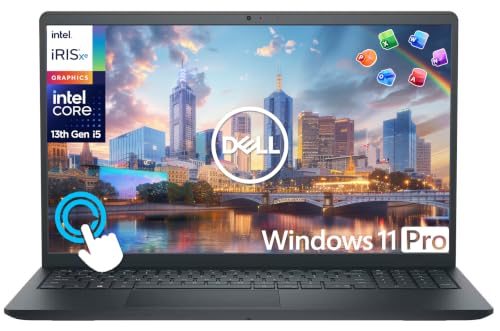
This listing combines a 15.6 inch full HD touchscreen with a 10-core Intel Core i5, 16 GB of RAM and 1 TB of storage, aimed at business, student and home use. It is the closest match here to what coursework with virtual machines requires, and the business, student and home wording suggests a general-purpose machine that can also serve after graduation.
- Strength: 16 GB of RAM leaves room for a host system and a VM running together.
- Strength: the 10-core Core i5 and large storage capacity suit multitasking across tools.
- Trade-off: the storage figure appears to combine more than one drive, so confirm how much is the fast SSD.
Skip it if you want an ultra-light machine for carrying all day, since a touchscreen 15.6 inch laptop is not built around portability. Also check the storage line closely, because the title cuts off while describing the split between drives.
Ryzen 5 15.6 Inch Student Laptop
The title lists an AMD Ryzen 5 processor up to 3.7 GHz, 16 GB of RAM, a 512 GB SSD, Radeon Vega 8 graphics, a 15.6 inch full HD display, 65W fast charging and Bluetooth 5.0. The seller also labels it a gaming laptop, but for coursework the processor, memory and SSD are the facts that count.
- Strength: the Ryzen 5 with 16 GB of RAM and a 512 GB SSD is a strong base for coding and VMs.
- Strength: fast charging helps between classes when outlets are scarce.
- Trade-off: the title claims it beats an older Intel i5, a comparison that tells you little about your own workload.
Skip it if you want a recognizable brand with a named support channel, since the listing leads with the specifications. It also lacks a named manufacturer in the title, so warranty terms deserve a close look before purchase.
Lenovo IdeaPad Slim 3i
This is a 15.6 inch full HD business-student model with an Intel Core i3-N305, 8 GB of LPDDR5 memory, 128 GB of UFS storage plus a 256 GB SD card, Windows 11 Pro, Wi-Fi 6 and a 720p webcam. The Intel N-series chip is aimed at low-power, light-duty tasks, which makes this a note-taking and web research machine more than a lab workhorse.
- Strength: Wi-Fi 6 and Windows 11 Pro suit campus networks and managed environments.
- Strength: LPDDR5 memory is faster than older memory types for everyday tasks.
- Trade-off: 8 GB of RAM and a card-based storage extension will feel tight for virtual machines.
Skip it if you plan to run Linux in a VM or keep several large projects installed locally. The SD card portion of the storage is also removable media, so it should hold files rather than your operating system.
DRKAKO 15.6 Inch IPS Student Laptop
The listing highlights a 15.6 inch full HD IPS screen, 12 GB of RAM, a 256 GB SSD, a J4105 quad-core processor, Wi-Fi 5, Bluetooth, Office 365 and an AI assistant, with a hinge that lays flat to 180 degrees. It sits between the barest entry laptops and the 16 GB models, which makes it a reasonable middle step for first-year coursework that stays mostly in a browser and an editor.
- Strength: 12 GB of RAM is more than most entry laptops offer.
- Strength: the IPS panel and lay-flat hinge help when sharing a screen in group projects.
- Trade-off: the J4105 is an entry-level quad-core chip and will strain under multiple VMs.
Skip it if your courses involve heavy compiling, containers or several virtual machines at once. The 256 GB drive also fills quickly once a VM image and development tools are installed.
15.6 Inch Pentium Laptop, 16 GB Version
This unbranded 15.6 inch laptop lists an Intel Pentium processor, 16 GB of RAM, a 512 GB SSD, Windows 11 Pro, Office 365, a 6-hour battery claim, mini HDMI and a camera with a microphone. On paper it offers the memory and storage of a more expensive-looking laptop, so it appeals to students who prioritize capacity over processor speed.
- Strength: 16 GB of RAM and a 512 GB SSD are generous for a laptop in this tier.
- Strength: Windows 11 Pro and mini HDMI cover remote desktop and external display needs.
- Trade-off: the Pentium processor is the limiting factor, and the 6-hour battery claim is modest.
Skip it if you need a recognizable brand or a stronger processor than a Pentium for compiling and VMs. Short battery claims also mean carrying the charger to every long lab session.
HP 14 Inch Student Laptop
The title lists a 14 inch laptop with an Intel 4-core processor, 4 GB of DDR5 RAM, 628 GB of combined storage, Microsoft Office and Windows 11 Pro. It is built for general student productivity rather than technical workloads. It is included here to show the floor of the category, not as a match for virtual machine labs.
- Strength: the 14 inch size is easier to carry between classes.
- Strength: Windows 11 Pro and Office are included for documents and presentations.
- Trade-off: 4 GB of RAM is too little for virtual machines or development tools.
Skip it if your program includes labs with VMs, programming or networking simulators. A student in a documentation-heavy or business-focused track will get more value from it than a lab-heavy IT program would.
Which One Fits Your Situation
You run virtual machines from the first semester
The Dell Inspiron 15 with a 10-core Core i5 and 16 GB of RAM is the safest pick, with the Ryzen 5 student laptop as the closest alternative.
You want to code and carry the laptop to every class
The Ryzen 5 model combines 16 GB of RAM, an SSD and fast charging, which helps when outlets are scarce. The HP 14 inch is lighter to carry but too limited for technical work.
You have a limited allowance and need a basic machine
The 16 GB Pentium laptop offers plenty of memory and storage on paper, while the DRKAKO with 12 GB of RAM sits just below it.
You need Windows Pro for campus network tools
The Lenovo IdeaPad Slim 3i comes with Windows 11 Pro and Wi-Fi 6, which suits managed networks, as long as you accept its modest memory.
Common Mistakes
- Buying 4 GB or 8 GB of RAM for a program that includes virtual machines and containers.
- Counting SD card or eMMC capacity as if it were main SSD storage.
- Trusting comparisons like “beats” a named processor instead of reading the actual chip model.
- Ignoring ports, then discovering you need adapters for Ethernet, USB drives and an external monitor.
- Paying attention to bundled AI features while overlooking basics like screen quality and keyboard comfort.
Specs and Terms Explained
Virtualization support
Virtual machines depend on a processor feature called Intel VT-x or AMD-V. Nearly every modern laptop chip includes it, but it is often disabled in the firmware by default. Before blaming the laptop, enter the BIOS setup and look for an option named virtualization technology or SVM mode. Without it, hypervisors either refuse to start or crawl.
SSD versus eMMC, and NVMe versus SATA
Entry laptops sometimes use eMMC flash soldered to the board. It works for light use, but it slows badly when a virtual disk is copied or booted. An NVMe SSD is the type to want, because snapshots, package installs and compiling all hammer the disk. If a listing says only “storage” with no type, treat that as a warning sign.
Dual-channel and soldered memory
Two memory modules working together deliver more bandwidth than one module of the same total size. Many budget laptops solder part of the memory to the board, which means the amount you buy is the amount you keep. A model with a free slot can be upgraded later; a fully soldered one cannot.
Windows Home versus Pro for lab work
Third-party hypervisors such as VirtualBox and VMware Workstation Player run on Home. The built-in Hyper-V feature, remote desktop hosting and BitLocker management need Pro. Check what your course materials actually require before paying for an edition you may not use.
Setup and Care Tips
- Leave at least a quarter of the drive free. Virtual disks grow, and a nearly full SSD slows down and wears faster.
- Take a snapshot of a virtual machine before every risky change, then delete old snapshots; they quietly consume gigabytes.
- Set up a dual-boot Linux install only after backing up the Windows recovery media, since partition resizing can go wrong.
- Give a virtual machine no more than half the laptop’s memory, so the host system keeps room to breathe.
- Run heavy labs on mains power. Battery saver modes cap processor speed and make simulators feel stuck.
- Keep the vents clear. A laptop on a duvet throttles within minutes under a multi-VM load.
Who Should Skip These
Students whose course is mostly theory, documentation and cloud-hosted labs can run everything in a browser and do not need to chase high specs. Anyone expecting to run several heavy virtual machines at once, or a full desktop Linux guest alongside an IDE, should be cautious about the lowest-tier models in this list, because a basic processor and limited memory will make that workflow frustrating. A university with a remote lab service may make a laptop purchase far less demanding than you expect, so ask the department before ordering.
Related guides
- Sony Wh-1000Xm5 Vs Bose Quietcomfort Ultra Headphones
- Bose Quietcomfort Ultra Vs Bose 700 Headphones
- Carbon Fiber Folding Electric Wheelchairs
Frequently Asked Questions
How much RAM does an IT student need?
Sixteen gigabytes is the practical target if you run virtual machines or containers. Eight gigabytes can handle light lab work, but it limits what you can run side by side.
Does a buyer need a gaming laptop for IT coursework?
No. A discrete graphics card rarely matters for networking, programming or security coursework. Spend on memory, an SSD and a capable processor first.
Is Windows 11 Pro better than Home for IT students?
Pro adds features such as remote desktop hosting, BitLocker and Hyper-V that suit lab work. Home can still run most tools through third-party virtualization software.
Can I upgrade a student laptop later?
It depends on the model. Many thin laptops solder the memory, so buy enough RAM at the start, and check whether the storage is a removable SSD.
More from Amazon
Programs that pair well with the guide above. Offers and eligibility are set by Amazon and may change.
Free shipping on eligible items, Prime Video and more. Eligible new members can start with a free trial.
Start a Prime free trialAudiobooks and podcasts to listen to on the go. Eligible new members can start with a free trial.
Try Audible freeAd-free music streaming. Eligible new subscribers can start with a free trial.
Try Music Unlimited freeA free business account with business pricing and bulk-buying tools for work, shop or home office.
Create a business accountAs an Amazon Associate we earn from qualifying purchases.