
Our Top Picks
A home office keyboard earns its keep in long stretches of email, documents, spreadsheets and chat, and that workload exposes the weaknesses of the average membrane board quickly: inconsistent key feel, mushy bottoming out and legends that wear smooth. A mechanical keyboard fixes the feel problem with individual switches under every key, but the wrong mechanical board creates new problems of its own, because a tall case, a loud clicky switch and a gaming-first feature list do not belong in a room where calls happen all day. The five boards below were chosen with typing work as the priority: quiet or tactile switch options, layouts that suit real desks, and extras such as multi-device pairing and media controls that help during a workday rather than a match.
As an Amazon Associate, we earn from qualifying purchases.
Quick Answer
For most home office typists, the Logitech MX Mechanical is the easiest pick: low-profile Tactile Quiet switches, a full-size layout and pairing for three devices. Traditionalists should look at the wired Das Keyboard 4 Professional, hot-swap fans at the Keychron K10, space-savers at the Keychron K8 Max, and silence seekers at the Razer Pro Type Ultra.
Five Boards Chosen for Typing First
Logitech MX Mechanical: The Low-Profile All-Rounder
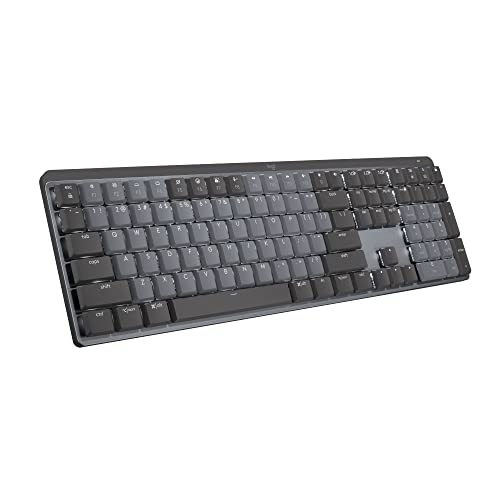
The MX Mechanical is built around the way office work actually happens. Its low-profile mechanical switches sit in a slim metal body, so your wrists stay closer to the angle they would use on a laptop keyboard while still getting a defined tactile bump from the Tactile Quiet switch variant. The full-size layout keeps the number pad for spreadsheet work, the white backlight turns itself on as your hands approach, and the board pairs with up to three computers over Bluetooth or the Logi Bolt receiver, switching between them with a key press. It charges over USB-C and is rated for up to 15 days of use with the backlight on, or up to 10 months with it off.
Specs
- Layout: Full-size with number pad
- Switches: Low-profile mechanical, Tactile Quiet variant
- Connectivity: Bluetooth, Logi Bolt USB receiver, USB-C
- Battery: Rechargeable, up to 15 days backlit or 10 months backlight off
- Backlight: White, with hand-proximity sensor
- Dimensions: 433.85 x 131.55 x 26.1 mm
- Weight: 828 g
- Model number: 920-010547
Das Keyboard 4 Professional: The Wired Traditionalist
Das Keyboard has sold typing-first boards for two decades, and the 4 Professional shows it. There is no wireless radio, no backlight and no software suite; instead you get Cherry MX Brown switches with gold contacts under laser-etched keycaps, an anodized aluminum top panel, and a two-port USB 3.0 hub built into the board itself. An oversized volume knob and dedicated media keys sit above the number pad, and the magnetic footbar that sets the typing angle doubles as a ruler. It is the heaviest and most single-minded board here, and for a fixed desk with one computer, that focus is the appeal.
Specs
- Layout: Full-size, 104 keys
- Switches: Cherry MX Brown soft tactile, rated up to 50 million keystrokes
- Connectivity: Wired USB, 6.5 ft cable
- Hub: Two USB 3.0 ports
- Controls: Oversized volume knob, media keys, instant sleep button
- Keycaps: Laser-etched legends
- Dimensions: 18 x 6.8 x 0.8 in
- Weight: 2.9 lbs
- Model number: DASK4MKPROSIL
Keychron K10: Full-Size and Hot-Swappable
The K10 gives you the full 104-key layout with a number pad, plus something the two boards above do not offer: hot-swappable switches. The Gateron G Pro Brown switches pull out without soldering, so if a switch wears or you want a different feel later, the board adapts instead of being replaced. It connects to up to three devices over Bluetooth 5.1 and also works wired over USB-C, includes keycaps for both Mac and Windows layouts, and carries a 4000 mAh battery rated for up to 240 hours of typing with the backlight off. The aluminum frame and RGB backlight lean more enthusiast than office, but nothing about it gets in the way of work.
Specs
- Layout: Full-size, 104 keys
- Switches: Gateron G Pro Brown, hot-swappable
- Connectivity: Bluetooth 5.1 for up to 3 devices, USB-C wired mode
- Battery: 4000 mAh, up to 240 hours with backlight off
- Backlight: RGB with more than 15 modes
- Frame: Aluminum
- Dimensions: 440 x 129 x 40 mm
- Model number: HS-K10J3
Keychron K8 Max: The Compact Customizable Pick
The K8 Max shrinks the formula to a tenkeyless layout that leaves room for a mouse or a notebook beside it. It runs Keychron Super Brown tactile switches and adds the enthusiast control layer: QMK support and browser-based remapping mean any key can be reassigned and macros can be stored on the board itself. Connectivity covers Bluetooth 5.1, a 2.4 GHz receiver and USB-C wired mode, with a 1000 Hz polling rate in the wired and 2.4 GHz modes. For a home office desk that also handles side projects, customization and a smaller footprint are the draw here.
Specs
- Layout: Tenkeyless, 87 keys
- Switches: Keychron Super Brown tactile, rated up to 50 million clicks
- Connectivity: Bluetooth 5.1, 2.4 GHz receiver, USB-C wired
- Customization: QMK support with remapping and macros
- Polling rate: 1000 Hz in 2.4 GHz and wired modes
- Backlight: RGB
- Model number: K8M-B3
Razer Pro Type Ultra: The Silent Option
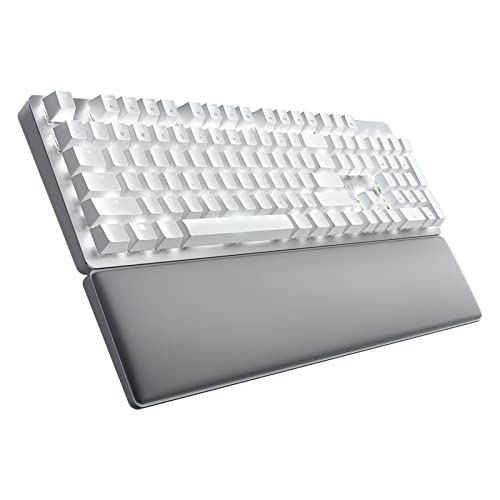
Razer is a gaming brand, but the Pro Type Ultra was designed for the office side of its audience. Its Razer Yellow mechanical switches are linear and silenced, and a layer of sound-dampening foam inside the case absorbs what noise remains, making this the quietest board in the group. It connects to up to four devices across Razer HyperSpeed wireless, Bluetooth and a wired mode, carries a battery rated for up to 310 hours, and ships with a cushioned leatherette wrist rest in the box. The soft-touch coated keycaps and plain white backlight keep it looking like office equipment rather than gaming gear.
Specs
- Layout: Full-size with number pad
- Switches: Razer Yellow mechanical, silent linear
- Connectivity: HyperSpeed 2.4 GHz, Bluetooth, USB-C wired; up to 4 devices
- Battery: Up to 310 hours per charge
- Wrist rest: Cushioned leatherette, included
- Case: Sound-dampening foam layer
- Backlight: White
- Model number: RZ03-04110200-R3U1
Switch Feel Is the Whole Decision
Everything else about a mechanical keyboard is secondary to the switch, because the switch decides both how the board feels and how much noise it makes. Tactile switches, such as the Browns and the Tactile Quiet variant in this roundup, have a small bump partway through the press that confirms the keystroke without needing to bottom out, which suits fast touch typing. Linear switches travel smoothly from top to bottom; in silenced form, as on the Pro Type Ultra, they are the quietest option for shared rooms and open microphones. Clicky switches add an audible click by design and are the hardest to justify anywhere near a meeting. Height matters too: low-profile switches shorten travel and keep wrists flatter, while standard-height switches offer the wider choice of replacement keycaps and switches later.
How to Choose
Start with layout. If your work involves regular data entry, accounting or spreadsheet shortcuts, a full-size board with a number pad saves real time; if your desk is shallow or you want your mouse closer to your body, tenkeyless is the better fit. Next, match the switch to your room: a solo office can tolerate tactile switches easily, while shared spaces and frequent calls argue for quiet tactile or silent linear switches. Then check connectivity against your setup. Bluetooth pairing for two or three devices is the practical minimum for a desk shared between a work laptop and a personal machine, and a 2.4 GHz receiver helps if your employer locks down Bluetooth. Hot-swappable switches are worth having if you like the idea of changing feel without changing boards. Finally, confirm the small things: Mac and Windows keycap legends if you switch operating systems, a backlight if you work in dim rooms, and whether a wrist rest is included or another purchase.
Who Should Skip a Mechanical Keyboard
Skip this category if you genuinely prefer the flat, short-travel feel of a laptop keyboard and type happily on it all day, because a mechanical board will feel tall and heavy by comparison. Skip it if your workspace is a shared table where even quiet switches would disturb others and a silent membrane board is the safer neighbor. And skip standard mechanical boards if you need a split or tented ergonomic layout for wrist or shoulder problems; those needs are served by ergonomic keyboards, which are a different product type with different trade-offs.
Frequently Asked Questions
Are mechanical keyboards louder than membrane keyboards?
Most are somewhat louder, because each key has a moving switch and the board has a rigid case that carries sound. The gap closes a lot with quiet tactile or silent linear switches, dampened cases and not bottoming out hard, which is why the boards in this roundup lean toward the quiet end of the category.
Which switch type is best for office typing?
Tactile switches are the common recommendation because the bump confirms each keystroke and helps pace fast typing without extra noise. If you share the room or spend the day on calls, a silent linear switch trades that bump for the lowest noise. Clicky switches are best left to solo rooms.
Is a tenkeyless board enough for spreadsheet work?
For occasional totals and short entries, yes, and the smaller footprint improves mouse position. For daily data entry, accounting work or heavy shortcut use, a full-size board with a number pad is meaningfully faster, and a separate number pad is an awkward substitute for most people.
Can one keyboard work with both a work laptop and a personal computer?
Yes. Every wireless board in this roundup pairs with at least three devices and switches between them with a key press or a dedicated button, so one keyboard can serve a work laptop, a personal desktop and a tablet without any cables being moved.
Final Verdict
Home office typing rewards boards that get the switch right and then stay out of the way. The Logitech MX Mechanical is the most complete package for most desks, the Das Keyboard 4 Professional remains the wired purist choice, the Keychron K10 and K8 Max add hot-swappable switches and customization at full-size and tenkeyless footprints, and the Razer Pro Type Ultra is the one to pick when silence matters most.


More from Amazon
Programs that pair well with the guide above. Offers and eligibility are set by Amazon and may change.
Free shipping on eligible items, Prime Video and more. Eligible new members can start with a free trial.
Start a Prime free trialAudiobooks and podcasts to listen to on the go. Eligible new members can start with a free trial.
Try Audible freeAd-free music streaming. Eligible new subscribers can start with a free trial.
Try Music Unlimited freeA free business account with business pricing and bulk-buying tools for work, shop or home office.
Create a business accountAs an Amazon Associate we earn from qualifying purchases.



