
Key takeaways
- Learn how to choose a mechanical keyboard for typing, from switches and layout to connectivity and keycaps, with five picks for long writing days.
- Top Pick: Keychron K2 Version 2
- Runner-up: Logitech G915 TKL Clicky
- Also consider: Ducky One 3 Pure White
A good typing keyboard should feel steady under your fingers, keep up with fast sentences, and stay comfortable through long documents, emails, and notes. The wrong one can slow you down with mushy keys, a cramped layout, or a sound that wears on you by mid-afternoon.
This guide explains the choices that matter most for typing, in plain terms, and then compares five keyboards that suit different desks, hands, and budgets. Use the decision points first, then match them to the pick that fits your daily work.
As an Amazon Associate, we earn from qualifying purchases.
Quick answer
Start with switch feel, then layout, then connectivity. Tactile switches suit most typists, a compact layout saves desk space, and wireless plus wired modes cover home and office use. Pick quiet switches for shared rooms, full-size boards for number work, and hot-swappable boards if you want to change switches later. The five picks below cover those needs without excess extras.
1. Keychron K2 Version 2

The Keychron K2 Version 2 is a compact wireless board that keeps the function row and arrow keys while dropping the number pad. That balance makes it a strong everyday choice for writers who want a smaller footprint without relearning where common keys sit.
Its linear red switches press smoothly from top to bottom, with no bump and no click, so long passages feel fluid rather than interrupted. The board pairs with up to three devices over Bluetooth and also works wired over USB-C. The aluminium frame feels solid, the RGB backlight helps in dim rooms, and Mac and Windows keycaps are included.
The trade-off is keycap material: stock ABS caps may develop shine with heavy use, and typists wanting a deeper feel may prefer a tactile switch, which this version does not offer.
Specs
| Feature | Detail |
|---|---|
| Layout | Compact 84-key layout |
| Switches | Linear red switches, smooth with no click |
| Connectivity | Bluetooth for three devices and USB-C wired |
| Backlight | RGB backlight |
| Keycaps | ABS keycaps, Mac and Windows sets included |
| Battery | 4000 mAh, listed up to 72 hours of typing |
| Compatibility | Mac and Windows |
| Best for | Everyday writing in a compact footprint |
2. Logitech MX Mechanical Linear
The Logitech MX Mechanical Linear is a full-size board built for quiet, low-profile typing. Its keys sit lower than those on most mechanical boards, so the hand position feels closer to a laptop keyboard while keeping a distinct mechanical press.
Linear switches move straight down without a bump or a click, which suits fast typists who dislike mid-stroke resistance. The full-size layout keeps the number pad, so spreadsheets and data entry stay quick, and backlit keys adjust to ambient light.
Connectivity covers Bluetooth Low Energy and the Logi Bolt receiver, plus USB-C wired use, across Mac, Windows, Linux, iOS, and Android. The trade-off is customisation: the switches are not hot-swappable, so you cannot change them later without replacing the board.
Specs
| Feature | Detail |
|---|---|
| Layout | Full-size layout with number pad |
| Switches | Low-profile linear switches, smooth and quiet |
| Connectivity | Bluetooth Low Energy, Logi Bolt receiver, USB-C wired |
| Backlight | Backlit keys, adjusts to ambient light |
| Keycaps | Low-profile keycaps on a metal top plate |
| Battery | Rechargeable battery, exact capacity not stated |
| Compatibility | Mac, Windows, Linux, iOS, and Android |
| Best for | Quiet full-size typing and number work |
3. Logitech G915 TKL Clicky
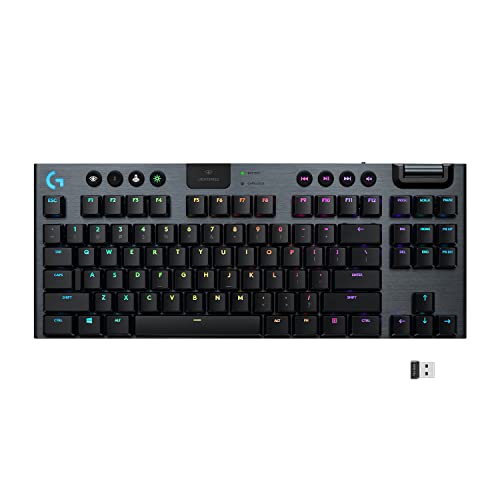
The Logitech G915 TKL Clicky is a tenkeyless board with low-profile switches and a slim aluminium body. It drops the number pad to free desk space for a mouse, while keeping the function row and navigation keys that writers use often.
Its clicky switches give a clear bump and an audible click, which many typists find helpful for rhythm and accuracy. The low-profile design keeps finger travel short, and the board connects through Lightspeed wireless or Bluetooth, with a wired option as well.
This is the pick for typists who like feedback from every keystroke and want a premium, desk-friendly build. The main drawback is noise: clicky switches are the loudest option here, so they suit shared offices poorly, and heavy number work will need a separate pad or a full-size board.
Specs
| Feature | Detail |
|---|---|
| Layout | Tenkeyless layout without number pad |
| Switches | Low-profile clicky switches with bump and click |
| Connectivity | Lightspeed wireless, Bluetooth, and wired use |
| Backlight | Lightsync RGB backlight |
| Keycaps | Low-profile keycaps on a slim aluminium body |
| Battery | Rechargeable battery, exact capacity not stated |
| Compatibility | Mac and Windows |
| Best for | Fast, clicky typing with a slim profile |
4. Ducky One 3 Pure White

The Ducky One 3 Pure White is a wired full-size board for typists who care most about key feel and build quality. It uses genuine Cherry MX Blue switches, which give a firm tactile bump and a crisp click, and it pairs them with thick double-shot PBT keycaps that resist shine.
Hot-swappable sockets let you change switches later without soldering. Sound-dampening foam, stable stabilisers, and three tilt angles make the board feel solid, and a detachable braided USB-C cable keeps the desk tidy.
The full-size layout includes the number pad and shortcut keys, suiting writers who also handle figures, and N-key rollover registers simultaneous presses accurately. The trade-off is connectivity: this board is wired only, so it suits a fixed desk rather than a multi-device setup, and it is heavier than the wireless picks here.
Specs
| Feature | Detail |
|---|---|
| Layout | Full-size layout with number pad |
| Switches | Cherry MX Blue switches, tactile with click |
| Connectivity | Wired only over detachable USB-C cable |
| Backlight | RGB backlight |
| Keycaps | Thick double-shot PBT keycaps |
| Battery | Not applicable, wired board with no battery |
| Compatibility | PC |
| Best for | Pure typing feel at a fixed desk |
5. Royal Kludge RK61 Brown

The Royal Kludge RK61 Brown is a compact 61-key board for typists who want a mechanical feel on a small desk or a tight budget. It drops the function row, arrow keys, and number pad, so it takes up far less space than a standard board.
Its brown switches give a gentle tactile bump without a loud click, a good middle ground for shared rooms. The board connects over Bluetooth, a 2.4 GHz receiver, or a wired cable, supports hot-swappable switches, and includes RGB backlighting and a coiled cable.
This is the pick for small desks, students, and first-time buyers. The trade-off is the learning curve: arrow and function keys sit on a second layer, reached with a function key, which takes practice, and constant arrow-key users will be faster on a larger board.
Specs
| Feature | Detail |
|---|---|
| Layout | Compact 61-key layout |
| Switches | Brown switches, tactile bump without loud click |
| Connectivity | Bluetooth, 2.4 GHz wireless, and wired use |
| Backlight | RGB backlight |
| Keycaps | Standard keycaps, exact material not stated |
| Battery | Rechargeable battery, exact capacity not stated |
| Compatibility | Mac and Windows |
| Best for | Small desks and first mechanical keyboards |
How to choose
Start with switch feel, because it shapes every keystroke. Linear switches press smoothly and quietly, tactile switches add a small bump without a click, and clicky switches add both a bump and a sound. If you share a room, choose linear or tactile. If you type alone and like audible feedback, clicky switches can improve rhythm.
Next, choose a layout that matches your work. Full-size boards suit number work, tenkeyless boards suit most writers, compact 84-key boards suit small desks, and 61-key boards suit minimal setups and travel. Count how often you use the number pad and arrow keys before giving them up, since relearning a layered layout costs time.
Then check connectivity and compatibility. Bluetooth suits multi-device use, a 2.4 GHz receiver suits a single desktop, and wired use removes charging worries. Confirm the board supports your operating system and includes the right keycaps.
Finally, look at keycaps and build. Thick PBT keycaps resist shine and feel more textured than thin ABS caps, a metal frame adds stability, and hot-swappable sockets let you change switches later. Backlighting helps in dim rooms but drains battery faster on wireless boards.
Who should skip
Skip a mechanical keyboard altogether if you need near-silent typing in a shared bedroom or a recording space, since even quiet switches make more sound than a good membrane board. Skip clicky switches if you work beside other people, take calls all day, or type late at night.
Skip compact 61-key boards if you use arrow keys, function keys, or a number pad constantly, since layered keys slow you down. Skip wired-only boards if you move between devices often, and skip boards without hot-swappable sockets if you like to change switches.
Frequently asked questions
Which switch is best for typing?
Tactile switches suit most typists, because the small bump marks the actuation point without the noise of a clicky switch. Linear switches suit very fast typists, while clicky switches suit people who type alone. Try brown-style tactile switches first if you are unsure.
Are mechanical keyboards good for long writing sessions?
Yes, when the switch, layout, and typing angle suit your hands. A comfortable key height, a stable frame, and a straight wrist position can reduce fatigue. Take breaks and keep your wrists neutral.
Do I need a full-size keyboard for typing?
No, unless you enter numbers often. Most writers do well with a tenkeyless or compact board, which brings the mouse closer and reduces shoulder reach. Choose full-size only if the number pad saves you real time every day, or if you prefer every key to have a dedicated position.
Is wireless reliable enough for typing?
Yes, for most typists. Modern Bluetooth and 2.4 GHz wireless connections handle normal typing well, and a wired mode covers charging or pairing problems. Keep the receiver close to the board and use wired mode if you notice missed keystrokes.
Final verdict
For most typists, the Keychron K2 Version 2 is the safest starting point, with a compact layout, smooth switches, and flexible connectivity. Writers who want a quieter, low-profile full-size board should choose the Logitech MX Mechanical Linear, while typists who love clicky feedback should choose the Logitech G915 TKL Clicky. The Ducky One 3 Pure White suits a fixed desk where key feel matters most, and the Royal Kludge RK61 Brown suits small desks and first-time buyers. Pick the switch and layout first, then let connectivity and keycaps settle the final choice.
More from Amazon
Programs that pair well with the guide above. Offers and eligibility are set by Amazon and may change.
Free shipping on eligible items, Prime Video and more. Eligible new members can start with a free trial.
Start a Prime free trialAudiobooks and podcasts to listen to on the go. Eligible new members can start with a free trial.
Try Audible freeAd-free music streaming. Eligible new subscribers can start with a free trial.
Try Music Unlimited freeA free business account with business pricing and bulk-buying tools for work, shop or home office.
Create a business accountAs an Amazon Associate we earn from qualifying purchases.



