Key takeaways
- Compare the best SD card readers for fast photo and video offloads, from UHS-II USB-C models to budget microSD picks, with slot and speed specs.
A card reader looks like the simplest accessory in a camera bag, yet it decides how long you wait between a shoot and your first edit. The reader has to match three things at once: the speed class of your cards, the slots your cameras and drones actually use, and the ports on your computer. A UHS-II card in a UHS-I reader gives up most of its speed, and a USB-C reader is useless on a desktop with only Type-A ports. The five readers below cover the main combinations, from a dual-connector UHS-II model for mixed laptop fleets to a tiny microSD-only stick for drone and action camera cards.
As an Amazon Associate, we earn from qualifying purchases.
Quick Answer
The UGREEN SD 4.0 reader is the best SD card reader for most people, pairing UHS-II support and 312 MB/s transfers with both USB-C and USB-A connectors. The SanDisk Professional PRO-READER suits heavy offload days, the Anker 2-in-1 covers mixed ports, and two budget picks handle everyday UHS-I cards.
How to Choose
Match the reader to your fastest card. UHS-I cards top out at 104 MB/s, and any decent USB 3.0 reader can keep up with them. UHS-II cards carry a second row of contacts and can reach 312 MB/s, but only a UHS-II reader has the extra pins to use them. Buying a UHS-II reader for UHS-I cards is harmless, while the reverse pairing wastes the money spent on fast cards.
Count your slots before you buy. Most photographers need SD and microSD, since drones and action cameras record to the smaller format. A dual-slot reader that reads and writes both cards at the same time also speeds up card-to-card backups. Single-slot readers are smaller and cheaper, and they make sense when every device you own uses one format.
Check the connector, not just the speed. Newer laptops often have USB-C ports only, while desktops and older machines rely on USB-A. Dual-connector readers with both plugs remove the adapter shuffle entirely. Cable-attached designs sit more comfortably next to other plugged-in gear, while stick-style readers can block the port beside them on tightly spaced laptops.
Look at the interface ceiling. A reader on a USB 3.2 Gen 2 port has more headroom than the cards themselves, while USB 3.0 at 5 Gbps is still enough to saturate UHS-II media. What slows real transfers down is usually the card, the destination drive, or a hub in between, so plug the reader straight into the computer for big offloads.
SanDisk Professional PRO-READER SD and microSD

Premium pick for heavy offload days. The PRO-READER is the reader SanDisk builds for its own Extreme PRO cards, and it is tuned around SanDisk QuickFlow Technology, which lifts transfer speeds from Extreme PRO UHS-I media beyond the standard UHS-I ceiling. Separate SD and microSD slots let you empty a camera card and a drone card in one session, and the reader works on its own over USB-C or drops into a SanDisk Professional PRO-DOCK 4 bay for a desktop offload station. It is the largest and most specialised reader here, aimed at people who move full cards every working day.
Specs
- Slots: SD and microSD
- Card support: UHS-I SD and microSD, SanDisk QuickFlow Technology
- Interface: USB-C, USB 3.2 Gen 1
- Model: SDPR5A8-0000-GBAND
- Extras: works standalone or in the PRO-DOCK 4 docking bay
UGREEN SD 4.0 Card Reader
Mid-range pick for UHS-II speed on any port. This is the only reader in the lineup that pairs full UHS-II support with two host connectors, one USB-C and one USB-A, so the same reader serves a modern ultrabook and an older desktop. SD and microSD slots handle both card families, and the SD 4.0 controller moves UHS-II media at up to 312 MB/s, roughly triple the ceiling of the UHS-I readers below. For a mixed bag of cameras and computers, it removes the most compromises in a single purchase.
Specs
- Slots: SD and microSD
- Card support: SD UHS-II and UHS-I, microSD, SDXC, SDHC, MMC
- Interface: USB-C and USB-A dual connector
- Max transfer: up to 312 MB/s on UHS-II cards
- Model: 65024
Anker PowerExpand+ 2-in-1 SD 3.0 Card Reader
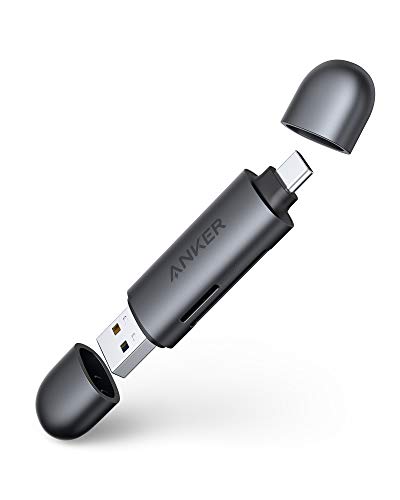
Mid-range pick for mixed ports and travel bags. Anker puts a USB-C plug on one end and a USB-A plug on the other, with caps for both, so this reader connects to phones, tablets and laptops without a cable or adapter. The SD and microSD slots read and write simultaneously, which helps when copying between cards in the field. Speed is capped at the UHS-I limit of 104 MB/s, so it suits everyday cards rather than UHS-II media, and the slim body travels well in a laptop sleeve.
Specs
- Slots: SD and microSD, simultaneous read and write
- Card support: UHS-I SD, SDXC, SDHC, microSD, microSDXC, MMC
- Interface: USB-C and USB 3.0 Type-A dual connectors
- Max transfer: up to 104 MB/s
- Size: 2.35 x 0.8 x 0.44 inches
- Model: A8326, 18-month warranty
UGREEN USB 3.0 SD Card Reader

Budget pick for a desktop drawer. This straightforward USB-A reader covers the two slots most people need, SD and microSD, and reads or writes both at the same time over a 5 Gbps USB 3.0 connection. It handles UHS-I cards at their full speed, works across Windows, Mac, Linux and Chrome systems with no software to install, and the short built-in cable keeps it from levering against the port. It gives up UHS-II support and a USB-C plug, which is a fair trade at this tier for a reader that mostly lives on one desk.
Specs
- Slots: SD and microSD, simultaneous read and write
- Card support: UHS-I SDXC, SDHC, SD, microSDXC, microSDHC, MMC
- Interface: USB 3.0 Type-A, 5 Gbps
- Compatibility: Windows, Mac, Linux and Chrome systems
- Model: 20250
SanDisk MobileMate USB 3.0 microSD Reader

Budget pick for microSD-only kits. The MobileMate does one job: it reads microSD cards over USB 3.0 at up to 170 MB/s when paired with SanDisk cards that support its faster transfer mode, and at standard UHS-I speeds with everything else. At barely over an inch long it disappears into a drone case or a coin pocket, and there is no cable to tangle. The trade-off is absolute: there is no full-size SD slot, so camera cards need a different reader.
Specs
- Slot: microSD only
- Card support: microSD UHS-I, SDHC and SDXC formats
- Interface: USB 3.0 Type-A, backwards compatible with USB 2.0
- Max transfer: up to 170 MB/s read with supported SanDisk cards
- Size: 1.2 x 0.82 x 0.35 inches
- Model: SDDR-B531-GN6NN, two-year limited warranty
Who Should Skip a Dedicated Card Reader
Skip the purchase if your laptop has a built-in SD slot that already matches your cards, since an external reader adds nothing but another item to carry. Skip it as well if your camera transfers over Wi-Fi or a USB cable at a pace you find acceptable for small batches of photos. And if your next camera move is to CFexpress media, none of these readers will follow you there, so put the money toward a reader for that format instead.
Frequently Asked Questions
Is a UHS-II reader worth it if my cards are UHS-I?
Only as future-proofing. A UHS-II reader reads UHS-I cards at their normal speed, no faster, because the card itself is the limit. The upgrade pays off the day you buy your first UHS-II card, at which point the same reader unlocks transfers up to 312 MB/s instead of 104 MB/s.
Can one reader handle both SD and microSD cards?
Yes, four of the five readers here carry both slots, and most can read and write both cards at the same time. The exception is the SanDisk MobileMate, which is microSD only. Check the slot list before buying if you shoot with both a camera and a drone.
Why is my card reader slower than the speed printed on the card?
The slowest link in the chain sets the pace. A UHS-I reader caps a UHS-II card at 104 MB/s, a USB 2.0 port caps everything far lower, and writing to a nearly full or slow hard drive throttles transfers further. Plug the reader directly into a USB 3.0 or USB-C port and copy to an SSD for the best results.
Do card readers need drivers or extra software?
No. Every reader in this roundup is plug and play on Windows, Mac, Linux and Chrome systems, and cards appear as standard removable drives. Phones and tablets with USB-C ports can read them too, although a file manager app may be needed to browse the card.
Final Verdict
For most people, the UGREEN SD 4.0 reader is the one to buy: UHS-II support, both USB-C and USB-A connectors, and SD plus microSD slots in a single unit. Choose the SanDisk Professional PRO-READER if offloading cards is a daily production task, the Anker 2-in-1 for a slim travel reader that fits any port, and either budget pick when your cards are UHS-I and simple is better.
Product and ASIN Reference
| Product | ASIN |
|---|---|
| SanDisk Professional PRO-READER SD and microSD Card Reader | B0B2X4FGYH |
| UGREEN SD 4.0 Card Reader with USB-C and USB-A Connectors | B0DP9QKGY7 |
| Anker PowerExpand+ 2-in-1 SD 3.0 Card Reader | B08VDWFSSX |
| UGREEN USB 3.0 SD Card Reader with Dual Slots | B0779V61XB |
| SanDisk MobileMate USB 3.0 microSD Card Reader | B07G5JV2B5 |
More from Amazon
Programs that pair well with the guide above. Offers and eligibility are set by Amazon and may change.
Free shipping on eligible items, Prime Video and more. Eligible new members can start with a free trial.
Start a Prime free trialAudiobooks and podcasts to listen to on the go. Eligible new members can start with a free trial.
Try Audible freeAd-free music streaming. Eligible new subscribers can start with a free trial.
Try Music Unlimited freeA free business account with business pricing and bulk-buying tools for work, shop or home office.
Create a business accountAs an Amazon Associate we earn from qualifying purchases.