
Key takeaways
- Compare the best USB-C cables for 140W charging, 40Gbps data and 8K video, from Anker, UGREEN and Belkin picks to Apple's Thunderbolt 4 Pro lead.
- Top Pick: Anker 2-in-1 USB-C to USB-C Cable (4 ft, 140W)
- Runner-up: UGREEN 100W USB-C to USB-C Cable (3.3 ft)
- Also consider: Belkin BoostCharge Braided USB-C to USB-C Cable (6.6 ft, 100W)
A USB-C connector tells you almost nothing about what a cable can actually do. Two leads that look identical can differ by a factor of twenty in charging power and a factor of eighty in data speed, because the wires and chips inside are built to different tiers of the USB spec. The five cables below cover the main jobs: high-wattage laptop charging, everyday phone top-ups, and full-speed data and video for docks and external drives.
As an Amazon Associate, we earn from qualifying purchases.
Quick Answer
The Anker 2-in-1 is the best USB-C cable for most people, splitting one charger port into two charging ends with up to 140W on tap. The UGREEN 100W is the short everyday pick, the Belkin BoostCharge adds USB-IF certification at 6.6 feet, and the Cable Matters and Apple Thunderbolt 4 cables add 40Gbps data and video.
How to Choose
Match the wattage to your hungriest device. Phones charge happily at 25 to 45 watts, most ultrabooks want 65 to 100 watts, and large gaming or workstation laptops can draw 140 watts or more. A cable is a hard ceiling in that chain: a 60W cable behind a 140W charger still delivers only 60W. For future-proofing, a 100W rating covers nearly every laptop, and 240W-rated cables add headroom for the newest high-draw models.
Look for an e-marker chip above 60W. Cables rated for more than 60W of power, meaning current above 3 amps, are required to carry an electronic marker chip that tells the charger what the cable can handle. Every high-wattage pick in this roundup has one. Unmarked bargain cables may charge slowly or, worse, misreport their limits, so the chip is a basic safety feature rather than a luxury.
Separate charging speed from data speed. Most charging-focused cables use USB 2.0 wiring and top out at 480 Mbps, which is fine for syncing a phone but painfully slow for moving video files to an SSD. If the cable will feed a dock, a monitor or an external drive, look for Thunderbolt 4 or USB4 branding, which brings 40Gbps data and DisplayPort video over the same lead.
Mind the length limits. Passive cables that carry 40Gbps are limited to about 0.8 meters before the signal degrades. Longer full-speed cables use active electronics to boost the signal, like the Cable Matters pick below, or accept a lower data rate. For pure charging, length is far less critical, and a 2 or 3 meter lead is a reasonable way to reach a sofa or a nightstand.
The 5 Best USB-C Cables
Anker 2-in-1 USB-C to USB-C Cable (4 ft, 140W)

The Anker 2-in-1 solves a problem most cables ignore: one charger port, two devices. A 3-foot base cable splits into two adjustable 1-foot ends, so a single wall charger or power bank can feed a laptop and a phone at once, with smart power distribution balancing the load between them. Connect just one device and the cable passes up to 140W, enough for a 16-inch MacBook Pro. Data transfer is USB 2.0 speed, so this is a charging tool rather than a data lead, and the braided nylon jacket suits life in a travel bag. It is the premium pick here, and the one to buy if hotel rooms and airport outlets are your natural habitat.
Specs
- Model: A8895
- Length: 4 ft total (3 ft base plus two 1 ft ends)
- Power: up to 140W to a single device, shared between two
- Data: USB 2.0, up to 480 Mbps
- Jacket: braided nylon
- Protocols: USB Power Delivery, PPS, PIQ 3.0
UGREEN 100W USB-C to USB-C Cable (3.3 ft)

UGREEN’s 100W cable is the straightforward desk and bedside option. At 3.3 feet it reaches from a desktop charger to a laptop or phone without leaving a coil of slack, and the 100W Power Delivery rating covers the great majority of USB-C laptops as well as fast-charging phones and tablets. An e-marker chip handles the high-current handshake, the nylon braid resists fraying at the ends, and aluminum housings protect the connectors. Data transfer runs at USB 2.0 speed, which matches its charging-first brief. As a budget pick that still respects the spec, it is hard to fault.
Specs
- Length: 3.3 ft
- Power: up to 100W (USB PD 3.0)
- Chip: built-in e-marker
- Data: USB 2.0, up to 480 Mbps
- Jacket: nylon braided
- Housings: aluminum alloy
Belkin BoostCharge Braided USB-C to USB-C Cable (6.6 ft, 100W)

Belkin’s BoostCharge is the certified, long-reach everyday cable. USB-IF certification means the design has passed the USB Implementers Forum compliance program, a meaningful check on a cable that may carry 100W into an expensive laptop. The double-braided nylon jacket and anodized aluminum heads are tested by the maker to survive over 25,000 bends and 10,000 insertions, and at 6.6 feet it spans the gap between a wall outlet and a desk or sofa that shorter cables cannot. Data stays at USB 2.0 speed, so treat it as a charging lead with unusually good paperwork and reach.
Specs
- Model: CAB014bt2MBK
- Length: 6.6 ft (2 m)
- Power: up to 100W USB Power Delivery
- Certification: USB-IF certified
- Data: USB 2.0, up to 480 Mbps
- Jacket: double-braided nylon, anodized aluminum heads
Cable Matters Active Thunderbolt 4 Cable (6.6 ft, 240W)

Passive 40Gbps cables give up at about 0.8 meters, which is why this Cable Matters lead exists. It is an active design with signal conditioning built in, so it sustains Thunderbolt 4 data rates of 40Gbps across a full 6.6 feet, carries up to 240W of charging under USB PD 3.1, and drives video up to 8K. Intel certification backs the Thunderbolt claims, and the cable also works with USB4 and Thunderbolt 3 hosts. One caution that applies to active cables generally: the electronics are tuned for Thunderbolt hosts, so plain USB data devices can fall back to slower speeds. For a dock or an eGPU across the room, it is the mid-range pick that does the whole job.
Specs
- Model: 107025-BLK-2m
- Length: 6.6 ft (2 m), active
- Power: up to 240W (USB PD 3.1)
- Data: Thunderbolt 4 and USB4, up to 40Gbps
- Video: up to 8K
- Certification: Intel certified for Thunderbolt 4
Apple Thunderbolt 4 (USB-C) Pro Cable (3 m)
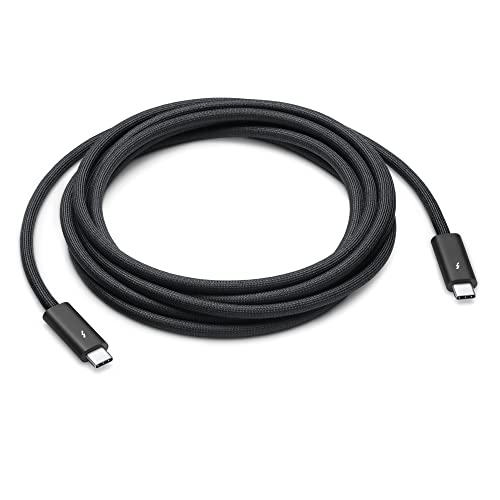
Apple’s 3-meter Pro cable is the longest full-featured option in this group. It supports Thunderbolt 4 and USB4 data at up to 40Gbps, USB 3.1 Gen 2 at up to 10Gbps, DisplayPort video output, and charging at up to 100W, and it can daisy-chain up to six Thunderbolt devices. The black braided jacket coils without tangling, which matters at this length. The trade-offs are the 100W charging ceiling, where the Cable Matters cable goes further, and a premium position in this lineup. For a Studio Display or a Thunderbolt dock parked well away from the computer, it remains the reference cable.
Specs
- Model: MW5H3AM/A
- Length: 3 m (9.8 ft)
- Power: up to 100W
- Data: Thunderbolt 4 and USB4 up to 40Gbps; USB 3.1 Gen 2 up to 10Gbps
- Video: DisplayPort (HBR3) output
- Jacket: black braided
Who Should Skip a Premium USB-C Cable
Skip this category if the cable in your phone’s box already does everything you ask of it; for overnight charging, wattage headroom and certification add nothing you will feel. Skip it, too, if your gear still ends in USB-A or Lightning, since none of these leads will connect without an adapter. And if you never move files or drive a display over USB-C, the Thunderbolt models are overkill: a certified 100W charging cable like the Belkin or UGREEN covers your needs for less, in budget terms, than the data-focused picks.
Frequently Asked Questions
What does an e-marker chip in a USB-C cable do?
The e-marker is a small chip in the connector that reports the cable’s power and data capabilities to the charger and the device. It is mandatory on cables rated above 60W, and it is what allows a charger to safely send 100W or more instead of falling back to a low default rate.
Can a USB-C charging cable also carry video to a monitor?
Only if it supports DisplayPort alt mode, which in practice means Thunderbolt or USB4 cables like the Apple and Cable Matters picks here. Charging-focused USB 2.0 cables such as the Anker, UGREEN and Belkin models move data at 480 Mbps and are not intended to drive a display.
Does a longer USB-C cable charge more slowly?
For charging, barely, provided the cable is rated for the wattage and carries an e-marker; voltage drop over a few meters is minor. Data is the real casualty of length. Passive 40Gbps cables are limited to about 0.8 meters, so longer full-speed runs need an active cable or a Thunderbolt dock placed closer to the computer.
Is USB-IF certification worth paying for?
It is a useful signal. Certification means the cable passed the USB Implementers Forum compliance tests for power and signal integrity, which reduces the risk of slow charging, dropouts or damage with high-wattage chargers. For a cable that will feed a costly laptop daily, that assurance is worth a modest premium.
Final Verdict
Buy the Anker 2-in-1 if one port has to serve two devices, the UGREEN 100W for a short and honest desk cable, and the Belkin BoostCharge when you want certification and 6.6 feet of reach. When the cable also has to move data or video, the Cable Matters Active Thunderbolt 4 is the value route to 40Gbps at distance, and Apple’s 3-meter Pro cable is the premium finishing touch for a Thunderbolt desk setup.
More from Amazon
Programs that pair well with the guide above. Offers and eligibility are set by Amazon and may change.
Free shipping on eligible items, Prime Video and more. Eligible new members can start with a free trial.
Start a Prime free trialAudiobooks and podcasts to listen to on the go. Eligible new members can start with a free trial.
Try Audible freeAd-free music streaming. Eligible new subscribers can start with a free trial.
Try Music Unlimited freeA free business account with business pricing and bulk-buying tools for work, shop or home office.
Create a business accountAs an Amazon Associate we earn from qualifying purchases.



