
Key takeaways
- 7-inch glare-free panel handles outdoor reading well
- 20 percent faster processing reduces perceived lag
- Black is the most common color, so cases and covers are widely available
- Con: at $199.99 it is fifty dollars more than the base Kindle for the same 16GB storage
A dedicated ebook reader solves one specific frustration: your phone or tablet is full of notifications, apps, and temptations that pull you away from long-form reading. E-paper displays render text without backlight glare, survive direct sunlight, and sip power so slowly that a single charge lasts weeks rather than hours. The downside is that mediocre readers exist too — laggy page turns, muddy contrast, and cheap build quality can make the experience worse than reading on a screen you already own.
What separates a genuinely good reader in 2026 from a passable one comes down to a handful of tangible specs: how fast pages flip, how much contrast the display delivers, how comfortable the device is over a long session, and whether the ecosystem around it actually gets out of your way. The eight models below represent the range most buyers are weighing right now, from a sixty-nine-dollar pocket device to a premium Kindle with wireless charging. We compared published specifications, price points, and recurring themes in owner feedback to sort them into a useful ranking.
Our top picks





As an Amazon Associate we earn from qualifying purchases at no extra cost to you. Ratings are shown as listed on Amazon.
Quick Picks
| Product | Best for | Price |
|---|---|---|
| Kindle Paperwhite 16GB (Black) | Balanced all-around reading | $199.99 |
| Kindle 16GB (Matcha) | Lightweight portability | $149.99 |
| Kindle 16GB (Black) | Budget Kindle ecosystem | $149.99 |
| Kindle Paperwhite 16GB (Jade) | Distinctive color, same core | $199.99 |
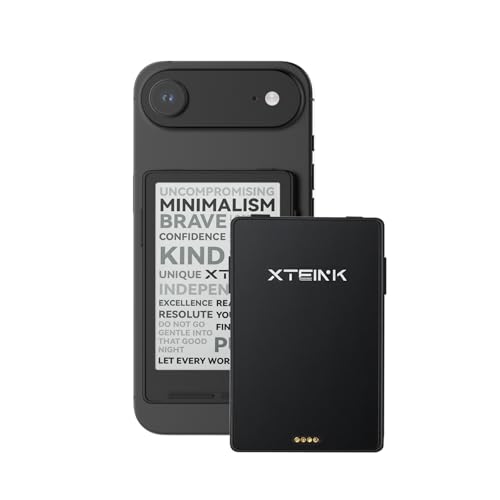
| XTEINK X3 (Space Black) | Ultra-compact pocket use | $69 |
| Kindle Paperwhite Signature 32GB | Premium features and storage | $249.99 |
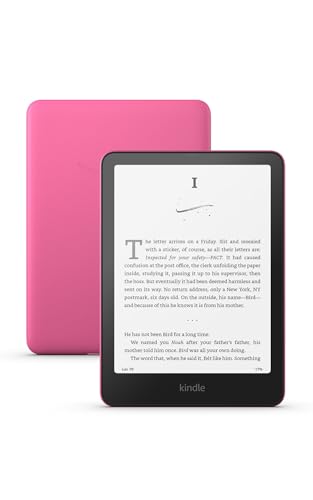
| Kindle Paperwhite 16GB (Raspberry) | Statement color option | $199.99 |
| XTEINK X3 (Mist Gray) | Casual travel companion | $69 |
How We Picked
Four criteria drove this ranking. First, display quality at the stated price: contrast ratio, size, and whether the panel is treated for glare. Second, performance metrics Amazon and other manufacturers publish — page-turn speed improvements, processor generation. Third, real-world ergonomics: weight, thickness, and how owners describe multi-hour sessions. Fourth, value density — how much of the premium experience you get before the price jumps disproportionately.
The 8 Best Ebook Readers in 2026
Amazon Kindle Paperwhite 16GB – Black
This is the default recommendation for most readers because it balances screen size, speed, and battery endurance without pushing you into premium pricing. The new 7-inch glare-free display is a meaningful step up for anyone who currently reads on smaller Kindles, and the 20 percent faster page turns make long chapters feel less interrupted.
- 7-inch glare-free panel handles outdoor reading well
- 20 percent faster processing reduces perceived lag
- Black is the most common color, so cases and covers are widely available
- Con: at $199.99 it is fifty dollars more than the base Kindle for the same 16GB storage
Skip this if your budget is firm at $150 or if you prioritize pocketability over screen real estate.
Amazon Kindle 16GB – Matcha
The matcha finish is the standout feature here, but the underlying device is Amazon’s lightest and most compact current Kindle. Faster page turns and a higher contrast ratio compared to the prior generation make it a genuine upgrade path for anyone still reading on an older entry-level model. The green shell appeals to readers who want their device to look distinct without going loud.
- Lightest and most compact option in the current Kindle lineup
- Higher contrast ratio improves text crispness on a smaller panel
- Matcha finish gives a visual identity without sacrificing readability
- Con: smaller display means fewer words per page and more frequent turns for dense text
Skip this if you read graphic-heavy material or long nonfiction with complex tables that benefit from more screen width.
Amazon Kindle 16GB – Black
Identical in hardware to the matcha version, this black model suits readers who prefer a low-profile look that disappears into a bag or bookshelf. At $149.99 it is the most affordable entry into the current-gen Kindle ecosystem with meaningful spec improvements over the predecessor. Owner feedback consistently praises the weight, describing it as noticeably lighter than the Paperwhite during single-hand reading sessions.
- Faster page turns and higher contrast than the previous entry Kindle
- Compact form factor is easy to hold for extended periods
- Black finish resists visible fingerprints better than lighter colors
- Con: lacks the 7-inch display and glare treatment of the Paperwhite tier
Skip this if you frequently read in bright sunlight or need the larger canvas for annotation-heavy work.
Amazon Kindle Paperwhite 16GB – Jade
The jade Paperwhite is the same 20-percent-faster, 7-inch, glare-free device as the black and raspberry variants, distinguished only by its green shell. For readers who want the Paperwhite experience but find black too generic and raspberry too bold, jade hits a middle ground that photographs well and feels distinctive in hand without being a statement piece.
- 7-inch glare-free display with weeks of battery life on a single charge
- 20 percent faster page turns make navigation feel snappy
- Jade color offers a quieter aesthetic than the more saturated options
- Con: color-specific cases and screen protectors are harder to source than black
Skip this if accessories compatibility matters more to you than enclosure color.
XTEINK X3 3.7-inch – Space Black
At $69, the XTEINK X3 is the least expensive dedicated reader in this roundup. Its 3.7-inch e-ink display is genuinely pocketable, fitting into a coat pocket or small bag without adding bulk. Space black gives it a utilitarian look. Owner feedback highlights the surprise of getting a readable e-ink screen at this price, though the small size limits practical use to lighter fiction and shorter reading bursts.
- 3.7-inch e-ink display at a fraction of the price of any Kindle here
- Space black finish is understated and hides wear well
- Light enough to forget you are carrying it
- Con: small screen makes dense text feel cramped and slows navigation through long books
Skip this if you read more than one or two chapters at a time or want ecosystem features like Whispersync.
Amazon Kindle Paperwhite Signature Edition 32GB
The Signature Edition justifies its $249.99 price tag for a specific buyer: someone who wants the Paperwhite experience with premium conveniences folded in. Auto-adjusting front light removes the daily fiddling with brightness levels, wireless charging means no cable hunt, and 32GB storage handles large audiobook-and-ebook hybrid libraries. The metallic black finish adds a subtle visual upgrade.
- Auto-adjusting front light adapts to ambient conditions without manual input
- Wireless charging eliminates cable wear and simplifies dock placement
- 32GB storage accommodates heavy multimedia libraries
- Con: fifty dollars above the standard Paperwhite for features many readers will not miss
Skip this if you charge via cable nightly out of habit or if your library fits comfortably in 16GB.
Amazon Kindle Paperwhite 16GB – Raspberry
The raspberry Paperwhite delivers the same 7-inch glare-free display and 20-percent-faster performance as its color siblings, but in a finish that is impossible to lose in a bag or confuse with another household member’s device. It is the right choice for readers who value visibility and personality in their hardware. The underlying reading experience is indistinguishable from the black and jade versions.
- Bright raspberry color makes the device instantly recognizable
- Same 7-inch glare-free panel and 20 percent faster page turns as other Paperwhites
- Weeks of battery life on a single charge regardless of finish
- Con: bold color shows dust and fingerprints more readily than darker shells
Skip this if you prefer a device that blends into professional settings or you dislike frequent exterior cleaning.
XTEINK X3 3.7-inch – Mist Gray
The mist gray X3 is the same compact, affordable e-ink reader as the space black variant, wearing a lighter shell that some owners describe as more visually soft in hand. At $69 it remains the lowest-cost path to a dedicated reading screen. The color choice does not affect performance, contrast, or battery — it is purely aesthetic and matters most if you want something that feels less industrial.
- Mist gray gives a softer, less utilitarian appearance than the black version
- 3.7-inch e-ink display at the lowest price in this lineup
- Ultra-light and genuinely pocketable for on-the-go reading
- Con: limited ecosystem support and smaller screen still restrict longer reading sessions
Skip this if you need access to Kindle Store purchases, Whispersync, or X-Ray, or if your reading sessions exceed thirty minutes.
Buying Guide
Display Size and Glare Treatment
Screen size determines how many words land on a page and how naturally your eyes track a full line. A 3.7-inch panel like the XTEINK X3 fits a few lines of text and works for short bursts, while 6-inch and 7-inch Kindles let you settle into longer paragraphs without constant scrolling. Glare treatment matters most if you read outdoors or near windows. Paperwhite models ship with a glare-free layer that diffuses reflections, whereas the base Kindle and XTEINK rely on standard e-ink surfaces that can mirror in bright conditions. Choose the smallest panel that still feels comfortable, because larger screens add weight.
Page-Turn Speed and Responsiveness
Amazon’s newest models tout a 20 percent improvement in processing, which translates to reduced visible lag when swiping between pages or tapping navigation buttons. For fiction, the difference between generations is subtle, but for nonfiction readers who jump between footnotes, tables of contents, and search results, a snappy interface keeps flow intact. If you are upgrading from a Kindle older than two generations, the perceived speed gap will be significant regardless of price tier.
Battery Life and Charging Method
All Paperwhite models in this list advertise weeks of battery life, and the base Kindle falls in a similar range given its smaller display draws less power. The practical differentiator is charging method: the Signature Edition supports wireless charging, while every other model here requires a cable. If you tend to forget to charge devices until they die, wireless eliminates the friction of searching for the right connector. Cable charging is faster and universally compatible, but it adds a small daily friction that compounds over years of use.
Our Verdict
The Kindle Paperwhite 16GB is the top pick for most buyers: the 7-inch glare-free display, 20 percent faster page turns, and weeks-long battery life cover every common reading scenario without pushing you into premium pricing. For readers who simply want the cheapest way to own a dedicated e-ink screen, the XTEINK X3 at $69 is the budget pick, accepting its small display as a trade-off for extreme portability and a fraction of the cost. However, if you read in bright outdoor settings several times a week, the Paperwhite’s glare treatment alone justifies the jump from the base Kindle.
FAQ
Do ebook readers work in direct sunlight?
Yes, and this is one of their core advantages over phones and tablets. E-ink displays reflect ambient light rather than emitting it, so brighter conditions actually improve readability. Models with a dedicated glare-free layer, like the Paperwhite, handle harsh sunlight even better by diffusing reflections that would otherwise wash out text on a standard panel.
Can I read non-Kindle books on a Kindle?
Amazon Kindles accept EPUB files sent through the Send-to-Kindle service, so most public-domain and DRM-free titles work without extra software. The XTEINK supports a wider range of formats out of the box, which appeals to readers who pull books from libraries that distribute in formats other than Amazon’s preferred ecosystem.
Is 16GB storage enough for most readers?
For text-only ebooks, 16GB holds several thousand books, which exceeds what the average reader finishes in a lifetime. You only need the jump to 32GB if you also download audiobooks for offline listening or carry graphic-heavy comics and illustrated nonfiction alongside your novels.
Which color should I choose if all specs are identical?
Color does not affect performance, battery life, or display quality in any model here. The practical considerations are fingerprint visibility (darker shells hide smudges, lighter and saturated shells show them) and accessory availability (black and standard finishes have the widest third-party case and cover options on the market).


