Key takeaways
- The phrase "universal remote for Vizio TVs" usually means one of two situations. Either the original remote has gone missing, cracked.
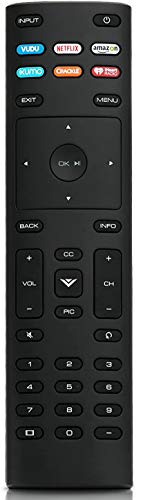
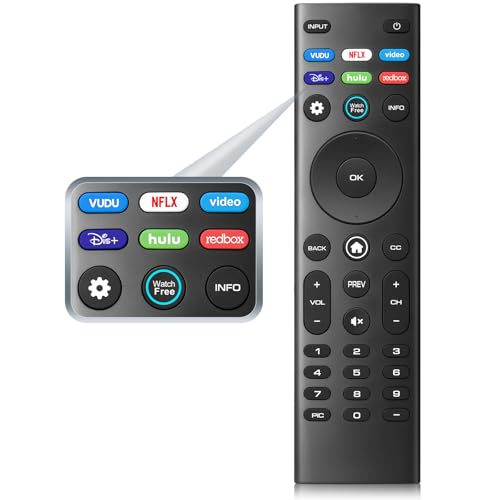
The phrase “universal remote for Vizio TVs” usually means one of two situations. Either the original remote has gone missing, cracked, or lost its buttons to a couch cushion, or someone wants a single clicker that does more than the one in the box. The listings below are mostly the first kind: replacement remotes built around the model codes Vizio has used on its Smart TVs, such as XRT136, XRT140, XRT260, and XRT270. A few are broader universal remotes that name Vizio alongside other brands. Which type you need depends entirely on the television sitting in your living room, and getting that match right matters more than any feature list.
This guide is written for people who want a working Vizio remote in 2026 without spending a weekend decoding model numbers. It leans on what each product title actually states: the remote code, the series it names, the pack size, and any warranty. Where a title is vague, we say so.
Quick Picks
Our top picks




As an Amazon Associate we earn from qualifying purchases at no extra cost to you.
| Product | Best for | Key spec from the title |
|---|---|---|
| XRT136 Replacement Remote | Direct swap for an XRT136 original | XRT136 code in the title |
| XRT140 Remote with XRT260/XRT270 Coverage | Owners of several Vizio generations | Lists XRT140, XRT136, XRT260, XRT270 |
| XRT140 Replacement Remote | Direct swap for an XRT140 original | XRT140 code in the title |
| New Universal Remote with Warranty | Buyers who want coverage if it fails | 1 Year Warranty |
| 2-Pack Universal Vizio Remote Set | Households with a spare-remote habit | 2-Pack, Smartcast D, E, M, P, V, PX Series |
| XRT136 Remote with Model List | Checking your exact TV against a list | Named models from D24f-F1 to P75-E1 |
| All-Vizio LED/LCD Universal Remote | Generic coverage across Vizio sets | LED, LCD, HD, 4K UHD, HDR |
| Multi-Brand Universal TV Remote | Homes with TVs from different makers | Names Samsung, LG, Vizio, Roku, TCL, Hisense, Sony |
| XRT270/XRT260 Multi-Model Remote | Newer FHD, 4K, and QLED sets | XRT270, XRT260, XRT140, XRT136; Quantum Pro |
| Hyphenated Vizio Remote (XRT140) | Simple XRT140 replacement | XRT140 for all Vizio Smart TV |
How to Choose
Match the remote code first
Flip your old remote over or look at its face. If it carries XRT136, XRT140, XRT260, or XRT270, buy a listing that names that exact code. Many titles in this group stack several codes together, which usually signals a broad-compatibility design, but a title that shows only your code is the safest direct swap. If your original is long gone, check the sticker on the TV’s back panel for the model name and compare it to the series letters (D, E, M, P, V, PX) named in the listing.
Decide between Vizio-only and multi-brand
A Vizio-specific remote keeps things simple: one TV, one clicker. A multi-brand universal remote names a long list of manufacturers and suits a home where a Samsung bedroom set and a Vizio den set share one controller. The trade-off is that broader coverage can mean more setup steps and fewer shortcut keys dedicated to Smartcast apps. If streaming buttons are why you want a Vizio remote, lean toward the Vizio-specific listings.
Look at pack size and warranty
Remotes get dropped, sat on, and borrowed by kids. A 2-pack costs more up front but pays off if you want a spare for the guest room. A stated warranty, like the 1 year listed on one product here, is a modest safety net against a dead-on-arrival unit.
Know where budget replacements cut corners
Third-party replacement remotes typically skip voice search or backlighting, and button feel can be stiffer than the original. Titles in this group rarely mention batteries, so plan to buy AAA cells separately. Treat any listing that claims “all Vizio TVs” with a little caution: confirm your series letter before trusting it, and keep the return window open until every button, especially input and volume, behaves.
The 10 Best Options
XRT136 Replacement Remote
This listing is the plainest of the XRT136 group: the title names the Vizio Smart TV, the replacement purpose, and the XRT136 code, and nothing else. If your original remote carried XRT136 on its face, you know exactly what you are replacing, with no long model list to second-guess.
- Strength: the title ties directly to one remote code, which keeps the matching decision easy.
- Strength: no feature promises beyond replacement, so there is little to be disappointed by.
- Trade-off: the title shows no warranty, pack size, or model list to lean on.
Skip it if your original says XRT140 or XRT270, or if you want evidence of broader compatibility before you buy.
XRT140 Remote with XRT260/XRT270 Coverage
The longest compatibility statement in the group belongs to this one. Its title names XRT140 as the main code and then lists XRT136, XRT260, and XRT270, plus Smartcast D, E, M, P, V, and PX series TVs. For a household that has bought Vizio sets across several years, that spread can mean a single remote model covers more than one TV, which makes reordering simpler.
- Strength: four remote codes appear in the title, covering several Vizio generations.
- Strength: six Smartcast series letters are named, which makes checking your TV straightforward.
- Trade-off: stacking many codes in one title makes it harder to confirm a perfect match for any single set.
Skip it if you own just one older TV and prefer a listing built around that one code.
XRT140 Replacement Remote
Think of this as the XRT140 counterpart to the basic XRT136 listing. The title reads as a straightforward replacement for Vizio Smart TVs, anchored by the XRT140 code. Owners whose original remote says XRT140 get a clean, uncomplicated target.
- Strength: a single clear remote code in the title keeps the match unambiguous.
- Strength: a simple replacement framing fits buyers who just want the old remote back.
- Trade-off: no model list, series letters, or warranty appear in the title.
Skip it if your TV is a newer set that uses XRT260 or XRT270, where a multi-code listing is the safer match.
New Universal Remote with Warranty
This is the only single-remote listing that spells out a warranty: one year. It also frames itself as new and compatible with all Vizio-brand TVs and Smart TVs, without naming remote codes. For a buyer who worries about receiving a dud and has no original remote left to read a code from, a stated warranty is the clearest reassurance in the title.
- Strength: a 1-year warranty is stated outright.
- Strength: broad Vizio-brand wording suits people who cannot identify their old remote.
- Trade-off: no XRT code or series letter appears, so you cannot cross-check it against your original.
Skip it if you want to verify an exact remote code before purchase.
2-Pack Universal Vizio Remote Set
Two remotes in one order is the draw here. The title covers LCD, LED, HD, 4K UHD, and HDR Vizio Smart TVs and names the D, E, M, P, V, and PX Smartcast series. A pair makes sense for a family with a habit of losing remotes, or for a vacation rental where one remote tends to wander off between guests.
- Strength: two remotes in one pack, handy as a ready spare.
- Strength: wide series coverage, from D through PX, across HD to 4K UHD HDR.
- Trade-off: you pay for two even if you only need one.
Skip it if you have a single TV and rarely misplace the remote.
XRT136 Remote with Model List
Where most titles stay general, this one lists specific TV models: D24f-F1, D43f-F1, D50f-F1, E43-E2, E60-E3, E75-E1, M65-E0, M75-E1, P55-E1, P65-E1, and P75-E1, with “and More” at the end. If your TV’s model number appears in that run, you have written confirmation of a match before buying, which is rare in this category.
- Strength: eleven named TV models let you verify compatibility against your own set.
- Strength: it carries the XRT136 code, so it pairs with an XRT136 original.
- Trade-off: if your model is not on the list, you rely on the vague “and More.”
Skip it if your TV model is not in the named run and you want firmer confirmation.
All-Vizio LED/LCD Universal Remote
This listing leans on breadth. It states compatibility with all Vizio Smart TVs, across LED, LCD, HD, 4K UHD, and HDR panels, and describes itself as a replacement. It does not cite a remote code, so it reads as a general-purpose Vizio solution for someone who cannot read the old remote’s face or has several differently aged sets at home.
- Strength: panel types and resolutions named broadly, from HD to 4K UHD HDR.
- Strength: no code lock-in, so it fits owners who do not know their remote model.
- Trade-off: the lack of a stated code means less to verify against.
Skip it if you want a listing that ties to a specific XRT code.
Multi-Brand Universal TV Remote
Unlike the rest, this one is not Vizio-only. The title lists Samsung, LG, Vizio, Roku, TCL, Hisense, and Sony, then continues into Onn, Element, Insignia, Philips, Sharp, Westinghouse, Sanyo, and Emerson. It is the logical pick for a house that has a mix of brands and would like to retire a drawer of remotes in favor of one.
- Strength: more than a dozen brands named, ideal for mixed-brand homes.
- Strength: one device can replace several, cutting down on remote clutter.
- Trade-off: it is not built around Vizio’s remote codes, so Vizio-specific shortcuts are not promised in the title.
Skip it if you only own Vizio TVs and want a purpose-built replacement.
XRT270/XRT260 Multi-Model Remote
This listing leads with the newer codes, XRT270 and XRT260, before XRT140 and XRT136, and it names FHD, 4K, QLED, and UHD Smartcast sets, including Quantum and Pro lines, across D, E, PX, P, M, and V series. If your Vizio is a more recent 4K or QLED model, this is the title that speaks to it most directly.
- Strength: four remote codes appear, with newer ones given priority.
- Strength: QLED and Quantum Pro lines are explicitly named.
- Trade-off: the title is truncated in the listing, so details past the series list are not visible.
Skip it if your TV is an older HD set where a simpler XRT136 listing already covers you.
Hyphenated Vizio Remote (XRT140)
The final entry is another XRT140 replacement, this time worded for all Vizio Smart TVs. It overlaps heavily with the basic XRT140 listing, so the choice between them often comes down to which one is in stock and which ships fastest. Its title promises compatibility with every Vizio Smart TV, which is optimistic wording worth double-checking against your series letter.
- Strength: XRT140 code stated clearly in the title.
- Strength: all-Vizio-Smart-TV wording suits mixed households.
- Trade-off: it offers nothing in the title that the other XRT140 listing does not already say.
Skip it if you want a warranty, a multi-pack, or a model list to verify against.
Which One Fits Your Situation
You know your remote code and want a clean swap
Match the code on your old remote: the XRT136 Replacement Remote for XRT136 owners, or the XRT140 Replacement Remote for XRT140 owners. If you want written proof of compatibility, the XRT136 Remote with Model List gives eleven named TVs to check against.
You own a newer 4K or QLED set
Start with the XRT270/XRT260 Multi-Model Remote, since its title names QLED, Quantum, and Pro lines. The XRT140 Remote with XRT260/XRT270 Coverage is a close second, with a longer list of series letters.
You are replacing remotes for a whole family
The 2-Pack Universal Vizio Remote Set gives you a spare at the outset. Pair it with the New Universal Remote with Warranty if one of the sets belongs to a relative who is likely to need support later.
Your living room has TVs from different brands
The Multi-Brand Universal TV Remote names far more manufacturers than the others and fits a mixed shelf of Samsung, LG, TCL, and Vizio sets best.
Common Mistakes
- Buying without reading the code on the old remote, then discovering the replacement carries a different XRT number.
- Assuming “all Vizio” wording guarantees a match for every series; always confirm your series letter.
- Forgetting batteries, since the titles here do not list them.
- Choosing a multi-brand remote when streaming-app shortcut keys are the main reason for the purchase.
- Letting the return window lapse before checking input, volume, and menu buttons one by one.
Related guides
- Sony Wh-1000Xm5 Vs Bose Quietcomfort Ultra Headphones
- Outdoor Night Vision Home Security Cameras
- Bose Quietcomfort Ultra Vs Bose 700 Headphones
Frequently Asked Questions
How do I find my Vizio remote code?
Look at the face or back of the original remote for an XRT number. If it is gone, check your TV’s model name on the back panel or in the settings menu, then compare its series letter to the listings above.
Are these remotes the same as official Vizio remotes?
The titles describe them as replacements or universal remotes, not official originals. Expect similar basic functions, but do not assume every shortcut key or voice feature carries over.
Can one remote control a soundbar or cable box too?
The multi-brand listing names a wide range of TV makers, but the titles do not state soundbar or cable box control. Read the full product page before counting on it.
Is a 2-pack worth it?
If you have more than one Vizio TV in the same series or you lose remotes often, yes. For a single set and careful users, one remote is plenty.
More from Amazon
Programs that pair well with the guide above. Offers and eligibility are set by Amazon and may change.
Free shipping on eligible items, Prime Video and more. Eligible new members can start with a free trial.
Start a Prime free trialAudiobooks and podcasts to listen to on the go. Eligible new members can start with a free trial.
Try Audible freeAd-free music streaming. Eligible new subscribers can start with a free trial.
Try Music Unlimited freeA free business account with business pricing and bulk-buying tools for work, shop or home office.
Create a business accountAs an Amazon Associate we earn from qualifying purchases.