Key takeaways
- Compare five wireless keyboard and mouse combos for the home office, from budget sets to ergonomic and multi-device picks, and find the right fit.
- Top Pick: Logitech MK270
- Runner-up: Logitech MK540 Advanced
- Also consider: Logitech MK850 Performance
A wireless keyboard and mouse combo is one of the simplest upgrades a home office can get. One small receiver connects both devices, so the desk stays free of cables and the keyboard can sit at a comfortable distance. That clean setup makes long sessions of typing and video calls noticeably easier.
The best combos pair a full-size keyboard with a comfortable mouse and hold a charge for months. This guide compares five office-focused sets, from a budget pick to an ergonomic design and a multi-device option.
As an Amazon Associate, we earn from qualifying purchases.
Quick Answer
For most home offices, the Logitech MK540 Advanced is the best all-round pick, with a comfortable full-size keyboard, a long battery life, and a reliable single receiver. Budget buyers should start with the Logitech MK270, while the Logitech MK850 suits people who switch between three devices. The Microsoft Sculpt suits ergonomic needs, and the HP 230 suits simple, quiet desks.
1. Logitech MK270
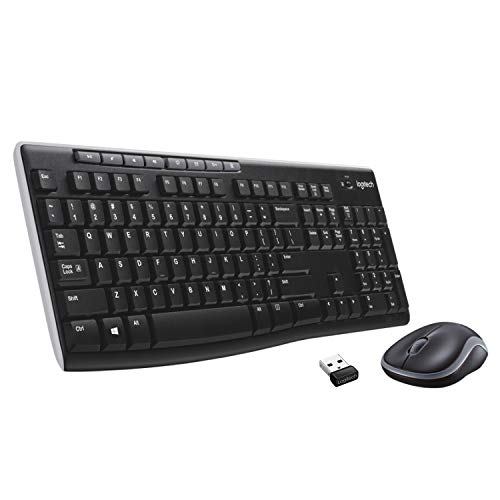
The Logitech MK270 is the budget pick in this roundup, and it covers the basics well. It pairs a full-size keyboard with a compact mouse, both running from a single tiny USB receiver that stores inside the mouse. Setup is plug and play, with no software to install.
The keyboard has a number pad, eight multimedia keys, adjustable tilt legs, and a spill-resistant design that tolerates small splashes. Keys are quiet, which suits shared rooms and video calls. Battery life is listed at up to 36 months for the keyboard and up to 12 months for the mouse, and both devices have on-off switches.
The trade-off is refinement: the mouse is small and ambidextrous rather than shaped for large hands, and there is no palm rest, backlight, or Bluetooth option.
Specs
| Feature | Detail |
|---|---|
| Layout | Full-size keyboard with number pad |
| Connectivity | 2.4 GHz wireless, one USB receiver for both devices |
| Keyboard battery | Up to 36 months |
| Mouse battery | Up to 12 months |
| Extra keys | Eight multimedia and shortcut keys |
| Design | Spill-resistant keyboard, adjustable tilt legs |
| Mouse | Compact ambidextrous mouse |
| Compatibility | Windows |
| Best for | Budget home offices and simple desks |
2. Logitech MK540 Advanced

The Logitech MK540 Advanced is the best all-round pick for most home offices. It combines the K540 full-size keyboard with the M310 mouse, both sharing one Logitech Unifying receiver. The keyboard has a built-in palm rest and dedicated multimedia keys, so long typing days feel relaxed.
Battery life is a real strength: the keyboard is listed at up to 36 months and the mouse at up to 18 months, both with on-off switches. The keyboard is spill-resistant, the keys are quiet, and the mouse has a contoured shape with rubber side grips. The wireless range reaches up to 10 metres.
The main limitation is connectivity: the MK540 uses the Unifying receiver only, with no Bluetooth, so the receiver must stay plugged in. It is also Windows and ChromeOS focused, so Mac users should look elsewhere.
Specs
| Feature | Detail |
|---|---|
| Layout | Full-size keyboard with number pad and palm rest |
| Connectivity | 2.4 GHz wireless, one Unifying USB receiver |
| Keyboard battery | Up to 36 months |
| Mouse battery | Up to 18 months |
| Extra keys | Dedicated multimedia and shortcut keys |
| Design | Spill-resistant keyboard, quiet keys |
| Mouse | Contoured ambidextrous mouse with rubber grips |
| Compatibility | Windows and ChromeOS |
| Best for | Everyday Windows home offices |
3. Logitech MK850 Performance

The Logitech MK850 Performance is the multi-device pick, pairing the K850 curved keyboard with the M720 Triathlon mouse. Both devices connect over Bluetooth or the included Unifying receiver, and Easy-Switch buttons move you between up to three paired devices with a single press.
The keyboard has a curved frame, scooped keys, and a cushioned palm rest. The mouse is contoured for right-handed use, with eight buttons and a hyper-fast scroll wheel for long documents. Battery life is listed at up to 36 months for the keyboard and up to 24 months for the mouse.
The trade-off is size: the set is larger and heavier than the budget picks, the mouse is right-handed only, and it sits in the premium group of this roundup.
Specs
| Feature | Detail |
|---|---|
| Layout | Full-size curved keyboard with number pad and palm rest |
| Connectivity | Bluetooth and 2.4 GHz Unifying receiver, up to three devices |
| Keyboard battery | Up to 36 months |
| Mouse battery | Up to 24 months |
| Extra keys | Dedicated shortcut keys and Easy-Switch buttons |
| Design | Curved keyframe with cushioned palm rest |
| Mouse | Contoured right-handed mouse, 1000 DPI, hyper-fast scroll wheel |
| Compatibility | Windows, macOS, and ChromeOS |
| Best for | People who switch between three devices |
4. Microsoft Sculpt Ergonomic Desktop

The Microsoft Sculpt Ergonomic Desktop is the ergonomic pick, designed for people whose wrists or shoulders ache after long typing sessions. Its split keyboard angles the hands into a natural position, with a domed centre and a cushioned palm rest. A separate number pad is included, so you can place it on either side or leave it off the desk.
The Sculpt mouse has a contoured shape with a thumb scoop and a Windows button. Both devices connect through a single 2.4 GHz transceiver, and the keyboard uses AES 128-bit encryption to protect keystrokes. Keyboard battery life is listed at up to 36 months, and the set carries a three-year warranty.
The trade-off is the learning curve: the split layout takes a few days to get used to, and the keyboard is larger than a standard board once the palm rest is counted. It is also a Windows-focused set.
Specs
| Feature | Detail |
|---|---|
| Layout | Split ergonomic keyboard with separate number pad |
| Connectivity | 2.4 GHz wireless, one USB transceiver |
| Keyboard battery | Up to 36 months |
| Mouse battery | Not stated |
| Extra keys | Dedicated shortcut keys and Windows button on mouse |
| Design | Domed split keyboard with cushioned palm rest |
| Mouse | Contoured ergonomic mouse with thumb scoop |
| Compatibility | Windows |
| Best for | Typists who want a natural wrist position |
5. HP 230 Wireless Mouse and Keyboard Combo

The HP 230 is the simple, quiet pick for a tidy home office. It pairs a slim full-size keyboard with a compact wireless mouse, both sharing one 2.4 GHz USB receiver. The keyboard uses low-profile chiclet keys that press quietly, which suits video calls and shared rooms.
The mouse offers adjustable sensitivity up to 1600 DPI for precise movement or faster travel across a large screen. The keyboard includes a number pad and twelve function keys, and the set works with Windows and Mac computers. Battery life is listed at up to 16 months, and batteries are included.
The trade-off is adjustability: the keyboard has no palm rest and no tilt legs listed, and the mouse is compact rather than contoured for long sessions. It is a budget pick that favours quiet, straightforward use over extra features.
Specs
| Feature | Detail |
|---|---|
| Layout | Full-size slim keyboard with number pad |
| Connectivity | 2.4 GHz wireless, one USB receiver |
| Keyboard battery | Up to 16 months |
| Mouse battery | Up to 16 months |
| Extra keys | Twelve function keys |
| Design | Low-profile chiclet keys, quiet typing |
| Mouse | Compact mouse, adjustable sensitivity up to 1600 DPI |
| Compatibility | Windows and Mac |
| Best for | Quiet desks and small workspaces |
How to choose
Start with layout. A full-size keyboard with a number pad suits spreadsheets and data entry, while a split or curved keyboard suits typists who want a more natural wrist position. Check for a palm rest, and confirm the mouse fits your hand.
Next, check connectivity and compatibility. A single 2.4 GHz receiver is the simplest setup for one computer, while Bluetooth and multi-device switching suit people who move between a desktop, a laptop, and a tablet. Confirm the set supports your operating system, since some combos are Windows only.
Then look at battery life and extras. Long battery life means fewer interruptions, and on-off switches help further. Multimedia and shortcut keys save time, adjustable mouse sensitivity helps on large screens, and a spill-resistant keyboard adds peace of mind. Finally, match the set to your desk: a slim combo suits a small space, while an ergonomic set needs room for its palm rest and number pad.
Who should skip
Skip a wireless combo if you need a wired connection for security policies or a locked-down work computer. Skip compact mice if you have large hands or wrist pain, and choose a contoured or ergonomic mouse instead.
Skip multi-device sets if you only use one computer, since the switching buttons add cost without benefit. Skip split ergonomic keyboards if you dislike relearning a layout, and skip Windows-only sets if you work on a Mac. Finally, skip any combo whose size does not match your desk: a full-size board with a number pad needs real space.
Frequently asked questions
Are wireless keyboard and mouse combos reliable for home office work?
Yes, for most home office work. A 2.4 GHz receiver gives a stable connection for typing, email, spreadsheets, and video calls, and Bluetooth options work well for multi-device setups. Keep the receiver close to the desk and use fresh batteries if you notice missed keystrokes.
How long do the batteries last in a wireless combo?
It varies by model. In this roundup, keyboard battery life is listed at up to 36 months on the Logitech sets and the Microsoft Sculpt, and up to 16 months on the HP 230, while mouse battery life ranges from up to 12 months to up to 24 months. On-off switches help reach those figures.
Can one receiver really run both the keyboard and the mouse?
Yes. Every combo in this roundup pairs both devices to a single USB receiver, so only one port is used. The receiver usually stores inside the mouse, so keep it safe when travelling. Bluetooth models can also pair directly without the receiver.
Do I need a number pad on a home office keyboard?
It depends on your work. A number pad speeds up spreadsheets, accounting, and data entry, and most full-size combos include one. If you rarely enter numbers, a compact layout saves desk space and brings the mouse closer. The Microsoft Sculpt includes a separate number pad, so you can use it only when needed.
Final verdict
For most home offices, the Logitech MK540 Advanced is the best all-round choice, with a comfortable full-size keyboard, a palm rest, and batteries that last for years. Budget buyers should choose the Logitech MK270, while the HP 230 suits quiet, compact desks. The Logitech MK850 Performance is the pick for people who switch between three devices, and the Microsoft Sculpt is the pick for typists who want a more natural wrist position.
More from Amazon
Programs that pair well with the guide above. Offers and eligibility are set by Amazon and may change.
Free shipping on eligible items, Prime Video and more. Eligible new members can start with a free trial.
Start a Prime free trialAudiobooks and podcasts to listen to on the go. Eligible new members can start with a free trial.
Try Audible freeAd-free music streaming. Eligible new subscribers can start with a free trial.
Try Music Unlimited freeA free business account with business pricing and bulk-buying tools for work, shop or home office.
Create a business accountAs an Amazon Associate we earn from qualifying purchases.