The best tablet keyboards for typing on the go are the Logitech Combo Touch for flexible iPad travel, Apple’s Magic Keyboard for the slimmest premium desk setup, Microsoft’s Surface Pro Flex Keyboard for Windows work, and Logitech Keys-To-Go 2 when low weight matters more than a built-in trackpad.
Our top picks
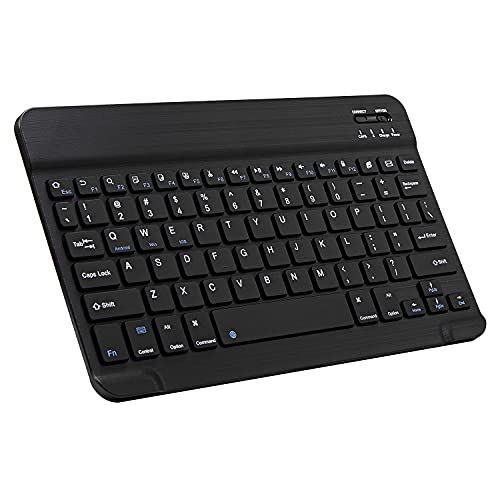 Ultra-Slim Bluetooth Keyboard Portable Mini Wireless Keyboard
- Excellent Compatibility: The Bluetooth keyboard compatible with iOS,…
- Light portable and compact: This keyboard is much…
- Long-term use: Built-in rechargeable lithium battery, after fully…
 Harvopu for iPad A16 11th/10th Generation Case
- 【Compatibility】For iPad (A16) 11th generation 11-inch 2025 (Model:…
- 【Quick Navigation Trackpad】Harvopu for iPad keyboard (A16) 11th/…
- 【Magnetically Detachable Keyboard】For (A16) 11th/ 10th gen keyboard…
 Apple Magic Keyboard Folio: iPad Keyboard and
- The perfect iPad (A16) companion
- Magic Keyboard Folio works with iPad (A16 and…
- Magic Keyboard Folio features a versatile two-piece design…
| Product | Key specs | |
|---|---|---|
| Ultra-Slim Bluetooth Keyboard Portable Mini Wireless Keyboard | Excellent Compatibility: The Bluetooth keyboard compatible with iOS,… Light portable and compact: This keyboard is much… Long-term use: Built-in rechargeable lithium battery, after fully… | Check price |
| Harvopu for iPad A16 11th/10th Generation Case | 【Compatibility】For iPad (A16) 11th generation 11-inch 2025 (Model:… 【Quick Navigation Trackpad】Harvopu for iPad keyboard (A16) 11th/… 【Magnetically Detachable Keyboard】For (A16) 11th/ 10th gen keyboard… | Check price |
| Apple Magic Keyboard Folio: iPad Keyboard and | The perfect iPad (A16) companion Magic Keyboard Folio works with iPad (A16 and… Magic Keyboard Folio features a versatile two-piece design… | Check price |
 TUNKARMOR Case Keyboard for Samsung Galaxy Tab | 【Model Compatibility】Designed ONLY for Samsung Galaxy Tab A9… 【Magnetically Detachable Keyboard】case for Samsung Galaxy Tab A9… 【Adjustable Viewing Angles and Support for Pen】case supports… | Check price |
As an Amazon Associate we earn from qualifying purchases at no extra cost to you.
How to choose a tablet keyboard: thresholds that separate good from frustrating
Most buying mistakes come from comparing keyboards on weight alone. Use the thresholds below to narrow the field before you look at any specific model.
- Key travel: aim for roughly 1 mm or more of travel if you write for more than 30 minutes at a time. Ultra-flat keys under about 1 mm feel fine for chat replies but tire the fingers during long documents.
- Key pitch: a full-size layout uses about 19 mm between key centers. Compact keyboards that shrink the pitch to roughly 17 mm or less cause more typos for people who touch type.
- Screen angle range: a fixed-angle cover is fine on a desk, but a lap or a train tray table needs a stand that holds the screen between roughly 100 and 130 degrees without wobble.
- Battery type: replaceable AAA or coin cells last many months; rechargeable keyboards usually last weeks of light use. Pick replaceable cells if you travel for long stretches without a charger.
- Pairing slots: two or three stored devices let one keyboard serve a tablet, phone, and laptop with a single key press to switch.
- Trackpad need: iPadOS, Windows, and Android desktop modes all support pointers. If you edit spreadsheets or select text a lot, a trackpad saves more time than any other feature.
Case keyboard versus standalone Bluetooth keyboard
| Factor | Keyboard case or folio | Standalone Bluetooth keyboard |
|---|---|---|
| Tablet protection | Front and back coverage, varies by model | None; you need a separate case |
| Extra weight | Adds a case-sized load to the tablet | Carried separately, usually lighter overall |
| Fit | Model-specific; the wrong generation will not attach | Works with almost any tablet or phone |
| Typing feel | Often shallow, limited by thickness | Wider range, including deeper desktop-style keys |
| Trackpad | Common on mid-range and premium cases | Rare; needs a separate mouse |
| When you replace the tablet | Usually must buy again | Keep using it |
If you replace tablets every two or three years, a standalone keyboard is the cheaper long-term choice because it survives the upgrade. If you keep a tablet for five years and want a single protective package, a case keyboard makes more sense.
Quick picks by situation
-
Best balance for an iPad: Logitech Combo Touch. It combines a removable keyboard, adjustable kickstand, protective case, and a large trackpad.
-
Best for a lightweight iPad workstation: Apple Magic Keyboard. Its rigid floating hinge and excellent trackpad feel are ideal at a desk, although it offers less protection and costs more.
-
Best for Surface Pro: Microsoft Surface Pro Flex Keyboard. It can be used attached to the tablet or separated over Bluetooth, which is useful when the screen needs to sit farther away.
-
Best ultralight keyboard: Logitech Keys-To-Go 2. It fits in a small bag and works with multiple devices, but it has no trackpad or integrated screen protection.
-
Best for a Galaxy Tab: Samsung Book Cover Keyboard, particularly the versions designed for Galaxy Tab S-series tablets. It provides a laptop-like layout, but fit and features vary substantially by tablet size and model.
Comparison: the keyboards that make the most sense for travel
| Keyboard | Typical compatible device | Approximate weight | Trackpad | Connection | Protection and support |
|---|---|---|---|---|---|
| Logitech Combo Touch | Selected iPad, iPad Air, and iPad Pro models | About 600–780 g, depending on version | Yes | Smart Connector; no separate charging | Full case, detachable keyboard, adjustable kickstand |
| Apple Magic Keyboard | Selected iPad Pro and iPad Air models | About 580–670 g for current 11- and 13-inch versions | Yes | Smart Connector; no separate charging | Front and rear coverage, floating hinge, limited edge protection |
| Microsoft Surface Pro Flex Keyboard | Compatible Surface Pro models | About 340–350 g | Yes | Surface connection and Bluetooth | Keyboard cover, pen storage on supported versions, detachable use |
| Logitech Keys-To-Go 2 | iPad, Android tablets, Windows, and other Bluetooth devices | About 222 g | No | Bluetooth | Thin spill-resistant keyboard cover; no tablet protection |
| Samsung Book Cover Keyboard | Selected Galaxy Tab S-series models | Roughly 400–700 g, depending on tablet size and version | Some versions | Tablet connector; no routine charging on compatible models | Book-style cover and rear support; model-specific fit |
Weights in this table are approximate because manufacturers produce separate versions for different screen sizes. Check the exact model number before ordering: a keyboard made for an 11-inch tablet will not necessarily fit a newer 11-inch tablet, even when the screen diagonal is unchanged.
Logitech Combo Touch: the practical iPad choice
Combo Touch is the strongest all-rounder for people who carry an iPad between a kitchen table, classroom, train, and office. Its keyboard detaches, so the tablet can be used without the keys in the way. The kickstand usually offers a wide adjustment range, making it better than a fixed laptop-style hinge for reading, drawing, or watching video.
Its main advantage is protection. The case surrounds more of the tablet than Apple’s keyboard, and the raised edges are reassuring in a crowded bag. The trade-off is bulk: the case and keyboard can make an iPad feel closer to a small laptop than a tablet. The trackpad is roomy enough for document work, but its click and surface feel are generally less refined than Apple’s.
Choose Combo Touch if you frequently remove the tablet, want a stable kickstand, or do not want to carry a separate protective case. Avoid it if every gram matters or if you mainly type at a desk.
Apple Magic Keyboard: the best desk experience
Apple’s Magic Keyboard is the closest iPad accessory to a compact laptop dock. The keys have a relatively crisp, low-travel feel, the backlighting is useful in dim rooms, and the glass trackpad supports precise cursor movement and gestures. The floating hinge also keeps the tablet elevated, which can be more comfortable than typing with the screen flat behind the keyboard.
The design is rigid and compact, but that does not make it a complete protective shell. The corners and sides remain more exposed than they are with Combo Touch, and the hinge adds weight to the tablet when packed. The keyboard also has no function-row shortcuts on many versions, something to consider if you regularly adjust brightness, volume, or media controls.
It is a good purchase for a frequent typist who leaves the keyboard attached and values a clean desk setup. It is less compelling for occasional email, where a lighter Bluetooth keyboard or the tablet’s on-screen keyboard may be more convenient.
Microsoft Surface Pro Flex Keyboard: best for flexible Windows work
The Surface Pro Flex Keyboard addresses a limitation shared by many tablet keyboards: the screen and keys do not have to occupy the same surface. It can operate attached to the Surface or detached over Bluetooth, allowing the tablet to stand on a desk while the keyboard moves closer to the user.
The key layout feels more like a conventional laptop than a travel keyboard, and the integrated trackpad is important for Windows applications that are awkward to control by touch. Its cover design is slim, but it is not a rugged case. The detachable feature also means the keyboard must be charged when used wirelessly, creating one more battery to manage.
Pick it for office work, spreadsheets, and frequent switching between desk and lap. If you only need a keyboard for short notes, its price and extra complexity are difficult to justify.
Logitech Keys-To-Go 2: the weight-saving option
Keys-To-Go 2 is a useful answer when the keyboard must disappear into a small day bag. At about 222 grams, it weighs less than most tablet keyboard cases and can pair with several operating systems. Its built-in cover helps protect the keys from crumbs and light spills, while replaceable coin-cell batteries avoid regular USB charging.
There is no trackpad, kickstand, or tablet protection. You need a separate stand, and the keyboard works best on a firm table rather than a lap. The shallow keys are suitable for messages, notes, and moderate writing, but people who type for hours may prefer the deeper feel of a keyboard case.
Calculate the complete travel setup rather than the keyboard alone. For example, a 222 g keyboard plus a 250 g folding stand is about 472 g before adding the tablet. That can still be lighter than a 650 g integrated keyboard case, but only if you already own a suitable stand.
Samsung Book Cover Keyboard: check the exact Galaxy Tab version
Samsung’s Book Cover Keyboard range gives Galaxy Tab owners a coherent, connector-based option with a laptop-like layout. Higher-end versions may include a trackpad, while simpler versions omit it. The cover can be convenient for DeX desktop mode, where a pointer and keyboard make Android feel more like a conventional computer.
Fit is the key issue. Galaxy Tab models vary in camera position, magnetic attachment, thickness, and connector placement. A keyboard for a large Ultra tablet can also become surprisingly heavy once the tablet is included. Confirm the exact tablet name and generation, not merely “Galaxy Tab S,” before buying.
Decision matrix: choose by your real use
| Your situation | Best direction | Why |
|---|---|---|
| Daily typing at a desk | Apple Magic Keyboard or Surface Pro Flex Keyboard | Better trackpads, rigid support, and laptop-like key layouts |
| Frequent travel with protection needed | Logitech Combo Touch | Case coverage, detachable keys, and a broad kickstand range |
| Very limited bag space | Logitech Keys-To-Go 2 plus a folding stand | Low keyboard weight and multi-device Bluetooth pairing |
| Android tablet and DeX use | Compatible Samsung Book Cover Keyboard | Direct attachment and a layout suited to desktop-style use |
| Occasional notes and short emails | Light Bluetooth keyboard or no keyboard | An expensive case adds weight that may not repay its convenience |
Key feel, stability, and protection: what specifications do not tell you
Key travel matters more than the number of keys. Low-profile keyboards pack small but can feel cramped during long sessions. Look for full-size letter keys, a standard bottom row, and dedicated arrow keys if you edit documents or navigate spreadsheets.
Kickstand stability depends on the base as well as the hinge. A narrow stand may hold a tablet on a desk but wobble when tapped. On a lap, almost every tablet keyboard is less stable than a conventional laptop because the screen’s weight sits farther behind the hinge.
Trackpads are particularly valuable on iPadOS, Windows, and DeX when selecting text or dragging files. They are less important if you mostly write in a single app. A keyboard without a trackpad can be the better travel choice if it saves several hundred grams.
Ownership tips before and after buying
-
Measure the tablet’s height, width, thickness, camera position, and connector location. Screen size alone does not confirm compatibility.
-
Clean crumbs from the key gaps with a soft, dry brush. Avoid spraying liquid directly onto keys or connectors.
-
Expect key legends, hinge fabric, and trackpad coatings to show wear first. Heavy daily use makes these areas more important than a short-term discount.
-
Keep detachable keyboards separate from rough items such as chargers and metal pens, which can scratch the key surface or trigger magnets.
-
For Bluetooth models, charge or replace the battery before a trip and remove unused pairings if reconnection becomes unreliable.
For most travelers, the decision is simple: choose Combo Touch when protection and flexibility matter, Magic Keyboard or Surface Pro Flex when desk typing matters most, and Keys-To-Go 2 when carrying less is the overriding priority. The best tablet keyboards are not the ones with the longest feature list; they are the ones whose weight, fit, and support match how you actually use the tablet.
More keyboards worth considering by budget and device
The picks above cover the best-known cases. The five options below fill gaps for multi-device users, budget buyers, and iPad Air or Pro owners who want a cradle-style case.
Logitech Pebble Keys 2 K380s: best compact multi-device keyboard
Bluetooth · multi-device pairing with quick switching · compact slim body · replaceable battery design · works with iPadOS, Android, Windows, and macOS
The Pebble Keys 2 K380s is a small, rounded keyboard that slips into a laptop sleeve next to a tablet. Its keys are shallow and quiet, which suits shared offices and trains. It has no stand, so pair it with a folding stand or a tablet case that props the screen upright.
Best for: people who switch between a tablet, phone, and laptop all day. Skip if: you need a trackpad or you write long documents and want deeper key travel.
- Pros: light, quiet, pairs with several devices, long battery life from replaceable cells
- Cons: no tablet protection, compact layout needs adjustment time, no stand

Logitech MX Keys Mini: best premium standalone typing feel
Bluetooth · USB-C rechargeable · smart backlighting · pairs with three devices · compact layout with a full set of keys
MX Keys Mini is built for people who treat a tablet as a main work surface. The keys have a dished, stable feel and the backlight turns on as your hands approach. It is heavier than travel keyboards, so it fits a desk workstation or a larger backpack more naturally than a small sling bag.
Best for: writers and analysts using a tablet on a stand at a desk. Skip if: every gram counts in your bag or you rarely type more than a few paragraphs.
- Pros: comfortable key feel, backlight, rechargeable, multi-device switching
- Cons: premium cost tier, no case function, needs a separate stand
Arteck Universal Backlit Bluetooth Keyboard: best budget universal keyboard
Bluetooth · backlit keys · rechargeable · designed for iPad, Android tablets, and Windows PCs · slim body
Arteck is a long-running budget name in tablet keyboards, and this backlit model targets buyers who want a decent keyboard without paying for a brand premium. It is a solid choice for a spare tablet used for notes or remote work.
Best for: entry-level budgets and secondary devices. Skip if: you want a trackpad, a premium finish, or manufacturer support for a specific tablet.
- Pros: entry-level cost, backlight, broad compatibility
- Cons: plain build, no cover or stand, basic pairing options

Belkin Backlit Bluetooth Keyboard Case with Cradle: best for iPad Air and iPad Pro 11-inch
Bluetooth · backlit keys · cradle design with magnetic attachment · multi-gesture controls · fits iPad Air 10.9 in and iPad Pro 11 in
This case uses a cradle that holds the tablet in a laptop-like position while the keyboard stays slightly separate. That separation lets you reposition the tablet and keyboard for comfort. Because it connects over Bluetooth rather than the Smart Connector, you charge it separately, which adds one more battery to remember.
Best for: iPad Air and 11-inch Pro owners who want a mid-range case-keyboard hybrid. Skip if: you own a different iPad size or generation, or you want the thinnest possible setup.
- Pros: cradle gives adjustable viewing, backlight, gesture controls
- Cons: model-specific fit, extra battery to charge, bulkier than a folio

ESR Ultra-Light Magnetic Detachable Keyboard Case: best budget case for the 10th generation and A16 iPad
Magnetic detachable keyboard · stable stand for desk and lap · ultra-light case design · fits iPad 10th generation and iPad A16 (11th generation)
ESR targets people who want the case, stand, and keyboard in one package at a mid-range cost level. The detachable keyboard lets you use the tablet for drawing or reading without keys in the way.
Best for: students with a standard iPad who need protection and a keyboard together. Skip if: you own an iPad Air or Pro, because the cutouts are specific to the standard iPad.
- Pros: detachable, light, includes a stable stand, wallet-friendly
- Cons: fit limited to named iPad models, key feel is shallow compared with desktop keyboards

Tablet keyboard FAQ
Do I need a trackpad on a tablet keyboard?
If you only type notes and email, no. If you edit documents, spreadsheets, or presentations, a trackpad is worth having because it avoids repeated reaching to the screen. iPadOS, Windows, and Samsung DeX all support pointers.
Can one Bluetooth keyboard work with an iPad, an Android tablet, and a Windows laptop?
Yes, if it supports multi-device pairing. Keyboards with two or three stored slots let you switch with a key press. Some key layouts differ by platform, so look for a model that lists support for all three operating systems.
Why does my new keyboard case not fit my tablet?
Case keyboards are built for a specific generation and screen size. A model for a 10th generation iPad will not fit an iPad Air with a similar screen diagonal. Match the exact model name or number before you order.
How long does a Bluetooth keyboard battery last?
Replaceable-cell models commonly last many months to a couple of years under light use. Rechargeable models usually last weeks to a few months depending on backlight use. Backlighting is the biggest drain.
Is a keyboard case better than a separate keyboard for travel?
A case keyboard is easier to carry as one piece and protects the tablet. A separate keyboard is lighter and works with more devices, but it needs a stand and does not protect the screen.
What is a comfortable key travel for long typing?
Many people find roughly 1 mm or more comfortable for long sessions. Shallower keys are acceptable for short messages.
Will a tablet keyboard work with a phone too?
Standalone Bluetooth keyboards do, as long as the phone supports Bluetooth keyboards. Case keyboards that use a physical connector generally do not.
Are cheap keyboard cases worth buying?
For occasional use, yes. For daily typing, hinge strength, key feel, and trackpad accuracy tend to improve noticeably in the mid-range and premium tiers.
More from Amazon
Programs that pair well with the guide above. Offers and eligibility are set by Amazon and may change.
Free shipping on eligible items, Prime Video and more. Eligible new members can start with a free trial.
Start a Prime free trialAudiobooks and podcasts to listen to on the go. Eligible new members can start with a free trial.
Try Audible freeAd-free music streaming. Eligible new subscribers can start with a free trial.
Try Music Unlimited freeA free business account with business pricing and bulk-buying tools for work, shop or home office.
Create a business accountAs an Amazon Associate we earn from qualifying purchases.