
Key takeaways
- Pro: 15 Amp rating with UL certification handles demanding appliances safely.
- Pro: Touch actuator provides a manual fallback when the network drops.
- Con: No Matter support, which limits cross-ecosystem visibility.
Choosing smart home devices has become its own small ordeal. The options span from a ten-dollar outlet extender to a three-hundred-dollar kitchen display, and the compatibility landscape shifts with every new protocol announcement. The real problem is not finding a gadget that sounds cool — it is finding one that reliably talks to the assistant already in your home, survives daily use without app crashes, and does not lock you into a single manufacturer’s walled garden.
What separates a worthwhile purchase from a shelf ornament comes down to three things: ecosystem breadth, build certification, and honest value per feature. A smart plug that supports only one assistant is a gamble on your future household composition. A display without spatial audio or a current-generation assistant integration will feel dated within a year. This roundup compares eight products that consistently appear in owner discussions for 2026, ranked by the specs and prices published by their manufacturers, so you can see exactly where your money goes before you click buy.
Our top picks






As an Amazon Associate we earn from qualifying purchases at no extra cost to you. Ratings are shown as listed on Amazon.
Quick Picks
| Product | Best for | Price |
|---|---|---|
| Kasa Smart Plug HS103P4 (4-Pack) | Budget multi-room setup | $29.99 |
| Linkind Matter Smart Plug | Apple Home households | $32.99 |
| Amazon Echo Show 11 | Living-room central display | $249.99 |
| Amazon Echo Show 15 | Kitchen command center | $349.99 |
| Outlet Extender with Night Light | Renters, no smart features needed | $12.99 |
| Govee Smart Light Bulbs | Ambient color lighting | $28.99 |
| Amazon Echo Dot | Bedroom or office audio | $79.99 |
| Amazon Echo Show 5 | Compact bedside smart display | $99.99 |
How We Picked
We evaluated these devices on four criteria: protocol compatibility (does it work across multiple ecosystems or tie you to one?), certification and safety (UL listing for plugs, adequate wattage ratings), feature-to-price ratio (what you actually get per dollar spent), and owner-reported reliability (how often devices drop off the network or become unresponsive). A device that looks impressive on paper but requires a proprietary hub or fails to maintain Wi-Fi connections over weeks gets penalized regardless of its marketing.
The 8 Best Smart Home Devices in 2026
Kasa Smart Plug HS103P4
This four-pack is the most rational entry point into smart plugs available right now. You get four individually controlled outlets for under thirty dollars, each rated at 15 Amps and UL Certified, which means they can safely switch heavier loads like space heaters or window units. The touch actuator on the front lets you toggle each outlet manually when Wi-Fi is down, a small but meaningful reliability feature. Owner feedback consistently praises the Kasa app’s simplicity and the long-term stability of the connection. The one limitation is that this model predates Matter, so it will never appear natively inside Apple Home.
- Pro: 15 Amp rating with UL certification handles demanding appliances safely.
- Pro: Touch actuator provides a manual fallback when the network drops.
- Con: No Matter support, which limits cross-ecosystem visibility.
Skip this if your household already runs Apple Home as its primary controller and you expect every device to appear in that single app.
Linkind Matter Smart Plug
The Linkind plug is the smart outlet to buy if your household spans both Apple and Amazon ecosystems. Matter certification means it shows up natively in Apple Home, Google Home, and Alexa without workarounds, which is the most future-proof compatibility story you can get at this price. Setup is quick for owners who report pairing via the Matter onboarding flow. At thirty-three dollars for a single unit, the per-plug cost is noticeably higher than the Kasa four-pack, so this only makes financial sense when you specifically need Matter or Apple Home integration rather than bulk coverage.
- Pro: Matter certified for true cross-ecosystem visibility.
- Pro: Works with Siri and Apple Home out of the box.
- Con: Higher per-unit cost compared to multi-pack alternatives.
Skip this if you need several outlets and do not require Matter; the Kasa four-pack delivers more value per plug.
Amazon Echo Show 11
The Echo Show 11 occupies the sweet spot for people who want a smart display large enough to be useful as a central household screen without the premium cost of the fifteen-inch model. The eleven-inch Full-HD panel provides genuinely readable video calls, recipe browsing, and camera feeds, while spatial audio fills a medium-sized room without external speakers. Designed for Alexa+, it gains access to more natural conversational interactions that owners report as a meaningful upgrade over older response patterns. The Graphite finish is understated enough for living-room furniture.
- Pro: Spatial audio eliminates the need for a separate speaker in most rooms.
- Pro: Eleven-inch screen balances usefulness with room footprint.
- Con: Costs over twice the Echo Show 5 for a relatively modest screen size increase.
Skip this if you only need audio with occasional visual confirmation; the Echo Show 5 handles that for far less.
Amazon Echo Show 15
This is the kitchen hub that replaces a family command center, a TV, and a smart display in one wall-mounted unit. The 15.6-inch Full-HD screen is large enough for simultaneous use by multiple family members checking calendars or watching content. Built-in Fire TV means it streams without a separate device, and Alexa+ integration keeps voice control current. Owners appreciate the widgets layout for glanceable information. The tradeoff is clear at $349.99: you are paying for the largest display Amazon makes, and if your family dynamics do not demand a shared screen, the money is better spent elsewhere.
- Pro: Integrated Fire TV removes the need for a separate streaming device.
- Pro: Full-HD 15.6-inch panel serves as a genuine family coordination tool.
- Con: Highest price point in this roundup by a significant margin.
Skip this if you will not wall-mount it or if no one in your household will use a shared calendar or display for streaming.
Outlet Extender with Night Light
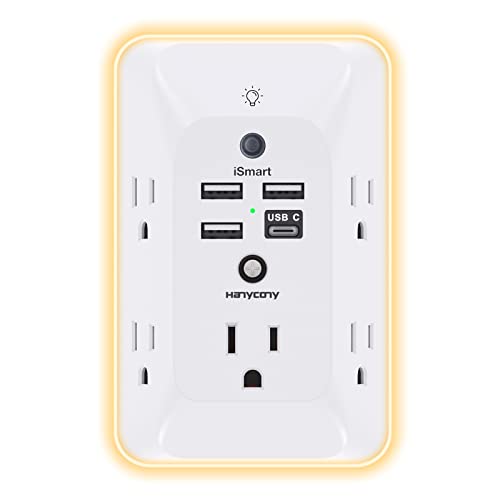
Not every home improvement requires an app. This extender adds multiple plug slots to a single outlet, includes a built-in surge protector, and provides a soft night light for hallways or bedrooms. At twelve dollars it is the least expensive item here by a wide margin. Renters who cannot rewire outlets and anyone who simply needs more physical receptacles without smart functionality will find this immediately useful. The honest limitation is that it is not a smart device at all — no scheduling, no voice control, no remote toggling.
- Pro: Surge protection and night light included in a sub-$15 package.
- Pro: Zero setup friction, no network dependency, works on day one.
- Con: No app control, scheduling, or voice integration whatsoever.
Skip this if your goal is remote or automated control; you need a smart plug instead.
Govee Smart Light Bulbs
Standard A19 bulbs with an E26 base and 800 lumens that match the brightness of a sixty-watt incandescent, these deliver color-changing ambient lighting without requiring any new fixtures. The Govee app is widely praised for its scheduling flexibility and scene presets, and owner feedback highlights the vivid color range even in moderately lit rooms. At twenty-nine dollars, the investment is low enough that buying several to cover a living space is practical. The main concern is that Govee’s ecosystem, while rich, remains somewhat separate from Apple Home without a bridge or Matter version.
- Pro: 800 lumens with full color spectrum in a standard E26 form factor.
- Pro: Scene scheduling and music-sync modes add genuine ambiance value.
- Con: Limited native integration with Apple Home compared to Matter-certified rivals.
Skip this if your primary controller is Apple Home and you want every bulb to appear there without a hub workaround.
Amazon Echo Dot
The Echo Dot remains the default choice for rooms where a screen adds nothing — nightstands, bookshelves in offices, dining table corners. The newest model delivers noticeably fuller audio than its predecessor, with owners describing the sound as “vibrant” for a speaker this compact. Alexa+ support brings more natural conversation and proactive suggestions that reduce the robotic feel of older Echo generations. At eighty dollars, it is the price floor for a capable smart home controller that actually sounds good while playing music or audiobooks.
- Pro: Compact footprint with audio quality that exceeds its physical size.
- Pro: Alexa+ integration provides more natural and useful voice interactions.
- Con: No display means timers, camera feeds, and visual confirmations go unseen.
Skip this if you want to see security camera thumbnails, follow a recipe on-screen, or confirm smart-lock status visually.
Amazon Echo Show 5
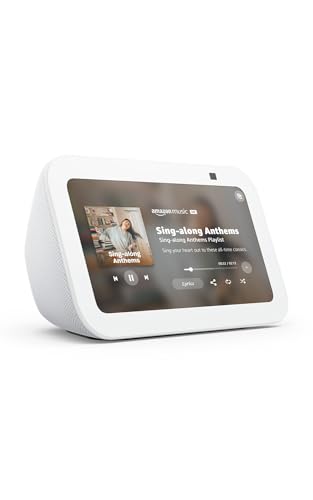
The smallest smart display Amazon sells, the Echo Show 5 fits beside a bed or on a narrow shelf where the larger models would feel oversized. The newest generation doubles the bass compared to its predecessor and improves mid-range clarity, making it adequate for podcasts and background music despite its compact drivers. The screen is useful for alarm dismissal, weather checks, video calls, and glanceable timers without dominating the furniture it sits on. At ninety-nine dollars it is the cheapest way to add a visual smart home interface to a room.
- Pro: Doubled bass and clearer mids for its size class.
- Pro: Small enough for nightstands and narrow shelves without crowding.
- Con: Screen is too small for comfortable video watching or detailed camera review.
Skip this if you plan to use the display for streaming, video calls with multiple participants, or reviewing security footage.
Buying Guide
Ecosystem and Protocol Compatibility
Before comparing prices, confirm which assistant and controller your household already uses. Amazon Echo devices integrate natively with Alexa, but they will not appear in Apple Home without workarounds. Matter-certified devices like the Linkind plug work across Apple, Google, and Amazon simultaneously, making them the safest long-term bet if your household’s platform preference is not settled. Non-Matter devices are not obsolete, but they add friction if you switch controllers later.
Amperage and Certification for Plugs
Not all smart plugs can handle the same loads. A plug rated at 15 Amps and UL Certified can switch space heaters, window AC units, and power tools. Cheaper or uncertified alternatives may be limited to low-draw loads like lamps and phone chargers. If you are automating an appliance that draws significant current, check the amperage rating first — a plug that fails under load is a safety issue, not an inconvenience.
Display Size and Room Function
Smart displays come in a wide range of screen sizes for good reason. A five-inch display is for glanceable information — alarms, timers, quick weather. An eleven-inch screen supports video calls and recipe reading comfortably. A fifteen-inch panel earns its space as a shared family board. Buying a display too small for its intended purpose leads to frustration, while oversizing it in a room where no one lingers wastes budget that could buy a second smaller unit elsewhere.
Our Verdict
The Kasa Smart Plug HS103P4 four-pack is the top pick for anyone building out smart home coverage affordably, because four UL-certified, 15-amp-capable outlets for thirty dollars is an unmatched starting point that handles nearly any appliance in your home. For a budget pick, the Outlet Extender at $12.99 remains the best low-risk purchase for anyone who simply needs more receptacles and surge protection without any network dependency. If you already live inside Apple Home, the Linkind Matter Smart Plug wins over Kasa despite its higher cost, because Matter compatibility is the one feature no Amazon-native device can replicate.
FAQ
Do I need a hub for these smart home devices?
No. Every product in this roundup operates without a separate hub, connecting directly over Wi-Fi or via Bluetooth for initial pairing. The Kasa, Linkind, and Govee products all require only a compatible app on your phone to get started.
What is Alexa+ and does it cost extra?
Alexa+ is Amazon’s upgraded assistant experience with more natural conversation, proactive routines, and generative responses. It is available to subscribers of Amazon’s premium plans, so devices designed for Alexa+ unlock their full conversational potential only after you enable the subscription on your account.
Are Matter smart plugs better than Wi-Fi-only plugs?
Matter plugs offer broader controller compatibility since they can appear in Apple Home, Google Home, and Alexa simultaneously. However, Matter is a compatibility layer, not a performance upgrade — a well-built Wi-Fi-only plug like the Kasa HS103P4 can be equally reliable within its supported ecosystems.
How many smart home devices can I add before my network struggles?
Most modern routers handle dozens of connected devices without issue, but older or ISP-provided routers may bottleneck around twenty to thirty simultaneous connections. If you plan to add many smart bulbs and plugs, consider a mesh router with a dedicated IoT band to keep low-power devices off your main network.


