Key takeaways
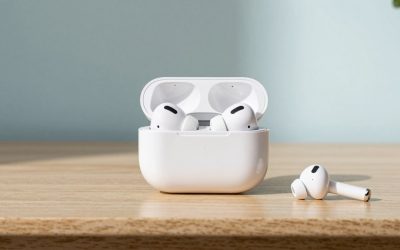
- Learn how to clean AirPods safely in 5 steps: what to use, what to avoid, how to handle speaker mesh, the case and charging contacts, and when to stop.
Clean AirPods with dry, soft tools first: a lint-free cloth for the body, a dry soft brush for the mesh, and a dry cotton swab for the charging contacts. Keep liquid away from every opening, never poke the speaker grille with a pin, and let anything slightly damp dry fully before it goes back in the case. This guide is written by the Editorial team from published specifications, manufacturer documentation and general knowledge, so always compare it with the care page for your exact model.
Most dirty-AirPod problems come down to earwax, skin oils and pocket lint. They are easy to fix when you stay gentle and patient.
What You Need Before You Start
The kit is short and cheap, and most of it is probably already in a drawer. Gather these before you begin so you are not tempted to improvise with something harsh halfway through.
- A clean, dry, lint-free microfiber cloth, such as the kind used for eyeglasses or camera lenses.
- A soft, dry brush, for example a clean, soft-bristled toothbrush kept only for electronics or a small anti-static brush.
- A few dry cotton swabs, and optionally a small amount of isopropyl alcohol for the exterior only, if the manufacturer’s guidance for your model allows it.
- A wooden or plastic toothpick for the case hinge area, used with very light pressure, never inside the earbud grille.
- Good light and a flat, clean surface with a towel under it so nothing rolls away.
Take the earbuds out of the case, disconnect any charging cable from the case, and, if your earbuds are on your phone, disconnect them in Bluetooth settings. Working from a powered-down state removes the risk of a short or an accidental volume jump while a brush is near a speaker.
Know What to Avoid First
Damage during cleaning is usually caused by too much force or the wrong liquid, not by dirt. A short list of no-go items prevents most of it.
- Running water, soaking, or sprays aimed straight at the earbuds or case.
- Bleach, window cleaner, household disinfectants and hydrogen peroxide, which can discolor or degrade plastics and coatings.
- Compressed air, which may drive debris inward or stress the mesh.
- Sharp metal objects such as pins, paper clips or needles in the speaker opening.
- Abrasive materials, including paper towels, rough cloth and scouring pads, that can leave fine scratches on the glossy finish.
When in doubt, use less. A dry cloth cannot hurt anything, while a wet one sometimes can.
Step-by-Step: Cleaning the Earbuds
- Wipe the outer surface with the dry microfiber cloth to remove oils and surface dust. Use light, short strokes.
- For a stubborn smudge, slightly dampen a corner of the cloth with water, squeeze it until it feels barely moist, and wipe only the affected spot. Dry the area immediately with a clean part of the cloth.
- Hold the earbud with the speaker mesh facing down and brush the grille very gently with the dry brush. Gravity helps loose particles fall away instead of settling inside.
- If wax is packed into the mesh, press a clean, dry cotton swab lightly against the surface and roll it, lifting wax onto the cotton. Do not push anything through the holes.
- Inspect the mesh in good light. Repeat the brush-and-swab cycle once or twice if needed, then set the earbuds on the dry towel for several minutes.
If your model has removable silicone tips, take them off and wash them separately in mild soap and water, then dry them completely before refitting. Never wash the earbud body this way.
Cleaning the Charging Case
The case collects more lint than people expect, especially around the hinge and inside the earbud wells. With the lid open, use a dry brush to sweep out loose pocket fuzz from the wells. Wipe the outside with the dry cloth, and for tougher marks use a cloth that is only lightly dampened, keeping moisture away from the charging port and hinge.
The metal charging contacts at the bottom of each well matter most. Dark residue there can interrupt charging, so a dry cotton swab, used with light pressure, usually lifts it. If a dry swab fails, a swab with a very small amount of isopropyl alcohol is a common technique, but check whether the manufacturer endorses it for your model, let it evaporate fully, and do not close the lid on damp contacts. Leave the lid open for a while before you reinsert the earbuds.
Clean the cable port with a dry, soft brush only. Do not insert metal tools into it, because the contacts and the internal board are easy to damage.
Quick Worked Example: A Five-Minute Weekly Routine
Suppose you wear your earbuds daily for about two hours. A simple routine, built on stated assumptions, keeps buildup low without constant fussing.
| Frequency | Action | Time |
|---|---|---|
| After each heavy session | Dry cloth wipe of the earbuds | About 20 seconds |
| Weekly | Brush the mesh, wipe the case exterior | About 3 minutes |
| Every couple of weeks | Swab the charging contacts, sweep the case wells | About 2 minutes |
| When sound seems muffled | Closer mesh inspection under bright light | About 5 minutes |
These intervals are suggestions, not manufacturer requirements. Someone who exercises, wears the earbuds in humid weather or carries the case loose in a bag may want shorter gaps.
What Can Go Wrong
The most common mistake is pushing debris further in. Wax sitting on the outside of the mesh is easy to remove, but wax pressed into it can muffle sound for good. If you feel resistance, stop and brush from the outside instead.
The second is moisture. A little dampness on a cloth is fine, while liquid that reaches the microphone ports or speaker openings can cause crackling, uneven volume or failed charging. If you suspect liquid got in, power everything down, keep the earbuds out of the case, and let them air dry in a well-ventilated spot away from heat. Do not use a hair dryer, rice, or the oven.
The third is cleaning too often with strong solvents. Alcohol can dull coatings over time, so reserve it for the exterior when needed and treat a dry method as the default.
Common Myths About Cleaning Earbuds
One myth is that anything that kills germs is good for the product. Disinfectants that suit a countertop may be wrong for glossy plastic and fabric-covered mesh. Another is that compressed air is a harmless quick fix, which most manufacturers’ guidance discourages. A third is that water resistance means washable. A rating describes resistance to sweat or splashes under specific conditions, and it often does not apply to the case or to a damaged, aged unit.
When to Stop and Contact Support
Stop cleaning and contact the manufacturer if you see swelling, cracks, or bent contacts, if one earbud will not pair or charge after cleaning, or if the sound remains faint or distorted with a clean mesh. Do not open the casing yourself. The batteries are tiny, glued in, and not designed for home repair, and opening a unit may void any warranty. Hygiene wise, if you have ear pain or irritation, it is wise to pause using earbuds and ask a qualified professional.
Related guides
- Sony Wh-1000Xm5 Vs Bose Quietcomfort Ultra Headphones
- Bose Quietcomfort Ultra Vs Bose 700 Headphones
- Carbon Fiber Folding Electric Wheelchairs
Frequently Asked Questions
Can you use water to clean AirPods?
Avoid running water or dunking the earbuds or the case. Even models with some water resistance are not designed to be rinsed, and the charging case is typically not water resistant at all. If a smudge will not budge, a barely damp, lint-free cloth is the most you should use, followed by a dry one. Check the manufacturer’s current care guidance for your specific model.
How often should AirPods be cleaned?
There is no fixed schedule, so go by what you see. A quick dry wipe after heavy use, such as workouts or commuting, keeps buildup in check. A closer clean of the mesh and tips every couple of weeks is a reasonable habit for daily wearers. Clean sooner if sound seems muffled or the case contacts look dirty or discolored.
Is it safe to use compressed air on the speaker mesh?
It is generally best to avoid it. A strong blast can push debris deeper into the opening or stress the delicate mesh and internal parts. Manufacturers commonly advise against canned air for earbuds. A soft, dry brush used with gentle strokes is a safer way to loosen loose debris from the surface.
Why does only one AirPod sound quieter than the other?
Earwax or lint blocking one speaker mesh is a common cause, so inspect both sides under good light. Also check the balance setting in your phone’s accessibility options, and confirm the fit of the ear tip if your model has one. If cleaning does not help, contact the manufacturer’s support rather than opening the earbud.
What should you do if AirPods will not charge in the case?
Look at the charging contacts in the case and on the earbuds for dark residue or lint. Wipe them gently with a dry, lint-free cloth or a dry cotton swab, then reseat the earbuds. Also try a different cable and power source. If it still fails, stop and contact support, since the issue may be the battery or hardware.