Our Top Picks
 CHESONA Compatible for iPad 11thFor iPad (A16) 11th & iPad 10th10.47 x 8.5 x 1.1 inches0.9 poundsCheck on Amazon
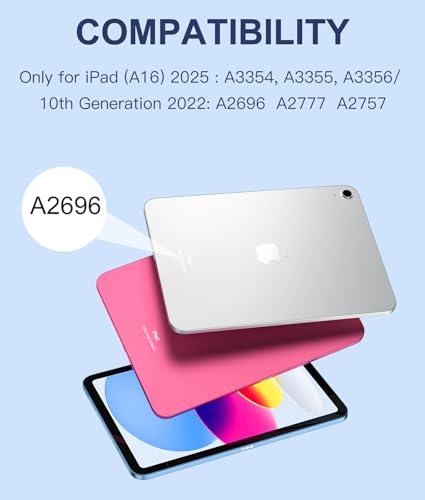
Before ranking anything, check your iPad’s model, because the best iPad keyboard case with a trackpad is the one built for your exact tablet. Seven of the eight listings below target the 10th-generation iPad and the 11th-generation iPad (A16), while the Apple Magic Keyboard entry is built for the 13-inch iPad Pro and will not suit them. The budget group shares nearly identical features, so the real choice is among stand design, keyboard feel and how much you want to spend.
All eight cases at a glance

Harvopu for iPad A16 11th/10th Generation Case with Keyboard, Folio Cover | Multi-Touch Trackpad, 7 Colors Backlit, Detachable Keyboard for iPad A16 11 inch/10th Gen with Pencil Holder, Navy Blue




As an Amazon Associate we earn from qualifying purchases. Product prices and availability are accurate as of the date/time indicated.
CHESONA Compatible for iPad 11th(A16)/10th Generation Case with Keyboard | Detachable Folio Keyboard Case with Multi-Touch Trackpad, 7-Color Backlight, Pencil Holder & Dual Bluetooth, Black


As an Amazon Associate we earn from qualifying purchases. Product prices and availability are accurate as of the date/time indicated.

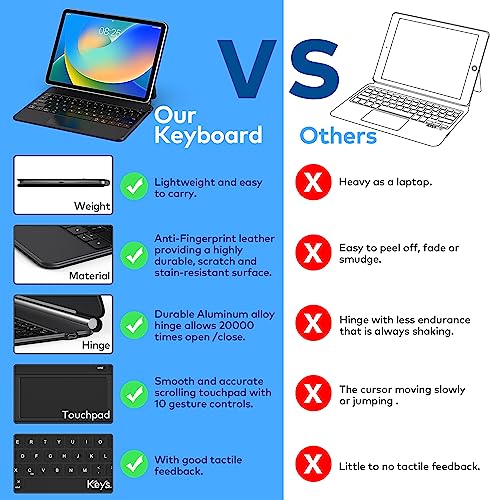
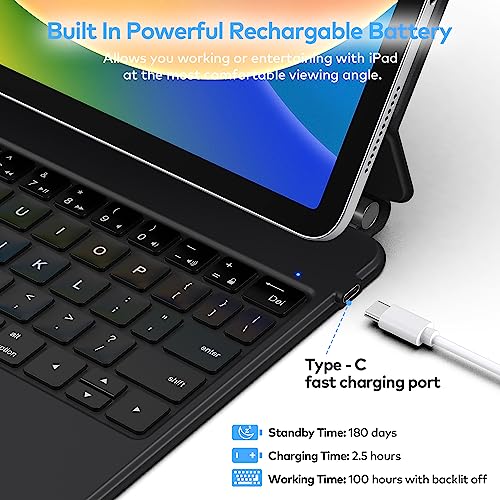
runelk Keyboard Case for iPad 10th Generation 2022 & 11th (A16, 2025) – Magic-Style Keyboard with Multi-Touch Trackpad – Floating Cantilever Stand – Magnetic Case for iPad 10.9 inch 10th / 11th Gen.




As an Amazon Associate we earn from qualifying purchases. Product prices and availability are accurate as of the date/time indicated.

Logitech Combo Touch, Detachable iPad Keyboard Case 10th gen - Oxford Gray | Large Precision Trackpad, Full-Size Backlit Keyboard, Smart Connector Technology, A16 compatible


As an Amazon Associate we earn from qualifying purchases. Product prices and availability are accurate as of the date/time indicated.

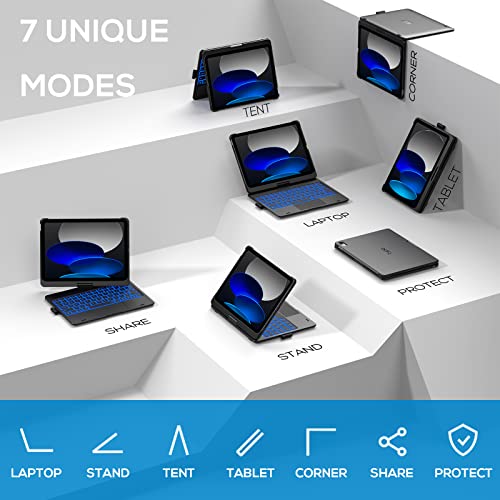
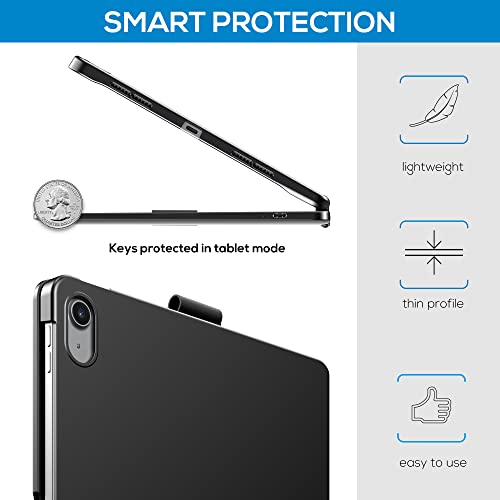
typecase Touch iPad A16 11th/10th Gen Case with Keyboard, 360° Rotating | Multi-Touch Trackpad, 11-Color Backlit, Pencil Holder; Fits iPad A16 11″ (2025) & 10th Gen 10.9″ (2022), Black



As an Amazon Associate we earn from qualifying purchases. Product prices and availability are accurate as of the date/time indicated.

typecase Edge iPad A16 11th/10th Gen Keyboard Case, Floating Magnetic Stand | Multi-Touch Trackpad, 11-Color Backlit Keyboard, Pencil Holder; Fits iPad A16 11″ (2025) & 10th Gen 10.9″ (2022), Black


As an Amazon Associate we earn from qualifying purchases. Product prices and availability are accurate as of the date/time indicated.

Apple iPad Magic Keyboard Case for iPad Pro 13-inch (M4 and M5), Great Typing Experience, Built-in Trackpad, Function Row, US English - Black


As an Amazon Associate we earn from qualifying purchases. Product prices and availability are accurate as of the date/time indicated.

MoKo Touch Keyboard Case for iPad (A16) 11th/10th Gen, Navy Blue | 7 Colors Backlit, Multi-TrackPad, with Pencil Holder, Auto Wake/Sleep, Compatible with iPad 11 inch 2025, iPad 10.9 inch 2020


As an Amazon Associate we earn from qualifying purchases. Product prices and availability are accurate as of the date/time indicated.
| Model | Key point from title | Price tier | Best for |
|---|---|---|---|
| Harvopu Folio Keyboard Case | Detachable keyboard, trackpad, 7-color backlight, pencil holder | Budget | Basic note-taking |
| CHESONA Folio Keyboard Case | Detachable, trackpad, 7-color backlight, dual Bluetooth | Budget | Switching between two devices |
| runelk Magic-Style Keyboard | Floating cantilever stand, magnetic case | Mid-range | Lap and desk typing |
| Logitech Combo Touch | Smart Connector, large trackpad, backlit keys; 10th gen | Premium | Long typing sessions |
| typecase Touch | 360-degree rotating case, 11-color backlight | Mid-range | Tablet and laptop modes |
| typecase Edge | Floating magnetic stand, 11-color backlight | Mid-range | Adjustable viewing angles |
| Apple Magic Keyboard (iPad Pro 13) | For iPad Pro 13-inch, built-in trackpad, function row | Premium | iPad Pro owners only (off-size) |
| MoKo Touch Keyboard Case | 7-color backlight, auto wake/sleep, pencil holder | Budget | Lowest-cost trackpad case |
Harvopu Keyboard Case with Trackpad
The title lists a folio cover, a multi-touch trackpad, a seven-color backlight, a detachable keyboard and a pencil holder, for the A16 11th-generation and 10th-generation iPad. That feature list covers the basics at the budget tier. Detachability matters: it lets you take the keyboard off and use the iPad as a plain tablet. Key travel, trackpad accuracy and battery life are not in the title, so look at the listing and buyer comments for those before ordering.
Pros
- Detachable keyboard in the title
- Pencil holder included
Cons
- Battery and key feel not stated
- Near-identical to other budget picks
Who it’s for: students who want a trackpad case without a big outlay.
CHESONA Detachable Keyboard Case
CHESONA states a detachable folio keyboard with a multi-touch trackpad, a seven-color backlight, a pencil holder and “dual Bluetooth”. The last point is the differentiator in this group: dual Bluetooth usually means the keyboard can pair with two devices, so it could serve a phone or second tablet as well, though the listing should confirm how switching works. The tier is budget, and the cover is aimed at the same iPad generations as the other cheap picks.
Pros
- Dual Bluetooth named in the title
- Detachable folio design
Cons
- Pairing steps not described in the title
- Typing feel unknown without buyer feedback
Who it’s for: people who switch between an iPad and a phone.
runelk Magic-Style Keyboard Case
runelk describes a Magic-style keyboard: a magnetic case, a floating cantilever stand and a multi-touch trackpad, for 10.9-inch 10th and A16 11th-generation iPads. A cantilever stand holds the screen above the keyboard and usually allows adjustable tilt, which suits lap typing. It sits in the mid-range tier, so you pay more than for folio cases. Backlight, battery and Pencil storage are not in the title, so check the listing for those.
Pros
- Floating cantilever stand
- Magnetic attachment
Cons
- Backlight not stated in the title
- Costs more than folio designs
Who it’s for: buyers who want a floating-screen look on a smaller budget.
Logitech Combo Touch (10th Gen)
Logitech lists a detachable keyboard case with a large precision trackpad, a full-size backlit keyboard and Smart Connector technology, and the title says “A16 compatible” alongside 10th gen. A Smart Connector link generally avoids Bluetooth pairing, but the title does not say so; confirm pairing and power in the listing. This is the most expensive of the iPad-fit options. It suits people who type for hours, but check the listing for how the stand and the tablet attachment work.
Pros
- Full-size backlit keyboard per title
- Large trackpad named
Cons
- Top price tier among compatible cases
- Bulkier than slim folios
Who it’s for: heavy typists who want a brand-name case.
typecase Touch
The Touch version highlights a 360-degree rotating design, a multi-touch trackpad, an eleven-color backlight and a pencil holder, for the A16 11th-generation iPad and the 10th-generation 10.9-inch model. Rotation means you can flip the keyboard behind the screen for tablet use, which folio and floating cases do differently. Eleven backlight colors beat the seven on cheaper picks, though that is a cosmetic gain. It sits in the mid-range tier.
Pros
- 360-degree rotation in the title
- Eleven-color backlight
Cons
- Rotating hinge may add bulk
- Battery life not in the title
Who it’s for: users who flip between typing and drawing.
typecase Edge
The Edge replaces rotation with a floating magnetic stand, keeping the multi-touch trackpad, eleven-color backlight and pencil holder. Floating stands let you adjust the viewing angle and usually sit the tablet close to the keys, which many people prefer for desk work. It is priced a step above the Touch, so decide whether you want the floating design or the rotating one. Both target the same two iPad generations according to the titles.
Pros
- Floating magnetic stand named
- Pencil holder and backlight included
Cons
- Costs more than the Touch
- Pencil generation fit not specified
Who it’s for: desk typists who like adjustable angles.
Apple iPad Magic Keyboard (iPad Pro 13-Inch)
This listing is not a match for the other seven. The title says it is for the 13-inch iPad Pro, with a built-in trackpad, a function row and US English layout. It will not fit a 10th-generation or A16 iPad, so it belongs here only as a reference point for what a premium Apple option looks like. The price tier is premium, the highest in the set. If you own a 13-inch iPad Pro, this is the Apple-made choice; otherwise skip it.
Pros
- Function row and trackpad per title
- Apple-made for the iPad Pro
Cons
- Does not fit 10th-gen or A16 iPads
- Highest price tier
Who it’s for: only owners of a 13-inch iPad Pro.
MoKo Touch Keyboard Case
MoKo lists a seven-color backlight, a multi-trackpad, a pencil holder and automatic wake and sleep for the A16 11th and 10th generation iPad. The title also mentions an “iPad 10.9 inch 2020”, a different tablet from the 10th generation, so confirm the model compatibility on the listing before ordering. It sits in the budget tier, and the feature list matches the other cheap picks, which means choosing between them comes down to buyer feedback.
Pros
- Auto wake/sleep named
- Budget tier
Cons
- Title mixes generations; verify fit
- Backlight limited to seven colors
Who it’s for: bargain hunters comfortable verifying compatibility.
How we picked these
This is an editorial comparison built from product titles. We noted each case’s stated fit, trackpad, backlight, stand style and Pencil storage, and separated cases that fit the 10th-generation and A16 iPads from one that does not. Nobody on the team used or measured these units. Our sources are published specifications, manufacturer documentation and buyer reviews, and anything the title leaves out is marked “check the listing”. Price tiers are relative within this set, and the order of entries is not a ranking.
What to look for in an iPad keyboard case
Confirm the model number first
On the iPad, open Settings, then General, then About, and read the Model Number. Compare the A-number with the one on the manufacturer’s compatibility list for the case. Do not rely on screen size alone: two iPad models can both measure 10.9 or 11 inches yet have different camera cutouts and button positions. A three-step checklist: note the model number, match it to the listing, and keep the return window in mind.
Folio, floating or rotating
Folio cases protect the tablet fully and tend to be cheapest. Floating stands, like the runelk and typecase Edge, tilt the screen and look closer to a laptop. Rotating hinges let you flip the keyboard behind for drawing. Match the stand to where you work: a lap needs stability.
Trackpad and keys
Multi-touch trackpads support gestures, but their size and responsiveness vary, and the titles do not give dimensions. Backlight color counts are cosmetic; check brightness levels and auto-off instead. Full-size keys speed typing, and the Logitech title is the only one here that says so. Row spacing and key travel are things buyer comments describe better than a spec sheet.
Pencil storage
A holder keeps the stylus with the case, but verify which Apple Pencil generation fits the slot and whether the Pencil can still charge or pair while stored. Some holders are loops or sleeves on the outside of the case, which can make the case thicker in a bag.
A cost-per-hour check
Suppose you type five hours a week for 40 weeks a year and keep the iPad for two years: that is 400 hours of use (an assumption, so substitute your own). A case costing X works out to X divided by 400 per hour, and a case costing twice as much doubles that rate. If you type only an hour a week, the premium tier rarely pays back; if you write all day, the extra cost of a pricier case is spread across many hours of better keys and a larger trackpad.
Battery, pairing and care
Bluetooth keyboards need charging, and Smart Connector designs may not. Follow the maker’s charging instructions, and do not leave a keyboard in a hot car. For long desk sessions, a keyboard wrist pad can help comfort.
Mistakes buyers make
Buying by screen size alone is the classic mistake, followed closely by ignoring generation names such as A16 and 10th gen. A related slip is trusting a headline that lists several tablets at once; read the compatibility table on the product page. Some shoppers assume every case supports the Apple Pencil in the holder, then find the wrong generation does not fit. Others pay premium prices for features they will not use, like eleven backlight colors. A fourth error is forgetting that detachable keyboards add weight, which defeats the purpose of a tablet in a school bag. Compare with the Alexa Tablet 11 versus iPad 11 comparison if you are still choosing a tablet.
Verdict
For most owners of a 10th-generation or A16 iPad, the Logitech Combo Touch is the safe premium pick for long typing, thanks to its large trackpad and full-size backlit keys. The runelk and typecase Edge suit those wanting a floating look, the typecase Touch suits flip-and-draw users, and Harvopu, CHESONA and MoKo cover the budget tier. Skip the Apple listing unless you have a 13-inch iPad Pro, and verify every fit by model number.
Frequently asked questions
Will a case for the 10th-generation iPad fit the A16 model?
Several titles list both the 10th generation and the A16 11th generation, which suggests a shared fit, but you should confirm on the manufacturer’s page. Compare your iPad’s model number with the case’s compatibility list, and keep the return window in mind in case a button or camera cutout does not line up once the case arrives.
Do these keyboard cases need charging?
Bluetooth keyboards usually have a rechargeable battery and need periodic charging, while Smart Connector designs, as in the Logitech listing, may draw power from the tablet. The titles do not give battery life, so check each listing and the manual. Follow the maker’s charging instructions, use the cable provided or an equivalent, and keep the keyboard away from heat.
Can I still use my iPad as a plain tablet?
If the keyboard is detachable, as in several titles here, you can remove it and use the iPad without the keys. A folio cover keeps the tablet protected either way. Rotating designs keep the keyboard attached but flip it behind the screen. Check whether the combined weight is acceptable for daily carry, because a keyboard case adds noticeably to the tablet alone.
Is the Apple Magic Keyboard a good choice for a standard iPad?
The Apple listing in this roundup is built for the 13-inch iPad Pro, so it does not suit the 10th-generation or A16 iPad. If you own an iPad Pro, it is a valid choice. Otherwise, pick a case matched to your model number instead of buying by brand alone, and read the compatibility notes before ordering.
Do backlit keys drain the battery?
Backlighting uses power, so a lower brightness setting or auto-off helps battery life. Titles list seven or eleven colors but not runtime, and brightness settings differ by case. If you type in bright rooms, you may rarely need the light and can turn it off. Check buyer comments for reported battery life before deciding, since the titles give no runtime figure.