
Our Top Picks


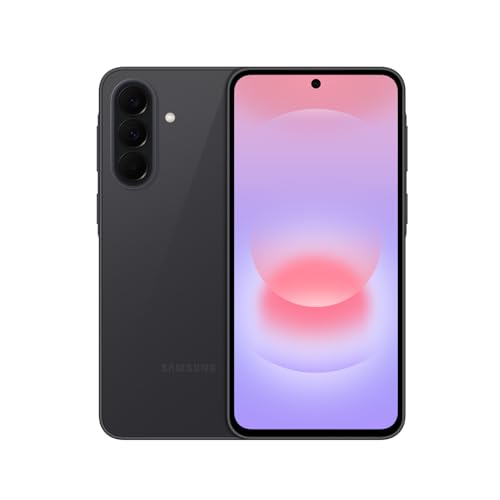

The best smartphones for seniors in 2026 are the Samsung Galaxy A16 5G for a low-cost large-screen Android, the Samsung Galaxy A36 5G for a smoother mid-range experience, the iPhone 16e for people who want the simplest ecosystem and strong hearing-aid support, and the Jitterbug Smart4 for anyone who wants a phone built around big text, a list-style home screen and a dedicated emergency button. Flip-phone buyers should look at the Jitterbug Flip2, and anyone who wants long update support and a clean interface should consider the Google Pixel 9a.
A good senior phone is rarely the one with the fastest chip. It is the one that is readable without glasses, loud enough for the person’s hearing, simple enough to use without a tutorial, and supported with security updates for years. This guide sorts nine real phones by the criteria that actually decide those outcomes, with concrete thresholds you can check on any spec sheet.
How we chose
This is a research-based guide, not a lab comparison. We compared manufacturer specification sheets, published accessibility documentation, hearing-aid compatibility ratings, and current-year roundups from senior-living and consumer-technology publications. We kept only phones that are sold new in 2026 or still widely available from carriers and retailers, and that have a documented accessibility feature set. Where a specific rating could not be confirmed, the entry says so and tells you where to check, rather than guessing.
Five criteria drove the shortlist:
- Screen size and text scaling: a display of roughly 6.5 inches or larger lets you raise system text to the largest setting without cramming the layout. Below about 6.1 inches, large text wraps awkwardly in many apps.
- Hearing-aid compatibility: look for an M rating (acoustic coupling, for people who use the phone speaker next to a hearing aid microphone) and a T rating (telecoil coupling). M3/T3 meets the baseline for being called hearing-aid compatible; M4/T4 is the best category.
- Interface simplicity: a mode that reduces the home screen to big labeled tiles or lists, plus big on-screen keys, removes most daily confusion.
- Emergency tools: a way to call emergency services quickly, share location, and store medical information that first responders can see from the lock screen.
- Update length and battery: a battery of about 4,500 mAh or more and at least five years of security updates keep a phone useful without an upgrade for the better part of a decade.
Quick comparison
| Phone | Screen class | Hearing-aid rating | Interface style | Update support | Tier |
|---|---|---|---|---|---|
| Jitterbug Smart4 | About 6.7-inch | M3/T4 (reported) | Large list-style senior UI, emergency button | Limited, Android-based | Entry-level |
| Samsung Galaxy A16 5G | 6.7-inch | M3/T3 (reported) | Standard Android with Easy Mode | Six years promised by Samsung | Entry-level |
| Samsung Galaxy A36 5G | 6.7-inch | Check spec sheet | Standard Android with Easy Mode | Six years promised by Samsung | Mid-range |
| Google Pixel 9a | 6.3-inch | Check spec sheet | Clean Android, Live Caption | Seven years promised by Google | Mid-range |
| iPhone 16e | 6.1-inch | M3/T4 (reported) | iOS with AssistiveTouch, Live Listen | Not a fixed date; long track record | Mid-range |
| iPhone 16 Plus | 6.7-inch | Check spec sheet | iOS with Live Listen | Not a fixed date; long track record | Premium |
| iPhone 17e | 6.1-inch | Check spec sheet | iOS | Not a fixed date; long track record | Mid-range |
| Jitterbug Flip2 | Flip phone, small external display | M4/T4 (reported) | Big physical buttons, urgent-response button | Not applicable (feature phone) | Entry-level |
Ratings marked reported come from published 2026 senior-phone roundups. Ratings can differ by carrier variant, so confirm the rating for the exact model you buy on the manufacturer or carrier spec page.
The nine picks
1. Jitterbug Smart4: best phone built specifically for seniors
Spec line: Android smartphone · about 6.7-inch display · senior-focused list interface · emergency button · voice typing · real-time captions · M3/T4 hearing-aid rating (as reported).
Best for: A first smartphone for someone who finds standard Android or iPhone overwhelming, or for a family member who wants emergency help built in.
Skip if: The user wants a wide range of apps, a strong camera, or fast performance. Its processor and app ecosystem are aimed at calling, texting, and a few essentials.
- Pros: Large-text list layout, a dedicated emergency button, voice typing, real-time captions, and a hearing-aid rating at the high end of the scale.
- Cons: Service plans from the brand add recurring cost, hardware is modest, and software update support is shorter than the Samsung or Google options.
2. Samsung Galaxy A16 5G: best low-cost large-screen Android
Spec line: 6.7-inch Super AMOLED display · 5,000 mAh battery · 5G · Easy Mode and text scaling · M3/T3 hearing-aid rating (as reported) · six years of updates promised.
Best for: A budget-conscious buyer who wants a big, bright screen and the option to turn on Samsung’s simplified Easy Mode.
Skip if: The person uses a telecoil hearing aid and needs the strongest possible coupling, because T3 is a notch below T4. Also skip if the user will play games or take many photos in low light.
- Pros: Large AMOLED screen at an entry-level tier, long battery life for light use, and a long update commitment.
- Cons: Performance is modest, the default interface is full Android and can be busy, and the camera is average.
As an Amazon Associate we earn from qualifying purchases at no extra cost to you.

3. Samsung Galaxy A36 5G: best mid-range Android for ease and speed
Spec line: 6.7-inch AMOLED display with a high refresh rate · 5,000 mAh battery · 5G · Easy Mode · six years of updates promised.
Best for: A senior who will use video calls, photos and web browsing and wants a phone that does not stutter.
Skip if: Hearing-aid performance is the deciding factor and you cannot confirm the rating, or you want the least setup possible.
- Pros: Smoother than the A16, bright screen for outdoor reading, and the same long update policy.
- Cons: The hearing-aid rating should be verified before purchase, and the default home screen still needs a one-time simplification.

4. iPhone 16e: best for simple, consistent software and hearing-aid pairing
Spec line: 6.1-inch OLED display · single rear camera · supports Made for iPhone hearing aids · M3/T4 hearing-aid rating (as reported) · AssistiveTouch, Voice Control, Magnifier.
Best for: Seniors whose family already uses iPhones, because FaceTime, shared photo albums, and remote help are easy to set up.
Skip if: You want the largest possible screen, since 6.1 inches is only moderate, or if the budget is tight.
- Pros: Predictable software, strong accessibility tools, direct pairing with compatible hearing aids, and Live Listen, which uses the phone microphone to send sound to compatible hearing devices.
- Cons: Higher entry price than the Android picks, smaller screen, and the basic iOS layout still has several gestures to learn.
5. iPhone 16 Plus: best large-screen iPhone
Spec line: 6.7-inch OLED display · dual rear cameras · Live Listen · Made for iPhone hearing-aid support · all-day battery for typical use.
Best for: Seniors who want an iPhone with the biggest screen for reading, video calls and maps.
Skip if: The phone will be used mostly for calls and texts. It is a premium-tier purchase and larger to hold.
- Pros: Large, bright screen, strong battery, and the full iPhone accessibility suite.
- Cons: It is heavier and costlier than other picks, and one-handed use is harder for small hands.
6. iPhone 17e: best value for a newer iPhone
Spec line: 6.1-inch OLED display · current-generation Apple chip class · iOS accessibility features · mid-range entry point into the iPhone line.
Best for: A buyer who wants the newest iOS-support runway at a lower cost than the standard model.
Skip if: You already found an iPhone 16e discount, because the practical difference for everyday senior use is small. Confirm exact specifications and hearing-aid rating on Apple’s spec page before buying.
- Pros: Newer hardware, same accessibility stack, and a long support horizon.
- Cons: Costs more than the 16e, and the screen is no larger.
7. Google Pixel 9a: best clean Android with the longest updates
Spec line: 6.3-inch OLED display · large battery in the 5,000 mAh class · seven years of OS and security updates promised · Live Caption and Call Screen · Emergency SOS and Personal Safety app.
Best for: Someone who wants fewer pre-installed apps, helpful spam call filtering, and captions for calls and video.
Skip if: A large display is a priority, or if the hearing-aid rating cannot be confirmed for the model you are considering.
- Pros: Call Screen reduces scam calls, Live Caption helps with hearing difficulty, and update support is the longest in this list.
- Cons: The screen is smaller than the 6.7-inch picks, and the interface still needs setup for first-time users.

8. Jitterbug Flip2: best flip phone for someone who does not want a smartphone
Spec line: Flip form factor · large physical buttons · urgent-response button · M4/T4 hearing-aid rating (as reported) · basic calls and texts.
Best for: People with arthritis, tremor, or low vision who benefit from physical buttons and a simple call-first experience.
Skip if: The user wants video calls, photos shared by family, or messaging apps.
- Pros: The strongest hearing-aid rating in the list, simple layout, and long standby time.
- Cons: Small display, minimal apps, and a plan structure that adds ongoing cost.
9. Samsung Galaxy S26: best when camera and speed matter
Spec line: 6.3-inch AMOLED display, 1-120Hz · 167 g · telephoto camera · premium-tier flagship · up to seven years of updates.
Best for: An active senior who wants high-quality photos of grandchildren and a phone that will not slow down.
Skip if: The goal is simplicity at a low price. This tier is overkill for calling and messaging.
- Pros: Excellent display and cameras, strong performance, and a long update policy.
- Cons: Premium tier cost, more features than most seniors will use, and a more complex settings menu.

Match the phone to the person
| Situation | Priority | Best match | Why |
|---|---|---|---|
| First smartphone, easily overwhelmed | Simplicity | Jitterbug Smart4 | List-style interface and an emergency button remove most setup work |
| Tight budget, wants big text | Screen size per cost | Samsung Galaxy A16 5G | 6.7-inch screen at an entry-level tier |
| Uses a behind-the-ear hearing aid with Bluetooth | Hearing-aid pairing | iPhone 16e or iPhone 16 Plus | Made for iPhone support and Live Listen |
| Uses a telecoil | T4 rating | Jitterbug Smart4 or Flip2, or an iPhone with T4 | T4 gives stronger telecoil signal |
| Wants fewer scam calls | Call filtering | Google Pixel 9a | Call Screen and spam detection |
| Hand tremor, arthritis, low vision | Physical buttons | Jitterbug Flip2 | Large physical buttons, no touchscreen errors |
| Family on iPhone, remote help needed | Ecosystem | iPhone 16e | FaceTime, shared albums, easy remote support |
Worked example: reading the hearing-aid rating
Hearing-aid compatibility ratings look cryptic, but the logic is short. Suppose a buyer wears a behind-the-ear hearing aid and sometimes switches it to telecoil mode for phone calls.
- Identify the coupling mode. If the aid picks up sound through its microphone while the phone is held to the ear, the M rating matters. If the aid is switched to telecoil, the T rating matters.
- Set the minimum. The baseline for a compatible phone is M3 for microphone use and T3 for telecoil use.
- Choose the margin. A rating of 4 means lower interference and a stronger signal. For a person who has noticeable buzzing or whistling on calls, aim for M4/T4 rather than M3/T3.
- Apply it. The Galaxy A16 5G (M3/T3 reported) meets the baseline for both modes but without extra margin. The iPhone 16e (M3/T4 reported) offers a better telecoil signal but the same microphone-mode baseline. The Jitterbug Flip2 (M4/T4 reported) has top ratings in both modes.
- Test by feel before keeping it. Make a call in a quiet room and in a noisy one. If buzzing appears, switch to speakerphone, Bluetooth streaming, or captions, and use the return window.
Bluetooth-capable hearing aids bypass most of this, because the phone streams audio directly. In that case, check the pairing compatibility list from your hearing-aid maker instead of relying only on the M/T rating.
Set it up for a senior user
- Raise text size and bold text. Set system font to the second-largest or largest step, then check that messages and settings still fit.
- Use a simplified home screen. On Samsung, switch on Easy Mode. On iPhone, keep only the apps used daily on the first page and use a large dock.
- Store medical information. Fill in the Medical ID on iPhone or the emergency information on Android so responders can see allergies, medications, and emergency contacts from the lock screen.
- Add emergency contacts. Set up Emergency SOS so a side-button press sequence calls emergency services and notifies chosen contacts. Practice it once with the person, using a non-emergency practice mode if available, and never trigger a real call as a drill.
- Turn on spam call protection. Use the built-in call filtering tools, and let unknown numbers go to voicemail.
- Enable automatic updates. Security updates matter more for people who may be targeted by scam messages and fraudulent links.
- Add a screen protector and a grippy case. A case with a textured edge reduces drops for people with tremor or reduced grip strength.
Safety and scam awareness
A phone can also be a security risk if it is set up carelessly. Teach the person never to share one-time codes, never to install an app because a caller asks, and to hang up and call back using a number from a trusted source. Keep payment apps off the phone unless they are needed, and set a passcode of at least six digits. Enable location sharing with one trusted family member rather than every contact. Emergency features can place a call to emergency services, so make sure the person understands that accidental triggers should be cancelled quickly and explained to the dispatcher.
How to choose: thresholds that settle the decision
Most buying arguments end quickly once you apply a few numbers. Use these limits, then pick the cheapest phone that clears all of them.
- Screen: 6.5 inches or larger for poor eyesight. A 6.1 to 6.3-inch screen is workable if the person already uses the magnifier and large-text settings.
- Battery: about 4,500 mAh or more for a full day with video calls. Flip phones last for days, so the number matters less there.
- Storage: 128 GB at minimum, so photo storage warnings do not appear in the first year.
- Updates: at least five years of security updates. Samsung A-series and Pixel phones state six to seven years; dedicated senior phones state less.
- Hearing aids: M3/T3 is the baseline. Choose M4/T4 for anyone who already hears buzzing or whistling on calls. Bluetooth hearing aids rely on the pairing list instead.
- Weight: about 200 g or less for arthritis or tremor, because heavier phones tire the hand during long calls.
- Water protection: IP67 or IP68 helps for kitchens and bathrooms, and is rare below the mid-range tier.
- Plan cost: for senior-plan phones, multiply the monthly service fee by 36 and add the hardware cost, then compare that three-year total with a standard phone on a normal plan.
If two phones tie on every threshold, choose the one the family can support remotely. A phone the helper knows well gets used for longer than a technically better phone nobody can fix.
Skip these mistakes
- Buying on processor name. Everyday tasks run fine on an entry-level chip. Screen size and battery life matter more.
- Ignoring carrier restrictions. Confirm the phone works with the person’s current carrier, and whether their plan needs a newer SIM.
- Overlooking storage. At least 128 GB avoids the warning pop-ups that confuse many first-time users when photos fill the phone.
- Skipping a trial period. Keep the packaging and check the return window. Let the person use the phone for several days before keeping it.
Six more senior-friendly phones worth shortlisting
The nine picks above cover the main routes, but several other phones solve the same problems at different price tiers or with different trade-offs. These six are current, widely sold, and easy to compare with the rest of the list. Hearing-aid ratings vary by carrier variant, so confirm the M and T rating on the exact model before you buy.
10. Jitterbug Smart5: newer software in the senior-focused line
Spec line: Android 16 · about 6.75-inch display · large-text, list-style home screen · no SIM card needed, service plan required · entry-level hardware tier.
Best for: Someone who liked the idea of the Jitterbug Smart4 but wants newer Android software and a slightly larger screen, with a family member ready to manage the dedicated plan.
Skip if: You want to bring your own carrier plan, or you expect the camera and app performance of a mainstream phone.
Pros: Simplified layout, big text from the first start, newer software than the Smart4, and a low upfront hardware cost.
Cons: Tied to one provider’s plan, modest hardware, a narrower app experience, and a hearing-aid rating that still needs checking.

11. Jitterbug Flip3: newer simple flip for calls and short texts
Spec line: Flip form factor · large physical keys · simple menu · no SIM card needed, service plan required · entry-level tier.
Best for: A person who only needs calls and short texts, has trouble with touchscreens, and wants a newer alternative to the Flip2.
Skip if: The user wants video calls, shared photo albums or messaging apps, because a flip phone cannot do those well.
Pros: Physical buttons remove touchscreen errors, menus are shallow, and standby time is long compared with any smartphone.
Cons: Limited screen and apps, a recurring plan cost, and the emergency-help service should be confirmed on the plan page.

12. Samsung Galaxy A17 5G: lowest-cost large AMOLED from a mainstream brand
Spec line: 6.7-inch Super AMOLED display · 5G · battery in the 5,000 mAh class · Easy Mode and text scaling · up to six years of updates promised · entry-level tier.
Best for: A buyer who wants a big, bright screen and a familiar app store at the lowest tier on this list, without a dedicated senior plan.
Skip if: Smooth performance matters, or the person relies on a telecoil and you cannot confirm a T4 rating for the exact variant.
Pros: Large screen for the money, multi-day battery for light use, and the same Easy Mode as the pricier Samsung picks.
Cons: Entry-level processor that slows with many apps open, an average camera, and a default interface that needs simplifying.

13. Samsung Galaxy A37 5G: step up with dust and water protection
Spec line: AMOLED display · triple rear camera · IP68 dust and water rating · battery in the 5,000 mAh class · slim body · mid-range tier.
Best for: A senior who uses the phone near a kitchen sink or in a bathroom, takes photos of family, and wants a smoother phone than the A16.
Skip if: You only make calls and send texts, since the entry-level A-series phones cost less and do the same job.
Pros: Water and dust protection that survives splashes, smooth scrolling, a capable camera set, and Samsung’s long update policy.
Cons: Higher tier than the A16 and A17, hearing-aid rating to verify before purchase, and the home screen still needs one-time setup.
14. Google Pixel 10a: scam-call screening with long update support
Spec line: Pixel 10a · battery listed at 30+ hours · Camera Coach photo guidance · Gemini assistant · seven years of updates · Call Screen and Live Caption · mid-range tier.
Best for: A person who gets frequent spam calls, wants captions during calls, and wants the longest update promise available at this tier.
Skip if: You need the biggest possible display, since the screen is smaller than the 6.7-inch picks, or you cannot confirm the hearing-aid rating.
Pros: Built-in call screening, live captions, a clean interface with few pre-installed apps, and seven years of updates.
Cons: Smaller screen than the Samsung A-series, and a higher tier than the entry-level phones in this list.

15. Motorola Moto G Power 2026: durable pick with a large battery
Spec line: 8 GB RAM · 128 GB storage · 50 MP main camera · military-grade durability rating listed · large battery class · entry-level to mid-range tier.
Best for: Someone who forgets to charge, drops the phone now and then, and wants a rugged-minded Android without paying flagship money.
Skip if: You need a long guaranteed update window or a confirmed M4/T4 rating, since carrier variants and update promises differ from Samsung and Google.
Pros: Large battery class, enough memory for everyday apps, and a durability rating that suits clumsy hands.
Cons: Shorter update promise than Samsung or Google, an average display, and the default interface is busy.
All 15 phones at a glance
| Phone | Type | Screen class | Best senior-friendly feature | Tier |
|---|---|---|---|---|
| Jitterbug Smart4 | Senior smartphone | About 6.7-inch | List-style interface, emergency button | Entry-level |
| Jitterbug Smart5 | Senior smartphone | About 6.75-inch | Newer Android, large text by default | Entry-level |
| Jitterbug Flip2 | Flip phone | Small external display | Big keys, top hearing-aid rating (reported) | Entry-level |
| Jitterbug Flip3 | Flip phone | Flip with large keys | Simple menus, no touchscreen | Entry-level |
| Samsung Galaxy A16 5G | Android | 6.7-inch | Large screen at lowest cost, Easy Mode | Entry-level |
| Samsung Galaxy A17 5G | Android | 6.7-inch | Large AMOLED, Easy Mode | Entry-level |
| Motorola Moto G Power 2026 | Android | Large | Big battery, durability rating | Entry-level to mid-range |
| Samsung Galaxy A36 5G | Android | 6.7-inch | Smooth performance, long updates | Mid-range |
| Samsung Galaxy A37 5G | Android | Large | IP68 water and dust rating | Mid-range |
| Google Pixel 9a | Android | 6.3-inch | Call Screen, seven years of updates | Mid-range |
| Google Pixel 10a | Android | Smaller than 6.7-inch | Call Screen, Live Caption, seven years | Mid-range |
| iPhone 16e | iPhone | 6.1-inch | Made for iPhone hearing aids, Live Listen | Mid-range |
| iPhone 17e | iPhone | 6.1-inch | Newer iOS runway, same accessibility tools | Mid-range |
| iPhone 16 Plus | iPhone | 6.7-inch | Largest iPhone screen, Live Listen | Premium |
| Samsung Galaxy S26 | Android | 6.3-inch | Speed and cameras, seven years of updates | Premium |
Frequently asked questions
What is the easiest smartphone for a senior to use?
The Jitterbug Smart4 is the easiest for a first-time user because its interface is built around large lists and an emergency button. For a more familiar ecosystem, the iPhone 16e is the simplest mainstream choice.
The Jitterbug limits what the person can install, while the iPhone and Samsung options give access to the full app store. Pick based on whether the person wants fewer features or the full range of apps.
How big should the screen be for someone with poor eyesight?
Aim for a display of 6.5 inches or larger, then raise the system text size. A bigger screen lets large text fit without wrapping awkwardly.
The 6.7-inch phones in this guide, such as the Galaxy A16 5G, Galaxy A36 5G, and iPhone 16 Plus, are the best fit. The Magnifier and zoom tools on iPhone and Android also help with fine print.
Do I need a hearing-aid compatibility rating of M4/T4?
No. M3/T3 meets the baseline for being called hearing-aid compatible, but M4/T4 offers the lowest interference and strongest signal for people with noticeable buzzing or a telecoil.
If your hearing aid streams over Bluetooth, check the maker’s compatibility list instead, because the audio goes directly to the aid rather than through the speaker.
Is an iPhone or an Android phone better for seniors?
Neither is universally better. An iPhone is simpler when the family also uses iPhones, while Android gives more choice at lower cost and a bigger screen for the money.
Choose the platform the person’s helpers already know, because remote help from family is often the deciding factor in whether a senior keeps using the phone.
Should a senior get a flip phone instead of a smartphone?
A flip phone is better if the person mainly makes calls and sends short texts, or has trouble with touchscreens. A smartphone is better for video calls, photos, maps and messaging apps.
The Jitterbug Flip2 is the best flip option in this list. If the person later wants video calls with grandchildren, a smartphone such as the Smart4 or the Galaxy A16 5G is a better long-term choice.
How long should a senior phone last?
Plan on five to seven years of use. Choose a phone with a published update commitment of at least five years, a battery of about 4,500 mAh or more, and 128 GB of storage.
The Pixel 9a promises seven years of updates and the Samsung A-series phones promise six, which is a solid basis for a purchase in 2026. Apple does not publish a fixed end date, but recent iPhones have a long record of receiving updates.
What emergency features should a senior phone have?
At minimum, look for Emergency SOS, stored medical information visible on the lock screen, and location sharing with a trusted contact. A dedicated emergency button is a bonus for people who struggle with gestures.
Set these up on day one and practice the steps with the person, but never place a real emergency call as a drill.
Can a senior use a phone with large buttons and a touchscreen at the same time?
Yes, but not on the same device in most cases. Large physical buttons are found on flip and bar phones such as the Jitterbug Flip2, while smartphones rely on touch.
If tremor makes touchscreens unreliable, turn on touch accommodations in the accessibility settings to ignore brief or repeated touches, or choose a physical-button phone.
More from Amazon
Programs that pair well with the guide above. Offers and eligibility are set by Amazon and may change.
Free shipping on eligible items, Prime Video and more. Eligible new members can start with a free trial.
Start a Prime free trialAudiobooks and podcasts to listen to on the go. Eligible new members can start with a free trial.
Try Audible freeAd-free music streaming. Eligible new subscribers can start with a free trial.
Try Music Unlimited freeA free business account with business pricing and bulk-buying tools for work, shop or home office.
Create a business accountAs an Amazon Associate we earn from qualifying purchases.









