
Key takeaways
- Covers technical depth most product reviews ignore
- Helps avoid common code violations during installation
- No replacement for a licensed electrician on complex circuits
Most people who walk into the smart homes category are trying to solve one of three problems: turning a single appliance into a scheduled or voice-controlled device, securing a front entrance without wiring a new doorbell, or replacing a dumb light with something that responds to a routine. None of these tasks is difficult on its own, but the market is crowded with products that either drop Wi-Fi connections under load, handle less amperage than advertised, or lock you into a single ecosystem with no upgrade path.
What separates a worthwhile pick from a frustrating purchase comes down to four things: the connectivity standard (Wi-Fi band support, Matter compatibility, or proprietary hub requirements), the rated power capacity versus what your actual devices draw, ecosystem breadth (whether a plug or bulb works across Alexa, Google Home, and Apple Home without extra bridges), and the long-term cost of features like cloud storage that may become mandatory after a trial period expires. Comparing published specs and aggregated owner feedback across these products reveals meaningful differences that marketing copy often obscures.
Our top picks



As an Amazon Associate we earn from qualifying purchases at no extra cost to you. Ratings are shown as listed on Amazon.
Quick Picks
| Product | Best for | Price |
|---|---|---|
| Residential Wiring and Smart Home Technology | DIY electrical planning | $85 |
| Kasa Smart Plug Ultra Mini 15A | High-draw appliances in tight spaces | $23.99 |
| GHome Smart Plug | Budget voice control | $9.99 |
| Govee Smart Plug (4-pack) | Multi-room rollout on a budget | $26.99 |
| Orbitell Video Doorbell | First-time smart security | $9.99 |
| TP-Link Tapo P125M (3-Pack) | Apple Home integration | $24.99 |
| Amazon Echo Show 5 | Central smart home dashboard | $99.99 |
| Govee Smart Light Bulbs | Ambient lighting scenes | $28.99 |
How We Picked
We weighted four criteria when comparing these products: power rating accuracy relative to real-world appliance demands, ecosystem compatibility across major voice and home automation platforms, value per unit in multipack pricing, and the absence of recurring fees or cloud lock-in that erode a low sticker price over time. A plug rated for 15A that fits behind furniture matters more than one with a flashy app if it trips your circuit. A $10 doorbell that charges you monthly for footage matters less than a slightly pricier one with local storage options.
The 8 Best Smart Homes in 2026
Residential Wiring and Smart Home Technology
For homeowners who want to plan permanent installations rather than plug-and-play gadgets, this guide covers wiring standards, relay selection, and network topology. It addresses the gap between buying a smart switch and actually wiring one safely into an existing junction box.
- Covers technical depth most product reviews ignore
- Helps avoid common code violations during installation
- No replacement for a licensed electrician on complex circuits
Skip this if you are looking for hardware to buy now. It is a reference resource for people planning a multi-room electrical overhaul who want to speak intelligently to a contractor or understand which switch types match their wiring configuration.
Kasa Smart Plug Ultra Mini 15A, EP10P4
Owners who need to control space heaters, window AC units, or coffee makers on a timer will appreciate the 15A rating in a form factor compact enough to stay hidden behind a couch or desk. The four-pack configuration keeps per-unit cost low for whole-home deployment.
- 15A rating handles high-draw appliances without overheating
- Ultra Mini design leaves adjacent outlets unblocked
- Setup process requires the Kasa app as a bridge to Alexa or Google
Skip this if your smart plug only controls lamps or fans under 600W; cheaper alternatives deliver identical functionality at a lower price point.
GHome Smart Plug
At $9.99, this is the entry point for anyone who wants a single appliance on a schedule or voice command without committing to a multipack. It works with Alexa and Google Home, covering the two dominant ecosystems for renters and budget-conscious owners.
- Lowest per-unit cost among the plugs compared here
- Compatible with both Alexa and Google Home voice commands
- No stated amperage rating above standard, limiting it to lighter loads
Skip this if you need to switch heaters, compressors, or other inductive loads. Pair two of these with the Kasa for mixed-duty coverage instead of relying on a single unit for everything.
Govee Smart Plug, WiFi Outlet (4 pcs)
Govee positions this four-pack as a smart home starter kit for people who want plugs in every room without hunting for deals individually. It pairs with Alexa and Google Assistant and shares the Govee app ecosystem already used by their lighting products.
- Four units per package simplify multi-room deployment
- Shared app with Govee bulbs creates unified scene control
- Larger form factor may block the second outlet on wall plates
Skip this if you already own Kasa or Tapo plugs; mixing ecosystems in one app adds friction to routines and automations across rooms.
Orbitell 1080p Wireless Wi-Fi Video Doorbell Camera
For renters or anyone unwilling to run a chime wire, this doorbell connects over 2.4GHz Wi-Fi and offers two-way audio, night vision, and AI motion detection at a price that makes it a disposable upgrade for older mechanical buzzers.
- Two-way audio lets you speak to visitors remotely
- Night vision and AI motion detection cover most security needs
- Cloud storage dependency means a subscription is likely required long-term
Skip this if you demand local recording without monthly fees or if your home only has a 5GHz Wi-Fi network, since this unit requires 2.4GHz exclusively.
TP-Link Tapo Matter Supported Smart Plug Mini (3-Pack)
The Matter certification is the headline here: this plug integrates natively with Apple Home, which few competitors support without a bridge. The 15A/1800W rating and UL certification give confidence on heavier loads, while the 3-pack pricing lands between Kasa and Govee.
- Matter support bridges Apple Home, Alexa, and Google Home seamlessly
- UL Certified for safety-conscious buyers in regulated jurisdictions
- 2.4GHz Wi-Fi only means some congested networks may struggle
Skip this if your smart home is built entirely on one ecosystem; the Matter advantage only pays off when you mix platforms or want future-proofing against vendor lock-in.
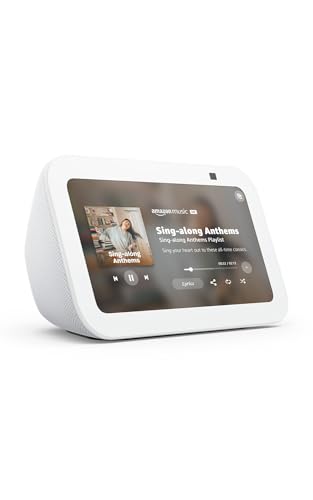
Amazon Echo Show 5 (newest model)
This smart display serves as a visible dashboard for your smart home, replacing the need to pull out your phone for camera feeds, timer checks, or video calls. The advertised 2x bass improvement and clearer sound make it viable as a kitchen radio replacement alongside its control-panel role.
- Screen interface lets you view doorbell feeds and camera clips directly
- Designed for Alexa+ with improved voice recognition over prior generations
- Higher price than basic Echo speakers, and camera placement on the front may concern privacy-focused buyers
Skip this if you already have a tablet or phone mounted nearby that handles the same tasks; the Echo Show 5 earns its spot primarily as a hands-free kitchen or bedside hub.
Govee Smart Light Bulbs, A19 Color Changing
With 800 lumens of output and an E26 base that screws into standard fixtures, these bulbs deliver color-changing scenes without requiring a hub. They pair with the same Govee app as their smart plugs, letting you build unified routines that dim lights and switch off fans simultaneously.
- 800 LM matches a traditional 60W bulb for general room use
- Color changing expands ambiance without smart fixtures or switches
- Color accuracy at extreme hues may not satisfy photography or design work
Skip this if your room needs tunable white rather than RGB color; dedicated white-temperature bulbs deliver more natural circadian lighting at similar cost.
Buying Guide
Match the Amperage Rating to Your Appliance
Every smart plug carries a maximum load rating, typically 10A, 15A, or 16A in the US market. A space heater drawing 1,500W pulls roughly 12.5A on a 120V circuit, so only 15A-rated plugs can handle it safely. Lamps, fans, and chargers draw far less, meaning you do not need the highest-rated plug for every application. Check the nameplate wattage of the device you intend to control and divide by 120 to find the amperage draw, then select a plug rated above that number.
Verify Wi-Fi Band and Ecosystem Compatibility
Most budget smart devices operate on 2.4GHz Wi-Fi only because the band offers better range through walls at lower cost. If your router broadcasts only a 5GHz SSID or you have hidden the 2.4GHz band, these devices will not connect. Beyond the band, check whether the product works natively with your voice assistant or requires a proprietary app as a middle layer. Matter-certified devices like the Tapo P125M reduce that friction by speaking to Apple Home, Alexa, and Google Home without bridges.
Account for Recurring Cloud Costs
A $10 doorbell that charges $3 per month for clip storage costs more over two years than a $40 unit with local microSD recording. The same logic applies to camera-equipped displays or any device that uploads footage. Before buying on price alone, search the product documentation or owner reviews for terms like “subscription,” “cloud plan,” or “storage tier” to understand the total cost of ownership over the lifetime of the device.
Our Verdict
The best overall smart homes upgrade for most buyers is the TP-Link Tapo P125M three-pack. Matter certification, a 15A rating, UL safety listing, and cross-ecosystem compatibility make it the plug most likely to still work after you change voice assistants or add an Apple Home hub. For a budget entry, the GHome Smart Plug at $9.99 covers single-appliance automation with Alexa and Google Home without overcommitting. If you want a visible command center that replaces a phone for routine checks, the Echo Show 5 wins that role despite its higher price.
FAQ
Do smart plugs need Wi-Fi to work?
Yes, most Wi-Fi-based smart plugs require an active 2.4GHz connection to your router for remote access and voice commands. Some models retain last-known schedules locally during outages, but you cannot issue new commands without connectivity.
Can I use a smart plug with a heater or air conditioner?
Only if the plug’s rated amperage exceeds the appliance’s draw. Check the nameplate, divide watts by 120 to get amps, and select a plug rated above that figure. The Kasa EP10P4 and Tapo P125M both handle 15A loads.
What is Matter and why does it matter for smart home buying?
Matter is a universal communication standard that lets devices work across Apple Home, Alexa, Google Home, and SmartThings without proprietary bridges. Buying Matter-certified hardware future-proofs your setup against vendor lock-in.
Are cheap smart doorbells worth buying?
They work for basic notification and two-way communication, but most rely on cloud storage subscriptions that add to the real cost over time. Read the fine print on retention periods before deciding the low upfront price is actually cheap.


