
Key takeaways
- 1 laptop (65-100W) + 2 phones (20W each) = minimum 120W station, ideally 200W
- 2 laptops + tablet + 2 phones = minimum 200-300W station
- Phones, earbuds, watches only = 65-100W station is enough
- iPhone + Watch + AirPods only = 15W wireless pad is enough, wired power is wasted
The best charging station for multiple devices in 2026 is the UGREEN Nexode 300W GaN station for wired setups, and the Belkin BoostCharge Pro 3-in-1 for wireless setups, because total shared wattage and port layout matter more than port count alone.
If you need the best fast charging station for multiple devices that can handle two laptops plus phones at full speed, get a 200W+ GaN desktop station. If you charge an iPhone, Apple Watch and AirPods overnight, get a dedicated 3-in-1 magnetic pad instead. The top rated multi device charging station options split cleanly into those two use cases, and mixing them is what creates cable clutter.
Our top picks


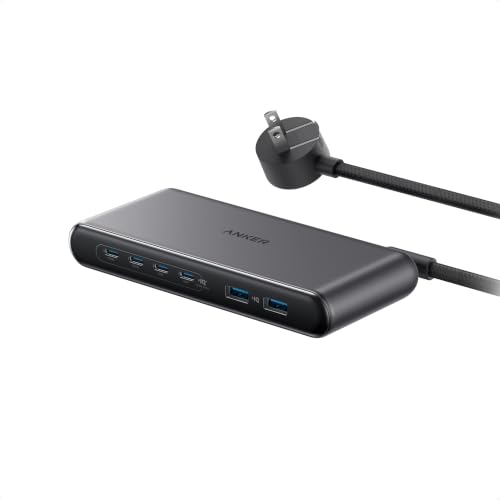
As an Amazon Associate we earn from qualifying purchases at no extra cost to you. Ratings are shown as listed on Amazon.
How to choose: wattage sharing beats port count
A 6-port station labeled 100W does not give 100W to every port. It gives 100W total, dynamically split. That is the single most misunderstood spec for the best usb charging station for multiple devices.
Check the wattage allocation table on the spec sheet, usually printed as C1+C2 = 65W+35W, or similar. GaN II and GaNPrime-type stations handle this better because they run cooler and sustain shared output without throttling.
Use this rule for the best usb c charging station for multiple devices:
- 1 laptop (65-100W) + 2 phones (20W each) = minimum 120W station, ideally 200W
- 2 laptops + tablet + 2 phones = minimum 200-300W station
- Phones, earbuds, watches only = 65-100W station is enough
- iPhone + Watch + AirPods only = 15W wireless pad is enough, wired power is wasted
Worked example: will 100W run your desk?
Add your sustained draw, not peak draw. A MacBook Air M-series pulls 45-60W while charging and working, an iPhone fast-charges at 18-20W for the first 50%, then drops to 7-12W, AirPods draw under 5W.
Example home office: MacBook Pro 14 at 67W + iPad at 22W + iPhone at 18W = 107W. A 100W station will slow one device or cycle power. A 200W station leaves 93W headroom, so fans stay off and the brick stays under 45C.
For families, stagger does not work. At 7pm everyone plugs in at 0-20%. That is when a 65W best charging hub for multiple devices overheats and drops to 5W per port. Buy 40% more wattage than your math suggests.
Spec comparison: 5 tidy stations for 2026
These cover the main types buyers search for when comparing the best charging pad for multiple devices vs. wired hubs:
| Model / Type | Total Output | Ports / Pads | Footprint and Weight | Best for |
|---|---|---|---|---|
| UGREEN Nexode 300W GaN Desktop | 300W shared, single port max 140W | 4x USB-C + 1x USB-A | 4.3 x 3.5 x 1.8 in, 2.1 lb | Family counter, 2 laptops + 3 phones |
| Anker 727 Charging Station GaNPrime 100W | 100W shared, single port max 100W | 2x USB-C + 2x USB-A + 2x AC outlets | 5.9 x 3.5 x 1.5 in, 1.1 lb | Home office desk with monitor lamp, printer |
| Satechi Dock5 Multi-Device Hub | 72W shared, single port max 60W | 2x USB-C PD + 2x USB-A + 1x Qi wireless pad | 5.5 x 3.9 x 1.2 in, 0.9 lb | Tidy desk, phones and earbuds upright |
| Belkin BoostCharge Pro 3-in-1 Magnetic | 15W iPhone + 5W Watch + 5W Buds | Magnetic wireless, no cables to devices | 5.9 x 5.1 x 4.3 in stand, 1.3 lb | Best wireless charging station for multiple devices for Apple users |
| Anker MagGo 3-in-1 Foldable Pad | 15W + 5W + 5W, 25W input required | Foldable Qi2 magnetic pad | 6.1 x 2.6 x 0.6 in folded, 0.6 lb | Nightstand, travel, small apartment |
General market ranges in 2026: 65-100W USB desktop hubs typically sit in the budget to mid-range bracket, 200-300W GaN stations cost roughly double, and Apple-certified 3-in-1 magnetic stations sit at the premium end due to official Watch fast-charge modules.
Pick by situation
| Your situation | Get this type | Why |
|---|---|---|
| Family of 4-5, kitchen counter, mixed iPhone / Android / iPad | 200-300W GaN brick with 5-6 ports and dividers | Only high-wattage stations sustain 4 fast charges at once without cable swapping |
| Home office, 1 laptop + monitor + phone + earbuds | 100W station with AC outlets like Anker 727 | AC pass-through removes a power strip and keeps desk footprint to one 6-inch bar |
| Minimalist desk, hate cables | Satechi Dock5 or similar stand hub | Devices sit upright in slots, short 6-inch cables stay hidden underneath |
| All-Apple bedroom, overnight charging | Best wireless charging station for multiple devices: Belkin 3-in-1 or Nomad Base One Max | MagSafe alignment prevents the 3am disconnect that flat best charging pad for multiple devices designs cause |
| Dorm, rental, frequent moves | Foldable Qi2 3-in-1 pad + 65W USB-C brick | 0.6 lb vs. 2.1 lb makes a real difference, and one cable packs away |
Wired hubs vs. wireless pads: cable layout reality
The best charging hub for multiple devices is not the one with the most ports, it is the one with rear-facing ports and 2+ inches between plugs. Front-facing USB-A stations force thick cables to bend 180 degrees, which pushes phones off stands and doubles desk depth to 10-12 inches.
For a tidy layout, look for:
- Rear DC input + side or top device slots, so the brick can sit flush against a wall
- At least one 100W+ USB-C port isolated from the low-power ports, so a laptop does not steal power from earbuds
- Included dividers or stands. Without them, six phones stacked flat need a 14 x 10 inch tray. With upright slots, the same setup fits in 8 x 5 inches.
- Detachable 4-5 ft AC cord, not a wall-wart. Wall-wart stations block adjacent outlets and fall out under cable weight.
Wireless is tidier but slower. A flat best charging pad for multiple devices without magnets will charge an iPhone at 7.5W if misaligned by 5mm, taking 4+ hours. Magnetic Qi2 pads lock alignment and hold 15W, taking about 2 hours. If you wake up and check messages first, magnetic is worth it.
Apple Watch and USB-C note
Apple Watch Series 9 and later and Ultra models need a certified fast-charge puck to hit full speed. Generic USB pads will show charging but take 2.5 hours instead of 1 hour. This is why Belkin, Satechi and Nomad Apple-specific stations cost more – they include the licensed module.
Durability and ownership: what actually wears out
Charging stations do not die from the GaN chips. They die from heat-cycled cables, loose USB-C tongues, and dust in wireless coils.
What to expect after 12-18 months of family use:
- USB-C ports loosen first on the two most-used ports. Rotate laptop cables monthly and avoid yanking sideways. Braided cables reduce port stress.
- Silicone pads yellow and collect dust, which cuts wireless efficiency 10-20%. Wipe magnetic pads weekly with a dry microfiber cloth. Do not use oils or wet wipes on the coil area.
- High-wattage bricks need airflow. Do not bury a 200W+ station under blankets or inside a closed cabinet. Leave 2 inches on all sides or thermal protection will cut output to 60%.
- Common mistake: using a 60W-rated USB-C cable on a 140W port. The station will cap at 60W and you will blame the station. Label 100W+ and 240W EPR cables with tape.
- Consumable is cables, not the station. Budget for replacing 3-ft 100W USB-C cables every 18-24 months in a shared household.
Setup in 10 minutes for a family station
Place the brick at the back edge of the counter, ports facing you. Plug the two hungriest devices – laptops, tablets – into the highest-wattage USB-C ports with the shortest capable cables. Put phones and earbuds on the lower-wattage ports. Leave one port empty. That empty port is your buffer so plugging in one more phone does not trigger a full power renegotiation that blinks every device off for 2 seconds.
Label each cable end with device name. It stops family members from unplugging a laptop at 80W to charge earbuds at 4W, which forces the whole station to re-split power.
FAQ
Is a 300W station overkill for phones only?
Yes. Phones cap at 20-27W wired and 15W wireless. A 300W station will idle at 8-12% load and waste desk space. A 67-100W best usb charging station for multiple devices runs cooler and tidier for phone-only homes.
Can one station fast-charge two laptops at once?
Only if total output is 200W or more and it supports 65W+ on two ports simultaneously. Most 100W stations split to 65W + 30W, so the second laptop will slow-charge. Check the C1+C2 combined spec, not just total watts.
Are wireless 3-in-1 stations good as a main family charger?
No, for mixed families. They charge three Apple devices well but cannot handle USB-C laptops, Kindles, or Android phones at full speed. Use wireless on the nightstand and a wired GaN hub on the desk or counter.
