
Key takeaways
- Cable rating: anything above 60W needs a USB-C cable rated for 5A (100W) or 240W. A thin phone cable silently caps you at 60W.
- MagSafe 3: recent MacBook Air and Pro models accept power through USB-C as well as MagSafe, so a USB-C to USB-C cable is all you need. A USB-C to MagSafe 3 cable also works if you prefer the breakaway connector.
- Recharge time: a 25,000mAh bank with 100W input refills in about 1.5-2 hours; with a 30W charger it takes 4 hours or more. Pair it with a strong wall charger.
- Pass-through: useful on desks with one outlet, but it adds heat; avoid it in hot cars or bags.
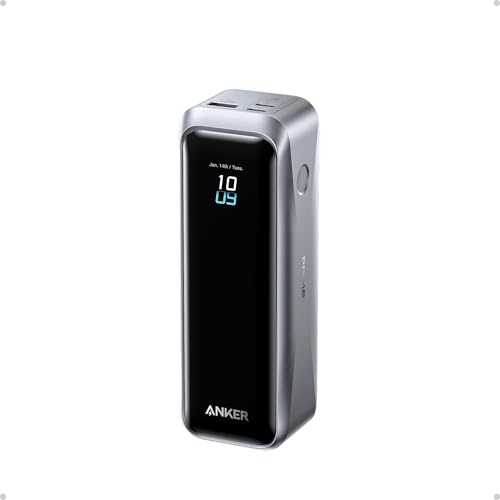
The best portable charger for a MacBook is a 20,000-27,000mAh USB-C power bank that can deliver at least 65W from a single port, such as the Anker 737 Power Bank (PowerCore 24K, 140W) or the Ugreen Nexode 25,000mAh 200W, because it can add roughly one full charge to a MacBook Air or about 70-80% to a 14-inch MacBook Pro while staying under the 100Wh airline limit. A MacBook Air owner who only needs a midday boost can get by with a slimmer 20,000mAh, 45-65W bank.
The right choice depends on which MacBook you own, because battery sizes and power draw differ a lot across the lineup. The numbers below do the matching for you.
Our top picks


As an Amazon Associate we earn from qualifying purchases at no extra cost to you. Ratings are shown as listed on Amazon.
Match the Power Bank to Your MacBook
Apple publishes battery capacity in watt-hours. Use those figures, not mAh, when sizing a power bank.
| MacBook model (recent generations) | Battery | Charger Apple pairs with it | Minimum useful power bank output | For fast charging |
|---|---|---|---|---|
| MacBook Air 13-inch (M2/M3/M4) | 52.6Wh | 30-35W, optional 70W | 30W | 60-70W |
| MacBook Air 15-inch (M2/M3/M4) | 66.5Wh | 35W dual or 70W | 45W | 70W |
| MacBook Pro 14-inch (M-series base chip) | about 70-72Wh | 70W | 45-60W | 70-96W |
| MacBook Pro 14-inch (Pro/Max chip) | 72.4Wh | 70-96W | 65W | 96-100W |
| MacBook Pro 16-inch | 100Wh | 140W | 65-100W | 140W (USB PD 3.1) |
Below the minimum output, a MacBook will still charge when it is asleep or idle, but under heavy load (video export, compiling) the battery may barely hold steady or even drain while plugged in.
How Many Charges Will You Get?
Power bank capacity is printed in mAh at about 3.6-3.7V. Converting to the 15-28V a MacBook uses loses roughly 15-25% with a good bank. Using 80% efficiency as a realistic figure:
| Power bank | Rated energy | Delivered (~80%) | MacBook Air 13 (52.6Wh) | MacBook Pro 14 (72.4Wh) | MacBook Pro 16 (100Wh) |
|---|---|---|---|---|---|
| 10,000mAh | 37Wh | ~30Wh | about 55% | about 40% | about 30% |
| 20,000mAh | 74Wh | ~59Wh | about 1.1 charges | about 80% | about 60% |
| 24,000mAh | about 86Wh | ~69Wh | about 1.3 charges | about 95% | about 70% |
| 25,000-27,000mAh | 90-99Wh | ~72-79Wh | about 1.4-1.5 charges | about 1 charge | about 75-80% |
Worked example: a 14-inch MacBook Pro that lasts about 12-15 hours of light work on its own gets roughly another 10-12 hours from a 25,000mAh bank, provided the bank can sustain 45W or more without throttling.
The 100Wh Airline Line
Most airlines, following FAA and IATA guidance, allow power banks up to 100Wh in carry-on bags without approval, and 100-160Wh with airline approval. Power banks are never allowed in checked luggage. A 27,000mAh bank at 3.7V is about 99.9Wh, which is why so many laptop banks stop just below that capacity. Look for the Wh rating printed on the case; security staff check it, and unmarked banks can be confiscated.
Picks by MacBook and Use
MacBook Air commuters: 20,000mAh, 45-65W
A 20,000mAh bank with a 45-65W USB-C port gives about one full Air charge and still tops up a phone. The Baseus Blade line is notable for its thin, flat shape that slides into a laptop sleeve. Anker and Ugreen offer more conventional 20,000mAh 65W bricks. Expect midrange pricing.
14-inch MacBook Pro: 24,000-25,000mAh, 100W-plus
The Anker 737 Power Bank (PowerCore 24K) delivers up to 140W from one port and shows live wattage on a small display, which helps you see whether the Mac is actually charging. The Ugreen Nexode 25,000mAh 200W can split high power across two laptops. Both sit around 500-550 g.
16-inch MacBook Pro: 140W-capable, near 100Wh
Only a bank with a USB PD 3.1 port at 140W can fast-charge a 16-inch MacBook Pro. The Anker 737 and newer Anker Prime high-output banks fit here. Even the largest carry-on-legal bank adds only about 75-80% to a 100Wh battery, so think of it as a range extender, not a second full battery.
Two devices at once: dual high-watt ports
If you charge a MacBook and an iPad Pro simultaneously, check the two-port split. Many 100W banks drop to 65W + 30W or less when both USB-C ports are in use.
Cable and Port Details People Miss
- Cable rating: anything above 60W needs a USB-C cable rated for 5A (100W) or 240W. A thin phone cable silently caps you at 60W.
- MagSafe 3: recent MacBook Air and Pro models accept power through USB-C as well as MagSafe, so a USB-C to USB-C cable is all you need. A USB-C to MagSafe 3 cable also works if you prefer the breakaway connector.
- Recharge time: a 25,000mAh bank with 100W input refills in about 1.5-2 hours; with a 30W charger it takes 4 hours or more. Pair it with a strong wall charger.
- Pass-through: useful on desks with one outlet, but it adds heat; avoid it in hot cars or bags.
Ownership Realities
Laptop-class banks weigh 450-650 g, about the same as an iPad mini, so they matter in a backpack. Their cells handle around 300-500 full cycles before dropping to roughly 80% capacity. Store them at about 50% charge for long breaks, avoid leaving them in hot vehicles and recharge them every few months even when unused. A bank that swells, gets unusually hot at idle or shows a sudden drop in capacity should be retired and recycled at an e-waste point, not thrown in household trash.
Quick Answer by Model
- MacBook Air 13/15: 20,000mAh, 45-65W single-port output.
- MacBook Pro 14: 24,000-27,000mAh, 100W or more from one port.
- MacBook Pro 16: under-100Wh bank with a 140W USB PD 3.1 port.
Buy for the wattage your Mac needs first, then the largest capacity you are willing to carry under 100Wh, and do not forget the 100W-rated cable.
