
Key takeaways
- 16GB: acceptable for basic 2D CAD, coursework, and small parts, but limiting for modern assemblies.
- 32GB: the practical minimum for serious 3D CAD and the best starting point for most buyers.
- 64GB: recommended for large assemblies, multiple applications, point clouds, simulation, and virtual machines.
- 128GB or more: worthwhile for advanced simulation, large BIM projects, and professional visualization rather than ordinary part modeling.
The best laptop for CAD in 2026 is a certified mobile workstation with a fast H-series processor, 32GB or more of RAM, an NVIDIA RTX professional GPU, and a color-accurate 16-inch display; for occasional 3D work, a high-end gaming laptop can deliver more performance per dollar.
For most professional users, the Lenovo ThinkPad P16v, Dell Precision 5690, and HP ZBook Power are the safest choices. The ThinkPad P16v is the value pick, the Precision 5690 is the best balance of portability and certification, and the ZBook Power is a practical option for students and engineers who need upgradeable memory and storage. If software certification is not essential, a Lenovo Legion Pro 7i or similar gaming laptop usually gives more GPU performance for the money.
Our top picks

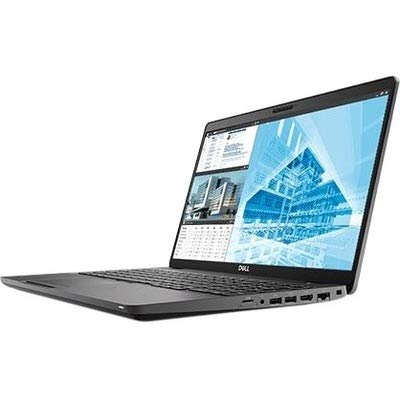


As an Amazon Associate we earn from qualifying purchases at no extra cost to you. Ratings are shown as listed on Amazon.
What matters most in a CAD laptop
CPU performance: prioritize strong sustained speed
CAD applications are often lightly threaded during sketching, feature creation, assembly editing, and many simulation setup tasks. A processor with excellent single-core performance can therefore feel faster than one with more total cores but lower sustained clock speeds. Look for an Intel Core Ultra 7 HX/H-series processor, Intel Core i7 HX, or AMD Ryzen 7/9 HS or HX processor from a recent generation.
More cores become valuable for rendering, finite-element analysis, compiling, photorealistic visualization, and exporting large assemblies. For mixed engineering work, eight high-performance CPU cores is a useful baseline; twelve to sixteen cores is preferable if rendering or simulation is a weekly task. Avoid thin laptops that advertise a powerful chip but cannot maintain its performance because of restrictive cooling.
Professional versus gaming GPUs
Professional GPUs such as the NVIDIA RTX A-series and newer RTX PRO workstation graphics are designed for certified drivers, stability, and applications that benefit from tested OpenGL behavior. Depending on the software, an RTX 500 Ada, RTX 1000 Ada, RTX 2000 Ada, or comparable professional GPU can be a sensible choice.
Gaming GPUs such as the GeForce RTX 4060, RTX 4070, and RTX 4080 often provide more raw rasterization and CUDA performance at the same price. They are excellent for Blender, Unreal Engine, KeyShot, and many GPU-rendering workloads. However, a gaming driver is not the same as a vendor-certified professional driver. If your employer, client, or university requires a certified configuration for SOLIDWORKS, CATIA, Siemens NX, Creo, or Autodesk applications, choose the workstation.
RAM and storage
- 16GB: acceptable for basic 2D CAD, coursework, and small parts, but limiting for modern assemblies.
- 32GB: the practical minimum for serious 3D CAD and the best starting point for most buyers.
- 64GB: recommended for large assemblies, multiple applications, point clouds, simulation, and virtual machines.
- 128GB or more: worthwhile for advanced simulation, large BIM projects, and professional visualization rather than ordinary part modeling.
A 1TB NVMe SSD is a reasonable minimum because CAD programs, local project files, texture libraries, and Windows updates consume space quickly. Choose a laptop with two memory slots or accessible SO-DIMM modules if possible. Soldered RAM makes the initial configuration more important and can shorten the machine’s useful life.
Best laptops for CAD by situation
| Laptop or type | Typical configuration | Weight and display | Best for | Typical 2026 market range |
|---|---|---|---|---|
| Lenovo ThinkPad P16v | Core Ultra 7 or Core i7 HX, 32GB RAM, 1TB SSD, RTX 1000/2000 Ada | About 2.2–2.3kg; 16-inch 16:10, commonly 1920×1200 or higher | Professional CAD at a reasonable cost | $1,500–$2,800 |
| Dell Precision 5690 | Core Ultra 7, 32–64GB RAM, 1TB SSD, RTX 1000/2000 Ada options | About 2.0kg; 16-inch 16:10, often 1920×1200 or 3840×2400 | Portable certified workstation use | $1,900–$3,500 |
| HP ZBook Power | Core Ultra or Core i7 HX, 32GB RAM, 1TB SSD, RTX professional graphics | About 2.0–2.3kg; 16-inch 1920×1200-class panel | Students, consultants, and upgrade-friendly ownership | $1,400–$2,700 |
| Lenovo ThinkPad P16 | Core i7/i9 HX or Xeon-class option, 64GB RAM, 1TB SSD, RTX 2000/3500 Ada | About 2.6–2.9kg; 16-inch high-resolution display | Large assemblies and sustained engineering workloads | $2,300–$4,500 |
| Lenovo Legion Pro 7i | Core i9 HX, 32GB RAM, 1TB SSD, GeForce RTX 4070 or RTX 4080 | About 2.5kg; 16-inch 2560×1600, commonly 240Hz | Maximum GPU performance without workstation pricing | $1,800–$3,200 |
Configurations vary by region and display choice. The weights above are approximate chassis figures and can change with the battery, power adapter, and installed hardware.
Head-to-head: workstation or gaming laptop?
Choose a mobile workstation when reliability and certification matter
A workstation is the better choice when CAD is your primary job, downtime is expensive, or you work with regulated engineering deliverables. Dell Precision, HP ZBook, and Lenovo ThinkPad P systems commonly offer ISV-certified driver combinations for major CAD and engineering applications. They also tend to provide better business support, docking compatibility, keyboard quality, and component validation.
The compromise is price. A workstation with an RTX 2000 Ada may cost as much as a gaming machine with a faster GeForce RTX 4070 or RTX 4080. Professional GPUs also prioritize certified behavior and memory reliability over maximum gaming frame rates.
Choose a gaming laptop for rendering value and general-purpose use
A gaming laptop makes sense if you are a student, hobbyist, maker, or engineer who uses CAD alongside games, video editing, or GPU rendering. The GeForce RTX 4060 is adequate for small and medium assemblies, while an RTX 4070 is a stronger all-round choice. An RTX 4080-class laptop is appropriate for heavy real-time visualization, though it adds cost, weight, and power consumption.
Gaming models require more care around drivers. Before buying, check the exact CAD application’s hardware guidance, not just the GPU’s benchmark score. Some viewport glitches or display issues can be solved with a certified driver, but that solution may not be available on a consumer system.
Screen, cooling, and portability trade-offs
A 16-inch 16:10 display is the best general format for CAD because it provides more vertical workspace than a 16:9 panel without becoming as cumbersome as a 17-inch machine. A resolution of 1920×1200 is easier on battery life and often produces a readable interface. A 2560×1600 panel gives sharper lines and more workspace, but may require interface scaling in older programs.
For engineering drawings, prioritize a matte screen, at least 400 nits of brightness, and near-complete sRGB coverage. If you also create product renders or marketing images, look for a panel covering close to 100% of sRGB and, ideally, strong DCI-P3 coverage. OLED screens offer deep contrast but can have glossy reflections and higher power use; they are not automatically better for long CAD sessions.
Cooling is a major difference between a thin premium workstation and a thicker performance laptop. Under sustained CPU or GPU loads, the machine may reduce clock speeds after several minutes. A thicker chassis with two fans, multiple heat pipes, and rear exhausts is usually faster over a 30-minute render than a lighter laptop that wins only in short benchmarks.
A practical buying decision matrix
| Your situation | Recommended specification | Best direction |
|---|---|---|
| 2D CAD, occasional coursework, limited budget | Core Ultra 5/Core i5, 16–32GB RAM, integrated graphics or RTX 4050, 512GB SSD | Entry workstation or mainstream performance laptop |
| Daily 3D part and assembly modeling | Core Ultra 7/Core i7 or Ryzen 7, 32GB RAM, RTX 1000 Ada or RTX 4060, 1TB SSD | ThinkPad P16v, ZBook Power, or equivalent |
| Large assemblies and frequent simulation | High-power 12–16-core CPU, 64GB RAM, RTX 2000/3500 Ada or RTX 4070/4080, 1TB–2TB SSD | ThinkPad P16, Precision, or thick gaming workstation |
| Travel between sites every day | About 2kg, 32GB RAM, 16-inch 1920×1200 screen, professional GPU, USB-C charging or compact adapter | Precision 5690 or a similarly portable workstation |
| CAD plus GPU rendering and gaming | 32GB RAM, RTX 4070 or better, 16-inch high-refresh display, strong cooling | Legion Pro 7i or comparable gaming laptop |
Ownership realities: what wears out first
Dust buildup is the most common cause of declining sustained performance. Inspect the vents every few months, keep the laptop on a hard surface, and use compressed air carefully with the fans prevented from spinning freely. Do not block rear or side exhausts with a monitor stand, cushion, or soft case.
The battery is usually the first major consumable. Heavy rendering, high brightness, and a discrete GPU can reduce practical battery life to roughly 3–6 hours even when the manufacturer quotes a much higher office-use figure. If the laptop remains docked, enable its battery conservation mode and cap charging near 80% when the manufacturer provides that option.
Thermal paste, fans, keyboard mechanisms, and hinges can also become maintenance issues after years of mobile use. Back up project files before servicing, keep at least 15% of the SSD free, and avoid buying a 16GB model if its RAM cannot be upgraded. For a machine used eight hours a day, paying more for replaceable memory, a second SSD slot, a business warranty, and certified drivers can cost less than replacing an otherwise capable laptop.
Bottom line
The best laptops for CAD are not necessarily the ones with the highest gaming benchmark scores. Choose the ThinkPad P16v, Dell Precision 5690, or HP ZBook Power for certified professional work; move to a larger ThinkPad P16 or equivalent Precision when assemblies and simulations stay heavy for hours. Choose a Legion Pro 7i or similar RTX gaming laptop when raw rendering performance and value matter more than ISV certification. Whichever route you take, make 32GB RAM, a 1TB SSD, sustained cooling, and a suitable 16-inch screen the starting point rather than optional upgrades.
