
Key takeaways
- Dust is not harmless: Keep the projector vents clear and avoid placing it beside a radiator, stove or dusty floor. Clean external vents with a soft brush or low-pressure air according to the manual.
- Laser light sources reduce maintenance: They avoid lamp replacements and usually last many thousands of hours, but brightness still declines over time. A projector used four hours per day averages about 1,460 hours annually.
- Do not hide ventilation: A tight cabinet can increase heat, fan noise and long-term component stress. Leave the manufacturer’s specified clearance around intake and exhaust openings.
- Align mechanically first: Place the chassis square to the screen, adjust feet, and focus at the intended seating position before using keystone or geometric correction.
- Do not judge brightness from showroom mode: Retail or dynamic modes may exaggerate brightness while making skin tones and black levels less accurate. Use a cinema or filmmaker mode for films, then create a separate game setting.
- Budget for the screen: A projector priced at $2,000 may need another roughly $500–$2,000 for an appropriate 100- to 120-inch UST screen, depending on frame, motorization and material.
The best ultra short throw projectors for most living rooms are the Hisense PX3-Pro for a flexible 100–150-inch setup, the Epson EpiqVision Ultra LS800 for bright rooms and low-latency gaming, and the Samsung LSP9T for a polished all-in-one living-room experience.
Ultra short throw (UST) projectors are not interchangeable: a model that looks excellent at 120 inches in a dark media room may appear washed out at 100 inches beside a window. The important buying questions are how close the projector can sit, how large an image it can produce, how much light it generates, whether gaming latency is acceptable, and whether its built-in sound is good enough to avoid a separate soundbar.
Our top picks

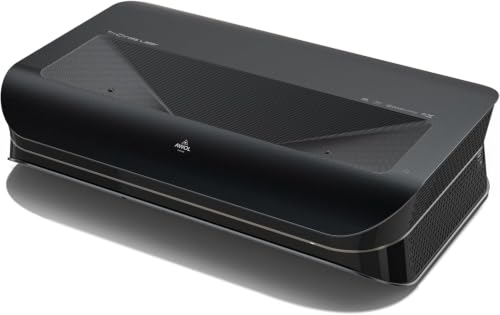


As an Amazon Associate we earn from qualifying purchases at no extra cost to you. Ratings are shown as listed on Amazon.
Best ultra short throw projectors by room and use
| Best for | Projector | Brightness | Screen size | Gaming latency | Typical market range |
|---|---|---|---|---|---|
| Bright living rooms and gaming | Epson EpiqVision Ultra LS800 | 4,000 ISO lumens | 80–150 inches | About 16.7 ms at 4K input | About $2,000–$3,000 |
| Flexible 4K viewing and gaming | Hisense PX3-Pro | About 3,000 ANSI lumens | 80–150 inches | About 12–18 ms in game mode | About $2,000–$3,000 |
| Premium movie-focused living room | Samsung LSP9T | About 2,800 ANSI lumens | 100–130 inches | About 50 ms in standard settings | About $3,000–$5,000 |
| Large-screen home cinema | LG CineBeam HU915QB | About 3,000 ANSI lumens | 90–120 inches | About 53 ms without game optimization | About $2,000–$3,500 |
| Lower-cost 4K laser TV | Formovie Theater | About 2,800 ANSI lumens | 80–150 inches | Typically 40–50 ms | About $1,500–$2,500 |
Brightness figures are not perfectly comparable because manufacturers and laboratories can use different measurement standards. They are useful for positioning the models, not for predicting identical real-world images. A proper ambient-light-rejecting UST screen also matters more than many buyers expect.
Hisense PX3-Pro: the best balance for most households
The Hisense PX3-Pro is the strongest general-purpose choice when one projector must handle films, streaming, sports and occasional console gaming. Its triple-laser light source covers a wide color gamut, supports 4K HDR content, and is designed for images from roughly 80 to 150 inches. The 150-inch upper limit is attractive for a dedicated room, although brightness and perceived contrast decline as the image gets larger.
Its short-throw ratio is approximately 0.25:1. In practical terms, a 100-inch 16:9 image needs the projector body positioned roughly 10–12 inches from the screen surface, with the exact distance depending on the screen and adjustment range. A 120-inch image generally requires around 12–15 inches. Measure from the projector’s optical reference point, not just from the front edge of the cabinet.
Game mode can reduce input delay to the low-teens or high-teens in milliseconds, which is suitable for most console games and casual competitive play. Built-in audio is more convincing than the thin speakers found in ordinary portable projectors, but a soundbar or AV receiver remains preferable for action films and low-frequency effects. Choose the PX3-Pro for a room that can be darkened moderately and for buyers who want more image-size flexibility than a fixed 100-inch laser TV.
Epson LS800: the best choice for bright rooms and fast gaming
The Epson LS800 is unusually practical when the projector must sit almost against the wall. Its approximately 0.16:1 throw ratio allows a 100-inch image with the chassis only a few inches from the wall or screen area, making it easier to place on a shallow media console. It is available with an included or optional ambient-light-rejecting screen depending on the package.
With a rated 4,000 ISO lumens, it is one of the safest picks for daytime sports, family viewing and rooms with imperfect light control. That does not make it immune to sunlight: direct light still reduces black-level depth and color saturation. Pulling curtains and avoiding a white wall opposite a window can produce a larger improvement than increasing screen size.
The LS800 uses Epson’s pixel-shifting 4K enhancement rather than a native 4K imaging chip. Fine detail is still strong at normal sofa distances, while its low-latency mode—around 16.7 ms at a 4K signal under suitable settings—is a major advantage for racing, sports and action games. Its included Yamaha-designed speaker system is useful for everyday viewing, though external audio is worthwhile in a large room.
Samsung LSP9T: the most polished all-in-one experience
The Samsung LSP9T combines a triple-laser light engine with a built-in smart-TV platform and a strong integrated speaker system. It is intended primarily for 100- to 130-inch viewing and works best with a UST screen rather than a bare painted wall. Its 2,800-lumen-class output is sufficient for a living room with controlled daylight, but it is less forgiving than the Epson in a bright space.
The LSP9T’s strengths are convenience, color volume and easy access to streaming apps. Its weakness is gaming responsiveness: standard input lag is much higher than on the Epson or Hisense, so it is better for story-driven games and occasional play than for competitive shooters. Samsung’s smart interface and wireless connectivity also make it attractive for users who do not want multiple external boxes.
At a 100-inch image, plan on roughly 9–12 inches between the projector and screen area, subject to calibration and the screen’s installation geometry. The built-in audio can fill a medium living room, but dialogue and bass improve with a dedicated soundbar connected through HDMI eARC.
LG HU915QB and Formovie Theater: two alternatives worth considering
LG CineBeam HU915QB
The LG HU915QB is a premium triple-laser 4K UST projector with approximately 3,000 ANSI lumens and a 0.19:1 throw ratio. It suits a 90- to 120-inch screen and offers useful smart-TV features, broad HDR support and a powerful integrated speaker array. It is a good fit for a design-conscious living room where the projector will be used frequently for films and television.
Its gaming performance is the main limitation. Input delay in non-game settings can be around 50 ms, which feels noticeably less immediate than the fastest options. Activate any available game optimizer and verify the resulting behavior with the console or PC you plan to use.
Formovie Theater
The Formovie Theater remains appealing when its lower market price is more important than maximum daytime brightness. It produces a highly saturated image from a triple-laser light source, supports Dolby Vision, and includes Dolby Atmos-capable audio hardware. It can create images from approximately 80 to 150 inches, but 100–120 inches is a more sensible target in a typical living room.
Its slower gaming response and variable software experience make it a better movie-and-streaming projector than a gaming-first display. Check app availability in your region before purchase and plan to use a streaming device if a required service is missing.
How room size changes the right choice
| Room situation | Recommended image | Best match | Why |
|---|---|---|---|
| Small room, sofa 7–9 feet away | 80–100 inches | Epson LS800 or Hisense PX3-Pro | Short placement distance and manageable brightness |
| Medium living room, some daylight | 100–120 inches | Epson LS800 | Highest brightness headroom in this group |
| Medium room, curtains available | 100–120 inches | Hisense PX3-Pro | Balanced HDR, size range and gaming response |
| Dedicated dark movie room | 120–150 inches | Hisense PX3-Pro or Formovie Theater | Large image flexibility and laser color performance |
| Gaming is the main activity | 100–120 inches | Epson LS800 | Low input latency and strong brightness |
Worked placement calculation: will a 120-inch screen fit?
A 120-inch 16:9 screen is approximately 105 inches wide and 59 inches high. For a projector with a 0.25:1 throw ratio, the optical distance is approximately:
105 inches × 0.25 = 26.25 inches
That figure describes lens-to-screen distance, not necessarily the gap from the cabinet’s front edge. A UST projector’s lens may sit well inside the chassis, so leave extra console depth and ventilation space. For a 0.16:1 projector, the same width would require about 16.8 inches of optical distance, although the actual model’s supported image range and installation instructions take priority.
Also check vertical placement. UST optics are highly sensitive to height: raising or lowering the chassis by even a small amount can create trapezoidal edges or uneven focus. Use the projector’s physical feet and screen mounting position before relying on digital keystone correction, which can reduce effective resolution.
Ambient light, screens and built-in audio
A white wall is acceptable for a temporary setup, but a fixed-frame UST ALR screen is the better long-term purchase. UST screens use a specialized surface that rejects light arriving from above while reflecting the projector’s steep upward light path toward viewers. A conventional long-throw ALR screen can produce hotspots or poor viewing angles when paired with a UST model.
For a 100-inch screen in a room with windows, prioritize a low-gain UST ALR surface and control direct sunlight. Increasing from 100 to 120 inches increases the image area by about 44 percent, so the same projector’s light is spread much more thinly. This is why a 100-inch image can look punchier than a 120-inch image even when both are within the advertised range.
Built-in speakers are adequate for news, television and casual streaming. They are most useful when the projector sits on a cabinet without room for separate speakers. For cinematic bass, connect HDMI eARC to a soundbar or receiver. Ensure the audio device supports the formats you use; some combinations pass stereo reliably but require settings changes for surround sound.
Ownership realities and setup mistakes
- Dust is not harmless: Keep the projector vents clear and avoid placing it beside a radiator, stove or dusty floor. Clean external vents with a soft brush or low-pressure air according to the manual.
- Laser light sources reduce maintenance: They avoid lamp replacements and usually last many thousands of hours, but brightness still declines over time. A projector used four hours per day averages about 1,460 hours annually.
- Do not hide ventilation: A tight cabinet can increase heat, fan noise and long-term component stress. Leave the manufacturer’s specified clearance around intake and exhaust openings.
- Align mechanically first: Place the chassis square to the screen, adjust feet, and focus at the intended seating position before using keystone or geometric correction.
- Do not judge brightness from showroom mode: Retail or dynamic modes may exaggerate brightness while making skin tones and black levels less accurate. Use a cinema or filmmaker mode for films, then create a separate game setting.
- Budget for the screen: A projector priced at $2,000 may need another roughly $500–$2,000 for an appropriate 100- to 120-inch UST screen, depending on frame, motorization and material.
Final recommendation
Choose the Epson LS800 if your room stays bright or gaming responsiveness is important. Choose the Hisense PX3-Pro if you want the best overall balance of image size, HDR color, low-latency gaming and room flexibility. Choose the Samsung LSP9T when an elegant all-in-one smart-TV replacement and strong built-in audio matter more than competitive gaming. For a darker movie room on a tighter budget, the Formovie Theater can deliver an impressive large image, provided its software and input-lag compromises fit your priorities.
